
WIP Report in Construction: Overbilling and Underbilling, Worked Out
A construction WIP schedule worked out on four jobs: percent complete by cost, earned revenue, overbilling, underbilling, profit fade and what an unsigned change order does to the numbers. Free Excel file, no email.
Nagi Software TeamUpdated 12 min read
A WIP report (work-in-progress schedule) lists every open job with its contract value, estimated total cost, cost to date, percent complete, earned revenue and billed to date. The gap between earned and billed is the job's overbilling or underbilling. Below, one example company runs it on four jobs, with every number shown and an Excel file to copy.
We make Nagi Construction Management Suite, where job cost and billing live in one program. Our progress billing guide does the math for a single job; this one adds the company view, profit fade and the unsigned change order.
What a WIP report shows
A WIP report answers one question per job: have we billed more or less than we've earned? Banks, sureties and your own month-end review read it for that answer, and for the trend from one month to the next.
Each row is an open job. Each column comes from a record you already keep.
| Column | What it means | Where the number comes from |
|---|---|---|
| Contract value | Original contract plus approved change orders | Client contract and signed change orders |
| Estimated total cost | What the job will cost when it's finished, as of today | Budget, updated with the latest forecast |
| Estimated gross profit | Contract value minus estimated total cost | Calculated |
| Cost to date | Cost actually incurred: bills, labor, equipment | Job cost report (actual, not committed) |
| Percent complete | Cost to date ÷ estimated total cost | Calculated |
| Earned revenue | Percent complete × contract value | Calculated |
| Billed to date | Everything invoiced on the job, before retainage | Pay applications or invoices |
| Overbilled | Billed minus earned, when billed is higher | Calculated |
| Underbilled | Earned minus billed, when earned is higher | Calculated |
Two of those columns carry all the judgment. Estimated total cost is a forecast, and a stale one makes every other figure wrong. Contract value should hold only approved changes, which is where unsigned work causes trouble (more on that below).
How to build a WIP schedule: four jobs, worked out
Example: a general contractor closes October with four open jobs. The numbers are round on purpose so you can check them by hand. The same figures are filled in on the example tab of the workbook: download the WIP schedule (.xlsx). No email needed. If you would rather work it out in the browser, the free WIP and over/under billing calculator works out percent complete, earned revenue and over or under billing for every open job, with totals you can print.
Step 1: Enter contract values with approved changes only
Office fit-out, $600,000. Warehouse, $800,000. Clinic renovation, $350,000. Retail shell, $420,000. Each already includes its signed change orders. The warehouse also has $50,000 of change work that the owner asked for on site and hasn't signed. It stays out.
Step 2: Enter today's estimated total cost
Not the bid. Ask each project manager for the cost at completion: cost to date, plus what's committed and not yet billed, plus what's still to buy or build. The warehouse estimate is now $720,000 because it includes $40,000 of cost for that unsigned work. The retail shell has crept from $365,400 at bid to $399,000. The job cost report calculator turns budget, committed and actual cost by cost code into a forecast, and more calculators for contractors are on our free tools page.
Step 3: Work out percent complete by cost
Cost to date divided by estimated total cost. The office fit-out has spent $255,000 of $510,000, so it's 50% complete. Use actual cost only: a signed $60,000 subcontract with nothing billed yet adds nothing here, though it belongs in the estimate from step 2.
Step 4: Work out earned revenue
Percent complete times contract value. The office fit-out has earned 50% of $600,000, which is $300,000.
Step 5: Compare earned with billed to date
Billed to date is the gross amount on every application so far, before retainage. The office fit-out has billed $340,000, so it's overbilled by $40,000.
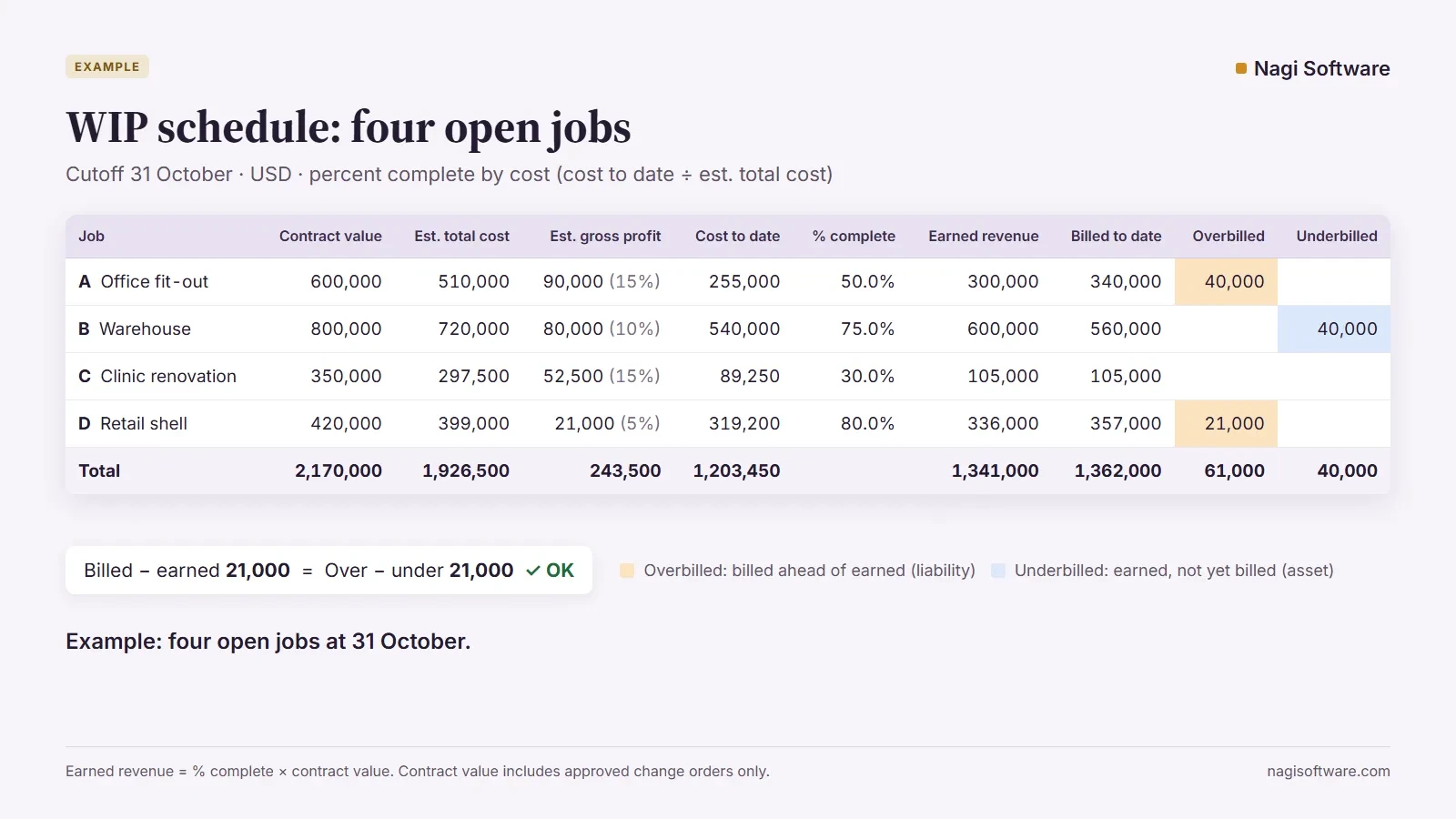
Here are all four:
| Job | Contract value | Est. total cost | Est. gross profit | Cost to date | % complete | Earned revenue | Billed to date | Overbilled | Underbilled |
|---|---|---|---|---|---|---|---|---|---|
| A Office fit-out | 600,000 | 510,000 | 90,000 (15%) | 255,000 | 50.0% | 300,000 | 340,000 | 40,000 | |
| B Warehouse | 800,000 | 720,000 | 80,000 (10%) | 540,000 | 75.0% | 600,000 | 560,000 | 40,000 | |
| C Clinic renovation | 350,000 | 297,500 | 52,500 (15%) | 89,250 | 30.0% | 105,000 | 105,000 | ||
| D Retail shell | 420,000 | 399,000 | 21,000 (5%) | 319,200 | 80.0% | 336,000 | 357,000 | 21,000 | |
| Total | 2,170,000 | 1,926,500 | 243,500 | 1,203,450 | 1,341,000 | 1,362,000 | 61,000 | 40,000 |
Check it the way an accountant would. Total billed ($1,362,000) minus total earned ($1,341,000) is $21,000. Overbillings ($61,000) minus underbillings ($40,000) is also $21,000. If those two differ, a row has a typo.
Overbilling and underbilling: what each means for cash
Overbilling is cash you've collected ahead of the work, and it's a liability. Underbilling is work you've done and haven't billed, and it's an asset only if you can bill it.
On a balance sheet, the $61,000 shows as billings in excess of costs and estimated earnings. The $40,000 shows as costs and estimated earnings in excess of billings. Your accountant may net them per job or show both; the schedule is the support either way.
Here's what each one means on Monday morning.
Job A's $40,000 overbilling is normal early in a fit-out: general conditions and mobilization were billed up front. The danger is treating that cash as profit and spending it. When the job finishes, you'll do $255,000 of work and bill only $260,000 more, so the cash for the last half of the job is thinner than the first half.
Job D is overbilled too, but for a worse reason. Its margin has shrunk, and billing ahead is covering for it.
Job B's $40,000 underbilling means your crews have done work the owner hasn't been asked to pay for. You're financing it from your own cash. Find out why before the month closes.
Profit fade: compare this WIP with the last one
Profit fade is the drop in a job's estimated gross profit from one WIP to the next. One schedule tells you where you are. Two schedules tell you which way each job is moving.
| Job | Gross profit at bid | Gross profit now | Fade |
|---|---|---|---|
| A Office fit-out | 90,000 (15%) | 90,000 (15%) | 0 |
| B Warehouse | 120,000 (15%) | 80,000 (10%) | 40,000 |
| C Clinic renovation | 52,500 (15%) | 52,500 (15%) | 0 |
| D Retail shell | 54,600 (13%) | 21,000 (5%) | 33,600 |
| Total | 317,100 | 243,500 | 73,600 |
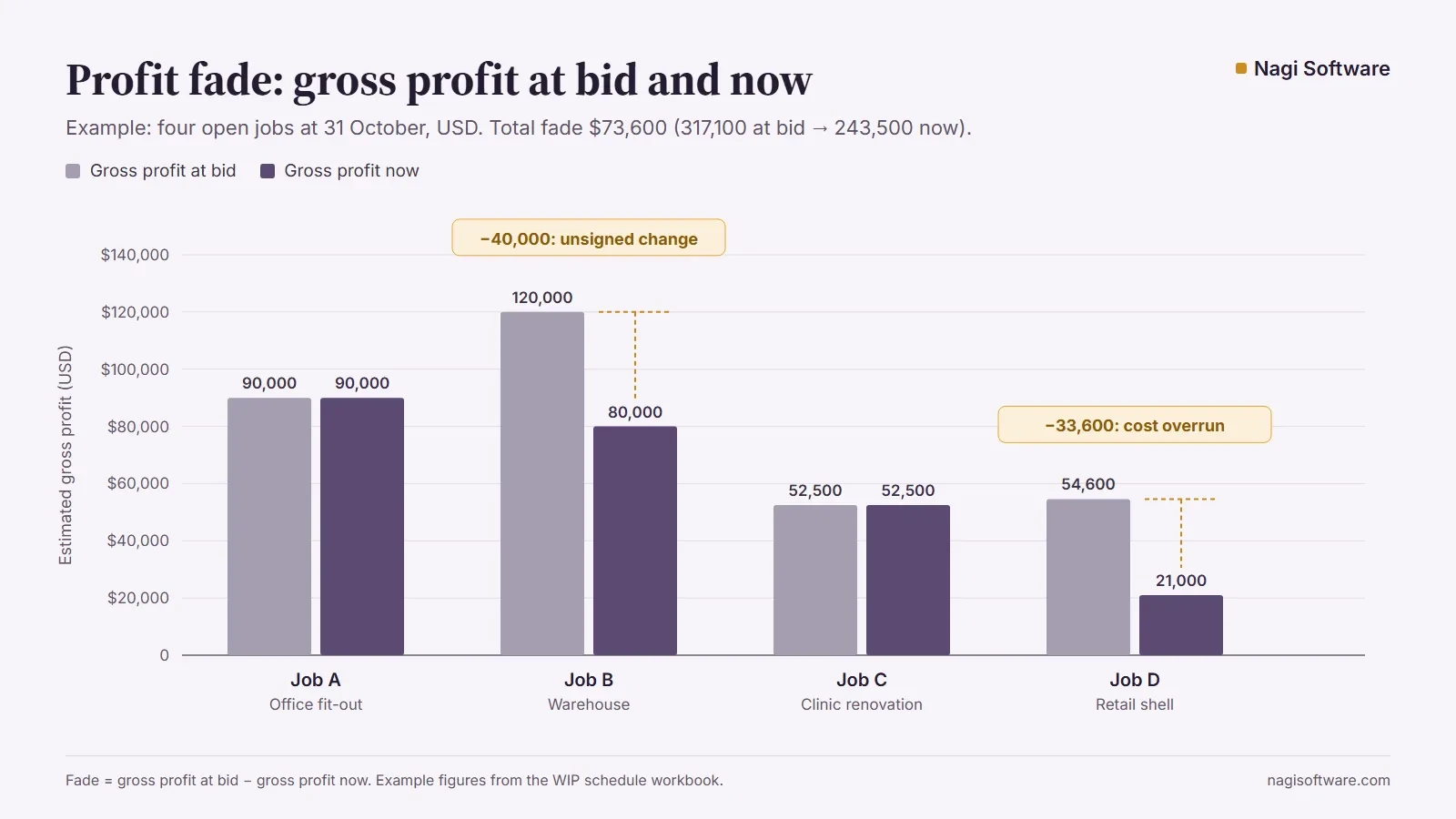
That's $73,600 of fade across two jobs, and the reasons differ.
Job D is a real cost overrun. Its estimate went from $365,400 to $399,000, and at 80% complete there's little room to recover. If the next forecast creeps past $420,000, the job loses money, and accounting practice is to recognize an expected loss on a contract as soon as you know about it rather than spread it over the months left (ask your accountant how your statements handle it). Watch Job D's cost to complete weekly, not monthly.
Job B is different. Its cost is on budget for the work done. The fade comes entirely from $40,000 of cost on change work nobody has signed.
Our rule: any job that fades more than two points of margin in a month gets a cost review with its project manager that week. Our job costing worked example shows how to read a cost report line by line for exactly that meeting.
Unsigned change orders in the WIP
An unsigned change order puts its cost into your WIP and leaves its revenue out. The job looks less profitable and more underbilled than it really is, and you can't bill the gap.
Here's Job B both ways. The owner asked for an extra loading dock apron on site. Your crew poured it. The change is priced at $50,000 and still sits in the PM's inbox.
| Job B Warehouse | Change unsigned | Change signed |
|---|---|---|
| Contract value | 800,000 | 850,000 |
| Est. total cost | 720,000 | 720,000 |
| Est. gross profit | 80,000 (10%) | 130,000 (15.3%) |
| Cost to date | 540,000 | 540,000 |
| % complete | 75.0% | 75.0% |
| Earned revenue | 600,000 | 637,500 |
| Billed to date | 560,000 | 560,000 |
| Underbilled | 40,000 | 77,500 |
Signing the change makes the underbilling bigger. That sounds backwards. It isn't: now $77,500 of it is backed by paper, and the $50,000 change can go on the next application. Unsigned, the $40,000 is a claim you hope to win.
Sureties see it the same way. In a 2025 article for the National Association of Surety Bond Producers, an underwriter at Old Republic Surety lists verbally agreed change orders that were never formalized among the causes of underbillings. The same article says late-stage underbillings on losing jobs can be disallowed from working capital unless they're explained and the job is still profitable (NASBP Pipeline).
Two habits fix most of this. Price and send the change within a week of the instruction. And keep a "pending changes" column next to the WIP, so the cost of unsigned work is visible on its own line instead of eating margin out of sight. Our change order template has a log that totals pending changes, and how to price a change order covers getting it signed.
When cost-to-cost gives the wrong percent complete
Cost-to-cost assumes every dollar spent is a dollar of progress. Most months that's close enough. Three situations break it, and each one shows up as a WIP that looks better than the site.
Materials delivered but not installed. Say the clinic renovation (Job C) receives $60,000 of air handling units in November and the supplier bills them. Cost to date jumps from $89,250 to $149,250, and percent complete from 30% to 50.2%, though nothing new is installed. Earned revenue rises by about $70,600 overnight. One common fix is to leave uninstalled materials out of the percent-complete calculation, or carry them as a separate stored-materials line. Ask yours which you use, and do it the same way every month.
Front-loaded subcontract bills. A steel erector who bills mobilization and shop drawings in month one makes the job look further along than the steel on site.
Rework and waste. Cost spent fixing a defect isn't progress. If Job D's last $20,000 went on tearing out and redoing a storefront, cost-to-cost counts it as 5 points of completion.
The cross-check takes five minutes: ask the PM for a physical percent complete on each job and set it beside the cost-based one. A gap of more than about 10 points deserves a conversation before the schedule leaves the office. The alternatives (units installed, labor hours spent against hours budgeted, or the PM's own estimate) each have their place; cost-to-cost wins on most small jobs because nobody can argue with an invoice.
How often to run it, and what a lender or surety reads
Run it every month, after the month's bills, timesheets and pay applications are in. Banks and sureties usually ask less often, commonly quarterly or at year end, with your financial statements.
What a reader outside the company tends to look for:
- underbillings that grow from one schedule to the next on the same job;
- jobs near the end with large underbillings and thin or negative margin;
- overbillings that are being spent to run the company;
- fade on several jobs at once, which points at estimating rather than one bad site;
- remaining gross profit on all open jobs (here, $243,500 − $137,550 earned so far = $105,950) compared with the overhead you'll carry while the work finishes.
That last check is simple and few small contractors do it. If the profit left in your backlog won't cover the next six months of overhead, you need more work or a cost cut, and the WIP tells you before the bank account does.
Common WIP mistakes
Most wrong WIP schedules are wrong for boring reasons.
- Mixed cutoffs. Costs through 31 October, billings through 25 October. Every figure must share one date.
- Committed cost counted as actual. A signed subcontract isn't cost to date until work is billed or done. Count it, and every job looks further along than it is.
- The bid used as the estimate. If nobody updated Job D's forecast, it would show 87% complete and a 13% margin that no longer exists.
- Net instead of gross billings. Billed to date means before retainage. Using cash received understates billings and invents underbilling.
- Unapproved changes in the contract value. They inflate earned revenue on paper you can't collect.
- No check total. The billed-minus-earned check in step 5 takes ten seconds.
Where the WIP numbers come from in Nagi
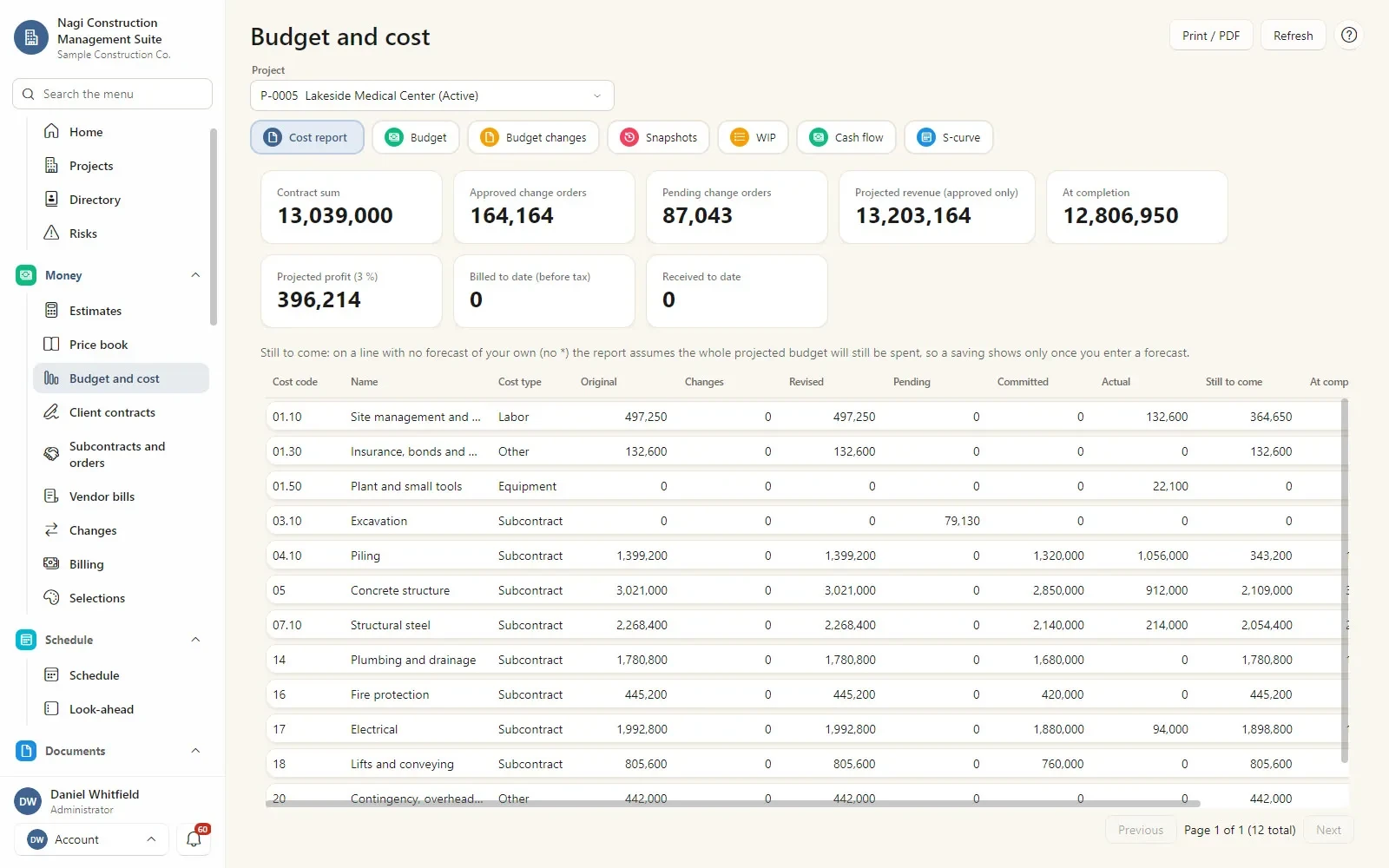
Nagi Construction Management Suite holds the inputs to a WIP schedule in the same program, and the Budget and cost screen has a WIP tab that lays them out. In the live demo (version 1.5.8) it shows one row per open job with contract, estimated cost, cost to date, percent complete by cost, earned, billed, over or under billed and estimated profit, compares against an earlier snapshot with the margin change in points, and exports to PDF, CSV or a spreadsheet. The inputs behind it:
- Estimated total cost: the cost report shows original budget, changes, pending, committed, actual, still to come and cost at completion for every cost code, next to the projected profit for the job.
- Cost to date: actual cost from vendor bills matched to their subcontracts and purchase orders, and from approved timesheets of your own crews costed at the worker's rate plus burden.
- Contract value: the client contract with its approved change orders. Pending change orders are shown separately, which is exactly the column the unsigned-change problem needs.
- Billed to date: each application for payment carries completed and stored to date, so the latest one gives you gross billings.
- The books: chart of accounts, journals, P&L, balance sheet and trial balance in the same program, with separate retention receivable and payable accounts.
What it doesn't do: there's no payroll, so labor cost depends on approved timesheets and the burden percentages you enter. And there's no QuickBooks link; if your accountant builds the WIP from QuickBooks, read our guide to QuickBooks for contractors first. For more on which books setup fits, see construction bookkeeping software.
Price, for the record: one company license is $99 a month, or $199.50 a year or $349.50 once at discounted prices (50% off $399 and $699), as listed on nagisoftware.com/pricing on 14 November 2026. It covers one Administrator PC, 10 employee seats and 11 phone connections, one price per company, not per user. See how job costing works in Nagi.
Software bought just for the WIP is money you don't need to spend. With five or six open jobs, the workbook above does the arithmetic perfectly well. The hard part is the inputs: a current forecast per job, every bill entered by the cutoff, and billings that match the applications. Software earns its keep when those inputs already sit in one place because that's where you estimate, buy and bill, and the WIP becomes a copy job instead of a chase.
Your first WIP this month
Start with the jobs you have, not a perfect system.
- Pick the cutoff: the last day of the month.
- Enter every bill and approved timesheet dated on or before it.
- Ask each PM for cost at completion, in writing, one number per job.
- Fill the four columns per job in the workbook and check the totals.
- Mark any job with fade over two points or underbilling older than one month, and book a 20-minute review for each.
Next month, run it again and put the two side by side. The second schedule is the one that tells you something.
Frequently asked questions
- What is a WIP report in construction?
A WIP report, or work-in-progress schedule, lists each open job with its contract value, estimated total cost, cost to date, percent complete, earned revenue and billed to date. The difference between earned revenue and billings shows whether each job is overbilled or underbilled. Contractors, their accountants, banks and surety companies use it to judge profit and cash on jobs that aren't finished.
- What is the difference between overbilling and underbilling?
Overbilling means you've billed more than you've earned by percent complete, so part of the cash you hold is for work not yet done. It's a liability on the balance sheet. Underbilling is the reverse: you've earned more than you've billed. It's an asset, but only if you can actually bill and collect it, which is why sureties look hard at large or old underbillings.
- How do you calculate percent complete for a WIP report?
Most contractors use the cost-to-cost method: cost to date divided by estimated total cost. A job with $540,000 spent against a $720,000 estimate is 75% complete. Earned revenue is that percentage times the contract value. The estimate must be today's forecast at completion, not the original bid, or the percentage will be wrong.
- Is overbilling illegal?
No. On a WIP report, overbilling is an accounting term: billings are ahead of earned revenue, which is common early in a job when mobilization is billed. It becomes a problem when it hides a loss or the cash is spent as profit. Billing for work not done under your contract is a separate question for your contract and your lawyer.
- How often should a WIP report be updated?
Run it every month for your own use, after the month's vendor bills, timesheets and pay applications are entered, so the figures share one cutoff date. Banks and sureties set their own schedule, often quarterly and at year end. A monthly habit makes those requests a copy-and-send job instead of a week of catch-up.
Sources
- NASBP Pipeline: A surety's perspective of underbilling and its impact on contractor financials (Old Republic Surety, June 2025), checked November 14, 2026
- Nagi Construction Management Suite: job costing page, checked November 14, 2026
- Nagi Construction Management Suite: progress billing page, checked November 14, 2026
The product in this post
Nagi Construction Management Suite
Run a construction company from estimate to close-out in one program that keeps your data on your own PC.
- wip-report
- overbilling
- underbilling
- job-costing
- construction-accounting