
Construction Bookkeeping Software for Small Contractors (With or Without QuickBooks)
What construction bookkeeping needs that ordinary bookkeeping doesn't (job costing, retainage, progress billing, committed cost, WIP), the three setups small contractors use, and how six tools compare at their listed prices.
Nagi Software TeamUpdated 15 min read
Nagi Software makes Nagi Construction Management Suite, which appears in this comparison.
Construction bookkeeping software is accounting software that also tracks the money by job: cost by cost code, committed cost, retainage held on both sides, progress billing and a WIP schedule. A small contractor gets there one of three ways: QuickBooks alone, QuickBooks plus a construction tool, or a construction program with the books built in. We make one of the third kind, so this guide says which setup fits which firm, and where ours is the wrong pick.
What makes construction bookkeeping different
Ordinary bookkeeping answers "how did the company do?" Construction bookkeeping has to answer "how is each job doing, and how much of the cash in the bank is really ours yet?" Five things create that gap.
Job costing. Every cost carries a job and a cost code. A plumber's invoice isn't just "Cost of goods sold"; it's "Job 214, code 22 Plumbing, subcontract". Our worked job costing example shows why the code-level view catches losses the P&L hides, and the free job cost report calculator turns budget, committed and actual cost by cost code into a forecast and projected margin.
Committed cost. A signed $27,800 electrical subcontract is a cost you will pay even if nothing has been billed. General ledgers record bills, not commitments, so the overrun stays invisible until the invoice arrives.
Retainage on both sides. Your client holds back part of each payment (often 5% or 10%), and you hold back part of what you pay your subs. Both balances can sit on the books for months.
Progress billing. You bill from a schedule of values by percent complete, not from a list of items sold. See our progress billing guide for the full method.
WIP. Because you bill by progress, what you've billed and what you've earned drift apart. The WIP schedule measures the gap on every open job, and lenders and bonding companies ask for it. The free WIP and over/under billing calculator works out percent complete and earned revenue for each open job; more are on our free tools page.
Retainage in the books: one pay application
Here's what retainage looks like as journal entries, with round numbers. You submit an application for $50,000 of work this month, and the contract holds 10% retainage.
| Account | Debit | Credit |
|---|---|---|
| Accounts receivable | $45,000 | |
| Retainage receivable | $5,000 | |
| Contract revenue | $50,000 |
Your drywall sub bills you $20,000 for the same period, and your subcontract holds 10% from them.
| Account | Debit | Credit |
|---|---|---|
| Job cost, code 09 Drywall (subcontract) | $20,000 | |
| Accounts payable | $18,000 | |
| Retainage payable | $2,000 |
Retainage receivable is money you've earned but can't collect until the owner releases it; retainage payable is money you owe your sub on the same terms. Keep both in separate accounts so neither gets lost. When the owner releases the $5,000, it moves from retainage receivable to accounts receivable, and you bill it. Our guide to retainage in construction covers the release steps.
If your software can't do this for you, two balance-sheet accounts and a spreadsheet by job will. The software question is how much of that you want to keep by hand.
Three setups for a small contractor
Most small contractors end up in one of these. None is wrong; each fits a different office.
1. QuickBooks alone
Jobs are tracked as projects (or customers and jobs), costs are tagged to them, and retainage lives in extra accounts. It suits a firm with a few jobs at a time, mostly time-and-materials or small fixed-price work, and an accountant who already knows the file. It starts to hurt when you bill on pay applications, when subcontracts and purchase orders matter, or when the owner wants a cost-to-complete figure on Monday.
2. QuickBooks plus a construction tool
A construction program (Knowify, JobTread, Contractor Foreman, Buildertrend and many others) handles estimates, budgets, change orders and billing, then sends invoices, bills and time to QuickBooks. This is how most small-contractor platforms work today, and it's the right setup when your accountant lives in QuickBooks and runs payroll there.
The cost is two subscriptions and one sync, and syncs fail sometimes. Buildertrend's public status page, for example, lists four QuickBooks-related incidents between August 2025 and September 2026, one of them described as QuickBooks Online's own API returning errors (status feed). That's not a reason to avoid integration. It's a reason to ask who fixes a broken sync, and how fast, before you sign.
3. Books inside the construction program
One program holds the jobs and the general ledger. A vendor bill is entered once and lands in job cost and in accounts payable together. Financial statements come from the same database as the job reports, so "why doesn't billing match the books?" has fewer places to hide.
This fits a firm where the owner or an office manager closes the month, payroll runs with a provider, and the accountant works from the trial balance at year end. Full construction accounting packages (Foundation, Sage 100 Contractor, ComputerEase) are also this setup, at a larger scale and price, with payroll inside.
Our opinion, for a contractor with under about 20 staff: if nobody in your office opens QuickBooks except to enter bills, setup 3 saves the most hours, because the bills are the part you'd otherwise type twice. If your accountant does your payroll and bookkeeping in QuickBooks, setup 2 is better, because changing their workflow will cost you more than the second subscription.
What QuickBooks does and doesn't do for contractors
QuickBooks Online is the default for small US contractors, and in 2026 Intuit added construction features to its top plan. Here's what Intuit's own pages say, checked on 13 November 2026.
The pricing page lists Plus at $140 a month (up to 5 users) with "Track project profitability", and Advanced at $340 a month (up to 25 users) with "Advanced project financials" and a "Construction financials solution". Both showed 50% off for the first three months when we checked.
Intuit's Summer 2026 update page says Advanced now includes job costing, budget versus actuals, AIA-style progress billing, change order management, WIP reporting and profitability, "at no additional cost". Its construction workflow page adds that AIA-style invoices are generated from the estimate and carry the amount invoiced to date, and that approved change orders update the estimate and budget. A later Intuit page, What's new in QuickBooks Online Advanced (read 14 November 2026), describes the construction features as a paid add-on module, so ask Intuit what your plan includes before you count on them.
What we could not find on those pages:
- Retainage. Neither page mentions retainage tracking or release. Some third-party sites say the 2026 update added it; we'd want to see it on Intuit's site or in a demo file first.
- Committed cost. Neither page describes signed subcontracts or open purchase orders showing as committed cost in job reports.
- Certified payroll. Not mentioned on either page.
So the honest answer to "can QuickBooks do construction accounting?" is: Advanced covers more than it did a year ago, and for budget versus actual plus AIA-style billing it may be enough. If retainage and committed cost are central to your jobs, test both in a trial file before you decide.
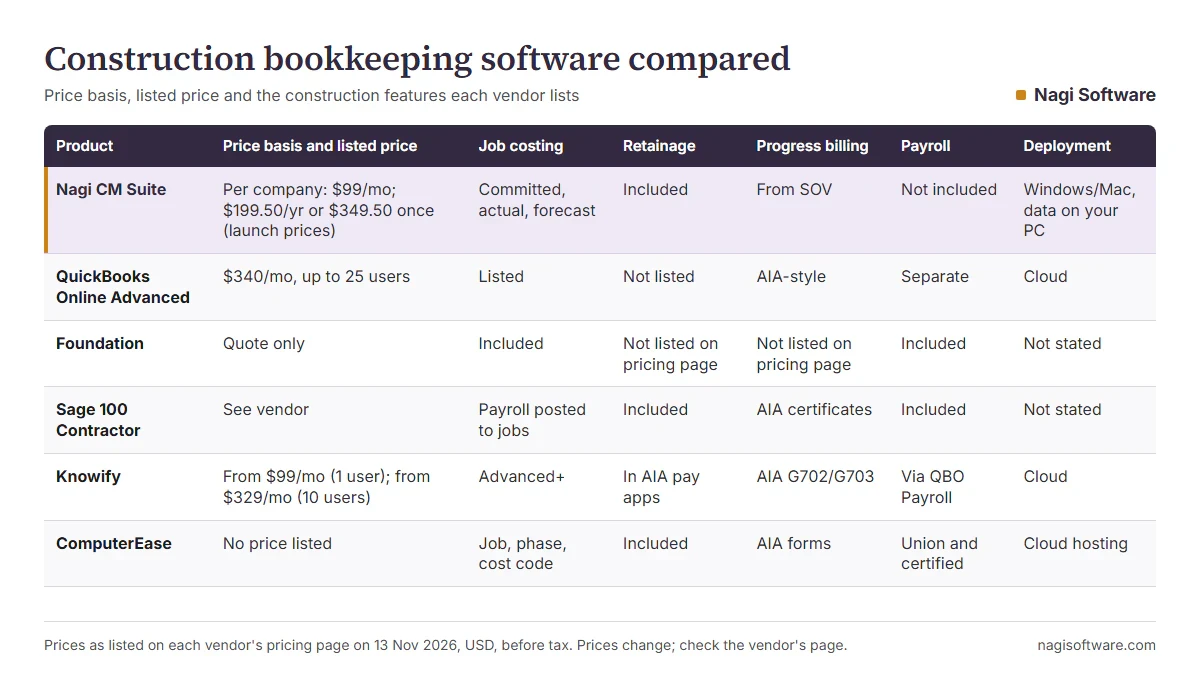
Construction accounting tools compared
Feature cells come from each vendor's own pricing, product or help pages. "Not listed" means we didn't find it on the pages we read, not that the product can't do it.
Prices as listed on each vendor's pricing page on 13 November 2026, in US dollars, before tax. Prices change; check the vendor's page.
| Nagi CM Suite | QuickBooks Online Advanced | Foundation | Sage 100 Contractor | Knowify | ComputerEase | |
|---|---|---|---|---|---|---|
| Price basis and listed price | Per company: $99/month; $199.50/year or $349.50 once (50% off $399 and $699) | $340/month, up to 25 users (50% off first 3 months when checked) | Quote only | See vendor (no price on the pages we read) | Core from $99/month (1 user); Advanced from $329/month (10 users); +$29 per extra user | No price listed; "only pay for the first month" when you start |
| General ledger | Built in: chart of accounts, journals, bank reconciliation, P&L, balance sheet, trial balance | Yes (it is the ledger) | In the site menu | Yes (accounting system) | Syncs to QuickBooks Online | Yes (accounting system) |
| Job costing | By cost code: committed, actual, forecast | Listed for Advanced | Included | Labor costs posted to jobs from payroll | Advanced and Enterprise | By job, phase and cost code |
| Committed cost | Subcontracts and POs, bills matched to them | Not listed | Not listed on pricing page | Not listed on the pages we read | Not listed | Not listed |
| Retainage | Retention receivable and payable in separate accounts; aged retention report | Not listed | Not listed on pricing page | Progress billing retention, release | Within AIA pay apps | Listed |
| Progress billing | Applications for payment from schedule of values | AIA-style progress billing | Not listed on pricing page | Progress bills on AIA certificates | AIA billing (G702/G703) | AIA forms |
| Payroll | Not included | QuickBooks Payroll (separate) | Included | Included, with union and prevailing wage | Via QuickBooks Online Payroll | Union and certified payroll; managed service option |
| Deployment | Windows and Mac program, data on your PC; Nagi Cloud optional | Cloud | Not stated on pricing page | Not stated on the pages we read | Cloud | Cloud hosting |
| Works offline | Yes, after activation (online a few seconds at least every 14 days) | Not listed | Not listed | Not listed | Not listed | Not listed |
Rival prices last checked on 15 November 2026 on each vendor's public pricing page.
Nagi Construction Management Suite
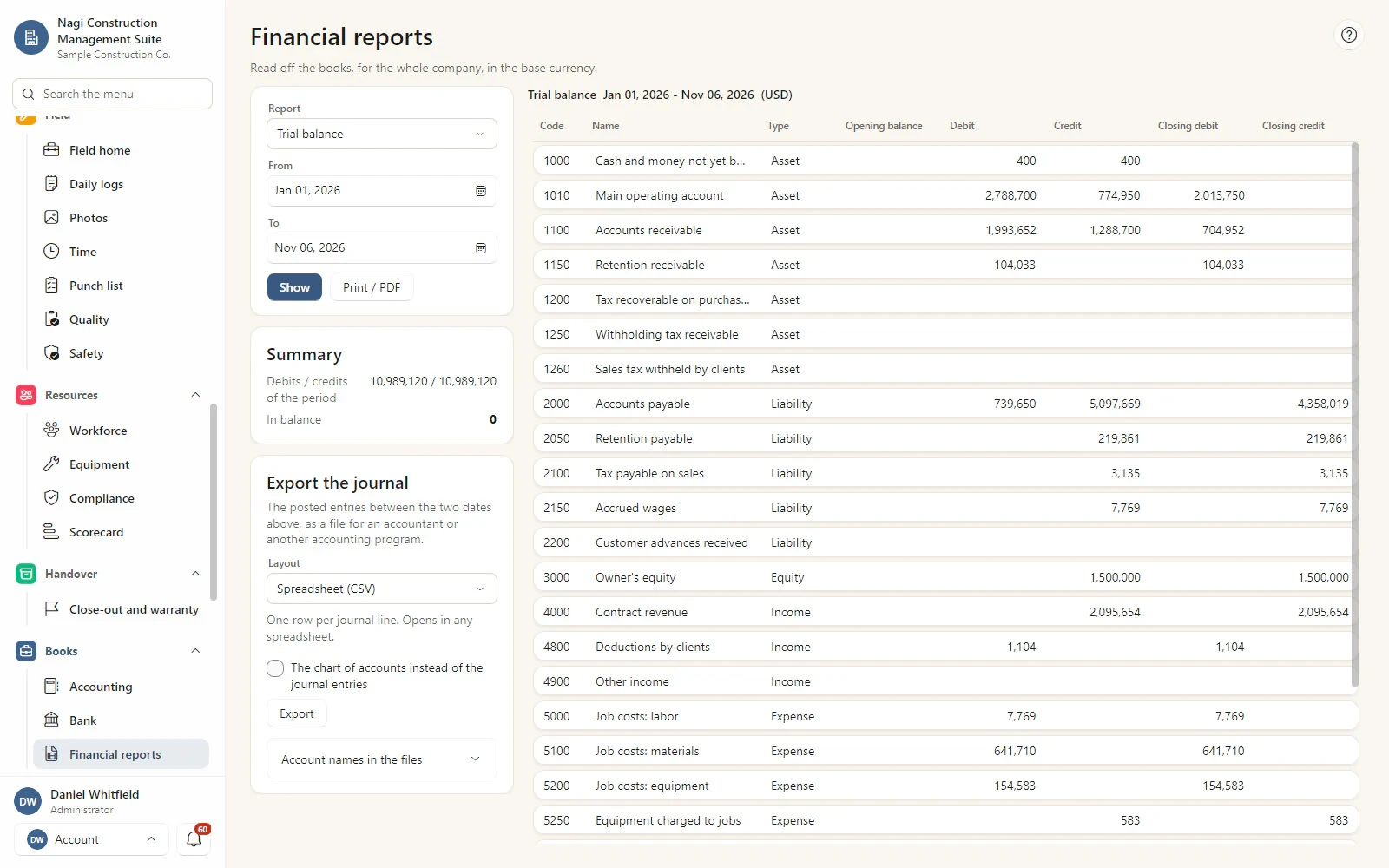
Our own program, so judge it on the facts. It runs jobs and books in one database on your own PC: estimates from your price book, budgets by cost code with committed, actual and forecast cost, client contracts with schedules of values and retention, subcontracts and purchase orders, vendor bills matched to commitments, change orders, progress billing and built-in bookkeeping. Retention runs both ways: held from your client on each application, and held from subs and suppliers on their bills as retention payable, with an aged retention report for both. One price covers the company (one Administrator PC and 10 employee PCs). It has no payroll, no QuickBooks or Xero link and no client portal. The product page goes through each screen.
QuickBooks Online Advanced
The accounting system most US accountants already know, now with construction features for its top plan (Intuit's pages differ on whether they cost extra). Its strength is everything around it: payroll, bank feeds, apps and accountants who can open your file tomorrow. Check retainage and committed cost yourself.
Foundation
Construction accounting with job costing and payroll built in, priced by quote. Its pricing page says it doesn't offer "standard pricing". It suits contractors who want accounting, job cost and payroll from one vendor and are ready for a sales process.
Sage 100 Contractor
A long-standing construction accounting system. Sage's help pages describe progress bills printed on AIA certificates, retention with a maximum and a release step, and payroll that handles union reports and prevailing wage. Sage doesn't publish a price on the pages we read.
Knowify
Knowify is a construction management tool for trade contractors that keeps QuickBooks Online as the ledger. Its pricing page lists AIA billing with retainage on every plan, job costing and WIP from Advanced, and payroll through QuickBooks Online Payroll.
ComputerEase
Deltek sells ComputerEase as a construction accounting system with cloud hosting. Its page lists job cost by job, phase and cost code, AIA progress billing, retainage, and union and certified payroll, plus a managed payroll service. No price is listed.
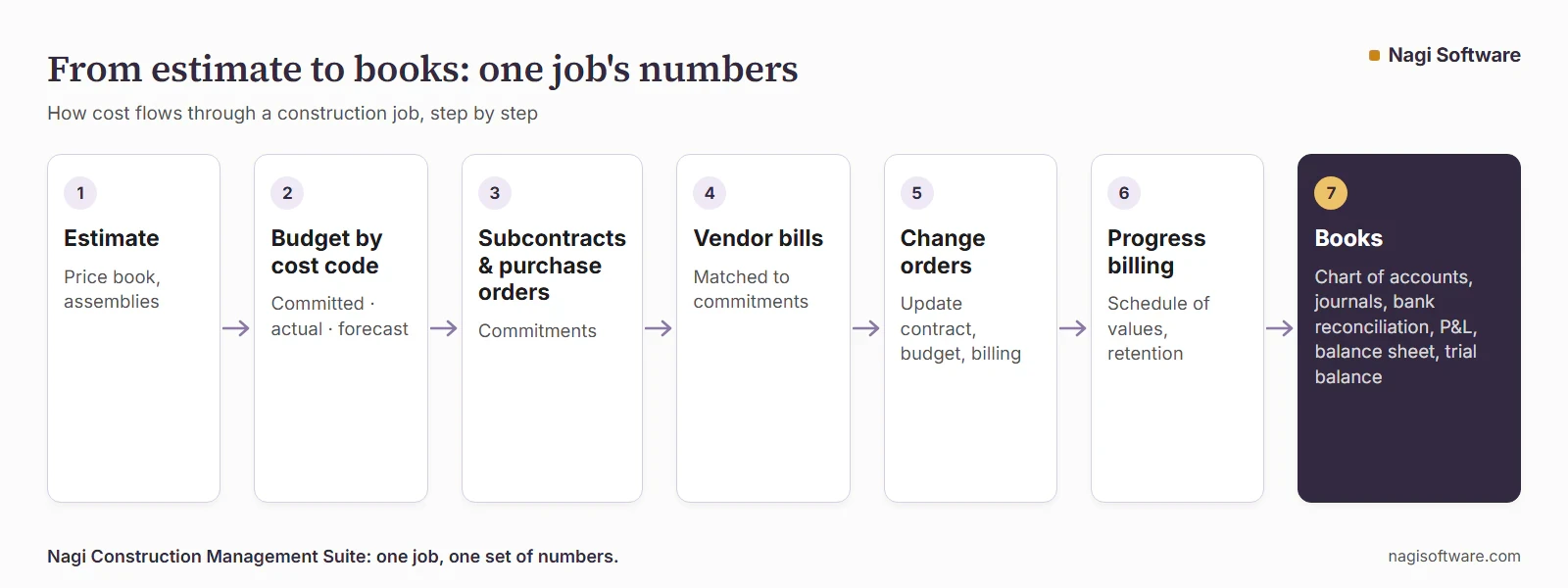
Books inside the construction program: what Nagi covers
In Nagi Construction Management Suite the money side of a job follows one line. The product page puts it as "the estimate becomes the contract, the budget and the bill."
- Estimate, built from your own price book, with assemblies you reuse.
- Budget by cost code, with committed, actual and forecast cost and alerts for anything late or over budget.
- Subcontracts and purchase orders, tracked against the budget the moment they're issued.
- Vendor bills, each matched to the commitment it belongs to.
- Change orders, which update the contract, the budget and the billing together.
- Progress billing, built from the client contract (with its schedule of values and retention) and the work done.
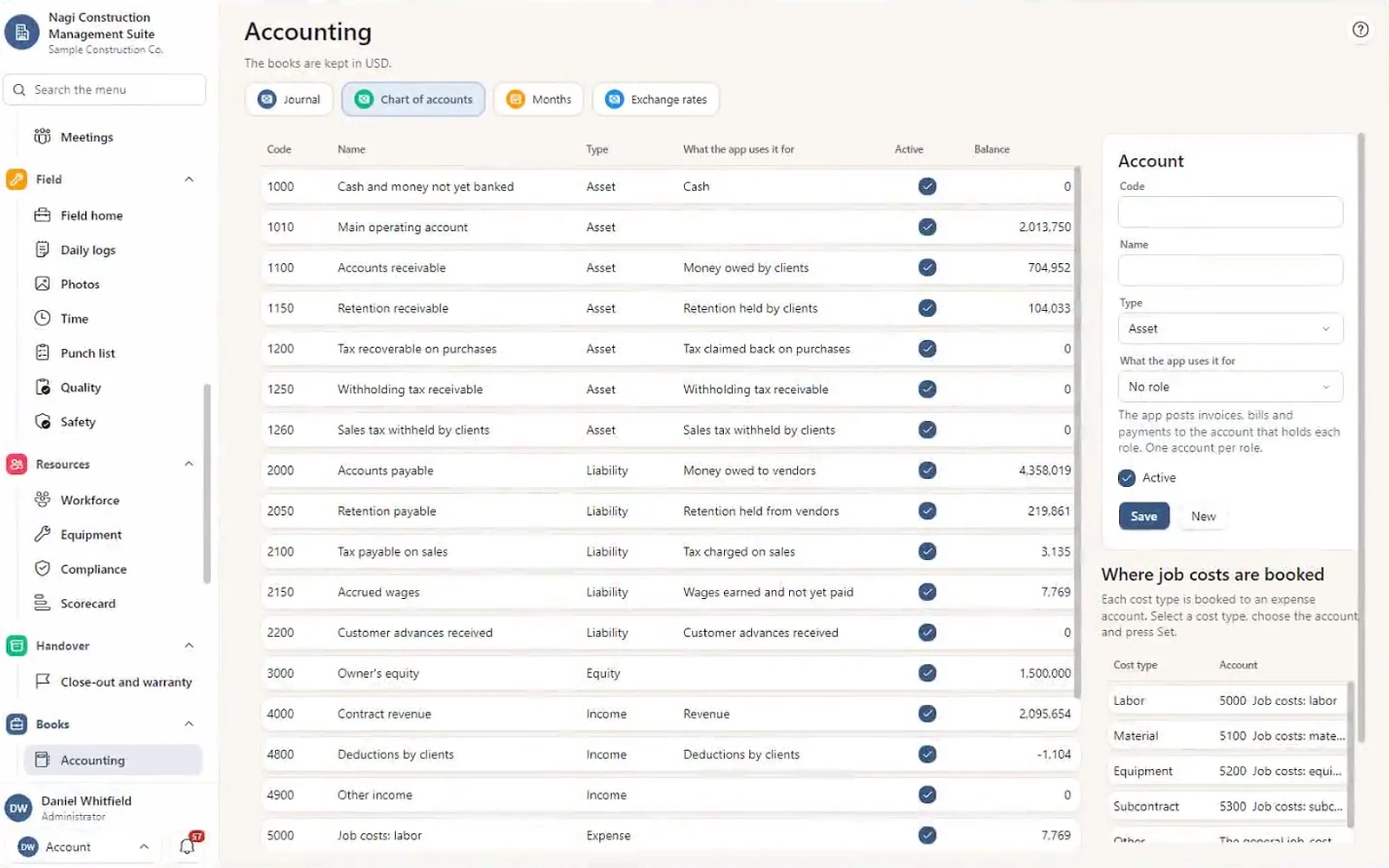
- Books: chart of accounts, journals, bank reconciliation, profit and loss, balance sheet and trial balance, reading the same figures.
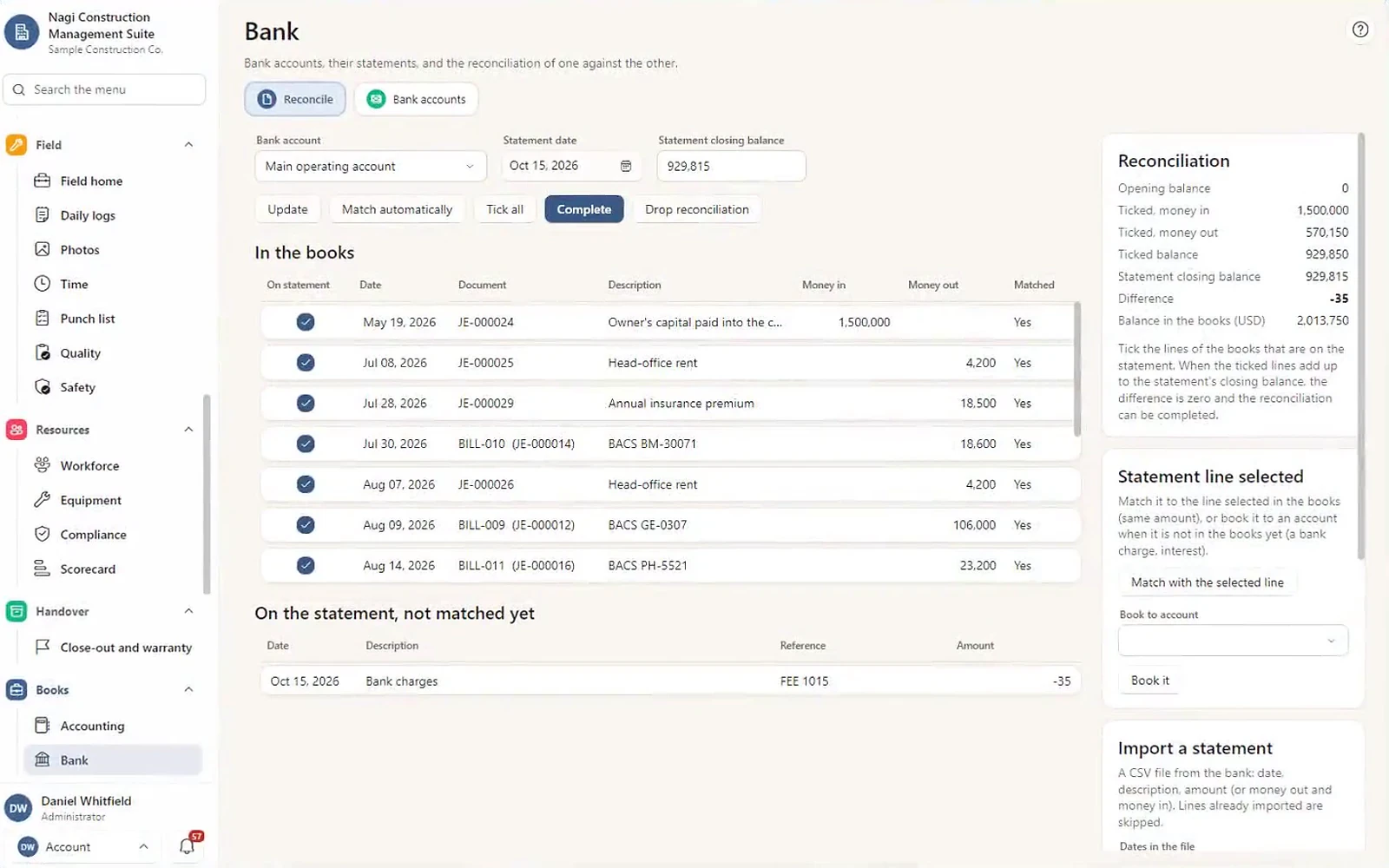
Setting up is mostly importing. The import wizard reads Excel or CSV files for the chart of accounts and opening balances, as well as the directory, projects, cost codes and price book. Bank statements come in as CSV or BAI files for reconciliation. Tax codes carry your own rate (recoverable VAT or GST stays out of job cost; sales tax you can't recover stays in it), invoices print your company tax number with subtotal, tax and total, and each company sets its own currency. You pick the code for each line; the program doesn't decide which country's rules apply. The program runs in English, Arabic (right to left), Spanish, French and German.
Labor reaches the books too. Each worker has an hourly rate, with an overtime multiplier, and burden profiles add the percentages you enter for payroll tax, workers' comp or benefits. When a timesheet is approved, wages plus burden post to the job's cost code and to the ledger (labor cost against accrued wages).
Your books live in the company database on your own PC, back up with the rest of the company as one file, and work without internet. It goes online for a few seconds at least once every 14 days to check the license, and for updates.
What it doesn't cover
Built-in bookkeeping isn't a full accounting department. Be clear about the gaps before you drop anything:
- Payroll. Approved timesheets cost labor to jobs at burdened rates, but the program doesn't run payroll or pay anyone, and certified payroll isn't listed. Keep your payroll provider for paying people and filing.
- Tax filing. Tax codes appear on invoices, but preparing or filing tax returns isn't listed. Your accountant or tax software still does that.
- Integrations. There is no QuickBooks or Xero link. Bank statements come in as CSV or BAI files.
- Client portal. Owners and subs don't log in to see invoices or pay online.
- Scale. If you need multi-entity consolidation, union payroll or an ERP, look at Foundation, Sage 100 Contractor, ComputerEase or bigger.
Who should not buy Nagi for this: a contractor whose accountant does the bookkeeping in QuickBooks and won't work from another system's reports, or anyone who needs payroll in the same program. You'd be paying for books you won't use.
Questions to ask before you switch
- Who closes the month? If it's you or an office manager, built-in books save re-keying. If it's an outside accountant, ask them first.
- Where does payroll run, and how does labor cost reach the job? Neither approach changes payroll for a small firm, but the burdened hours must land on the right cost code.
- How often do billing, job cost and the books disagree at month end? If it's every month, fewer systems usually help more than a better sync.
- Do you bill on pay applications with retainage? Then test a real pay app, including a retainage release, in the trial. Our G702/G703-style pay application template shows the math the software should do.
- What's the five-year cost? Add the construction tool and the accounting subscription together. For a firm on QuickBooks Online Plus ($140 a month as listed) plus a $99-a-month construction tool, that's $2,868 a year before payroll. Our cost guide to construction software you buy once covers the construction side at listed prices.
- What happens to your data if you stop paying? With Nagi, the company file stays on your PC and becomes read-only until you renew; you can still open, print and export it. Ask every vendor the same question and get the answer in writing.
Working with your accountant
Switching books is a conversation with your accountant before it's a software decision. Most accountants care about three things: a clean trial balance, a clear cutover date and records they can trace.
Pick the cutover at a period end, ideally the start of your fiscal year or a quarter. Bring opening balances from the old system's trial balance on that date, and keep the old file read-only for the years your country requires.
Agree what you'll send at each period end. A typical pack for a small contractor is the trial balance, the P&L and balance sheet, the bank reconciliations, an aged receivables list with retainage receivable shown separately, the same for payables and retainage payable, and the WIP schedule. If payroll runs with a provider, its journal summary goes in too.
Ask how they want payroll entered. The usual answer is one journal per pay run from the provider's summary, split by job where the provider reports it.
Then run one month in both systems. If the two trial balances agree at the end of it, switch. If they don't, the difference tells you which entries the new system handles differently, and that's worth knowing before year end, not after.
Which setup to choose
Use QuickBooks alone if you run a few small jobs at a time, rarely bill on pay applications and your accountant is happy.
Choose QuickBooks plus a construction tool if your accountant runs your payroll and books in QuickBooks, or you need online payments and a client portal. Knowify, JobTread and Contractor Foreman all list a QuickBooks Online link.
Choose books inside a construction program if you or an office manager close the month, payroll is with a provider, and you're tired of entering bills twice. Nagi Construction Management Suite is one option at a published per-company price; Foundation, Sage 100 Contractor and ComputerEase are the larger, quote-priced versions with payroll inside.
QuickBooks is a trademark of Intuit Inc. Foundation, Sage 100 Contractor, Knowify, ComputerEase, Deltek, JobTread, Contractor Foreman, Buildertrend and Xero are trademarks of their respective owners. AIA, G702 and G703 are trademarks of The American Institute of Architects. Nagi Software is not affiliated with, endorsed by or sponsored by them. Comparisons use information published by each vendor on the date shown.
Frequently asked questions
- What is the best bookkeeping software for a small contractor?
It depends on who keeps the books. If an outside accountant works in QuickBooks and runs your payroll there, keep QuickBooks and add a construction tool that syncs to it. If you or an office manager keep the books, a construction program with built-in bookkeeping saves entering every bill twice. Firms that need certified payroll and union reporting are better served by a full construction accounting package such as Foundation, Sage 100 Contractor or ComputerEase.
- Do contractors need special accounting software?
Not always. General bookkeeping software handles the general ledger, bills and invoices. What it usually lacks is the construction layer: job costing by cost code, committed cost from subcontracts and purchase orders, retainage receivable and payable, progress billing from a schedule of values, and a WIP schedule. You can add that layer with a construction tool, or buy a package that has both.
- Can QuickBooks track retainage?
Intuit's own pages we checked on 13 November 2026 don't say so. They list job costing, budget versus actuals, AIA-style progress billing, change orders and WIP reporting in QuickBooks Online Advanced, but don't mention retainage. A common workaround is separate retainage receivable and payable accounts, or a construction add-on. Ask Intuit or a ProAdvisor before you rely on it.
- What is WIP in construction accounting?
WIP (work in progress) is a schedule that compares what you have billed on each open job with what you have earned, based on percent complete. If you have billed more than you have earned, the job is overbilled, which is a liability; if less, it is underbilled, an asset. Lenders and bonding companies often ask for it.
- Can I replace QuickBooks with construction software?
Yes, if the construction software keeps a general ledger: chart of accounts, journals, bank reconciliation and financial statements. Nagi Construction Management Suite does, for example. You will still need a payroll provider for anything the program doesn't do, and your accountant should agree to work from its trial balance and reports before you switch.
- Does Nagi Construction Management Suite connect to QuickBooks or Xero?
No. It keeps its own books instead of syncing with an accounting package. If QuickBooks or Xero must stay your system of record, a construction tool that syncs with it, such as Knowify, JobTread or Contractor Foreman, fits that workflow better.
Sources
- Intuit: What's new in QuickBooks Online Advanced (paid construction add-on module), checked November 14, 2026
- QuickBooks Online pricing page (US), checked November 13, 2026
- Intuit: QuickBooks feature updates, Summer 2026, checked November 13, 2026
- Intuit: construction workflow management in QuickBooks Online Advanced, checked November 13, 2026
- Foundation Software pricing page, checked November 13, 2026
- Sage 100 Contractor help: About progress billing retention, checked November 13, 2026
- Sage 100 Contractor help: Working with Payroll, checked November 13, 2026
- Knowify pricing page, checked November 13, 2026
- ComputerEase product page (Deltek), checked November 13, 2026
- Buildertrend status page history (RSS), checked November 13, 2026
- JobTread pricing page, checked November 13, 2026
- Contractor Foreman pricing page, checked November 13, 2026
- Nagi Construction Management Suite product page, checked November 13, 2026
The product in this post
Nagi Construction Management Suite
Run a construction company from estimate to close-out in one program that keeps your data on your own PC.
- construction-accounting
- bookkeeping
- quickbooks
- job-costing
- retainage
- comparison