
Free Daily Construction Report Template (and What to Log Every Day)
A free, ungated daily construction report template in Excel, a fully filled-in example day, and the 12 things a daily log has to hold if you ever need it to settle a delay or a change order months later.
Nagi Software Team10 min read
A daily construction report is the record of one day on one site: weather, who was there and for how long, what got built, what arrived, what stopped work and why, plus photos and a signature. Our free Excel template covers the 12 items you need, and comes with a fully filled-in example day. We build the daily log and site app in Nagi Construction Management Suite, so we know which fields get asked for months later.
Download the daily construction report template (.xlsx) or see the filled example day (PDF). No email, no form.
Why the daily report gets read later
Nobody reads a daily report on the day. It gets read in April, when the owner disputes a change you made in March, or when a delay claim needs to show that rain and an unanswered RFI cost you three days. The report has to answer questions you can't predict yet. That's why "framing, drywall, cleanup" isn't enough, and why the time of day counts as much as the event.
We call this the 7 a.m. test: at 7 a.m. tomorrow, can your site engineer open today's job and write the first line of the log before the crew starts? If the honest answer is "they'll do it on Friday", the record is already weaker than you think.
The 12 things a daily log has to hold
Each of these is a column or a block in the template. The right-hand column is the question someone will ask later.
| # | What to log | Detail that holds up later | The later question it answers |
|---|---|---|---|
| 1 | Header | Date, job, report number, author, shift start and end | Who wrote this, and when? |
| 2 | Weather | Readings at 7:00 and 12:00, rain or wind with start and end times | Could the work planned for that day happen? |
| 3 | Crews and hours by company | Own crews and each sub, headcount and hours | Was the sub really on site? Who was idle? |
| 4 | Equipment | Unit, hours worked, hours standing | What did the delay cost in plant? |
| 5 | Deliveries | Time, supplier, ticket number, what was rejected | When did the material arrive, and in what state? |
| 6 | Work done by area | Level, gridline or room, and the activity | Was the area ready for the next trade? |
| 7 | Inspections and visitors | Who, when, result | Did it pass? Was the owner's rep there? |
| 8 | Delays and cause | Start and end time, crews affected, who or what caused it | Whose delay was it, and how long? |
| 9 | Safety | Toolbox talk topic and attendance, incidents, near misses | Was the site run safely that day? |
| 10 | Photos with captions | Number, area, time, what it shows | What did it look like at 11:40? |
| 11 | Instructions received | Who gave it, what, how (verbal, email, drawing) | Did the owner tell you to do the extra work? |
| 12 | Signature and lock | Name, time signed, no edits after | Was this written on the day, or later? |
Item 11 is the one most templates leave out, and it's the one that pays. A verbal "move that door two feet" from the owner's rep is a change. Logged with the time and the name, it becomes the first page of a change order. Unlogged, it's your word against theirs. Our guide to pricing a change order picks up from there.
How to write a daily construction report in 15 minutes
Write it during the day, in short entries, and the report takes about 15 minutes in total. Write it at night from memory and it takes an hour and loses the times.
Step 1: Before 7 a.m., open the day
Fill the header and the first weather reading. Note the planned work for the day in one line. If the plan changes at 11:30, you can show what the plan was.
Step 2: At the start of work, count crews by company
Write headcount per company, not a site total. "15 people" can't show that the electrician sent two instead of four.
Step 3: Log deliveries and inspections as they happen
Copy the ticket number from each delivery. Write what you rejected and photograph it before it leaves.
Step 4: Record delays and instructions the minute they happen
Start time, who's affected, the cause and, for instructions, who gave it and how. Add the end time when work restarts.
Step 5: Take photos with captions
Caption each photo with the area, the time and what it proves. "IMG_4471" proves nothing in six months.
Step 6: Before you leave, finish work done and hours
Work done by area, final hours per company and equipment hours. Then read it top to bottom.
Step 7: Sign and lock
Sign with the time. After that, corrections go in as a dated note on the next day's report, never as an edit to this one.
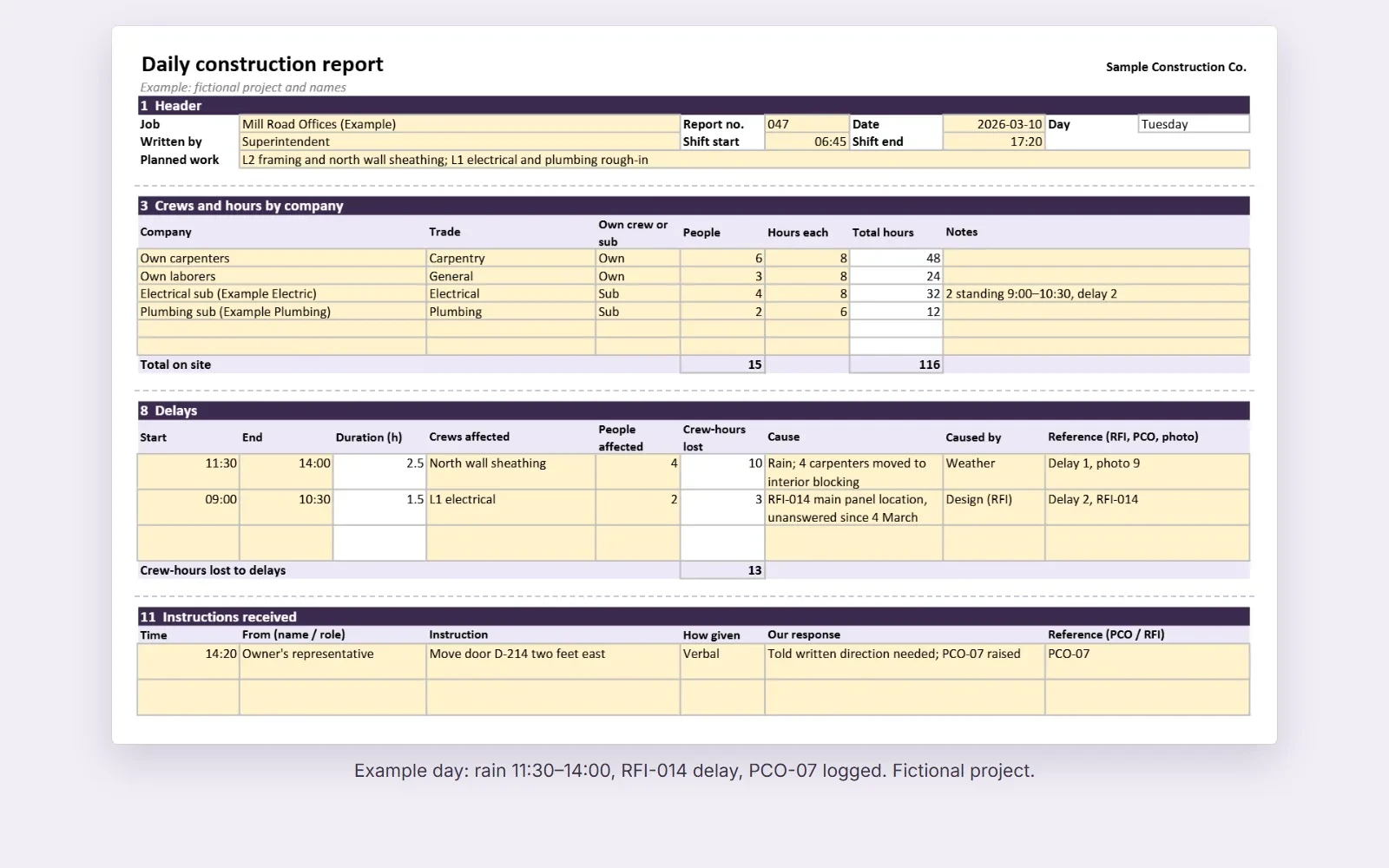
A filled example day
This is the "Example" tab of the workbook, and the PDF linked above. One site, one rainy Tuesday. The project and every name are made up.
Example: Mill Road Offices, report 047, Tuesday 10 March 2026, written by the superintendent.
| Block | Entry |
|---|---|
| Weather | 7:00 38°F overcast, wind 10 mph. Rain 11:30 to 14:00, about 0.4 in. 15:00 dry, 44°F |
| Planned | Level 2 framing and north wall sheathing; Level 1 electrical and plumbing rough-in |
| Own carpenters | 6 people × 8 h = 48 h |
| Own laborers | 3 people × 8 h = 24 h |
| Electrical sub | 4 people × 8 h = 32 h (2 people standing 9:00 to 10:30, see delay 2) |
| Plumbing sub | 2 people × 6 h = 12 h |
| Total on site | 15 people, 116 h |
| Equipment | Telehandler: 6 h worked, 2 h standing (rain). Scissor lift: 4 h |
| Deliveries | 9:10 drywall, 240 sheets 5/8 in. Type X, ticket 88412: 20 sheets rejected, wet and broken corners (photos 5 and 6). 13:30 lumber, ticket 31907, accepted |
| Work done | L2 east framing, grids A to D, about 85%. L1 electrical rough-in rooms 101 to 108. L1 restroom plumbing rough-in |
| Inspections, visitors | 10:30 city framing inspection, Level 1: passed. 14:00 owner's representative, walk of Level 2 |
| Delay 1 | 11:30 to 14:00, rain: north wall sheathing stopped. 4 carpenters moved to interior blocking, 10 crew-hours off plan |
| Delay 2 | 9:00 to 10:30, RFI-014 (main panel location) unanswered since 4 March: 2 electricians standing, 3 crew-hours lost |
| Safety | 7:00 toolbox talk, ladder use, 15 attended. 9:45 near miss: unsecured guardrail L2 east, fixed by 9:55 (photo 3) |
| Instruction received | 14:20 owner's representative, verbally: move door D-214 two feet east. Told written direction needed. Logged as PCO-07 |
| Photos | 14 photos, each captioned, e.g. photo 9: "L2 north wall, sheathing stopped at grid 4, 11:40, rain" |
| Signed | Superintendent, 17:20. Locked |
Three entries from that day decide money later. The rain delay supports a time extension if the contract allows one for weather. RFI-014 shows 3 crew-hours lost to a late answer, which belongs on the RFI log and may become a claim. The free RFI log shows how long each request has been open and which are past the response date. And PCO-07 turns a hallway remark into a priced change. The weekly progress report for the same week pulls all three forward, so the owner sees them on one page.
Why logs written on Friday fail
A report written on Friday for the whole week loses exactly the details a dispute needs: times, headcounts per company, who said what. Memory rounds everything off. "Rain Tuesday" replaces "11:30 to 14:00". The electrician's two idle people disappear because by Friday they were working. And the instruction from the owner's rep, later priced at $3,900 as PCO-07, becomes "discussed door location".
There's a second problem. A report that's obviously been written days later, five days in the same handwriting, the same pen and the same length, is easy for the other side to question. A record made on the day, with times and a signature, is much harder to argue with.
On the paper diary in the site box, the usual failure is simpler: it gets wet, it gets lost, or it's in the truck when the inspector arrives. Photos sit on the foreman's own phone, and they leave the company when he does.
Photos that still prove something in six months
A photo proves something only if a stranger can tell where, when and why it was taken. Give every photo a caption with four parts: area, time, what it shows, and the reference it belongs to (a delay, an RFI, a delivery ticket, a PCO). "L2 north wall, grid 4, 11:40, sheathing stopped by rain, delay 1" passes. "Wall" doesn't.
Shoot in threes when something might be argued about later: a wide shot that shows the location, a middle shot that shows the item in context, and a close-up of the detail. Take a set before anything gets covered: rough-in before the drywall closes the wall, rebar before the pour, waterproofing before backfill. Once it's buried, the photo is the only inspection anyone can still do.
Keep the photos with the report, not on a personal phone or in a shared folder named "March". In the workbook, the Photos block has a row per photo: number, time, area, caption, reference. If your photos live in a separate folder, name the files with the report number and photo number (047-09) so the link survives a move.
Who writes it, who signs, who gets a copy
One named person writes and signs each day's report, usually the superintendent or site manager. On larger jobs a field engineer drafts it and the superintendent signs. Subcontractors often keep their own daily reports; ask for them each week and file them with yours, because their headcount and your headcount should agree.
The office should see the report the same day, not at the end of the week. The project manager reads it for delays, instructions and anything that costs money. Owners usually get the weekly summary rather than every daily report, unless the contract asks for dailies. The free project status report builder turns milestone dates and budget into days late and a budget variance for that weekly page; our other free templates and calculators are on the free tools page.
Keep the reports for as long as your contract, your insurer and your lawyer say, which is often years after the job closes. In the UK and much of the Gulf the same document is usually called a site diary; the 12 items don't change.
Where a spreadsheet daily report stops working
The Excel template works well for one site and one superintendent with a laptop in the site office. It gets harder with two or three sites, because the reports live in separate files, photos sit in a folder somewhere else, and nobody in the office can see today's report until someone emails it.
In Nagi Construction Management Suite, daily logs record weather, people, equipment and delays, and the program locks each day's log. Photos carry their date and an area tag and link to the daily log, so photo 9 stays attached to the rain delay it proves. The same program holds the punch list, safety incidents and observations, toolbox talks, and time sheets, so the day's hours don't have to be retyped from the back of a delivery ticket.
On site, the Android app lets your team open the day's job, write daily log entries, add photos and hours, and see alerts and cost. With no signal, new entries (hours, daily log lines, photos, punch items, observations and incidents) wait in the phone's outbox and go out when it's back online. Looking things up, such as projects, RFIs, documents and approvals, needs a connection. Our guide to offline construction apps compares how other apps handle a site with no signal.
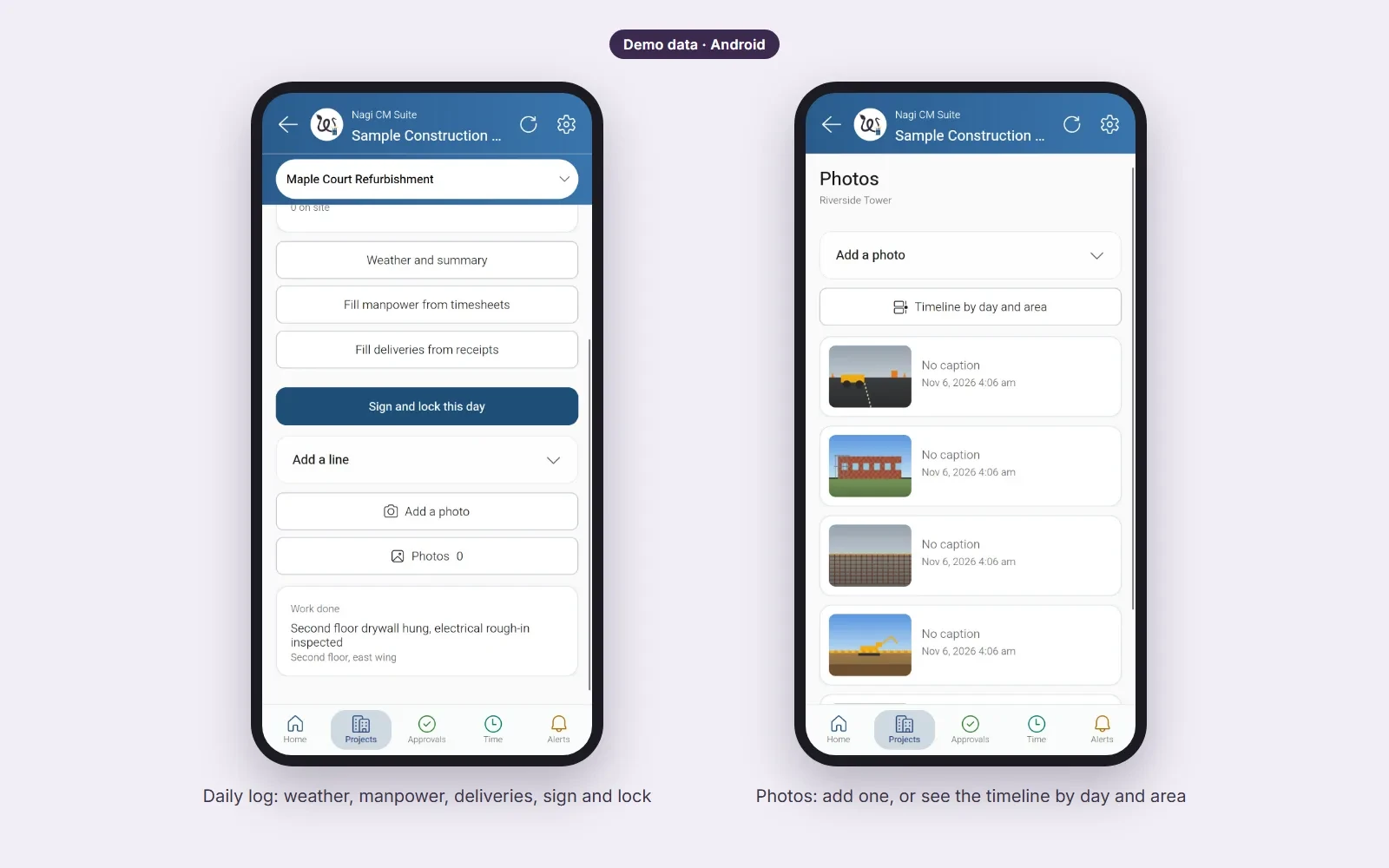
What it doesn't do: the phone app is Android only for now (the product page lists Windows, Mac and Android releases), and there's no client portal, so the owner gets reports as PDFs, not a login. Pricing is one price per company, not per user: one company license covers one Administrator PC, 10 employee seats and 11 phone connections, at $99 a month, or $199.50 a year and $349.50 lifetime at discounted prices (50% off $399 and $699), as listed on nagisoftware.com/pricing on 14 November 2026.
Run the 7 a.m. test this week
Tomorrow at 7 a.m., ask your site lead five things, on whatever they use now: open today's job, write the first log line, add a photo, add the hours, and see what's late and what it's costing. Five yeses is a pass.
If it's a paper diary or an end-of-week spreadsheet, start with the template today and fill it during the day, not after. If you run several sites and want the log, the photos and the hours in the program the office already uses, try it with one real day's report and compare it with what you'd have written on Friday.
Related: RFI log template for tracking the questions that hold up crews, and the weekly progress report template built from these daily logs.
Frequently asked questions
- What should be included in a daily construction report?
A daily construction report should hold the date and author, weather with times, crews and hours by company, equipment, deliveries, work done by area, inspections and visitors, delays and their cause, safety events, captioned photos, instructions received, and a signature that locks the day. Those 12 items cover what you'll need if the day is ever questioned in a delay or change order dispute.
- Who writes the daily construction report?
The superintendent or site manager usually writes it, because they see the whole site that day. On bigger jobs a field engineer drafts it and the superintendent reviews and signs. Subcontractors often keep their own daily reports too, and many contracts ask them to hand those to the general contractor. One named person should own each day's report.
- What is the difference between a daily log and a daily report?
Most contractors use the two terms for the same document: the record of one day on one site. Where a company separates them, the daily log is the running list of entries made during the day, and the daily report is the signed summary sent to the office or owner. Our template does both: entries during the day, then a locked sign-off.
- How long should a daily construction report take to write?
About 15 minutes if you fill it in during the day, and closer to an hour if you write it from memory at night. Enter weather and crews in the morning, add photos and delays when they happen, and finish work done and hours before you leave. Reports rebuilt at the end of the week take longer and carry fewer facts.
- Can a daily report be used as evidence in a construction dispute?
Often, yes. Daily reports are a common source of facts in delay claims and change order disputes, because they record what happened on the day it happened. How much weight a report carries depends on your contract, the forum and how the report was kept. Dated entries, named sources and an unchanged signed record help. This is general information, not legal advice.
Sources
- Nagi Construction Management Suite product page, checked November 14, 2026
- Nagi Construction Management Suite: job costing page (Android outbox wording), checked November 14, 2026
- Nagi Software pricing page, checked November 14, 2026
The product in this post
Nagi Construction Management Suite
Run a construction company from estimate to close-out in one program that keeps your data on your own PC.
- daily-report
- daily-log
- site-diary
- superintendent
- templates
- field