
Job Costing in Construction: A Worked Example by Cost Code
One $180,000 renovation costed code by code: budget, committed, actual and forecast at completion, with labor burden, overhead, a change order and what QuickBooks shows you along the way.
Nagi Software TeamUpdated 15 min read
Job costing in construction means tracking every dollar of one project against that project's budget, cost code by cost code, so you can see a loss while there is still time to fix it. The useful version tracks four numbers per code: budget, committed, actual and forecast at completion. We make Nagi Construction Management Suite, which keeps those four columns on one screen, so below is the method worked through on a real-sized job, then what the software does and doesn't do for you.
What job costing is
Job costing is cost accounting for one project. Every cost (labor hours, materials, subcontracts, equipment, permits) is tagged to the job and to a cost code, then compared with what you planned. Your profit and loss statement tells you how the company did last month. A job cost report tells you which job did it.
The difference shows up fast. A contractor can post a healthy quarter while one of four jobs loses $20,000, and the P&L will not say which one. Projul's guide on the subject opens with a remodeler who lost $18,000 on a kitchen job because the spreadsheet was only updated near closeout (Projul). That's the failure job costing exists to prevent.
Most guides stop at "compare estimate to actual." That's half the method. Actual cost arrives late, often 30 days after the work, when the bill shows up. Committed cost arrives the day you sign. A job costing system that tracks only actuals is reading last month's mail.
Cost codes: how to set them up
A cost code is the label every cost on a job carries. Set them up once, use the same list on every job, and make them match how you estimate, because your estimate becomes the budget.
Three rules keep the list usable:
- Use the same codes in the estimate, the budget, purchase orders, subcontracts, time sheets and vendor bills. If the estimator says "Rough carpentry" and the foreman logs hours to "Framing", nobody can compare them.
- Keep it short. OneCrew recommends 8 to 15 codes for a field crew (OneCrew). Ten to twenty-five is typical for a small general contractor or remodeler; a hundred codes means half of them get misused.
- Split by who does the work when it changes how you buy it. Framing done by your own crew and drywall done by a sub belong in different codes even if both are "interiors", because one is labor plus material and the other is a subcontract.
Many US contractors number their codes after the CSI MasterFormat divisions (03 Concrete, 06 Wood and plastics, 09 Finishes, 26 Electrical in the current numbering, or 16 in the older one). You don't have to, but it helps when an owner or architect hands you a spec book organized the same way.
A cost type sits under each code. The usual four are labor, material, subcontract and equipment, plus "other" for permits and fees. Cost types let you see that framing is over because of labor hours, not lumber.
In Nagi Construction Management Suite, cost codes live in company settings, and the import wizard reads an existing list from Excel or CSV along with your price book and projects. Bring the list you already use; don't redesign it in week one.
The worked example: a $180,000 renovation
The job: converting the ground floor of a two-story building into a small clinic. Contract price $180,000, fixed price. Twelve weeks on site. The contractor's own crew does demolition and framing; drywall, plumbing and electrical go to subcontractors; cabinets and finishes are bought as materials.
The budget
The estimate becomes the budget. Here it is by cost code, with $150,000 of direct cost and $30,000 of gross margin (16.7% of the contract).
| Code | Description | How it's bought | Budget |
|---|---|---|---|
| 01 | General conditions (supervision, dumpster, toilets, temporary power) | Own staff + rentals | $12,000 |
| 02 | Demolition | Own crew | $8,000 |
| 06 | Framing and carpentry | Own crew (400 h × $41.00) + lumber | $30,000 |
| 09 | Drywall and paint | Subcontract | $22,000 |
| 22 | Plumbing | Subcontract | $24,000 |
| 26 | Electrical | Subcontract | $26,000 |
| 12 | Cabinets and finishes | Material | $28,000 |
| Total direct cost | $150,000 | ||
| Contract price | $180,000 | ||
| Gross margin | $30,000 (16.7%) |
Framing labor is budgeted at $41.00 an hour, not the crew's $30.00 wage. The difference is labor burden, explained in the next section. Get it wrong and the framing line is short by $4,400 before anyone picks up a nail gun.
Six weeks in: committed, actual and forecast
Halfway through, this is the job's cost report. One change order has been approved (more on that below), so plumbing's budget moved from $24,000 to $29,200.
| Code | Revised budget | Committed | Actual to date | Forecast at completion | Variance |
|---|---|---|---|---|---|
| 01 General conditions | $12,000 | $3,000 | $6,500 | $13,000 | −$1,000 |
| 02 Demolition | $8,000 | $0 | $9,200 | $9,200 | −$1,200 |
| 06 Framing and carpentry | $30,000 | $14,100 | $18,900 | $32,140 | −$2,140 |
| 09 Drywall and paint | $22,000 | $21,500 | $0 | $21,500 | +$500 |
| 22 Plumbing | $29,200 | $29,200 | $12,000 | $29,200 | $0 |
| 26 Electrical | $26,000 | $27,800 | $9,000 | $27,800 | −$1,800 |
| 12 Cabinets and finishes | $28,000 | $0 | $0 | $28,000 | $0 |
| Total | $155,200 | $95,600 | $55,600 | $160,840 | −$5,640 |
What each column means:
- Committed is the full value of signed subcontracts and purchase orders, billed or not. The $14,100 under framing is the lumber purchase order; the $21,500 under drywall is the signed drywall subcontract, with nothing billed yet.
- Actual is cost already incurred: vendor bills entered plus labor hours times the burdened rate. Framing's $18,900 is 260 crew hours at $41.00 ($10,660) plus $8,240 of lumber billed so far.
- Forecast at completion is what the code will cost when the job is done. For subcontracted codes it's usually the committed value. For your own crew it's actual plus your estimate of what's left: the foreman expects 180 more framing hours, so labor lands at 440 hours ($18,040) and lumber at the full $14,100 purchase order, for $32,140.
- Variance is revised budget minus forecast. Negative means over budget.
Reading the table
The job is forecast to finish $5,640 over budget. Gross margin drops from a planned $31,300 (the original $30,000 plus $1,300 earned on the change order) to $25,660, or 13.8% of the revised $186,500 contract. To get the same forecast, percent complete and projected margin from your own numbers, the free job cost report calculator takes budget, committed and actual cost by cost code; more calculators for contractors are on our free tools page.
Now look at what an actual-cost-only report would have shown at the same moment: $55,600 spent against a $155,200 budget. That's 36% spent with half the schedule gone, which looks comfortable. Nothing in the actuals says the job is in trouble.
Electrical is the clearest case. The electrician's subcontract was signed at $27,800 against a $26,000 budget. The overrun was certain on the day of signing, but only $9,000 has been billed. A report built on actuals stays green until the last electrical invoice lands, probably in week eleven, too late to recover anything. A report with a committed column turns red in week three.
Framing is the other lesson. Lumber is on budget; the crew is not. You only see that if labor and material are separate cost types under the code.
Labor burden and overhead
Two numbers decide whether a job that looks profitable really is: the burdened labor rate and the overhead rate. Both are easy to skip and expensive to miss.
Labor burden
Labor burden is everything an hour of labor costs you beyond the wage. The usual parts are employer payroll taxes, workers' compensation insurance, health and other benefits, and paid time off. In our example, with illustrative percentages (use your own from your payroll provider and insurer):
| Item | Per hour |
|---|---|
| Base wage | $30.00 |
| Employer payroll taxes (10% of wage) | $3.00 |
| Workers' compensation (12% of wage) | $3.60 |
| Health and other benefits | $4.40 |
| Burdened rate | $41.00 |
That's a 37% burden. Budget 400 framing hours at the bare $30.00 and the line is $4,400 short before the job starts, which is almost the whole variance in the table above. Projul's guide gives a similar example, a $35 carpenter costing about $47 to $50 an hour once burdened (Projul).
Overhead
Overhead is the cost of running the company that no single job causes: the office, the estimator's salary, the truck the owner drives, insurance, software. It still has to be paid out of job margins.
The simple method allocates it as a percentage of direct cost. Say this contractor expects $240,000 of overhead in a year and $2,000,000 of direct job cost. The overhead rate is 12%.
| Planned | Forecast at week 6 | |
|---|---|---|
| Contract | $186,500 | $186,500 |
| Direct cost | $155,200 | $160,840 |
| Gross margin | $31,300 | $25,660 |
| Overhead at 12% of direct cost | $18,624 | $19,301 |
| Net profit | $12,676 (6.8%) | $6,359 (3.4%) |
Gross margin fell 18%. Net profit fell by half. That's why a $5,640 variance on a $180,000 job is worth a meeting, and why bidding the next job at "cost plus 15%" without counting overhead can leave you working for free.
Change orders and their effect on the budget
A change order changes three things at once: the contract price, the budget and what you can bill. If it only changes one of them, the job cost report lies.
In the example, the owner asked for a second restroom in week four. The plumber priced it at $5,200. The contractor sold it to the owner for $6,500. Recorded properly:
| Before | Change order 1 | After | |
|---|---|---|---|
| Contract price | $180,000 | +$6,500 | $186,500 |
| Budget, code 22 Plumbing | $24,000 | +$5,200 | $29,200 |
| Plumbing subcontract (committed) | $24,000 | +$5,200 | $29,200 |
| Margin on the change | $1,300 |
Miss the budget side and plumbing shows a $5,200 overrun that isn't one. Miss the contract side and you never bill the $6,500. Both mistakes are common when the change lives in a text message until the end of the job.
Keep potential changes visible too. A change the owner has asked about but not approved isn't in the budget yet, but the cost may already be committed if the sub started work. Track it as a pending item with an estimated value so the forecast doesn't surprise you.
In Nagi Construction Management Suite, potential changes and change orders are part of the Money module, and each approved change order updates the client contract, the budget and the billing together. A manager with approval rights can approve or reject client and subcontract change orders from the Android app.
Reading variances early
A variance is only useful if someone sees it while it's small. Three habits catch most of them.
Review weekly, by cost code, before the site meeting. Enter the week's bills and time sheets first. OneCrew's step-by-step suggests about 20 minutes per job per week once the setup is done (OneCrew). A short code list is what keeps it that quick.
Compare progress, not just spend. Framing at 63% of its budget with the walls 50% framed is a problem; framing at 63% with walls 80% done is fine. Ask the foreman for percent complete per code and set it beside the cost.
Set alerts, so you don't have to remember. The useful triggers are a commitment signed above budget, a code whose forecast passes its budget, and a code whose actual passes, say, 90% of budget. Nagi's reports module includes alerts for late, over-budget or expiring items, and the home page lists what needs attention today.
From job cost to WIP
Your job cost report also feeds the work-in-progress (WIP) schedule your accountant or bonding company asks for. With the cost-to-cost method, percent complete is actual cost divided by forecast cost: $55,600 ÷ $160,840 = 34.6%. Earned revenue is 34.6% of $186,500, about $64,470. If you have billed the owner $72,000 so far, the job is overbilled by roughly $7,530. That isn't bad news by itself; it means some of the cash you hold is for work not yet done. Our guide to progress billing walks through over- and underbilling with three pay periods. If you want the sum done for every open job at once, the WIP and over/under billing calculator works out percent complete, earned revenue and over or under billing, with totals you can print.
Notice the dependency: a forecast that leaves out committed cost makes the WIP schedule wrong too.
Job costing in QuickBooks: what works and what doesn't
QuickBooks can do part of construction job costing, and in 2026 Intuit added more of it to its top plan. Here is what Intuit's own pages say, checked on 13 November 2026.
On the QuickBooks Online pricing page, Plus lists "Track project profitability" and Advanced adds "Advanced project financials" and a "Construction financials solution". The listed prices are $140 a month for Plus and $340 a month for Advanced, with a 50%-off offer for the first three months at the time we checked.
Intuit's Summer 2026 product update says QuickBooks Online Advanced now includes job costing, budget versus actuals, AIA-style progress billing, change order management, WIP reporting and profitability "at no additional cost". Its construction workflow page adds that AIA-style invoices carry forward amounts invoiced to date, and that approved change orders update the estimate and budget. A later Intuit page, What's new in QuickBooks Online Advanced (read 14 November 2026), describes the construction features as a paid add-on module, so ask Intuit what your plan includes before you count on them.
What those pages don't mention:
- Committed cost. Neither Intuit page we read describes open purchase orders or subcontracts appearing as committed cost in job reports. Projul, a competitor, writes that QuickBooks Online can't easily compare estimated and actual cost by cost code (Projul). We couldn't confirm either point on an Intuit page, so treat it as a question to ask, not a fact.
- Retainage. Neither page mentions retainage tracking. One third-party page says the 2026 update added it; Intuit's pages we read don't say so.
- Labor burden. QuickBooks values labor from payroll. If you run payroll elsewhere, the burdened rate has to come in some other way.
Our read: if you already pay for QuickBooks Online Advanced, test its construction features before you add another tool, because for budget versus actual on a handful of jobs it may be enough. If you're on Plus, the gap between "project profitability" and the table in this post is the committed column and the forecast, and that's the part that saves money. Ask a ProAdvisor to show you the electrical example above in your own file: subcontract signed at $27,800, budget $26,000, nothing billed. When the report shows the overrun that day, you're covered.
Spreadsheet vs software
A spreadsheet can do everything in this post. The table above is a spreadsheet. The problem isn't the math; it's that the numbers come from five places (estimate, purchase orders, subcontracts, time sheets, vendor bills) and someone has to type them in every week.
A spreadsheet works when:
- you run one to three jobs at a time,
- one person enters every cost, and
- that person has a fixed weekly hour to do it.
It breaks when two people edit the same file, when a change order is approved on site and nobody tells the office, or when the bookkeeper enters a bill to the wrong code and the sheet never finds out. If you copy our tables into Excel, add a "source" column to every cost line. You'll want it the first time a number looks wrong.
Software earns its cost when the same entry feeds all four columns. In Nagi Construction Management Suite the chain looks like this:
- The estimate is built from your own price book, with reusable assemblies, and becomes the budget by cost code.
- Subcontracts and purchase orders become committed cost the moment they're issued.
- Vendor bills are matched to the commitment they belong to, so the actual column fills in and the open balance on each commitment is visible.
- Time sheets record hours against the job and cost code; the site team can log hours, daily logs and photos from the Android app, even with no signal, and the entries are sent when the phone is back online. When a timesheet is approved, the hours are costed at the worker's rate plus burden and posted to the job.
- Change orders update the contract, the budget and the billing together.
- Progress billing (applications for payment, with the schedule of values and retention) reads the same contract, and the built-in bookkeeping reads the same bills.
The screens below come from the program's demo company, a larger job than our worked example.
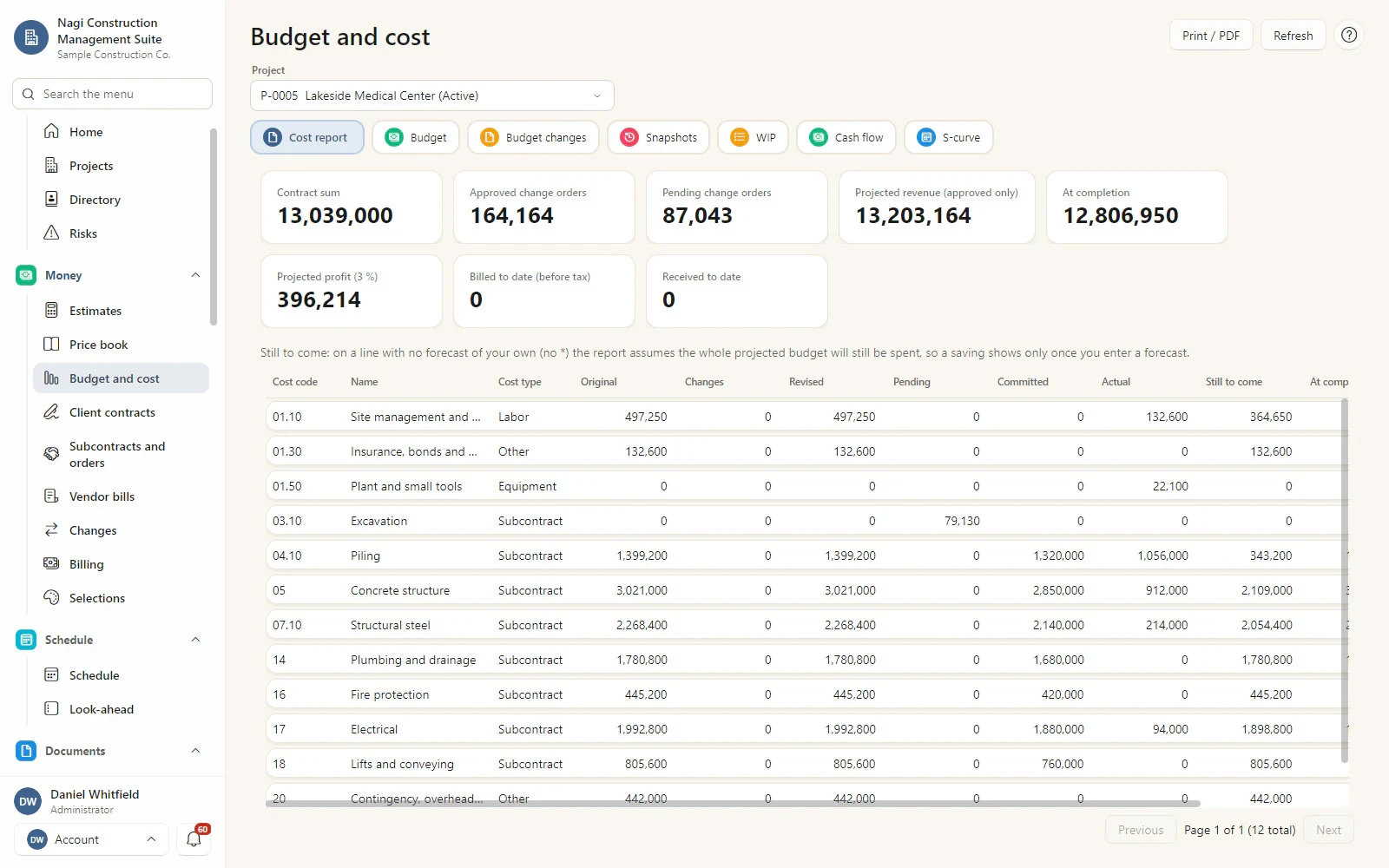
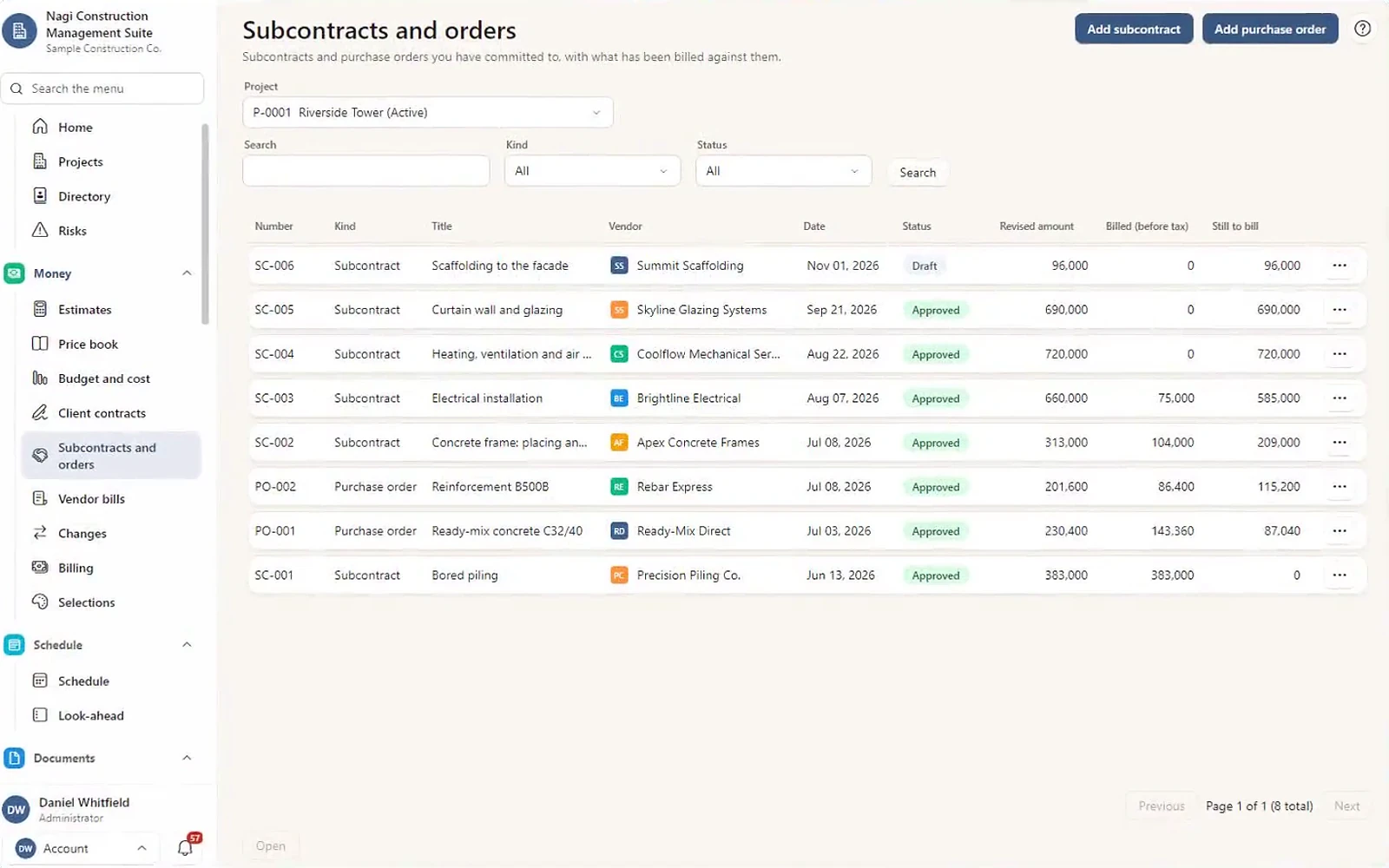
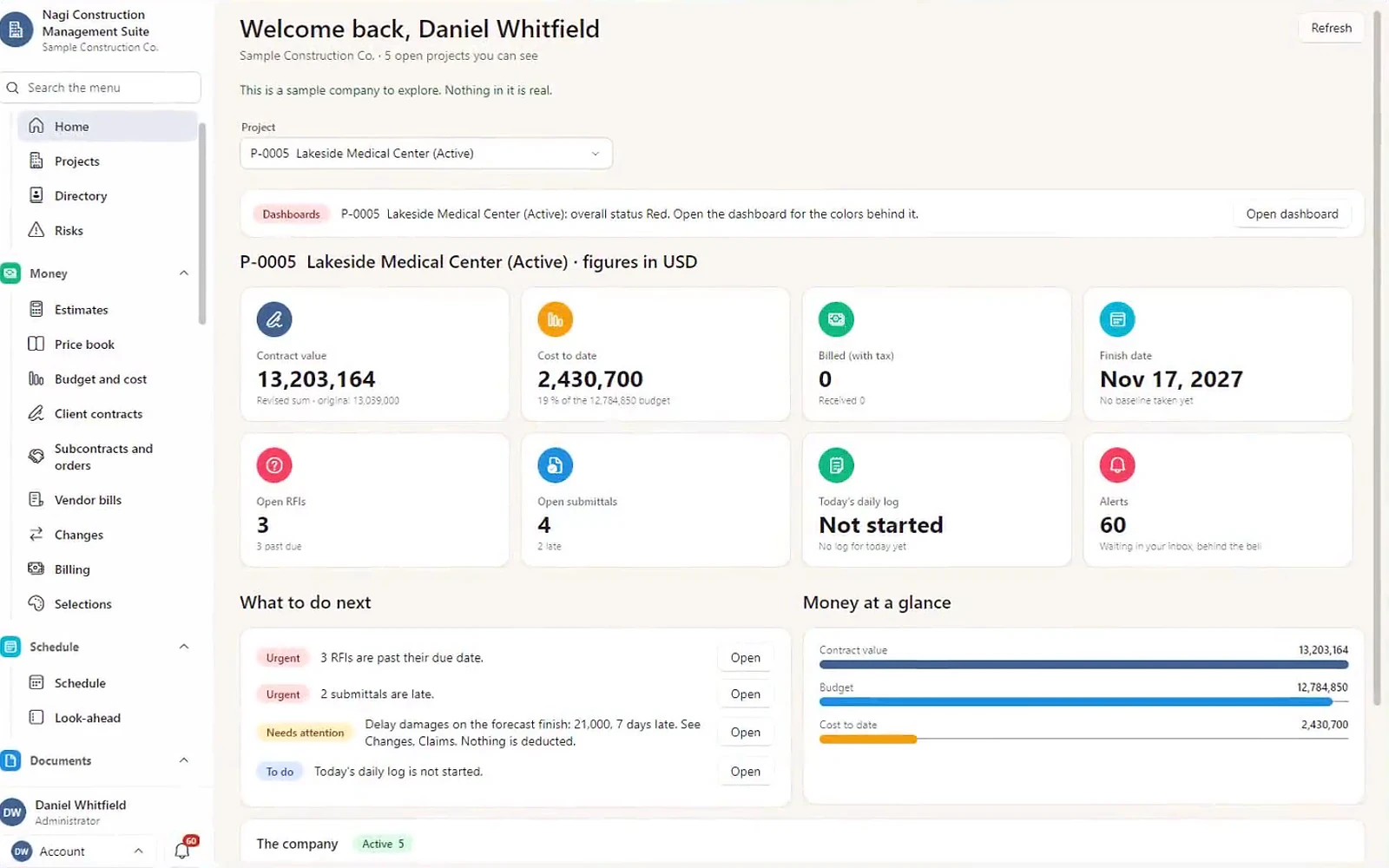
What it doesn't do, so you can plan around it: Nagi has no payroll, so paying people and filing stay with your payroll provider. It does cost your own crews' labor: each worker has an hourly rate (effective-dated, with an overtime multiplier), burden profiles add the percentages you enter for payroll tax, workers' comp and benefits, and approved timesheets post wages plus burden to job cost and to the books. No statutory rates come built in, so take yours from your payroll provider and insurer. It has no QuickBooks link; it keeps its own books instead (chart of accounts, journals, bank reconciliation, P&L, balance sheet and trial balance). If QuickBooks must remain your system of record, a construction tool that syncs to QuickBooks is the better fit, and our guide to construction software you buy once lists the prices of several. Our own monthly, yearly and lifetime prices are on the pricing page.
A weekly routine you can start Monday
Pick the routine before the software. This one takes under an hour a week for three to five jobs.
- Monday morning, enter last week's bills and time sheets against cost codes.
- Update committed cost for anything signed: subcontracts, purchase orders, change orders.
- Ask each foreman for percent complete per code, in one line each.
- Update the forecast for your own-crew codes: hours used plus hours left, at the burdened rate.
- Look only at codes whose variance moved since last week, and decide one action per code.
- At month end, check billed-to-date against earned revenue, and send the overbilled or underbilled figure to whoever keeps your books.
If the first week's report already shows a code over budget, you've paid for the effort. If it doesn't, keep going for six weeks before you judge it. On a twelve-week job, the subcontracts get signed and the crew reaches full speed in the middle weeks, and that is when the committed column starts to move.
QuickBooks is a trademark of Intuit Inc. Projul and OneCrew are trademarks of their respective owners. Nagi Software is not affiliated with, endorsed by or sponsored by them.
Frequently asked questions
- What is job costing in construction?
Job costing is tracking every cost of one project against that project's budget, line by line, so you know whether the job is making money while it is still running. Costs are grouped by cost code (demolition, framing, electrical and so on), and each code shows the budget, what is committed, what has been spent and the forecast at completion.
- What are cost codes?
Cost codes are the labels you use to sort a job's costs, such as 01 General conditions, 06 Framing or 16 Electrical. The same codes should appear in your estimate, your budget, your purchase orders, your time sheets and your vendor bills. Many contractors base them on CSI MasterFormat divisions; a small firm usually needs 10 to 25 codes, not hundreds.
- What's the difference between committed and actual cost?
Committed cost is money you have agreed to spend: the full value of signed subcontracts and purchase orders, whether or not they have been billed yet. Actual cost is money already incurred: vendor bills entered and labor hours worked. Committed cost shows a problem on the day you sign a subcontract above budget; actual cost shows it weeks later when the bills arrive.
- Can QuickBooks do job costing for contractors?
Yes, for part of it. Intuit's pricing page lists project profitability tracking on QuickBooks Online Plus, and its Summer 2026 update page lists job costing, budget versus actuals, AIA-style progress billing, change orders and WIP reporting in QuickBooks Online Advanced. Neither page we read mentions retainage or committed cost, so check those with Intuit or your ProAdvisor before you rely on them.
- How often should I update job costs?
Weekly is the usual rhythm for a small contractor: enter the week's bills and time sheets, then review each cost code's forecast before Monday's site meeting. Update committed cost the day a subcontract, purchase order or change order is signed, because that is when the number moves.
Sources
- Intuit: What's new in QuickBooks Online Advanced (paid construction add-on module), checked November 14, 2026
- QuickBooks Online pricing page (US), checked November 13, 2026
- Intuit: QuickBooks feature updates, Summer 2026 (QuickBooks Online Advanced construction features), checked November 13, 2026
- Intuit: construction workflow management in QuickBooks Online Advanced, checked November 13, 2026
- OneCrew: job costing process (7 steps), checked November 13, 2026
- Projul: how to track job costs in construction, checked November 13, 2026
- Nagi Construction Management Suite product page, checked November 13, 2026
The product in this post
Nagi Construction Management Suite
Run a construction company from estimate to close-out in one program that keeps your data on your own PC.
- job-costing
- cost-codes
- construction-accounting
- quickbooks
- small-contractors