
Progress Billing in Construction: How It Works, With a Worked Example
Progress billing explained with one $480,000 job carried through three pay periods: schedule of values, percent complete, stored materials, retainage, a change order and the amount due, plus overbilling, underbilling and WIP in plain words.
Nagi Software TeamUpdated 12 min read
Progress billing means invoicing a construction contract in stages, usually monthly, for the share of the work actually done. You split the contract sum into a schedule of values, claim each line's completed work and stored materials to date, hold back retainage, and subtract what you've already billed. What's left is this month's payment. We build the billing screens in Nagi Construction Management Suite, so below you'll find one $480,000 job carried through three pay periods, with a change order in month two, and the exact arithmetic each step.
What progress billing is
Progress billing is a way of getting paid on a long job as the work happens, instead of waiting for the end. It's standard on commercial work, public jobs and most contracts longer than a couple of months, because neither side wants the contractor to finance the whole job.
Four things make it work. A schedule of values (SOV) splits the contract sum into line items. Each period you measure percent complete on every line. The owner holds back retainage as security. And each application for payment builds on the last one, so mistakes carry forward until someone fixes them.
The owner, the architect or the general contractor above you reviews each application against the work in place before certifying it. That review is where most payments slow down, which is why the arithmetic needs to tie out to the cent.
Progress billing vs milestone billing vs time-and-materials
| Method | How you bill | Works best for | Main risk |
|---|---|---|---|
| Progress billing | % complete on each SOV line, every period | Fixed-price contracts over a few months | Disputes over percent complete; retainage ties up cash |
| Milestone billing | Fixed amounts when defined events happen | Short jobs, residential draws, design phases | A slipped milestone means no payment that month |
| Time-and-materials | Hours and materials used, plus markup | Repairs, unclear scope, small change work | Owner pushback on hours; a cap may apply |
| Lump sum | Once, at completion | Small jobs of a few weeks | You carry every cost until the end |
Our call: on any fixed-price job longer than two months, ask for progress billing on a detailed SOV. A missed milestone date costs you a month of cash with nothing you did wrong. Progress billing still pays you for the 40% of the roof that's done.
How to do progress billing: 6 steps with a worked example
The job: a $480,000 office fit-out, 10% retainage on work and stored materials, billed monthly. Application 1 covers February, application 2 March, application 3 April. The same numbers are pre-filled in the example workbook: download the worked example (.xlsx). No email needed.
Step 1: Build the schedule of values
Agree the SOV with the owner before the first application. Every line gets a scheduled value, and the lines add up to the contract sum exactly.
| # | Line | Scheduled value |
|---|---|---|
| 1 | General conditions | $48,000 |
| 2 | Sitework | $62,000 |
| 3 | Concrete | $115,000 |
| 4 | Framing | $98,000 |
| 5 | MEP rough-in | $125,000 |
| 6 | Finishes | $32,000 |
| Contract sum | $480,000 |
Six lines is the minimum we'd show an owner; on a real job you'd split these further, by CSI division or by floor. Our schedule of values template shows the same job broken into 17 lines and explains why the extra detail gets you paid faster.
Step 2: Measure percent complete on each line
Bill each line by the work physically in place, not by what you've spent on it. Walk the job with the person who'll review the application if you can. Three bases are common: units in place (meters of duct, cubic yards poured), cost to date against the line's budget, or the project manager's estimate. Units in place is the easiest to defend.
At the end of February: general conditions 20%, sitework 65%, concrete 20%, nothing else started.
| # | Line | Scheduled | Previous | This period | Stored | To date | % |
|---|---|---|---|---|---|---|---|
| 1 | General conditions | 48,000 | 0 | 9,600 | 0 | 9,600 | 20% |
| 2 | Sitework | 62,000 | 0 | 40,300 | 0 | 40,300 | 65% |
| 3 | Concrete | 115,000 | 0 | 23,000 | 0 | 23,000 | 20% |
| 4–6 | Framing, MEP, finishes | 255,000 | 0 | 0 | 0 | 0 | 0% |
| Application 1 total | 480,000 | 0 | 72,900 | 0 | 72,900 | 15.2% |
Step 3: Add stored materials
Stored materials are bought for the job and delivered to site, or to storage the contract allows, but not yet installed. Many contracts let you bill them before installation if you attach invoices, delivery tickets and proof of insurance.
In March, $14,000 of framing lumber arrives but isn't up yet. It goes in the "stored" column on line 4. In April it gets installed, so it moves out of "stored" and into "this period". The same dollars are never billed twice, and nothing is lost.
Step 4: Hold retainage
Retainage is the share the owner keeps from each payment until the job is finished: 10% here, on everything completed and stored to date. Because it's worked out on the running total, you don't calculate it period by period; the amount held simply grows. Our guide to retainage in construction covers reductions, release and the UK and Gulf "retention" wording. For a job paid in draws, the draw schedule and cost-plus calculator builds a draw schedule with retainage and works out interest on loan draws.
Application 1: $72,900 completed, so $7,290 held, and $65,610 earned less retainage.
Step 5: Subtract previous billings
Take off everything you were certified for on earlier applications, after their retainage. Use the certified figures, not what you submitted. If the owner cut last month's application, today's "previous" starts from the cut number.
Application 1 has nothing before it, so the current payment due is $65,610.
Step 6: Add approved change orders as new lines
On 10 March the owner signs change order CO-01 for extra drainage, $18,500. It becomes line 7 of the SOV, the revised contract sum becomes $498,500, and you bill it like any other line. Pending changes stay off the application until they're signed; a verbal "go ahead" isn't a change order.
Application 2, March:
| # | Line | Scheduled | Previous | This period | Stored | To date | % |
|---|---|---|---|---|---|---|---|
| 1 | General conditions | 48,000 | 9,600 | 9,600 | 0 | 19,200 | 40% |
| 2 | Sitework | 62,000 | 40,300 | 21,700 | 0 | 62,000 | 100% |
| 3 | Concrete | 115,000 | 23,000 | 57,500 | 0 | 80,500 | 70% |
| 4 | Framing | 98,000 | 0 | 19,600 | 14,000 | 33,600 | 34.3% |
| 5–6 | MEP, finishes | 157,000 | 0 | 0 | 0 | 0 | 0% |
| 7 | CO-01 Extra drainage | 18,500 | 0 | 7,400 | 0 | 7,400 | 40% |
| Application 2 total | 498,500 | 72,900 | 115,800 | 14,000 | 202,700 | 40.7% |
Application 3, April. The lumber is installed, so framing's "this period" of $49,000 is $14,000 of lumber now in place plus $35,000 of new work. Switchgear for the MEP line arrives and sits as stored.
| # | Line | Scheduled | Previous | This period | Stored | To date | % |
|---|---|---|---|---|---|---|---|
| 1 | General conditions | 48,000 | 19,200 | 7,200 | 0 | 26,400 | 55% |
| 2 | Sitework | 62,000 | 62,000 | 0 | 0 | 62,000 | 100% |
| 3 | Concrete | 115,000 | 80,500 | 34,500 | 0 | 115,000 | 100% |
| 4 | Framing | 98,000 | 19,600 | 49,000 | 0 | 68,600 | 70% |
| 5 | MEP rough-in | 125,000 | 0 | 25,000 | 12,000 | 37,000 | 29.6% |
| 6 | Finishes | 32,000 | 0 | 0 | 0 | 0 | 0% |
| 7 | CO-01 Extra drainage | 18,500 | 7,400 | 11,100 | 0 | 18,500 | 100% |
| Application 3 total | 498,500 | 188,700 | 126,800 | 12,000 | 327,500 | 65.7% |
Then the three summaries side by side. Read each column top to bottom; it's the whole method in seven lines.
| Application 1 | Application 2 | Application 3 | |
|---|---|---|---|
| Revised contract sum | $480,000 | $498,500 | $498,500 |
| Completed and stored to date | $72,900 | $202,700 | $327,500 |
| Retainage held (10%) | $7,290 | $20,270 | $32,750 |
| Earned less retainage | $65,610 | $182,430 | $294,750 |
| Less previous certificates | $0 | $65,610 | $182,430 |
| Current payment due | $65,610 | $116,820 | $112,320 |
| Balance to finish, including retainage | $414,390 | $316,070 | $203,750 |
The three payments add up to $294,750, the earned-less-retainage figure on application 3. That's the check we run before anything goes out. If the payments to date don't equal the latest earned-less-retainage line, something was overtyped.
Now look at it as cash. Say the contract pays 30 days after certification and the reviewer takes a week. The April work is billed on 25 April, certified in early May and paid in early June, so crews and suppliers who worked in April are paid by you five or six weeks before the owner pays you. Meanwhile $32,750 of retainage is held and won't come back until the end of the job. Price that gap into the job: it's the money you'll carry, every month, on a $500,000 contract.
Two habits shrink it. Submit on the contract's cut-off date every month, even when the month was slow, because a skipped month doubles the next review. And get change orders signed in the month the work happens, so they ride on the next application instead of waiting at the bottom of a pile.
What goes on the application for payment
An application for payment has two parts: a one-page summary and a continuation sheet. On AIA's widely used forms, the summary is the G702 (Application and Certificate for Payment) and the continuation sheet is the G703. Many owners accept any form that shows the same figures; if your contract names the AIA documents, buy the official forms from AIA Contract Documents.
The summary carries the contract sum, net change orders, completed and stored to date, retainage, earned less retainage, previous certificates, current payment due and balance to finish, plus a change order summary and the signatures your contract asks for. The continuation sheet carries the line-by-line table from step 6. Our G702/G703-style pay application template is a free Excel version with the formulas in place and a line-by-line fill guide.
Overbilling and underbilling: what your WIP report shows
Billing and earning aren't the same number. Your applications say what you've billed. Your accountant measures what you've earned, most often by cost to date against total estimated cost (the cost-to-cost method used for percentage-of-completion revenue). The gap between them appears on your work-in-progress (WIP) report.
Back to April. Say the job's total estimated cost, including the drainage change, is $400,000, and $252,000 has been spent to date.
| WIP line | Amount |
|---|---|
| Percent complete by cost ($252,000 ÷ $400,000) | 63% |
| Earned revenue (63% × $498,500) | $314,055 |
| Billed to date (application 3, before retainage) | $327,500 |
| Overbilled (billings in excess of costs and estimated earnings) | $13,445 |
Overbilling is a liability: you've been paid ahead of the work, which feels good and isn't income yet. Underbilling is the reverse. Had $268,000 been spent, the job would be 67% complete, $333,995 earned and $6,495 underbilled, an asset you haven't invoiced.
Neither is wrong in small amounts. Large or growing underbillings deserve attention first: they usually mean unapproved change work, a cut application, or costs running over budget. Lenders and sureties read WIP schedules for exactly that reason.
Lien waivers and owner approval: why payments stall
When a progress payment is late, the math is rarely the reason. Paperwork is.
A lien waiver is a signed release of lien rights for the amount being paid. A conditional waiver takes effect only once the payment clears, so it can go in with the application. An unconditional waiver takes effect when signed, so you'd normally sign it only after the money arrives. Some states prescribe the exact waiver form; check yours.
On a job with subcontractors, the general contractor usually has to collect waivers from every sub and supplier who worked that period. One missing waiver can hold the whole application.
What an owner's reviewer checks, in roughly the order they reject things:
- percentages that look higher than the work in place;
- change orders billed before they're signed;
- stored materials without invoices, delivery tickets or insurance;
- retainage held at the wrong rate, or not shown per line;
- previous figures that don't match the last certified application;
- missing waivers, certified payroll or schedule updates the contract requires;
- a late submission that misses the month's cut-off.
Outside the US: "retention", "interim payment certificates" and "variations"
The method is the same everywhere; the words change. In the UK, the Gulf and much of the Commonwealth, retainage is called retention, a change order is a variation (or variation order), and the monthly application leads to an interim payment certificate issued by the engineer, architect or contract administrator. On FIDIC-based contracts, common in the UAE and Saudi Arabia, the contractor submits a statement and the engineer certifies an interim payment.
| US term | UK / Gulf term |
|---|---|
| Retainage | Retention, retention money |
| Change order | Variation, variation order |
| Application for payment (G702-style) | Interim application; interim payment certificate |
| Schedule of values | Activity schedule, pricing schedule, or bill of quantities on remeasured work |
| Substantial completion | Practical completion (UK), taking-over (FIDIC) |
| Punch list | Snagging list |
Retention in the UK may change. In its response to the 2025 late payment consultation, the UK government said it proposes to prohibit deducting and withholding retention payments under construction contracts, and will consult further before deciding how (GOV.UK). Check the current position before you price a UK job.
Doing it in Excel vs in software
A spreadsheet handles progress billing well for one or two jobs. Our free schedule of values template and pay application template are built for that, and the free progress billing and retainage calculator works out an application for payment from your schedule of values, with change orders, retainage and stored materials. The trouble starts with the third or fourth job, with change orders every month, and when someone re-keys each application into the accounts.
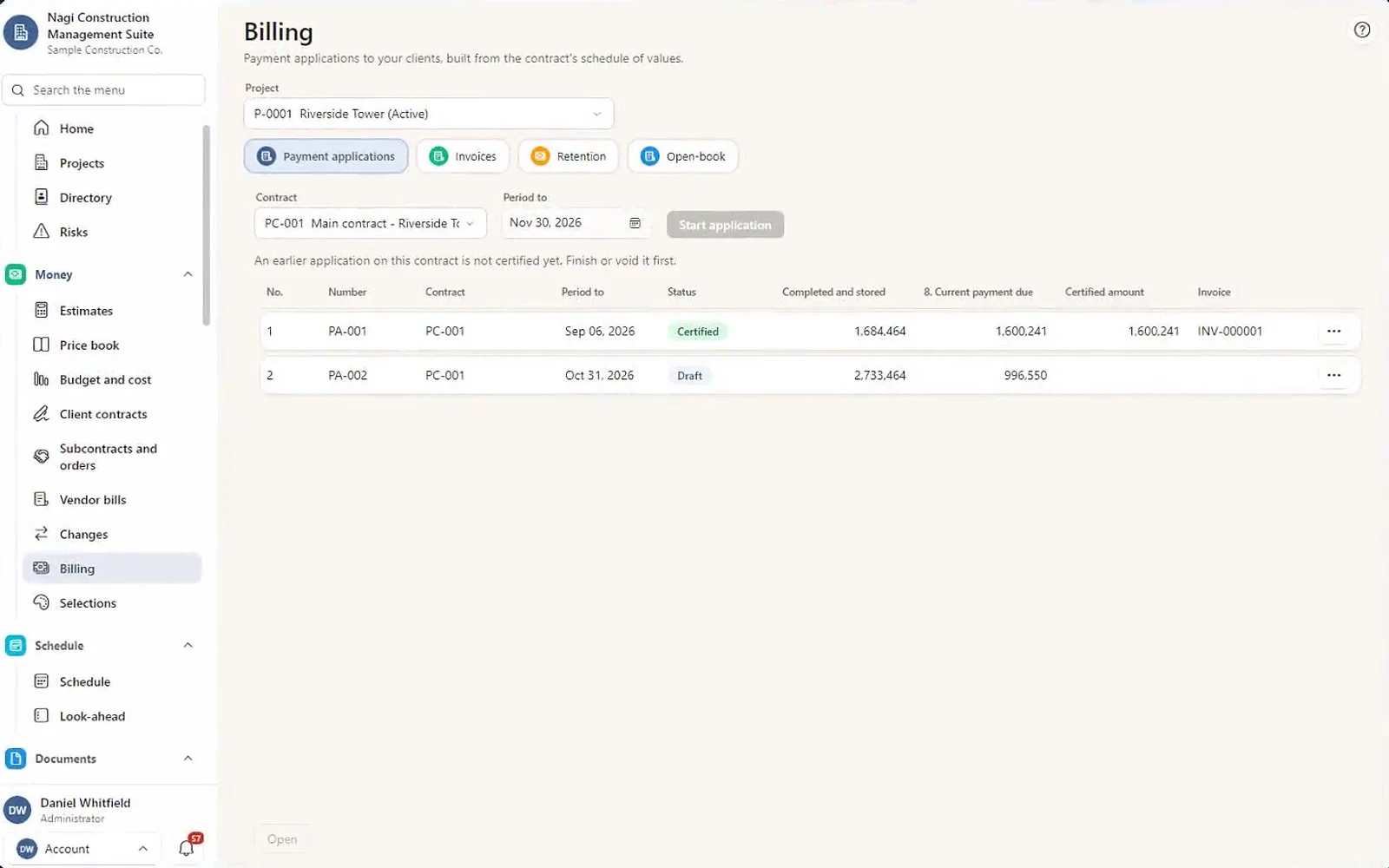
In Nagi Construction Management Suite the application is the end of a chain you already keep:
- Client contract with its schedule of values and retention. Enter the lines once, or import a bill of quantities from Excel.
- Potential changes become change orders; an approved one updates the contract, the budget and the billing together.
- Each application for payment is built from the contract and the work done, so previous figures, retention and the amount due come from the same numbers. Stored materials can carry their own retention rate, shown as a separate amount, and the contract can step retention down at a set percent complete.
- Vendor bills are matched to subcontracts and purchase orders, and committed, actual and forecast cost per cost code sit next to what you've billed. That's the raw material for a WIP review; our job costing worked example walks through it.
- The books (chart of accounts, journals, bank reconciliation, P&L, balance sheet) are in the same program, with no QuickBooks link to keep in sync.
Applications print on your letterhead. In Arabic too, right to left, for Gulf clients, and each company bills in its own currency, with tax codes at its own rate and its tax number on the invoice. For a one-off bill, the construction invoice generator makes a printable invoice for a lump sum, time and material or progress billing job, and it is one of several on our free tools page. What it doesn't do: there's no owner or sub portal, so applications and waivers still travel by email or print, and it doesn't collect lien waivers for you.
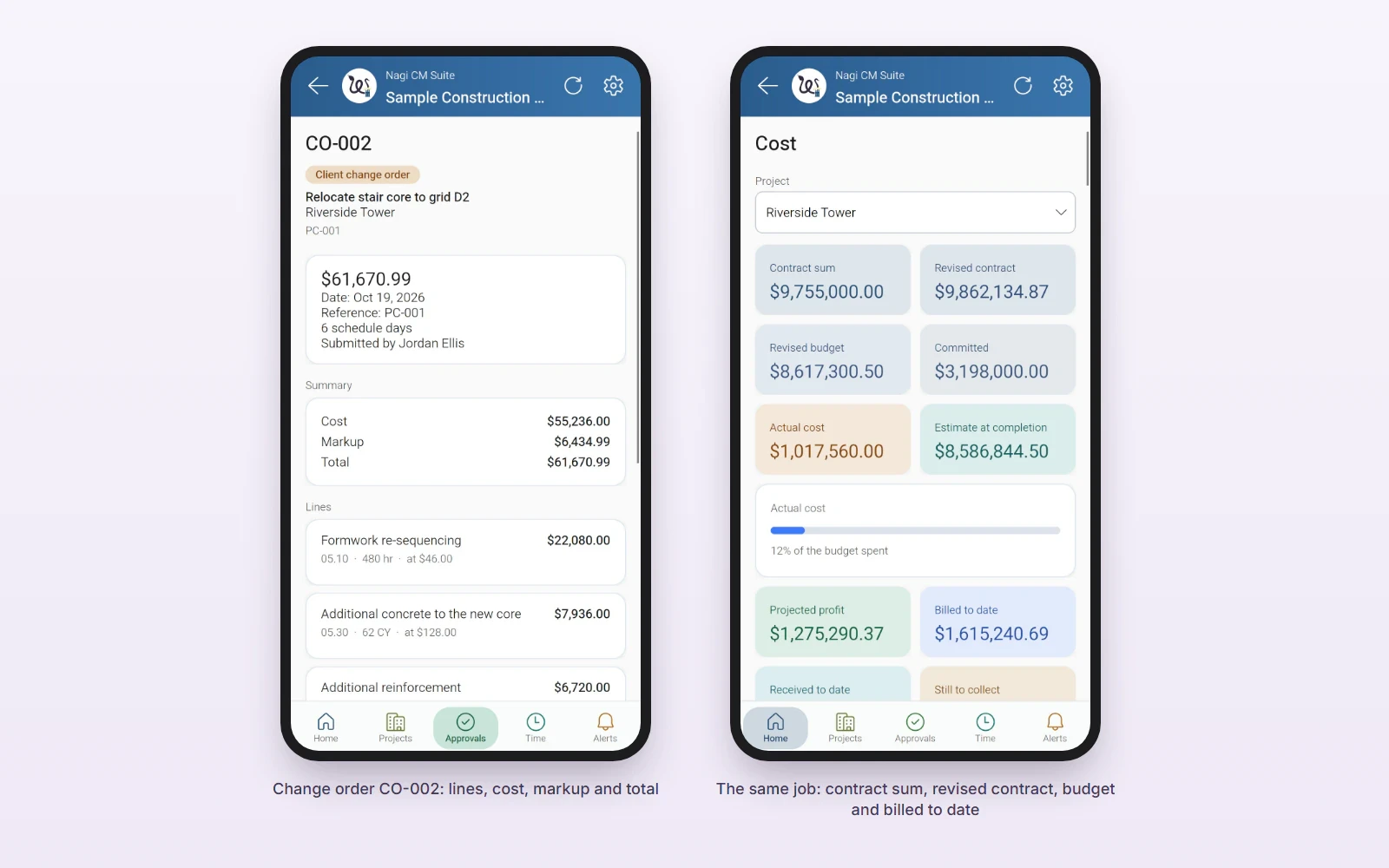
If you bill more than two jobs a month on a schedule of values, try it with last month's real application: enter the contract, the change orders and the work to date, and check that the amount due matches yours to the cent. The monthly, yearly and lifetime prices are on the pricing page.
AIA, G702 and G703 are trademarks of The American Institute of Architects. FIDIC and QuickBooks are trademarks of their respective owners. Nagi Software is not affiliated with, endorsed by or sponsored by them.
Frequently asked questions
- What is progress billing in construction?
Progress billing is invoicing a construction contract in stages, usually monthly, for the share of work actually done. The contract sum is split into a schedule of values; each period you claim the work completed and materials stored on each line, less retainage and less what you have already billed. The difference is the payment due for that period.
- How do you calculate a progress billing?
Add up work completed and materials stored to date across every schedule-of-values line. Take retainage off that total, then subtract the total of your earlier certified applications (also after retainage). On our worked example, $327,500 completed and stored, less $32,750 retainage, less $182,430 previously certified, leaves $112,320 due.
- Is retainage deducted from each progress payment?
Usually, yes. Most contracts hold a percentage, often 5% or 10%, of the work completed to date on every application, and many hold it on stored materials too. Because the calculation is cumulative, the amount held grows each period until the contract lets it be reduced or released, typically at substantial or final completion. Rates and release rules come from your contract and local law.
- What is the difference between progress billing and milestone billing?
Progress billing claims the measured share of work done on each line every period, so you bill something whenever work moves. Milestone billing pays fixed amounts when defined events happen, such as roof on or handover. If a milestone slips past the billing date, a milestone contract can leave you with no payment that month even though crews worked.
- What does overbilling mean on a WIP report?
Overbilling means you have billed more than you have earned by percent complete, usually measured by cost to date against total estimated cost. It shows on the balance sheet as billings in excess of costs and estimated earnings, a liability. Underbilling is the reverse: earned but not yet billed, an asset. Small, explainable amounts are normal; large ones need a look.
- Can I do progress billing in QuickBooks?
QuickBooks Online has progress invoicing: Intuit's help describes billing a customer-approved estimate in installments, with an estimate summary showing what remains. Its help article doesn't mention retainage or stored materials, so check whether your plan handles them the way your contract asks, or add a G702/G703-style sheet alongside.
Sources
- Nagi Construction Management Suite product page, checked November 13, 2026
- Intuit help: Add project estimate summaries to a progress invoice in QuickBooks Online, checked November 13, 2026
- GOV.UK: Late payment consultation, time to pay up (government response), checked November 13, 2026
- AIA Contract Documents (official G-series forms), checked November 13, 2026
The product in this post
Nagi Construction Management Suite
Run a construction company from estimate to close-out in one program that keeps your data on your own PC.
- progress-billing
- pay-application
- retainage
- schedule-of-values
- construction-accounting