
Free Construction Invoice Template (Excel): Lump Sum, Progress and T&M
One free Excel workbook with three construction invoices (lump sum or milestone, progress with retainage, and time and materials), each filled in with an example, plus the fields that get an invoice sent back and when to switch to a pay application.
Nagi Software Team11 min read
A construction invoice bills your client for work under a contract, and the right layout depends on how the contract pays. Lump sum and milestone jobs bill fixed amounts. Progress jobs bill the share of work done, less retainage and earlier billings. Time-and-materials jobs bill hours, materials and markup. Our free Excel workbook has all three, each filled in with an example. We build the billing screens in Nagi Construction Management Suite, so every number below ties out to the cent.
Download the construction invoice template (.xlsx). No email, no form.
Which invoice type fits your contract
Pick the invoice by the payment clause in your contract, not by habit. The workbook has one tab for each type. If you would rather make the invoice in your browser, the free construction invoice generator covers lump sum, time and material and progress billing, with retainage and a cap tracker; our other templates and calculators are on the free tools page.
| Invoice type | Contract it fits | What you bill | Example in the workbook |
|---|---|---|---|
| Lump sum or milestone | Fixed price, paid in stages or at the end | A fixed amount when a stage is reached | $86,000 remodel, invoice 2 of 4: rough-in done, $25,800 |
| Progress with retainage | Fixed price on a schedule of values, billed monthly | Work completed and stored to date, less retainage, less earlier billings | $246,500 fit-out, period 2: $61,695 due |
| Time and materials (T&M) | Repairs, unclear scope, small change work | Hours at agreed rates, materials and subs plus markup | Water damage repair: $4,147.77 against a $5,000 cap |
Milestone billing is the simplest to read and the easiest to delay. If the drywall stage slips past the billing date, you send nothing that month, even with a crew on site every day. Progress billing pays you for what's in place. On any fixed-price job longer than two months, we'd ask for progress billing in the contract.
Why construction invoices get sent back
Most returned invoices aren't disputes about the work. They're missing a field the owner's reviewer, a lender or an accounts payable clerk needs before they can approve anything. Rabbet's 2025 Construction Payments Report puts the cost of slow, inconsistent payment at $299 billion across US construction in 2025, and says general contractors lose 65 hours a month to payment administration (Rabbet). A clean invoice won't fix a slow payer. It removes their easiest excuse.
These are the fields every tab in our template carries, and why each one is there:
| Field | Why a reviewer sends the invoice back without it |
|---|---|
| Invoice number and date | AP can't log it, and a resent invoice looks like a duplicate |
| Your legal name, address, tax number, contractor license number (where required) | The vendor record doesn't match, so payment can't be released |
| Client's billing name and address, exactly as in the contract | The invoice goes to the wrong entity or approver |
| Contract or PO number | Nobody can tie the bill to an approved budget line |
| Job name and site address | One client, several jobs: the bill lands on the wrong one |
| Period covered (from and to) | Progress and T&M bills need a period to check against site records |
| Lines tied to the contract or schedule of values | "Work done in October, $25,800" can't be checked |
| Previous billed, retainage held, change orders | The reviewer can't reconcile against earlier invoices |
| Lien waiver reference | Many owners won't pay without the waiver for that amount |
| Tax line at your own rate | Wrong or missing tax means a corrected invoice |
| Due date and how to pay | "Net 30" from which date? The clock starts late |
Two habits help more than any layout. Send on the contract's cut-off date every month, even after a slow month. And never put an unsigned change order on an invoice: list it in your notes as pending, and bill it once it's approved.
How to fill in a construction invoice: 7 steps
These steps follow the progress tab, the one with the most moving parts. The lump sum and T&M tabs use the same header and the same last three steps.
Step 1: Fill in the header once per job
Your company block, the client's billing details and the contract number come straight from the signed contract. Copy them exactly. A client billed as "Harbor Dental" when the contract says "Harbor Dental Group LLC" is a returned invoice. Add the job name, the site address and your license and tax numbers.
Step 2: Number the invoice and set the period
Use one running sequence across all your jobs (INV-2026-0142), not a new "1" per job. Then set the period. In the example, period 2 runs from 1 to 31 October 2026.
Step 3: Enter the schedule of values
Type each line of the contract's schedule of values with its scheduled value, and add each approved change order as a new line. Our example fit-out has five lines worth $240,000 and one approved change order, CO-01 for extra circuits at $6,500, so the revised contract sum is $246,500. If you don't have an SOV yet, our schedule of values template shows how to split a contract.
Step 4: Bill this period's work and stored materials
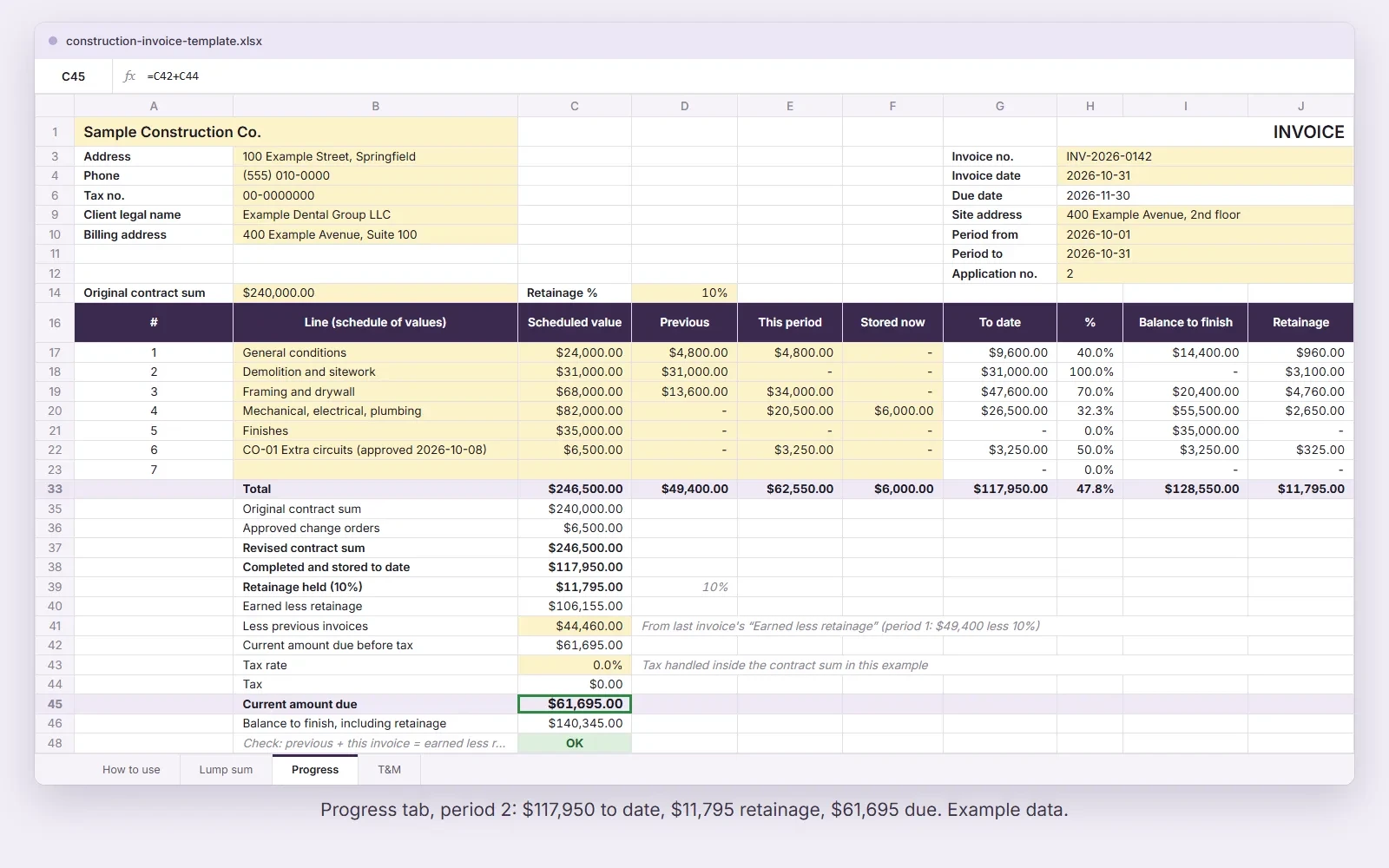
For each line, enter the work done this period, by what's physically in place, plus any materials delivered but not installed in the "stored" column. "Previous" fills in from the last invoice. Example, period 2:
| # | Line | Scheduled | Previous | This period | Stored | To date | % |
|---|---|---|---|---|---|---|---|
| 1 | General conditions | 24,000 | 4,800 | 4,800 | 0 | 9,600 | 40.0% |
| 2 | Demolition and sitework | 31,000 | 31,000 | 0 | 0 | 31,000 | 100.0% |
| 3 | Framing and drywall | 68,000 | 13,600 | 34,000 | 0 | 47,600 | 70.0% |
| 4 | Mechanical, electrical, plumbing | 82,000 | 0 | 20,500 | 6,000 | 26,500 | 32.3% |
| 5 | Finishes | 35,000 | 0 | 0 | 0 | 0 | 0.0% |
| 6 | CO-01 Extra circuits | 6,500 | 0 | 3,250 | 0 | 3,250 | 50.0% |
| Total | 246,500 | 49,400 | 62,550 | 6,000 | 117,950 | 47.8% |
Step 5: Hold retainage and subtract earlier billings
Retainage is worked out on the total to date, not on this period. The workbook does the rest:
| Summary line | Amount |
|---|---|
| Completed and stored to date | $117,950.00 |
| Retainage held (10%) | $11,795.00 |
| Earned less retainage | $106,155.00 |
| Less previous invoices (period 1: $49,400 less 10%) | $44,460.00 |
| Current amount due | $61,695.00 |
| Balance to finish, including retainage | $140,345.00 |
Check it the way an owner's reviewer will: the amounts due on every invoice so far must add up to the latest "earned less retainage" line. Here, $44,460 plus $61,695 is $106,155. If that check fails, a number was overtyped. Our guide to retainage in construction covers reductions and release, and the free progress billing and retainage calculator works out an application from your schedule of values.
Step 6: Add the tax line at your rate
Enter your own rate in the tax cell and mark which lines are taxable. The workbook doesn't decide what's taxable for you, because that depends on your state or country and on the contract. The progress example uses 0% (tax handled inside the contract sum); the T&M example taxes materials at an example rate of 7%. Ask your accountant which applies. In the UK, most construction services reported under the Construction Industry Scheme fall under the VAT domestic reverse charge, which changes what the invoice must say (HMRC guidance).
Step 7: Terms, waiver reference and send
State the due date as a date, not just "Net 30". Add how to pay, and in the waiver field, the reference of the conditional lien waiver you're attaching for this amount. The invoice only refers to it; the waiver itself is a separate document, and some states prescribe its exact form. Then save a PDF and send it the way the contract says.
The lump sum and T&M tabs, worked
The lump sum tab is short on purpose. Example: an $86,000 kitchen and bath remodel billed in four milestones, 10% deposit, 30% at rough-in, 35% at drywall and cabinets, 25% at final. Invoice 2 bills the rough-in milestone: $25,800. A "billed to date" box shows $34,400 of $86,000 (40%), so the client sees where the job stands without asking. Attach the inspection sign-off or a dated photo for the milestone. Milestone invoices get queried mostly over whether the stage is really done.
The T&M tab carries the cap. Example: a water damage repair with a not-to-exceed amount of $5,000.
| T&M line | Quantity | Rate or cost | Markup | Amount |
|---|---|---|---|---|
| Carpenter | 16 h | $68.00 | $1,088.00 | |
| Laborer | 12 h | $45.00 | $540.00 | |
| Materials (receipts attached), taxable | $1,140.00 | 15% | $1,311.00 | |
| Compact excavator | 1 day | $325.00 | $325.00 | |
| Electrician (sub invoice attached) | $720.00 | 10% | $792.00 | |
| Subtotal | $4,056.00 | |||
| Tax on materials (example rate 7%) | $91.77 | |||
| Total due | $4,147.77 |
Below it, the cap check reads: billed to date $4,056 of $5,000, $944 left. Show that line on every T&M invoice. A client who learns about a blown cap from the final bill tends to dispute all of it. One who saw "$944 left" two weeks earlier usually signs the extra.
T&M invoices get questioned on hours. Always. Bill hours that match your timesheets and daily logs for the same dates, and attach the receipts. If the hours on the invoice don't match the hours your foreman wrote down, the client will find it before you do.
Payment terms and the late invoice
Your payment terms are whatever the contract says; the invoice only repeats them. Print the due date as a calendar date worked out from the contract's trigger, which might be receipt, approval or certification, so nobody argues later about when "30 days" started.
Many US states have prompt payment laws that set deadlines and interest on late payments, for public work and sometimes for private work too. The rules, deadlines and interest rates differ from state to state, so look up yours before you quote one on an invoice.
When an invoice goes past due, a phone call usually beats a reminder email. Ask accounts payable one question: "Is anything missing that stops you approving it?" Most of the time the answer is a waiver, a signature or a change order number, and you can fix it the same day. Log each call with the date and the name of the person you spoke to. Then, if the payment is still late a month later, you have a record of what was asked and what you supplied, which is worth more than a stack of reminder emails that went unanswered.
Is an invoice a legal document? It's a written claim for payment under your contract, and it becomes part of the job's record. Treat every number on it as something you may have to explain later.
When to switch to a G702/G703-style pay application
Switch when the contract or the lender asks for it, and at the latest when a job outgrows one page. A simple invoice works for a few lines. Once you have a schedule of values longer than about five lines, stored materials, retainage that steps down, and change orders every month, the reviewer wants a continuation sheet, line by line, in the format they know.
Three signs you've reached that point:
- the contract names AIA documents or "an application for payment in a form acceptable to the owner";
- a construction lender funds the job and reviews draws;
- you're a subcontractor and the general contractor sends you their pay application format.
Our free G702/G703-style pay application template picks up where this workbook stops, and the progress billing guide walks one $480,000 job through three months. If the contract names the AIA forms themselves, buy them from AIA Contract Documents; ours is a G702/G703-style sheet, not an AIA document. A browser version of the same idea is the pay application generator, which prints nine summary lines and a continuation sheet.
Where a spreadsheet invoice stops working
A spreadsheet invoice is fine for one to three active jobs billed by one person. It breaks in predictable places. Previous billed gets retyped from last month's file. An approved change order lives in an email and never reaches the SOV. Retainage is calculated on this period instead of the total to date. And the invoice never meets the job's cost, so you learn a line is over budget after you've billed it at 100%.
Nagi Construction Management Suite builds each application for payment from the client contract's schedule of values. Previous applications are already in, so you enter only this period's work and stored materials. Approved change orders update the contract, the budget and the billing together. Retention can step down at a set percent complete, and stored materials can carry their own rate. A certified application is invoiced and printed on your letterhead, with your tax number, the subtotal, tax and total. The progress billing page shows the five steps on real screens.
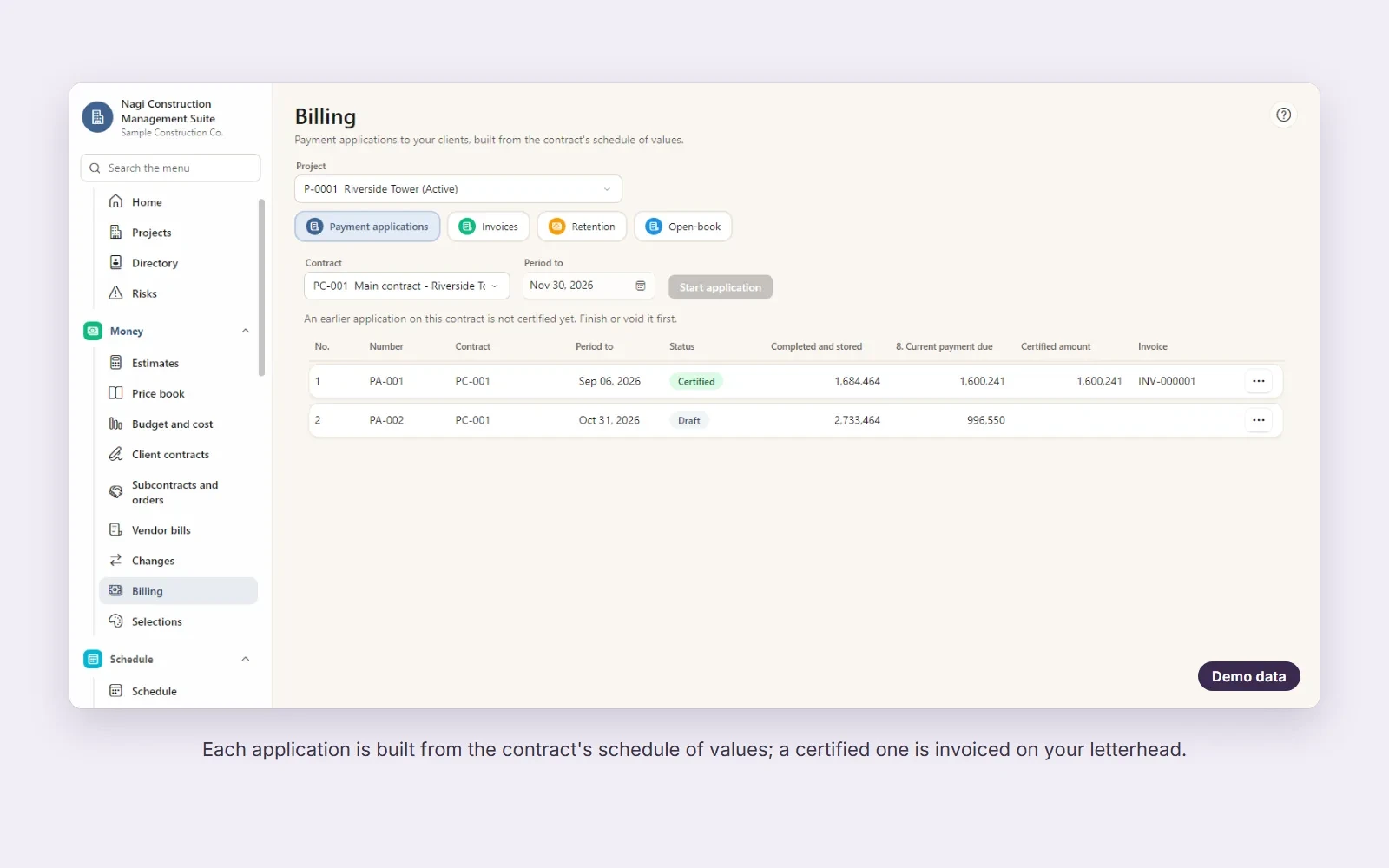
What it doesn't do: there's no client portal, so invoices still travel by email or on paper. It doesn't collect lien waivers or print the official AIA forms. Tax codes use the rates you enter; it doesn't decide when sales tax or VAT applies. The product page doesn't list a separate time-and-materials invoice, so for T&M repair work keep the T&M tab of this workbook. And there's no QuickBooks link; the program keeps its own books.
Pricing is one price per company, not per user. One company license covers one Administrator PC, 10 employee seats and 11 phone connections, at $99 a month, or $199.50 a year and $349.50 lifetime at discounted prices (50% off $399 and $699), as listed on nagisoftware.com/pricing on 14 November 2026.
Pick your next step
- One or two jobs a month, fixed price or milestones: use the lump sum tab and send on the same day every month.
- Repair and service work: use the T&M tab and show the cap on every invoice.
- Monthly progress billing on three or more jobs, with change orders: try the program with one real contract. Enter its schedule of values and last month's work, and check that the amount due matches the invoice you sent.
AIA, G702 and G703 are trademarks of The American Institute of Architects. QuickBooks is a trademark of its owner. Nagi Software is not affiliated with, endorsed by or sponsored by them.
Frequently asked questions
- What should a construction invoice include?
A construction invoice needs your legal name, tax number and license number where your state asks for one, the client's billing name, the contract or PO number, the job address, the period covered, and lines tied to the contract. Progress invoices add previous billed, retainage held and approved change orders. Finish with the tax line at your own rate, the due date and how to pay.
- What is the difference between a progress invoice and a pay application?
A pay application is a progress invoice in a stricter format. Both bill the share of work done this period. A pay application, such as a G702/G703-style form, adds a line-by-line continuation sheet from the schedule of values, stored materials and a certificate block. Use one whenever the contract or lender asks for it, or the job has more than about five lines.
- How do you show retainage on a construction invoice?
Show retainage as its own line, worked out on the total completed and stored to date, not on this period alone. Subtract it, then subtract what earlier invoices billed after their retainage. In our example, $117,950 to date less 10% retainage is $106,155; less $44,460 already billed leaves $61,695 due this period.
- Should a lien waiver go with a construction invoice?
Often, yes, but as a separate document, not as wording on the invoice. Many owners and lenders want a conditional waiver with each progress invoice and an unconditional one once paid. Our template has a field to reference the waiver you attach. Some states prescribe the exact waiver form, so check your state's rules and your contract.
- Can I use this construction invoice template in Google Sheets?
Yes. Upload the .xlsx file to Google Drive and open it with Google Sheets. The formulas are plain sums, multiplications and links between cells, so they carry over. Sheet protection may be dropped on import, so take care not to type over the white formula cells. Word users can copy a filled tab into a document.
Sources
- Rabbet: 2025 Construction Payments Report (summary page), checked November 14, 2026
- HMRC: Check when you must use the VAT domestic reverse charge for building and construction services, checked November 14, 2026
- Nagi Construction Management Suite: progress billing page, checked November 14, 2026
- Nagi Software pricing page, checked November 14, 2026
The product in this post
Nagi Construction Management Suite
Run a construction company from estimate to close-out in one program that keeps your data on your own PC.
- construction-invoice
- invoice-template
- progress-billing
- retainage
- time-and-materials
- templates