
Free Change Order Template and Change Order Log (Excel)
A free Excel change order template with a filled example (CO-03: $8,450 cost, $9,595 price, 3 days added) and a change order log that totals approved, pending and rejected changes and the revised contract sum. No email needed.
Nagi Software TeamUpdated 12 min read
A change order template is a one-page form that records a change to the contract: what changed, why, what it costs, how many days it adds and who approved it. Ours is a free Excel file with a filled example and a change order log that keeps the revised contract sum. We build the change screens in Nagi Construction Management Suite, so the fields below are the ones we've seen decide whether a change gets paid.
Download the change order template and log (.xlsx). No email, no sign-up.
What a change order is, and what it isn't
A change order is a written agreement, signed by both sides, that changes the scope, the price or the time of a construction contract. A text that says "go ahead" isn't one. Neither is a thumbs-up under a photo, or a nod in the site office.
Those informal yeses are how most changes start.
The crew does the work the same week and the price comes "later". Later, nobody can show who agreed, to what, at what price, or on which day. We call that work the free extra: done, paid for in labor and materials, and never billed in full.
It isn't rare. In a survey of nearly 200 US contractors by Clearstory and Dodge Construction Network, 92% of specialty contractors said their change orders are not always paid in full (The State of Change Orders in 2026). PlanRadar asked 1,728 construction professionals in Europe, the Middle East and Asia-Pacific in January 2026. Nearly 8 in 10 said at least half of their project documentation sits in email threads, text messages and phone calls (PlanRadar survey report, PDF).
Try this on your own jobs today. Take your last five changes. How many have a priced, approved record with a name and a date? Every one that doesn't is a change you may end up doing for free.
The 9 fields a change order needs to get paid
Your change order gets paid when the person reviewing your next pay application can't question it. Nine fields cover that. Most free templates have the first seven and skip the time impact and the approval method, which are the two that come up in disputes.
| # | Field | What to write | Why it gets you paid |
|---|---|---|---|
| 1 | Number and date | CO-03, raised February 18 | One number follows the change from the log to the invoice |
| 2 | Project and contract | Project name, contract date, original contract sum | Ties the change to the right contract and its markup clause |
| 3 | Requested by, and how | Name, role, date, and the form of the instruction (email, site instruction, meeting minutes) | Proves the owner asked; this is the "who agreed" |
| 4 | Description and references | Scope in plain words, location, drawing, RFI or spec section | Stops "that was in your base scope" arguments |
| 5 | Reason | Owner request, site condition, design change, regulation | Shows who carries the cost |
| 6 | Cost breakdown | Labor (hours × rate), materials, equipment, subcontract quotes | A reviewer approves lines they can check, not a lump sum |
| 7 | Markup, price and new contract sum | Contract markup %, this change, contract sum before and after | Uses the markup your contract already allows |
| 8 | Time impact | Days added (or "no time impact"), old and new completion date | Unclaimed days can leave you exposed to delay charges |
| 9 | Approval | Name, title, date, signature, and the method (signed form, signed PDF, email from the named representative) | Proves the right person agreed, and how |
Field 8 deserves a sentence of its own.
If a change adds three days and the form says nothing, the owner can argue the agreed price settled everything, time included, and some contracts read that way. Write "no time impact" when that's true, so the question is closed either way.
How to fill in a change order: a worked example
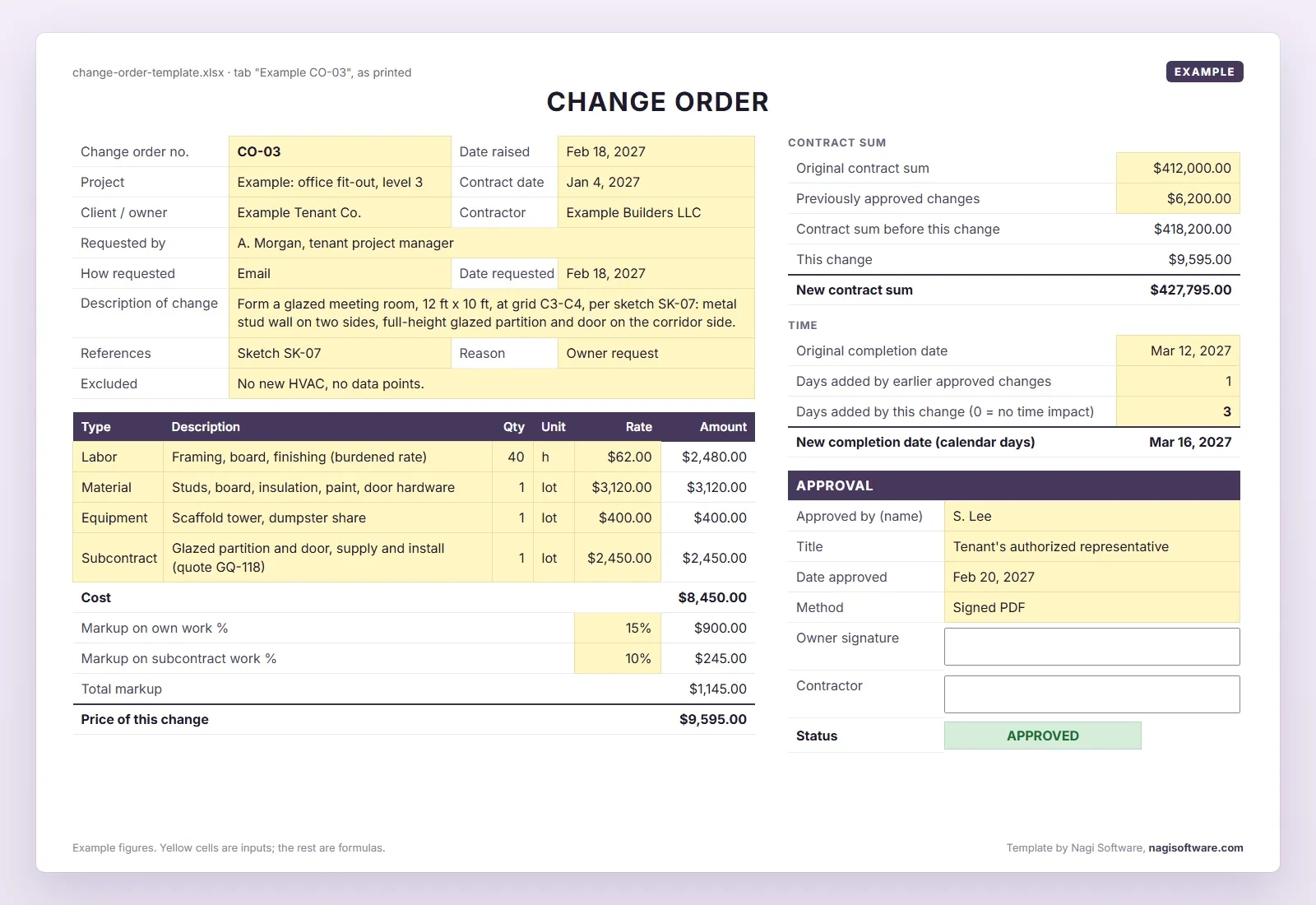
The example job is an office fit-out with an original contract sum of $412,000 and a completion date of March 12. The contract allows 15% markup on the contractor's own work and 10% on subcontracted work. CO-01 (eight extra data points, $6,200, one day) is already approved. The same numbers are filled in on the "Example" tab of the download.
Step 1: Number the change and log it the day it's raised
On February 18 the tenant's project manager asks, on site, for a glazed meeting room in the open office. Before anyone picks up a tool, give it the next number, CO-03, and add a row to the log with status "Pending". An unnumbered change is the one that gets forgotten.
Step 2: Get the instruction in writing
Ask for the request in an email, or write it in a site instruction and send it back for confirmation. Here the tenant's PM confirms by email on February 18. Field 3 reads: "Requested by A. Morgan, tenant PM, on site, confirmed by email 18 Feb."
Step 3: Describe the scope with references
"Form a glazed meeting room, 12 ft × 10 ft, at grid C3–C4, per sketch SK-07: metal stud wall on two sides, full-height glazed partition and door on the corridor side." Add what's excluded too ("no new HVAC, no data points"). A clear exclusion saves a second argument later.
Step 4: Build the cost line by line
Use your burdened labor rate (wage plus payroll taxes, insurance and benefits), not the bare wage, and attach the subcontractor's written quote. Our labor burden rate guide shows how to work out the rate.
| Example: CO-03 cost | Quantity | Rate | Amount |
|---|---|---|---|
| Labor: framing, board, finishing | 40 h | $62.00 (burdened) | $2,480 |
| Materials: studs, board, insulation, paint, door hardware | $3,120 | ||
| Equipment and disposal: scaffold tower, dumpster share | $400 | ||
| Subcontract: glazed partition and door, supply and install (quote GQ-118) | $2,450 | ||
| Cost | $8,450 |
Step 5: Apply the contract's markup
Mark up at the rates your contract allows for changes, and show it as its own line. Own work: $6,000 × 15% = $900. Subcontract: $2,450 × 10% = $245. Markup $1,145, so the price of CO-03 is $9,595.
| Example: contract sum | Amount |
|---|---|
| Original contract sum | $412,000 |
| Previously approved changes (CO-01) | $6,200 |
| Contract sum before this change | $418,200 |
| This change (CO-03) | $9,595 |
| New contract sum | $427,795 |
Pricing a change at cost, or with a smaller markup than the base bid, is a common leak: the change still uses your office, your supervisor and your insurance. Our guide on how to price change orders walks through overhead, time-related costs and markup in more depth. To test your own numbers, the free change order calculator builds a price from labor, materials, equipment and subcontractors, with markup, bond and delay days.
Step 6: State the time impact
The meeting room adds three calendar days because the glazing is a two-week order and the ceiling can't close until it's in. Completion was March 12, became March 13 after CO-01, and moves to March 16 with CO-03.
Step 7: Get it approved, and record how
The tenant's authorized representative signs the PDF on February 20. Fill in field 9 with the name, title, date and "signed PDF". If approval comes by email, the form should name the email and the sender. Then change the log row to "Approved".
Step 8: Bill it on the next pay application
An approved change becomes a new line on your schedule of values and goes on the next application for payment, billed by percent complete like any other line. Our progress billing worked example shows a change order added as a new line, and the schedule of values template has room for it.
The change order log: what it should total
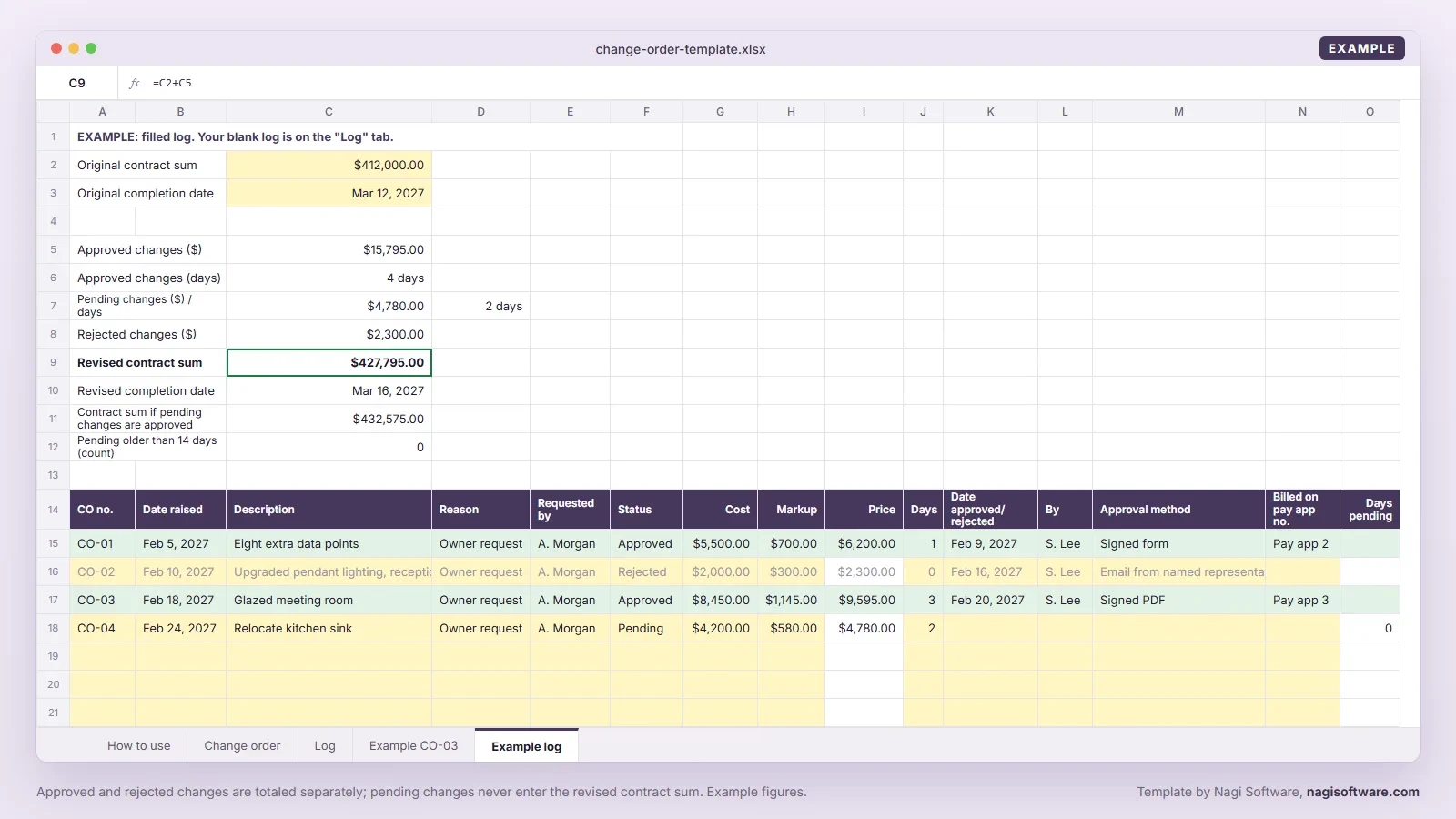
The log is one row per change, from the day it's raised to the day it's billed. Its job is to answer one question at any moment: what is the contract sum now, and what's still waiting on the owner?
The log in our template has these columns: CO number, date raised, description, reason, requested by, status (pending, approved, rejected, void), cost, markup, price, days, date approved, approved by, approval method, and the pay application it was billed on. At the top it totals approved, pending and rejected changes separately, and works out the revised contract sum and completion date from approved changes only.
| CO | Description | Status | Price | Days |
|---|---|---|---|---|
| CO-01 | Eight extra data points | Approved | $6,200 | 1 |
| CO-02 | Upgraded pendant lighting, reception | Rejected | $2,300 | 0 |
| CO-03 | Glazed meeting room | Approved | $9,595 | 3 |
| CO-04 | Relocate kitchen sink | Pending | $4,780 | 2 |
| Example: log totals | Amount | Days |
|---|---|---|
| Approved | $15,795 | 4 |
| Pending | $4,780 | 2 |
| Rejected | $2,300 | |
| Revised contract sum ($412,000 + approved) | $427,795 | |
| Revised completion date (March 12 + 4 days) | March 16 | |
| Contract sum if pending changes are approved | $432,575 |
Pending changes never go into the revised contract sum.
They sit on their own line so you can see the exposure: $4,780 of work the owner hasn't agreed to yet. Review that pending list every week, and chase anything older than 14 days. Anything pending for a month is usually work the crew has already finished.
Change order vs change directive vs T&M ticket
Once signed, a change order has an agreed price and time. When the owner needs the work started before the price is agreed, many contract forms use a change directive instead (AIA documents call it a construction change directive): a signed instruction to proceed, with the price settled later by a method the contract sets out.
A time-and-materials (T&M) ticket is the daily record behind that later price. List the hours, names, materials and equipment, and get it signed by the owner's representative the same day. A stack of signed T&M tickets is much harder to argue with than a total written up three weeks later.
Our opinion: treat a directive as a change order with a blank price, not as permission to stop recording. Log it the same day, keep the tickets, and convert it into a priced change order as soon as you can.
You'll also see "change order request" (or "potential change order", PCO). That's your side of the paper: the priced proposal you send before anyone signs. Our template uses the same form for both. While the approval block is empty, it's a request; once it's signed, it's the change order. Keep one number from start to finish, so CO-03 the request and CO-03 the approved change are plainly the same thing.
Who signs a change order?
The person your contract names as able to change it signs for the owner, and someone with authority signs for you. That's often the owner or a named representative. An architect, engineer or project manager may prepare or recommend the change, but on many contracts a recommendation alone isn't approval.
Put the signer's name and title on the form, and keep a copy of whatever gives them authority (the contract clause, or a letter naming the representative). If a site manager agrees changes they can't approve, you find out at billing time, when it costs the most.
Five mistakes that get change orders cut
Most cuts come from the paperwork, not the price. These are the ones we'd check before any change order leaves the office.
Lump sums with no breakdown. "Meeting room: $9,595" invites a counter-offer. The same figure with 40 hours, a material list and a glazier's quote attached usually goes through, because there's nothing vague left to cut.
Markup that doesn't match the contract.
If the contract says 15% on own work and 10% on subcontracts, and your form says 20% on everything, the reviewer rewrites it, and now they're pricing your change instead of you. Quote the clause on the form, or use its rates and say so.
Work billed before it's approved. A pay application that includes an unsigned change is the easiest thing in the world to send back, and it can hold up the approved lines on the same application. Keep pending changes off the application until the signature is in.
No days claimed. Once the job runs late, three days you didn't ask for in February are hard to get back in May. If the change adds no time, write that down too.
Approval from the wrong person. A site supervisor's "fine by me" is a start. It isn't the owner's approval unless your contract says it is.
Outside the US: "variation" instead of "change order"
The idea is the same everywhere; the word changes. Use your contract's own word on the form, so nobody can say you used the wrong document.
| Contract or region | What a change is called |
|---|---|
| US (AIA-style and most private contracts) | Change order; change directive when the price comes later |
| UK, JCT contracts | Variation, instructed by the architect or contract administrator |
| UK and elsewhere, NEC contracts | Most changes are handled as compensation events |
| FIDIC contracts (common in the Gulf) | Variation |
| Australia, AS 4000 | Variation |
Notice periods differ a lot between these forms, and some are short. If your contract sets a deadline for notifying a change, that date belongs in your log next to the date raised.
Where a spreadsheet stops working
The template works well for one or two jobs and a handful of changes a month. It strains at three points: the approval happens on site, but the form is on the office PC; the budget doesn't move when the change is approved, so cost reports go stale; and someone has to retype the change onto the next pay application. If you only need the printed form, the free change order form generator prices a change and prints it with the new contract sum and signature lines; the other calculators and generators are on our free tools page.
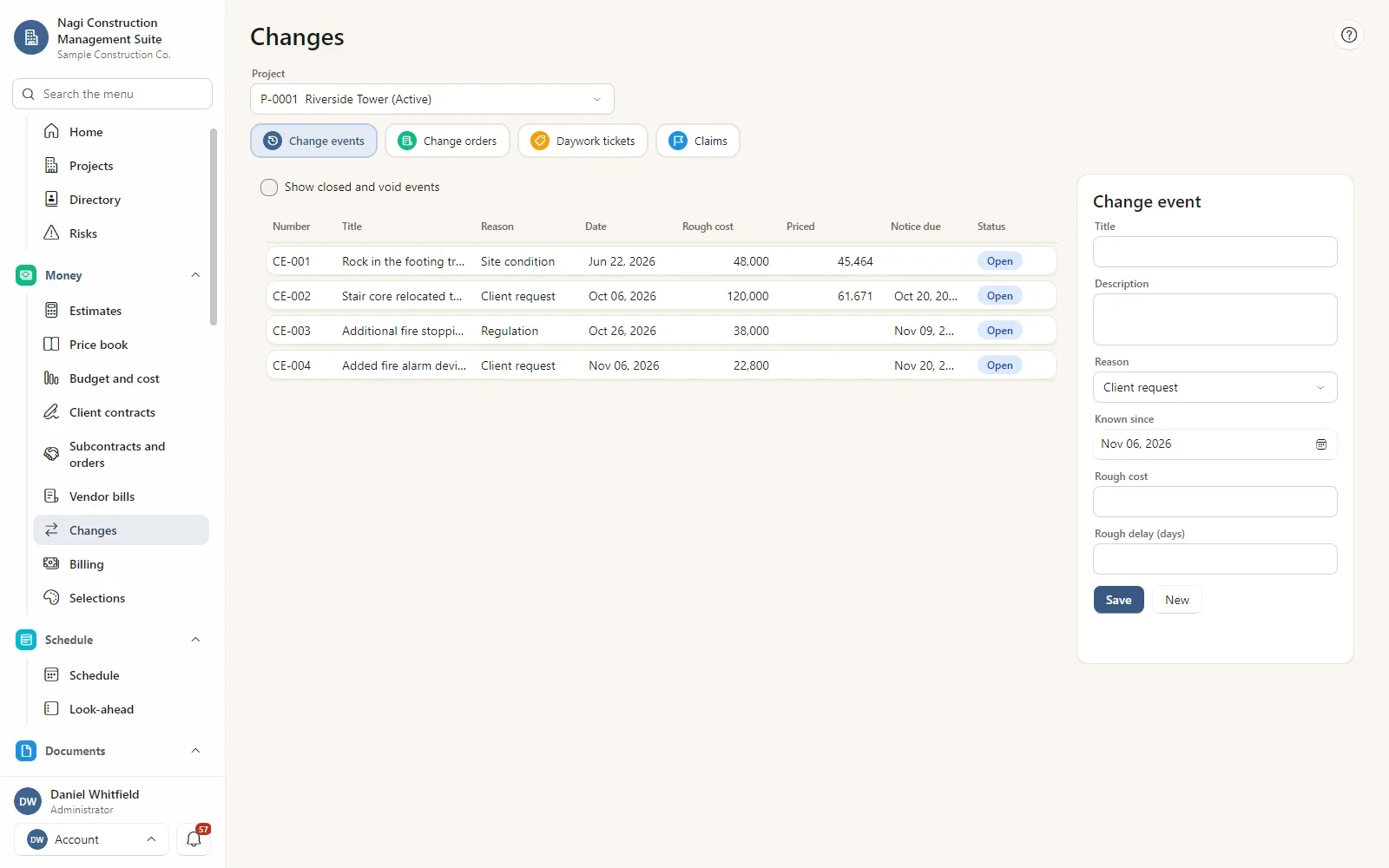
In Nagi Construction Management Suite, potential changes and change orders live in one Changes screen. An approved change order updates the contract, the budget and the billing together, so the next application for payment already includes it. A project manager with the right permission can approve or reject client change orders and subcontract change orders in the Android app, with a reason for a rejection. Users and roles set who can do what, with an audit trail behind them. When a client picks a finish over its allowance, the program drafts the change order for the difference automatically, with optional markup.
What it won't do: there's no client portal, so your client still signs on paper or by email and you record the approval. It writes no contract or legal wording for you. And if you have two jobs and three changes a year, keep the spreadsheet; it's free and it's enough.
One company license covers one Administrator PC and 10 employee seats (a seat is a PC, not a person), with 11 phone connections: one price per company, not per user. It costs $99 a month, or $199.50 a year or $349.50 for lifetime at discounted prices (50% off $399 and $699), as listed on nagisoftware.com/pricing on 14 November 2026.
Run the five-change test this week
Open your last five changes, from texts, emails or the log, and score each one. Give it a point for a number, a price with a cost breakdown, the days added, a named approver and a date. Anything under five points goes into the template this week and onto the pending list.
Then make it a habit.
Log the change the day it's raised, even with a blank price. Get the approval in writing before the work is covered up. Bill it on the very next application. If it isn't on record, it isn't getting paid.
For the next step on the same job, see how to price a change order and get it paid and where construction jobs lose margin.
AIA is a trademark of The American Institute of Architects. JCT, NEC, FIDIC and AS 4000 are trademarks or publications of their respective owners. Nagi Software is not affiliated with, endorsed by or sponsored by them.
Frequently asked questions
- What should a change order include?
A change order should include its number and date, the contract it changes, who asked for the change and how, a description with drawing references, the reason, a cost breakdown, the markup and new contract sum, the time impact in days, and the approver's name, date and method of approval. Without the last two, it is the change orders that get argued over.
- Who signs a change order?
The person your contract names as having authority to change it, usually the owner or the owner's authorized representative, and you as the contractor. An architect or project manager often prepares or recommends it, but a recommendation is not approval unless the contract says so. Check the contract's change clause and write the signer's name and title on the form.
- What is the difference between a change order and a variation order?
They are the same thing under different names. US contracts say change order; UK, Gulf, FIDIC-based and Australian contracts usually say variation or variation order, and NEC contracts handle most changes as compensation events. The fields are the same: scope, price, time and approval. Use the word your contract uses so nobody can argue the form is the wrong document.
- Can a client refuse to sign a change order?
Yes, a client can refuse to sign, and then you have a disagreement over scope, price or time rather than an approved change. What happens next depends on your contract's change and dispute clauses. Keep the written direction, photos and daily logs, give any notice the contract requires, and get legal advice before stopping work or walking away from a disputed change.
- Is this change order template free to use?
Yes. The Excel file is free, with no email or sign-up. It has a change order form, a change order log that totals approved, pending and rejected changes and works out the revised contract sum and completion date, and a how-to tab. Formula cells are locked without a password, so you can unprotect and adapt them.
Sources
- PlanRadar, Construction Survey Report 2026: Managing Project Changes in the Age of AI (PDF, survey of 1,728 professionals, January 2026), checked November 14, 2026
- Clearstory and Dodge Construction Network, The State of Change Orders in 2026, checked November 14, 2026
- Nagi Construction Management Suite product page, checked November 14, 2026
- Nagi Software pricing, checked November 14, 2026
The product in this post
Nagi Construction Management Suite
Run a construction company from estimate to close-out in one program that keeps your data on your own PC.
- change-orders
- templates
- construction-contracts
- progress-billing
- excel