
How to Price a Change Order and Get It Paid
Price a change order from the cost up: burdened labor, materials, equipment, subs, the extra days of site overhead, then the markup your contract allows. One worked example ($9,000 of work priced at $11,752.50), the paper trail that gets it paid, and what to do when the owner says "do it now, price later".
Nagi Software Team12 min read
To price a change order, add up its direct cost (labor at your burdened rate, materials, equipment, subcontract quotes), add the site overhead for any extra days, then apply the markup your contract allows for changes. Then get it approved in writing before the work is covered up, and bill it on the next application. We build the change and billing screens in Nagi Construction Management Suite; below is one change priced line by line, and the paper trail that gets it paid.
Why change orders go unpaid
Most change orders that go unpaid were never priced or approved properly in the first place. The work happened on a text or a "go ahead", the price came later, and later it got argued down.
The surveys agree. Clearstory and Dodge Construction Network surveyed nearly 200 US contractors: 92% of specialty contractors said their change orders are not always paid in full, and 42% face cash flow problems from slow change order processing (The State of Change Orders in 2026). PlanRadar's January 2026 survey of 1,728 professionals in Europe, the Middle East and Asia-Pacific found that 2 in 3 say mid-project changes lead to budget overruns on many or most of their projects. More than a third fail to recover most of the extra change-related cost (PlanRadar report, PDF).
One line in that report is worth pinning above the estimator's desk. Where people could easily track who owned a change request through approval, nearly 7 in 10 recovered most of their change-related costs.
So pricing is half the job. The other half is the record.
How to price a change order, step by step
The example: a $640,000 medical office fit-out. After framing and board are up, the owner moves a corridor wall 4 feet to enlarge two exam rooms. The contract allows 15% markup on the contractor's own work and 10% on subcontracted work. The job's general conditions budget is $54,000 over 120 working days. To price a change on your own job, the free change order calculator builds the price from labor, materials, equipment and subcontractors, with markup, bond and delay days.
Step 1: Price labor at the burdened rate
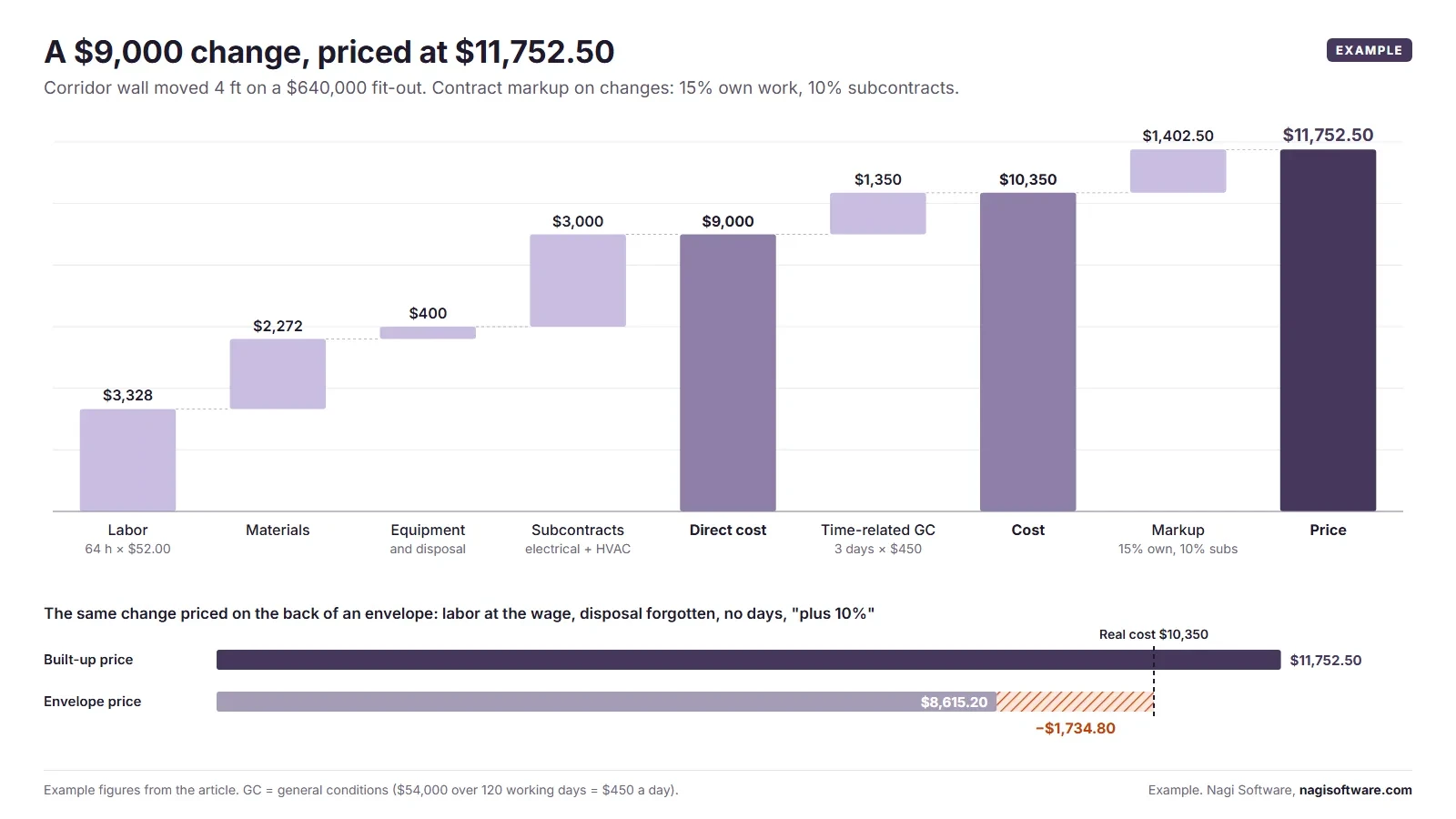
Labor goes in at what an hour really costs you, not the wage. Burden is payroll taxes, workers' comp, insurance and benefits on top of the hourly pay. Our crew's wage is $40.00 an hour and burden adds 30%, so the rate is $52.00. Taking the wall down and rebuilding it takes 64 hours: $3,328.
Use your own burden percentage, the one your payroll provider and insurer give you, and update it when your workers' comp rate or benefits change at renewal. Our labor burden rate guide shows the calculation. Pricing at the bare wage is an easy way for a change order to lose money before anyone notices.
Step 2: Add materials, equipment and disposal
Materials for the new wall (studs, board, door frame, tape, paint) cost $2,272. Equipment and disposal (a lift for two days, a dumpster share for the torn-out wall) add $400. If prices have moved since the bid, and on a job that started six months ago they often have, use current supplier prices for the change rather than the rates in your original estimate.
Step 3: Get written quotes from the subs
The electrician relocates six outlets and two switches for $1,800. The HVAC sub moves two diffusers and their duct for $1,200. Attach both quotes to the change order. Subs: $3,000.
Direct cost so far is $9,000.
Step 4: Price the time
A change that adds days keeps your superintendent, site office, toilets and temporary power on the job for longer. Divide the general conditions budget by the working days: $54,000 ÷ 120 = $450 a day. The wall has to be rebuilt and re-inspected before the ceiling grid goes in, so the change adds 3 working days: $1,350.
This is the line that's easiest to forget. Three days looks small. On a $640,000 job with a dozen changes, unpriced days can add up to weeks of supervision you pay for and never bill. On a change that adds no time, leave it out and write "no time impact" on the form.
Step 5: Apply the contract's markup
Mark up at the rates the contract allows for changes. Own work, including the time line: $3,328 + $2,272 + $400 + $1,350 = $7,350, at 15% is $1,102.50. Subcontracts: $3,000 at 10% is $300. Total markup is $1,402.50.
| Example: change order build-up | Amount |
|---|---|
| Labor: 64 h × $52.00 ($40.00 wage + 30% burden) | $3,328.00 |
| Materials: studs, board, door frame, finishes | $2,272.00 |
| Equipment and disposal | $400.00 |
| Subcontracts: electrical $1,800, HVAC $1,200 | $3,000.00 |
| Direct cost | $9,000.00 |
| Time-related general conditions: 3 days × $450 | $1,350.00 |
| Cost | $10,350.00 |
| Markup on own work: $7,350 × 15% | $1,102.50 |
| Markup on subcontracts: $3,000 × 10% | $300.00 |
| Price of the change order | $11,752.50 |
Step 6: Write the days and the new completion date on the form
Claim the 3 working days on the change order itself, with the new completion date. Don't round them away. Days you don't claim now are hard to win back once the job is late and the owner is counting delay damages.
What the back-of-the-envelope price would have cost
Here is the same change priced the way it often happens on site: hours at the wage, materials, the subs' quotes, "plus 10%", with no time.
| Example: two ways to price the same change | Envelope price | Built-up price |
|---|---|---|
| Labor | 64 h × $40.00 = $2,560 | 64 h × $52.00 = $3,328 |
| Materials, equipment, disposal | $2,272 (disposal forgotten) | $2,672 |
| Subcontracts | $3,000 | $3,000 |
| Time-related general conditions | $0 | $1,350 |
| Markup | 10% on everything: $783.20 | Contract rates: $1,402.50 |
| Price sent to the owner | $8,615.20 | $11,752.50 |
| Your real cost | $10,350.00 | $10,350.00 |
| Result on this change | −$1,734.80 | +$1,402.50 |
The envelope price looks fair to the owner and loses $1,734.80. Same crew. Same wall. Two lines cause most of the gap: labor at the wage, and three days of site overhead nobody priced.
How much markup to put on a change order
Use what the contract says. Many contracts set the markup for changes, often with one rate for your own work and a lower one for subcontracted work, and some cap it. If the contract sets a rate, quote the clause on the form so the reviewer can't rewrite it.
Where the contract is silent, our view is simple: never price a change below the overhead and profit in your base bid. A small change uses the same office time, the same superintendent and the same insurance as base work. Per dollar, it often uses more, because estimating, ordering and paperwork don't shrink with the size of the job.
Watch the words too. A 15% markup is a 13% margin, not 15%. If your company plans on margin, convert before you price: our markup vs margin guide has the formulas, a conversion table and a calculator. The markup vs margin calculator does the conversion for you, and more calculators like it are on the free tools page.
Some contractors also set a minimum charge for any change, to cover the paperwork on a $300 item. If your contract allows it, put it in the contract before the job, not on the first small change.
Settle the rates before the first change
The cheapest time to agree how changes are priced is before the contract is signed. Once a change is on the table, every rate becomes a negotiation.
Four things are worth writing into the contract, or into a schedule attached to it. The markup on your own work and on subcontracted work. Your labor rates by trade, already burdened, for time-and-materials work. A daily rate for time-related site costs, worked out the way we did in step 4. And how credits are priced when the owner deletes scope.
That last one catches people out.
Say the owner drops a $4,000 run of shelving from the base scope. Do you credit $4,000 at cost, or $4,000 plus the markup you would have earned? Contracts handle it differently: some return cost only, some return cost plus overhead and profit, and some say nothing at all. If yours says nothing, propose cost only (you still did the estimating, the buying and the coordination for the original scope) and get the answer in writing before the first credit comes up.
Subcontractor changes: price both sides on the same day
When a change touches a sub's work, you're pricing two change orders: theirs to you, and yours to the owner. Ask the sub for their price in the same breakdown you'll use (labor hours, materials, equipment, their markup), with the days they need. Then add your own markup at the contract's subcontract rate, plus your own supervision if the change needs it.
Don't approve the sub's change before the owner approves yours. Should the owner cut or reject the change after you've agreed the sub's price, the difference comes out of your margin. A short line in each subcontract ("changes are approved only when the owner approves the matching change") keeps the two in step.
Who pays for a change
Who pays depends on why the change happened, and the contract has the final word. The reason you write on the change order is the start of that argument, so pick it with care.
| Reason for the change | Who usually pays | What to keep |
|---|---|---|
| Owner asks for something new or different | The owner | The written request |
| Design error or missing detail in the drawings | Usually the owner, who may recover it from the designer | The RFI and the answer |
| Site condition nobody could see at bid time | Depends on the contract's site conditions clause | Photos, daily log, notice letter |
| New code or authority requirement after the bid | Depends on the contract | The authority's letter or inspection note |
| Contractor's own mistake | The contractor | Nothing to bill, but log it anyway |
Log the last row too. A rework cost you can't bill is still a cost, and it belongs on the job's cost report, not hidden inside another line.
Notice how many rows say "depends on the contract". That's honest: the same buried rock is the owner's cost under one contract and yours under another. Read the clause before the change is priced, not after it's refused.
The paper trail from "go ahead" to paid
A change gets paid when every stage leaves a record with a name and a date. Six stages cover it.
| Stage | The record | Who | When |
|---|---|---|---|
| 1. Direction | Email, site instruction, meeting minutes or a signed T&M ticket | Owner's representative | The day it's asked for |
| 2. Potential change | Number, description, rough cost, rough days, notice deadline | Your PM | Same day |
| 3. Priced change order | Build-up, markup, days, quotes attached | Estimator or PM | Within days |
| 4. Approval | Name, title, date and method (signed form, signed PDF, email from the named representative) | Owner's representative | Before the work is covered up |
| 5. Billed | New line on the schedule of values, on the next application | PM or accounts | Next billing cut-off |
| 6. Paid | Payment matched to the application | Accounts | When the contract says |
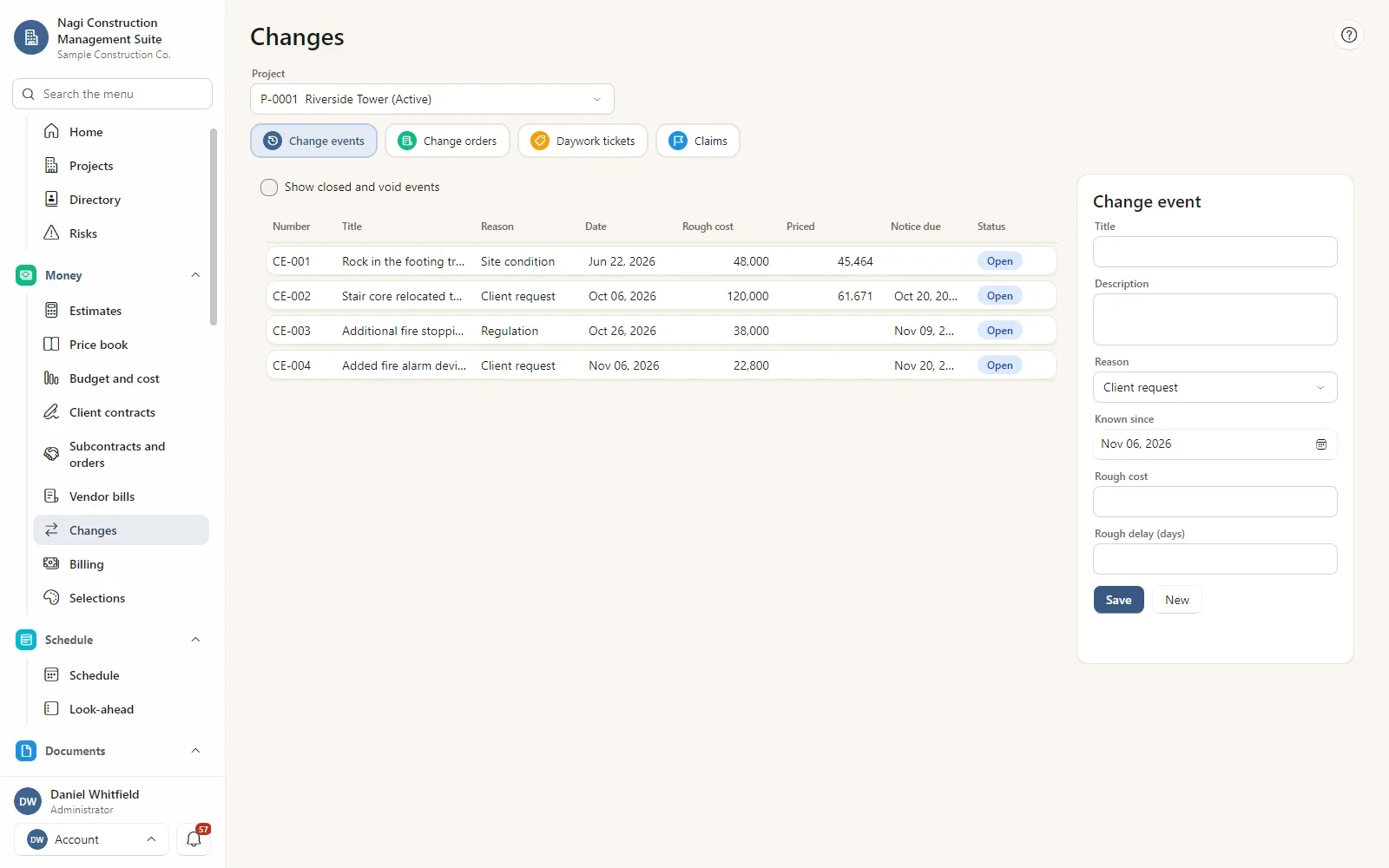
Stage 2 is the one most companies skip. A potential change, logged the day it comes up with a rough price, is what stops a change from living only in someone's phone. Our free change order template and log gives you a form and a log that keeps the revised contract sum. If you only need the printed form, the change order form generator prices the change and prints it with the new contract sum and signature lines.
Stage 5 needs the approved change on the next application, as a new line billed by percent complete. The progress billing worked example shows exactly how a change order becomes line 7 of the schedule of values.
When the owner says "do it now, price later"
Sometimes the work can't wait for a price. The concrete truck is coming, the inspector is booked, the tenant moves in Monday. You can still protect the money.
These steps are general practice, not legal advice, and your contract decides what counts:
- Get the instruction in writing the same day. A one-line email back ("Confirming your instruction today to move the corridor wall at grid 4; we'll price it as a change") is enough to start.
- Give any notice the contract requires, inside its deadline. Some notice periods are short, and missing one can cost you the claim.
- Record time and materials daily on T&M tickets, and get each ticket signed by the owner's representative that day.
- Take dated photos before, during and after, and note the change in the daily log.
- Price it as soon as the cost is known, and send it even if the owner disagrees. Some contractors mark a disputed price "submitted under protest"; whether that helps depends on your contract.
An owner who refuses to sign leaves you with a dispute, not a change order. Follow the contract's dispute clause and take legal advice before you stop work or slow down. People sometimes call work the owner in practice ordered without a formal change a "constructive change". Whether you can recover it depends on the contract and the jurisdiction, and on the records above.
One accounting point for US contractors: unapproved and unpriced changes have their own revenue rules under ASC 606, so ask your CPA before you count one on the WIP schedule. Until it's approved, treat it as exposure, not income.
How Nagi carries a change from site to invoice
In Nagi Construction Management Suite, a change starts as a potential change and becomes a change order, and an approved change order updates the contract, the budget and the billing together. The next application for payment already includes it, so nobody retypes it.
Labor cost for the change work comes from approved timesheets of your own crews, at each worker's hourly rate plus the burden profile you enter (payroll tax, workers' comp, benefits or union fringe), posted to the job by cost code. Give a big change its own cost code and you can see what it really cost, next to what you priced. The job costing page shows the cost report column by column.
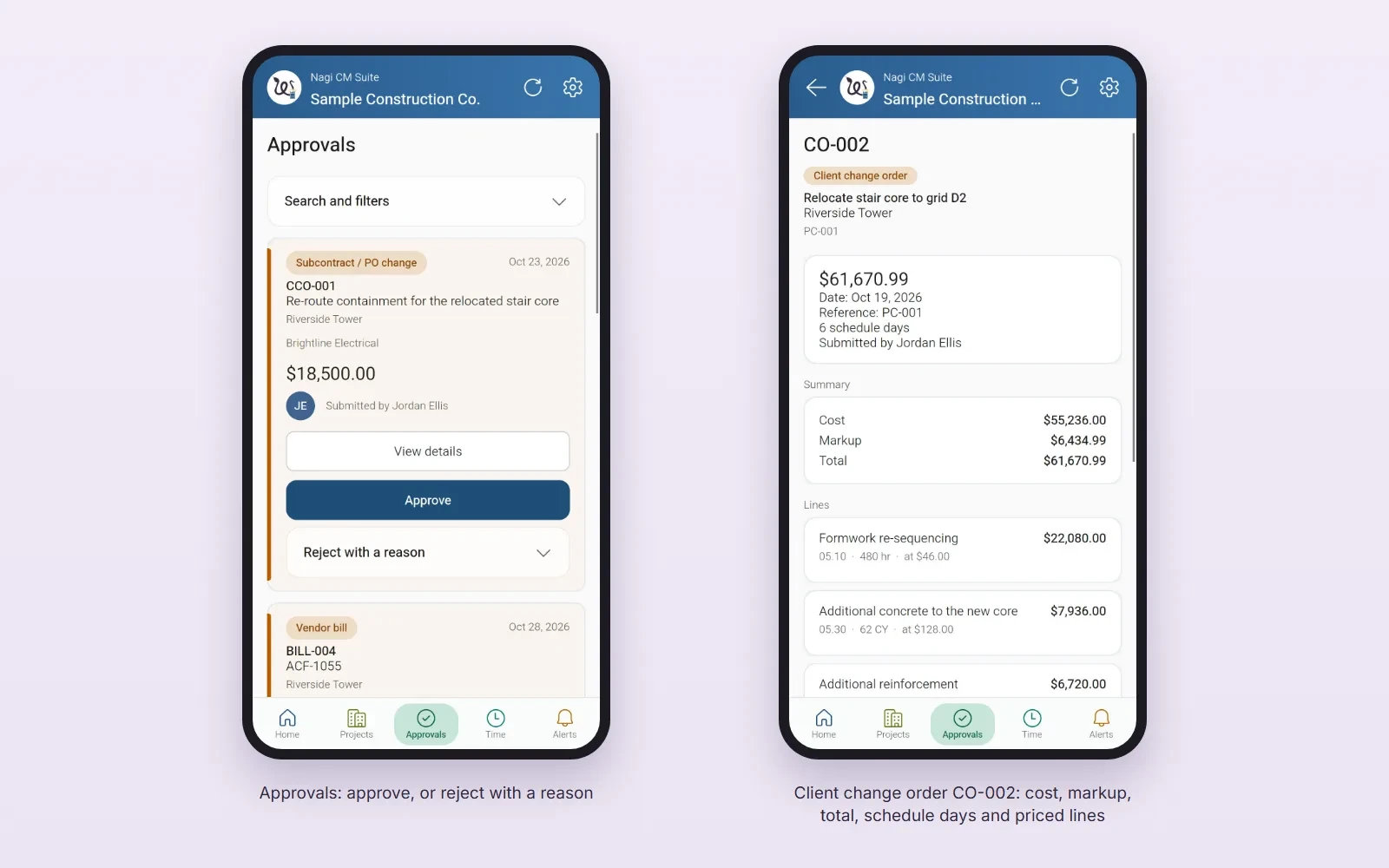
On site, a project manager with the right permission can approve or reject client and subcontract change orders in the Android app, with a reason for a rejection. Daily logs and dated photos sit in the same program, which is the evidence you want when a change is argued. When a client picks a finish over its allowance, the program drafts the change order for the overage automatically, with optional markup.
Where it stops: there's no client portal, so the owner still signs your change order on paper or by email and you record the approval. It writes no contract or legal wording, and it doesn't come with statutory burden rates; you enter the percentages your payroll provider and insurer give you. There's no payroll either, so keep your payroll provider.
Pricing is per company, not per user: one company license covers one Administrator PC and 10 employee seats, with 11 phone connections. See current prices, including the discount on yearly and lifetime plans.
Check these six things before the next change order goes out
Run this list on the next change you price, and on any change still pending from last month.
- Labor at the burdened rate, not the wage.
- Disposal, equipment and any small materials included, not "covered in the base".
- Written sub quotes attached.
- Days claimed, with the new completion date, or "no time impact" written down.
- Markup at the contract's rates, with the clause quoted.
- A named approver, a date and a method, before the work is covered up.
Score five or six and you've priced it properly. Then bill it on the very next application, because if it isn't on record, it isn't getting paid. For where else money leaks on a job, read where construction jobs lose margin.
Frequently asked questions
- How much should you mark up a change order?
Use the markup your contract sets for changes. Many contracts state separate rates for your own work and for subcontracted work, such as 15% and 10%. If the contract is silent, price changes at no less than the overhead and profit in your original bid, because a change uses the same office, supervision and insurance as the base work, often more per dollar.
- How do you calculate the price of a change order?
Add the direct cost (labor at your burdened rate, materials, equipment and subcontract quotes), add time-related site costs for any extra days, then apply the markup. In our example, $9,000 of direct cost plus 3 days at $450 of general conditions gives $10,350, and the contract markup brings the price to $11,752.50.
- Can you charge for extra time on a change order?
Usually, if the change extends the job and the contract allows it. Claim the days on the change order itself, with the new completion date, and price the time-related site costs such as supervision and temporary facilities. If the form says nothing about time, the owner may argue the agreed price covered it, so write the days down or write 'no time impact'.
- What should I do if the owner won't sign a change order?
Keep working from the contract's change and dispute clauses, not from goodwill. Get the instruction in writing, give any notice the contract requires within its deadline, keep signed daily time-and-materials tickets, photos and daily logs, and price the change anyway. Then take legal advice before stopping work, because contracts and local law differ on what you may do next.
- Should a change order be priced before the work starts?
Yes, whenever you can. A change priced and signed before the work is covered up is the easiest kind to get paid. When the owner needs the work done first, get a signed instruction to proceed, record time and materials daily with the owner's signature, and turn it into a priced change order as soon as the cost is known.
Sources
- Clearstory and Dodge Construction Network, The State of Change Orders in 2026, checked November 14, 2026
- PlanRadar, Construction Survey Report 2026: Managing Project Changes in the Age of AI (PDF, survey of 1,728 professionals, January 2026), checked November 14, 2026
- Nagi Construction Management Suite product page, checked November 14, 2026
- Nagi Construction Management Suite job costing page, checked November 14, 2026
The product in this post
Nagi Construction Management Suite
Run a construction company from estimate to close-out in one program that keeps your data on your own PC.
- change-orders
- estimating
- markup
- construction-contracts
- cash-flow