
Where Construction Jobs Lose Margin: 8 Leaks and How to Find Yours
Margin rarely goes in one big mistake. One $650,000 job worked from a 12% estimate to a 6.4% finish, leak by leak, with the check you can run this week and a free 0 to 8 leak score.
Nagi Software TeamUpdated 15 min read
Construction jobs lose margin through eight ordinary leaks, not one big mistake: the unbilled change, the late cost, the forgotten retention, the double bill, the retype, the seat tax, the missing record and the month-end marathon. Each costs a little. Together they can halve a job's profit. We build Nagi Construction Management Suite, the job costing and billing program, so below is one $650,000 job worked from a 12% estimate to a 6.4% finish, leak by leak, with the check you can run on your own jobs this week.
The eight leaks at a glance
Every leak has a place it shows up and a check that finds it. Here they are on one page.
| Leak | Where it shows | The check this week | The fix |
|---|---|---|---|
| The unbilled change | Work done on a "go ahead", no signed change order | List every change since the start; mark which are signed and billed | Price and sign before work, or within 48 hours |
| The late cost | An overrun first seen at month end | Committed + actual vs budget on each cost code, weekly | Weekly cost review with a forecast column |
| The forgotten retention | Retention still held months after handover | Retention held per job, with its age | A release plan dated at contract signing |
| The double bill | A bill paid twice, or past the order value | Match every bill to its subcontract or PO before paying | No order, no payment |
| The retype | A typo between estimate, budget and orders | Compare estimate totals with budget totals per code | Type the numbers once |
| The seat tax | Paying per user for people who log in now and then | Count paid logins against monthly active users | Price software per company, or trim users |
| The missing record | No daily log or photo for the day in dispute | Count days with no log on each open job | A log locked at the end of each day |
| The month-end marathon | A week lost reconciling before billing goes out | Time from period end to application sent | Books and billing reading the same numbers |
One $650,000 job, from 12% to 6.4%
This is the whole story in one table. It's an Example: a $650,000 fixed-price commercial fit-out, estimated at $572,000 of cost and $78,000 of profit, which is a 12% margin. Nothing dramatic happens. Eight small things do.
| Step | Leak | Example amount | Profit left | Margin |
|---|---|---|---|---|
| Estimate | None | $0 | $78,000 | 12.0% |
| 1 | The unbilled change | −$9,800 | $68,200 | 10.5% |
| 2 | The late cost | −$8,400 | $59,800 | 9.2% |
| 3 | The forgotten retention | −$3,900 | $55,900 | 8.6% |
| 4 | The double bill | −$4,600 | $51,300 | 7.9% |
| 5 | The retype | −$2,700 | $48,600 | 7.5% |
| 6 | The seat tax (this job's share) | −$1,500 | $47,100 | 7.2% |
| 7 | The missing record | −$3,600 | $43,500 | 6.7% |
| 8 | The month-end marathon | −$1,900 | $41,600 | 6.4% |
Margin is profit divided by contract value: $41,600 ÷ $650,000 = 6.4%. The total leak is $36,400, and the biggest single item is under $10,000. That's why nobody notices.
No line on its own looks like a disaster worth a meeting, so nobody calls one.
Our view: a contractor who finishes most jobs a few points under the estimate has a leak problem before a pricing problem. Raising the markup to cover it just bids you out of work you'd have won. The free markup vs margin calculator shows what a given markup really leaves you.
Download the leak score checklist (.xlsx). One sheet, eight yes/no questions, totals per job. No email needed.
Leak 1: the unbilled change
The unbilled change is work done on site because someone said "go ahead", and never priced, signed or billed. It's usually the biggest leak, because the cost is real and the revenue never arrives.
Example: the owner's representative asks for extra blocking and backing in three rooms for wall-hung equipment that wasn't on the drawings. The foreman agrees on the spot. The crew does it over two weeks: labor, material and a lift rental come to $9,800. Nobody writes it up. By the time the project manager hears about it, the owner's rep says it was "part of the scope".
Spot it with a spreadsheet: list every change you know about on each open job, with four columns: raised (date), priced (yes/no), signed (yes/no), billed (yes/no). Ask each foreman for theirs. Any row with "no" in the last three columns and work already done is a leak in progress.
Mostly, process stops it. Price and sign before the work starts, or within 48 hours when the owner insists on "do it now". Get it in writing, even a text, then turn it into a priced change order. A verbal yes isn't a change order. Our post on how to price a change order covers the cost build-up and the paper trail, and the free change order calculator prices one from labor, materials, equipment and subcontractors.
Nagi Construction Management Suite turns a potential change into a change order. Once approved, it updates the contract sum, the budget and the billing together, so the next application for payment already includes it. Someone with approval permission can approve or reject a change order (with a reason) in the Android app, which helps when the owner decides on site.
Leak 2: the late cost
The late cost is an overrun found at month end, or later, when it's already spent. The money isn't lost because the work was hard. It's lost because nobody saw the trend while there was still time to act.
Example: framing labor runs about 14% over its budget for five weeks. The weekly timesheets are in a payroll system; the budget is in a spreadsheet nobody opens until the monthly cost report. When the report finally shows the overrun, framing is nearly done. The extra $8,400 is gone.
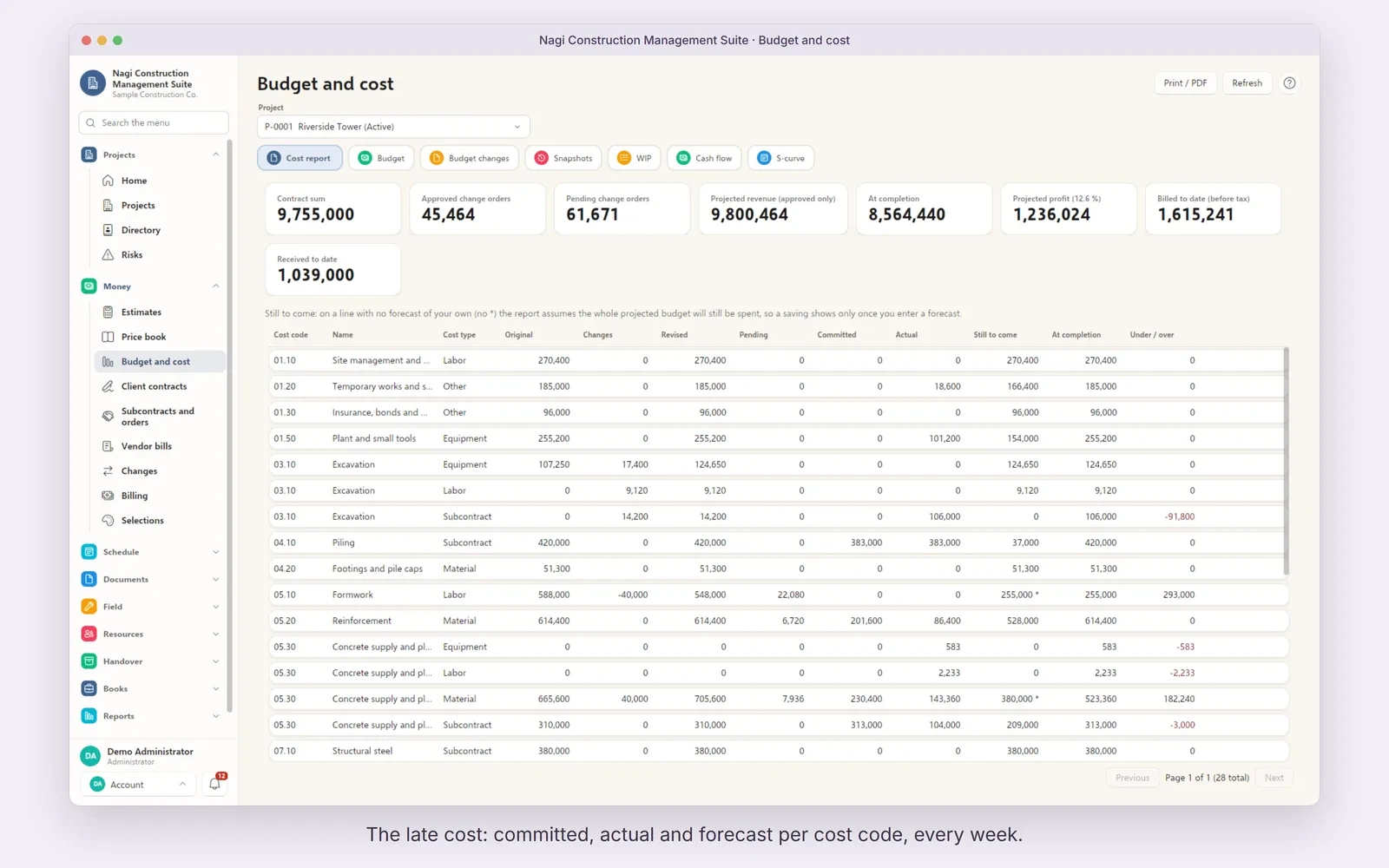
For this week's check, add a "committed" column next to "budget" and "actual" for every cost code. Committed is money you've agreed to spend (signed subcontracts and issued purchase orders). Then add a forecast: actual plus what you still expect to spend. If forecast exceeds budget on any line, that's this week's conversation, not next month's. The job costing worked example shows the columns on a $180,000 renovation.
What fixes it is a 20-minute weekly cost review, line by line, with the forecast in front of you. Ask "what will this line cost at the end?" rather than "what has it cost so far?". The free job cost report calculator turns budget, committed and actual cost by cost code into a forecast; it sits with the rest of our calculators on the free tools page.
Nagi's budget and cost screen shows budget, committed, actual and forecast for every cost code, filled from the estimate, subcontracts, purchase orders, vendor bills and approved timesheets. The program costs approved timesheets for your own crews at each worker's hourly rate plus the burden percentages you enter. Alerts list what's late or over budget on the home page, and the job costing page walks through each step. One job, one set of numbers, seen before the cost is late.
Leak 3: the forgotten retention
The forgotten retention is money the owner held back from every payment that nobody chased once the job was handed over. It was earned. It just never came home.
On a $650,000 contract at 5% retention, $32,500 is held by the end. Most of it comes back in the Example, but the last $3,900 sits for over a year: nobody sent the release request with the closeout documents, the owner raised two small punch items late, and in the end the balance was settled against them. Retainage is cash, so most of the time a late release costs you financing rather than margin. Once you write it off or trade it against a claim, it's margin.
To find it, list retention held on every job, open or closed, with the date the job reached substantial completion. Anything held more than 60 days after that date needs a named person and a date. Our guide to retainage in construction explains release stages and the UK "retention" wording.
Plan the release when you sign the contract, not when you remember it. Put the stages and their triggers in the contract file.
Nagi holds retention on every application, with a separate rate for stored materials and an optional step-down at a set percent complete. A release plan can have up to six stages, each with a percentage and a due date or event, and the money released goes on the next application. Approving a release checks the close-out list, and open items need a typed reason to override. The aged retention report shows receivable and payable retention per contract in age buckets. One limit: the program writes no legal release wording, so your release documents still come from you or your lawyer.
Leak 4: the double bill
The double bill is a vendor bill paid twice, or a subcontractor paid past the value of their subcontract. It happens when someone pays bills from the inbox instead of against an order.
On our Example job, the rebar supplier emails an invoice for $4,600 and posts a paper copy a week later with a different reference. The office pays both. Nobody notices until the supplier's statement comes in four months later, and by then the supplier says the overpayment was applied to another customer's account. Recovering it takes more calls than it's worth.
Your check: export the last 90 days of paid bills on one job, sort by vendor and amount, and look for matching amounts within 30 days of each other. Then total what you've paid each subcontractor against their subcontract value. Anyone above 100% needs a call. A three-way match (order, delivery or progress, bill) catches both; our post on three-way match for contractors has the weekly routine.
The rule that stops it: no order, no payment. Every bill must point at a subcontract or purchase order with enough left on it.
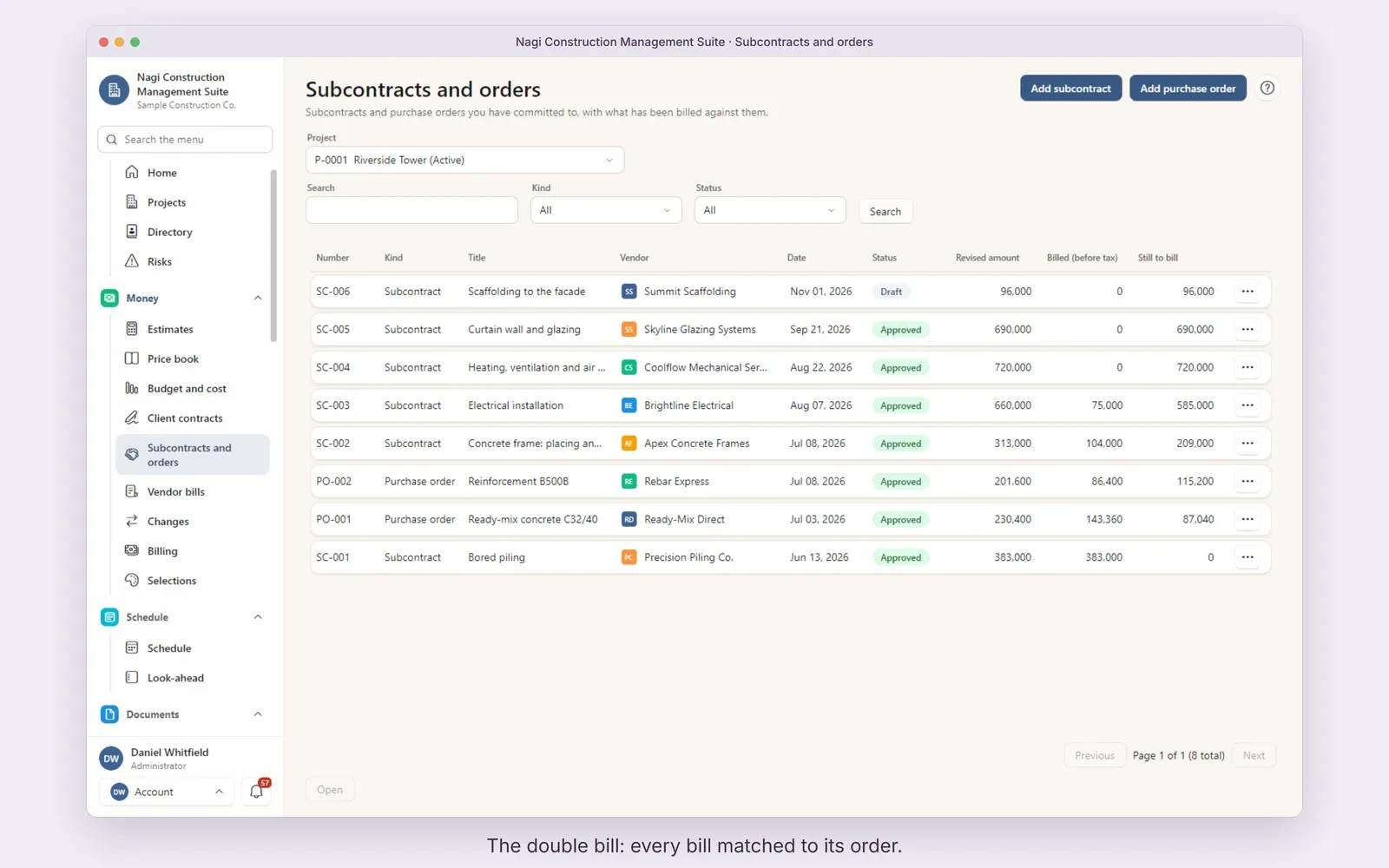
Nagi matches every vendor bill to the commitment it belongs to, so the list of subcontracts and orders shows what each is worth, what's been billed and what's still to bill. Retention you hold from subcontractors goes on record when you approve their bill, and you pay it later on a retention release bill.
Leak 5: the retype
The retype is the error that creeps in when someone types the same number again: from the estimate into the budget, from the budget into a purchase order, from a schedule into a spreadsheet. One wrong digit costs real money.
Here the estimate has 1,450 square feet of a specialty floor finish. The buyer retypes it into the purchase order as 1,045. The material runs short on install day. A rush reorder, a second delivery charge and half a day of an idle crew add up to $2,700.
Run this on one job: put the estimate's totals per cost code next to the budget's totals per cost code. They should match to the dollar, apart from approved changes. Any gap means something was retyped wrong, or left out.
Type each number once. The estimate should become the budget and the contract, not be copied into them.
Nagi builds estimates from your own price book with reusable assemblies, and the estimate becomes the budget by cost code and cost type. If a client sends a bill of quantities, you can import it from Excel or CSV into the client contract instead of typing it.
Leak 6: the seat tax
The seat tax is what per-user software pricing costs a contractor whose people log in now and then. A superintendent who checks the schedule twice a week costs the same as the project manager who lives in the program.
Our Example company pays per user for a cloud tool and spreads the bill across its jobs. This job's share over its life is $1,500, for logins that several people barely use. It's an overhead leak more than a job leak, but it lands in the same place: your profit.
Check it by listing everyone you pay a software seat for, and next to each name, the last date they logged in. Most tools show this on an admin page. Seats unused for 30 days are money you can stop spending or reassign. Our construction management software pricing post compares how 12 tools charge, with dated prices.
Nagi is priced per company, not per user. One company license covers one Administrator PC and 10 employee seats (a seat is a PC, not a person), with 11 phone connections. As listed on nagisoftware.com/pricing on 14 November 2026, it's $99 a month, or $199.50 a year and $349.50 for a lifetime license at discounted prices (50% off $399 and $699). Buyers on the yearly plan keep their price when they renew.
Leak 7: the missing record
The missing record is the day nobody wrote down. When an owner disputes a delay or a change months later, the side with dated logs and photos usually wins, and a thin site diary loses money you were owed.
Example: the electrician's late rough-in holds up drywall for four days. Your crew stands by and a rented lift sits idle: $3,600 of cost. Two months later you claim it. The daily logs for those days say "drywall prep" and nothing else, with no photos and no mention of the electrician. The claim goes nowhere.
Count the days in the last month with no daily log on each open job, and the logs with no photo. If a log was written on Friday for the whole week, count those days as missing too. Memory written days later doesn't hold up well.
A log written on the day, every day, is the cure: with weather, who was on site, what was done where, what held the work up and who caused it, plus captioned photos.
Daily logs in Nagi record weather, people, equipment and delays, and each day's log locks. Photos carry their date and area tag and link to the daily log. On the Android app, new site entries (hours, daily log entries, photos, punch items, observations and incidents) wait in the phone's outbox with no signal and are sent once it's back online. Looking things up on the phone, such as projects, RFIs or documents, needs a connection.
Leak 8: the month-end marathon
The month-end marathon is the week lost reconciling job costs, bills and billing before anything goes out. It costs staff time and delays the application for payment, so cash arrives later.
On the Example job, the project manager and the bookkeeper spend about 40 hours over the job's life matching cost reports to the books and rebuilding billing figures from spreadsheets. At $47.50 an hour, that's $1,900 charged to the job's general conditions. Two applications also go out about a week late, which pushes those payments back too.
Write down the date the last billing period ended and the date the application went out. More than five working days between them is a marathon. Ask who did the work in between and what they were reconciling.
Fewer copies fix it. When the books, the job costs and the billing read the same numbers, there's less to reconcile.
The books in Nagi (chart of accounts, journals, bank reconciliation, profit and loss, balance sheet and trial balance) sit in the same program as the jobs, and labor cost posts to the books when a timesheet is approved. Report packs can be scheduled and run again, and the weekly status report comes out as a PDF. There's no QuickBooks link, so if your accountant needs QuickBooks as the system of record, keep it and check with them before switching.
Your leak score (0 to 8)
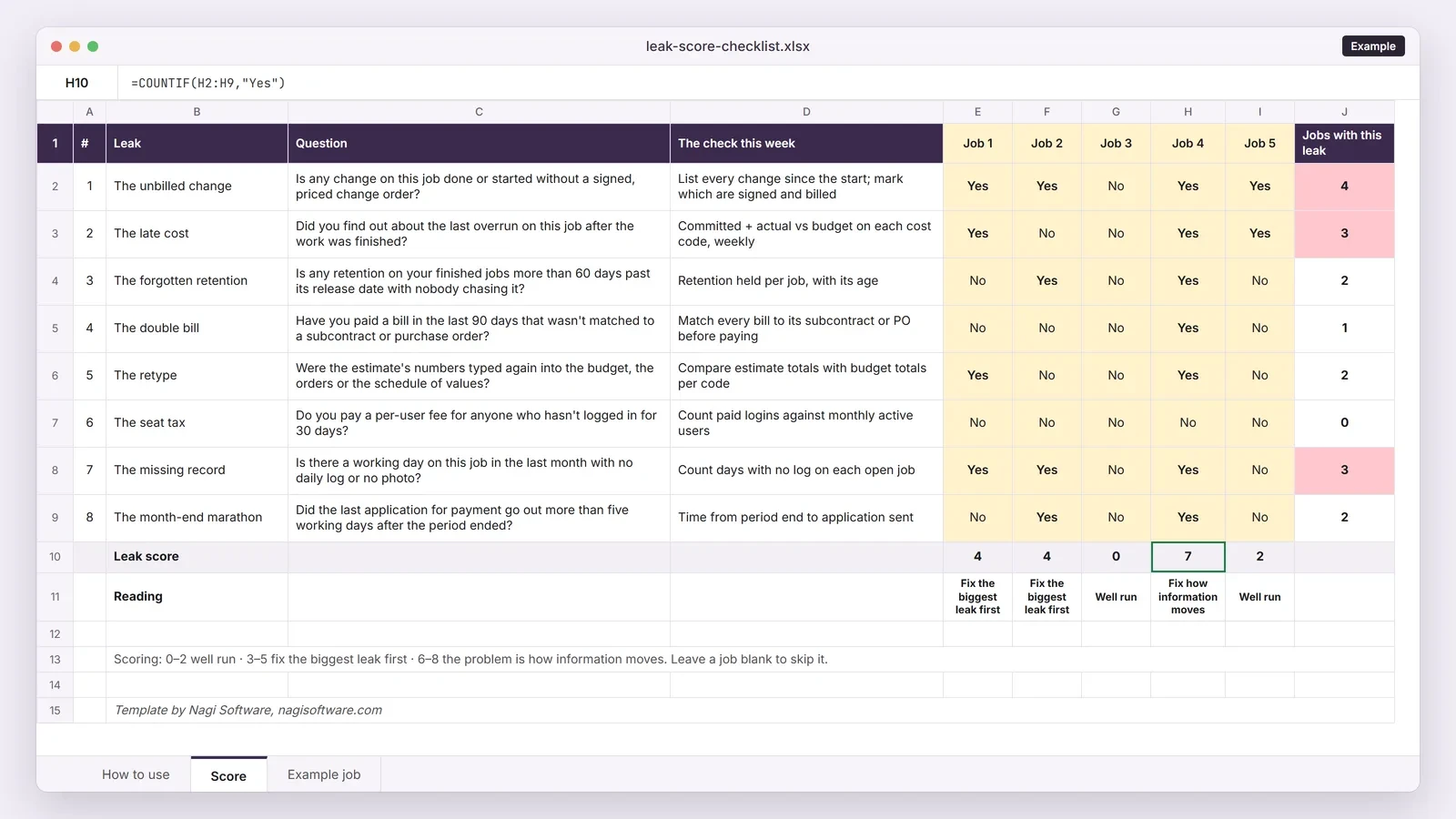
Score one open job. Answer yes or no; every "yes" is one leak.
- Is any change on this job done or started without a signed, priced change order?
- Did you find out about the last overrun on this job after the work was finished?
- Is any retention on your finished jobs more than 60 days past its release date with nobody chasing it?
- Have you paid a bill in the last 90 days that wasn't matched to a subcontract or purchase order?
- Were the estimate's numbers typed again into the budget, the orders or the schedule of values?
- Do you pay a per-user fee for anyone who hasn't logged in for 30 days?
- Is there a working day on this job in the last month with no daily log or no photo?
- Did the last application for payment go out more than five working days after the period ended?
A score of 0 to 2 is a well-run job. At 3 to 5, pick the leak with the biggest dollar figure on your job and fix that one first. At 6 or more, the problem is how information moves, not one person: fixing it a leak at a time will take months, and that's the point where one program for the whole job saves more than it costs.
The checklist file has the same eight questions, a column per job and totals, so you can score five jobs side by side: download the leak score checklist (.xlsx).
What a spreadsheet still does well
A spreadsheet is fine for scoring the leaks and for tracking one or two jobs. If one careful person keeps it, updates committed and actual cost every week and logs every change, it works. Plenty of good contractors run that way.
It stops working when three people keep their own copies, when bills arrive faster than one person can match them, and when the site record lives in phones and notebooks. That's when the retype and the month-end marathon come back, because somebody has to reconcile every copy.
Nagi Construction Management Suite won't fix everything either.
There's no payroll, so paying people stays with your payroll provider. There's no client or subcontractor portal: applications and approvals still travel by email or on paper. The official AIA G702 and G703 forms aren't printed, and there's no AI.
Where to start on Monday
Start with the leak that cost you most on your last finished job, not the one that feels most familiar. For most small contractors that's the unbilled change or the late cost, because both grow every week nobody looks.
Score one live job with the checklist. Then run the matching check from the table above for one week. If the same three or four leaks keep showing up on every job, try the whole chain on one real job: enter the estimate, the orders and last week's bills, and read the cost report. Your data stays on your own PC.
QuickBooks is a trademark of Intuit Inc. AIA, G702 and G703 are trademarks of The American Institute of Architects. Nagi Software is not affiliated with, endorsed by or sponsored by them.
Frequently asked questions
- Why do construction jobs finish with less margin than estimated?
Usually through several small losses rather than one bad bid. Change work done on a verbal go-ahead and never billed, overruns found weeks after they started, retention never chased, bills paid twice and records too thin to win a dispute each take a slice. On our $650,000 example job they took the margin from 12% to 6.4% without one dramatic mistake.
- What is margin fade in construction?
Margin fade is the gap between the profit a job was expected to make and the profit it actually makes, measured as the job runs. It shows when the forecast cost at completion keeps rising while the contract value stays put. Watching it monthly, per cost code, is the earliest warning you get; seeing it only at close-out is too late to act.
- How do I find where a job lost money?
Compare the estimate with the final cost line by line, on the same cost codes. Then check four lists: change work without a signed change order, vendor bills not matched to an order, retention still held, and days with no daily log. Most lost margin turns up in one of those lists. Our free leak score checklist walks through all eight.
- What is a good profit margin for a small contractor?
There is no single right figure, because it depends on your trade, your overhead and your market. The useful test is your own: did each finished job keep the margin its estimate promised? If jobs regularly finish several points below the estimate, find the leaks first. Raising your markup without fixing them only moves the problem to the next job.
- Can a spreadsheet track job margin?
Yes, for one or two jobs, if someone updates committed cost, actual cost and change orders every week. It breaks when several people type into copies, when bills arrive faster than anyone matches them, and when site records live in phones and notebooks. That is the point where one program holding the estimate, budget, bills and billing starts paying for itself.
Sources
- Nagi Construction Management Suite product page, checked November 14, 2026
- Nagi Construction Management Suite job costing page, checked November 14, 2026
- Nagi Construction Management Suite progress billing page, checked November 14, 2026
- Nagi Software pricing page, checked November 14, 2026
The product in this post
Nagi Construction Management Suite
Run a construction company from estimate to close-out in one program that keeps your data on your own PC.
- profit-margin
- job-costing
- change-orders
- retainage
- margin-fade