
Construction Management Software Pricing in 2026: What 12 Tools Cost
Published prices for 12 construction management tools, each dated and linked, the four ways vendors charge, and the 5-year cost for a 15-, 42- and 85-person contractor where the prices are public.
Nagi Software TeamUpdated 14 min read
Construction management software costs anything from $0 to several thousand dollars a year, and three of the 12 tools below don't publish a price at all. For a contractor with 5 office staff and 10 site people, the rival plans we costed came to $2,654 to $16,020 a year on 14 November 2026 (ours is $99 a month). We make Nagi Construction Management Suite, one of the 12, so we're not neutral; every rival price here comes from that vendor's own page, dated and linked.
Prices of 12 construction management tools
Here's what each vendor's own pricing page said on 14 November 2026, in US dollars. Where a vendor lists no price, the table says so.
| Tool | How it charges | Published price (as listed on 14 Nov 2026) | Source |
|---|---|---|---|
| Nagi Construction Management Suite | Per company: 1 Administrator PC, 10 employee seats, 11 phone connections | $99/month; $199.50/year and $349.50 lifetime at discounted prices (50% off $399 and $699) | nagisoftware.com/pricing |
| Procore | Annual fee by product, based on Annual Construction Volume; unlimited users | Quote only / not published | procore.com/pricing |
| Buildertrend | Custom quote; unlimited users; 10% off when paid annually upfront | Quote only / not published; see vendor page | buildertrend.com/pricing |
| JobTread | Base fee with 1 internal user, plus each extra internal user | $199/month base; extra users $20 (users 2–10), $15 (11–20), $10 (21–30), $5 (31+) a month; annual plan saves 20% | jobtread.com/pricing |
| Contractor Foreman | Tiers with a user cap | Billed annually, per month: Basic $49 (1 user), Standard $105 (3), Plus $166 (8), Pro $221 (15), Unlimited $332 | contractorforeman.com/pricing |
| Fieldwire | Per user | Basic $0 (5 users, 3 projects, 100 sheets); Pro $39, Business $64, Business Plus $89 per user/month billed annually | fieldwire.com/pricing |
| Houzz Pro | Plan plus extra users | Pro $199/month (1 user); Teams from $399/month (5 users); +$50 per extra user/month; Enterprise "Let's Talk" | houzz.com/houzz-pro/pricing |
| Knowify | Plan plus extra users | Core $99 or $149/month (1 user); Advanced $329 or $399/month (10 users); +$29 per extra user/month; the page doesn't label which figure is yearly | knowify.com/pricing |
| Raken | Per user, minimum 3 users, billed annually | Basic $23 and Performance $59 per user/month (read 15 Nov 2026) | rakenapp.com/pricing |
| Buildxact | Tiers with unlimited users; annual billing saves 15% | Foundation $199, Pro $399, Master $599 per month (read 15 Nov 2026) | buildxact.com/us/pricing |
| CompanyCam (photo documentation) | Plan plus extra users, billed annually | Core $63/month (1 user), Crew $129 (3 users), Scale $199 (3 users); +$29 per user | companycam.com/pricing |
| Autodesk Build | Bundles, "Get a Quote" | Quote only / not published | construction.autodesk.com/pricing |
Prices change. Check the vendor's page before you budget. CompanyCam is a photo and documentation app rather than a full construction management suite; it's here because contractors often price it alongside one.
Rival prices last checked on 15 November 2026 on each vendor's public pricing page.
Three readings of that table. Half the market still asks you to talk to sales before you see a number. The tools that do publish mostly charge more as you add people. And the cheapest entry plan rarely includes the money features (change orders, budget, progress billing) you'd buy the software for.
The four ways vendors charge
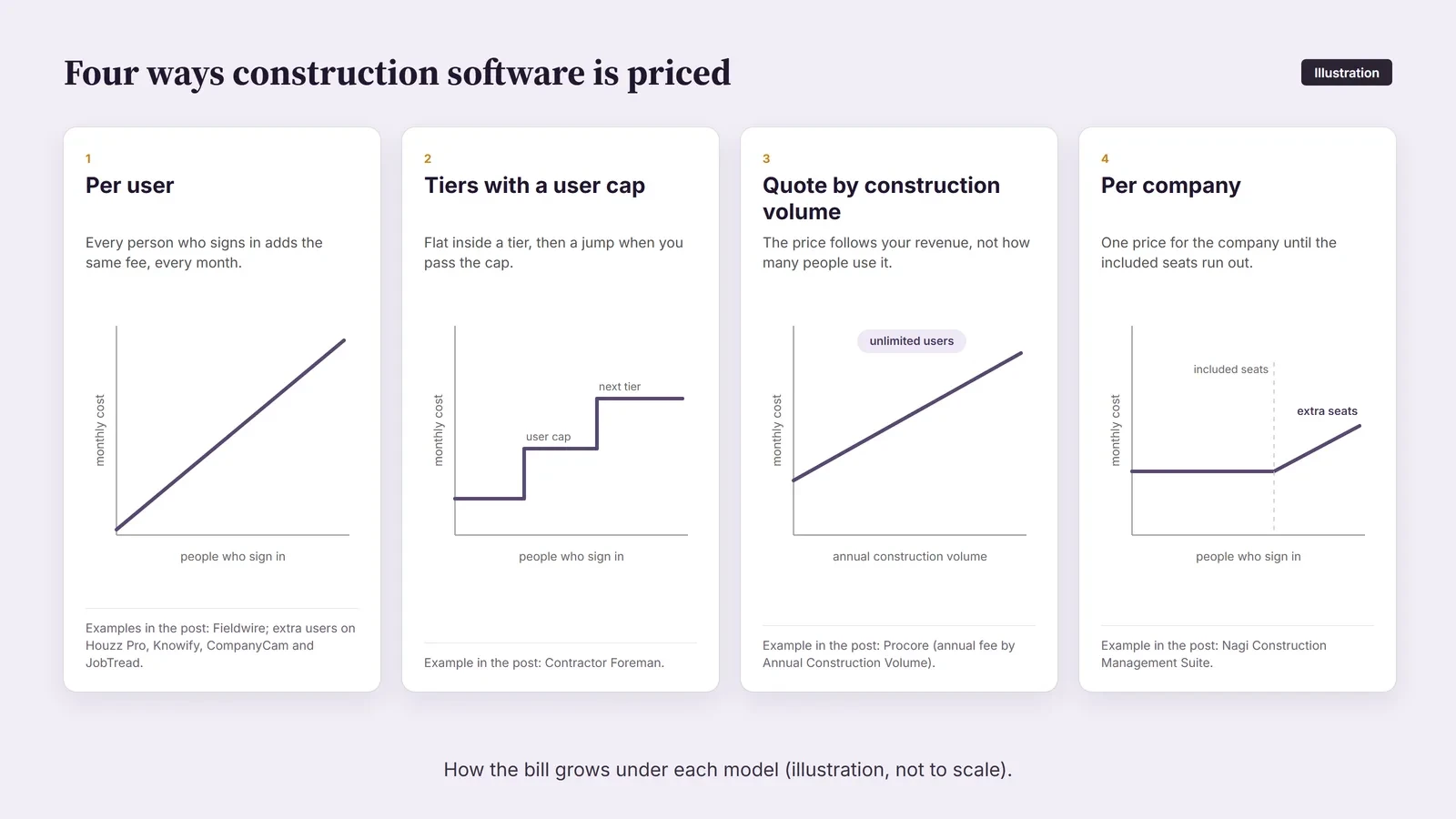
Almost every construction tool uses one of four pricing models. Which one you're on decides what your bill does when you hire.
Per user
You pay for each person who signs in, every month. Fieldwire is the clean example: $39, $64 or $89 per user per month, billed annually. Houzz Pro, Knowify and CompanyCam add a fee for each user beyond the plan's allowance ($50, $29 and $29 a month). JobTread is per user too, with a twist: the price per extra user falls in bands ($20, then $15, $10, $5), and its page says the lower prices apply only to the users inside each band.
Per user is fair when everyone uses the tool all day. It hurts when site staff open it twice a week for a schedule or a photo. Some vendors soften that. JobTread's page says field crew who only upload photos, log daily notes or view schedules and tasks can be added as free users, and portal users for vendors, subs and customers are free and unlimited.
Tiers with a user cap
You pick a plan by headcount, and the price jumps at each cap. Contractor Foreman's annual plans go from 1 user at $49 a month to 15 users at $221, then Unlimited at $332. The cost is easy to predict until you hire the 16th person, then you move up a tier.
A quote based on construction volume
Procore charges "an upfront annual fee by product", based on your Annual Construction Volume, with unlimited users. Autodesk Build and Buildertrend also send you to sales or a quote form. Unlimited users is a real advantage for a company with a big field team. The catch is that your price rises with your revenue, not your use, and you can't compare it without a sales call.
Per company
You pay for the company, and a set number of computers or devices come with it. That's how we price Nagi Construction Management Suite: one company license covers one Administrator PC (the computer that holds the company's data) and 10 employee seats, where a seat is a PC, not a person, plus 11 phone connections. You can pay $99 a month, or $199.50 a year or $349.50 once for a lifetime license at discounted prices, as listed on our pricing page on 14 November 2026. Buyers on the yearly plan keep their price when they renew.
Per company is cheapest when many people share a few office PCs. It costs more when you add devices beyond the bundle, as the next section shows.
Five-year cost for three contractors
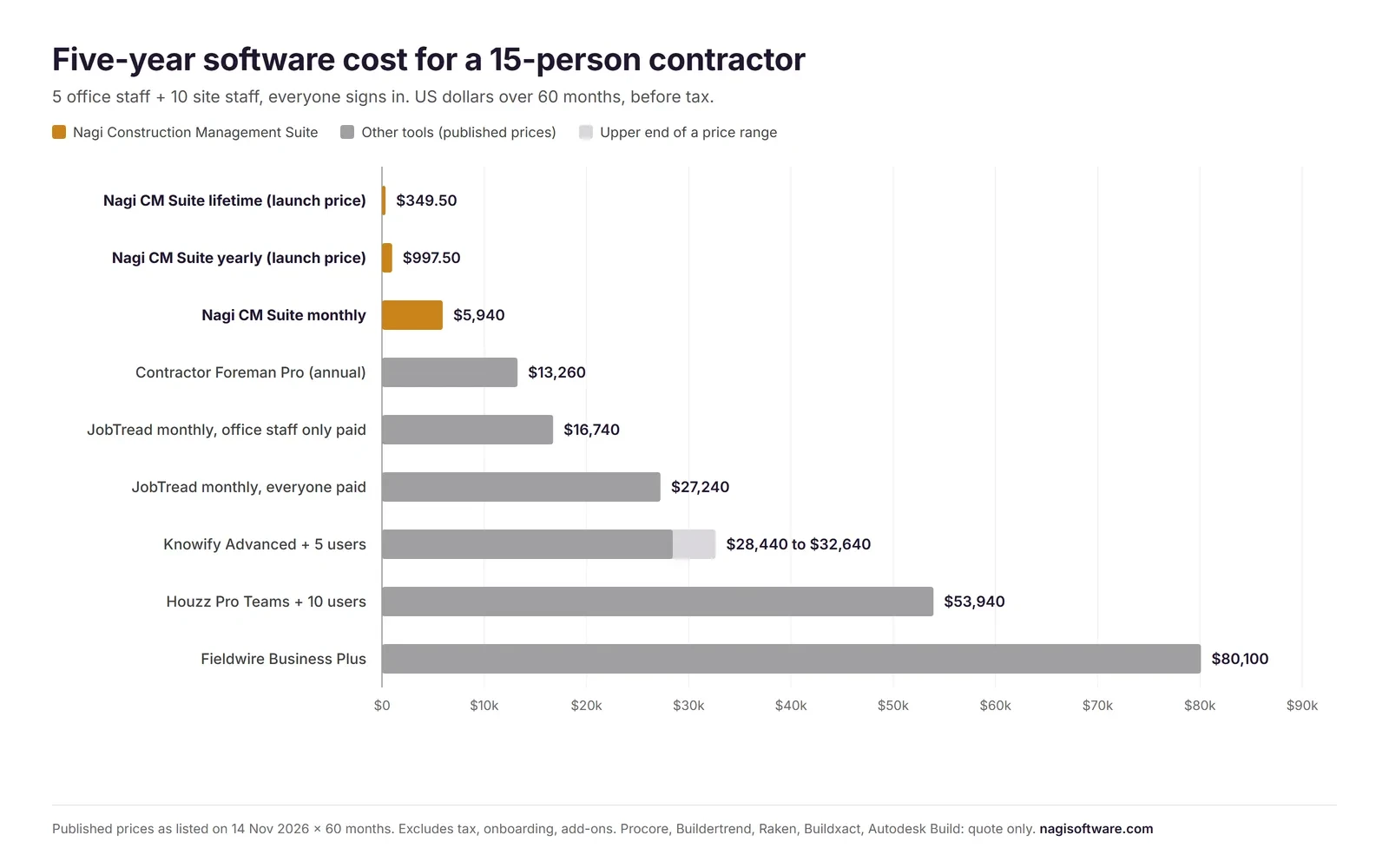
We priced three company shapes a small contractor grows through: 5 office staff and 10 site staff (15 people), 12 and 30 (42 people), and 25 and 60 (85 people). The strict assumption: every person signs in, office staff on a PC and site staff on a phone. We used the vendors' published prices and multiplied by 60 months. Tax, onboarding and add-ons are left out.
| Tool and plan | 15 people (5 + 10) | 42 people (12 + 30) | 85 people (25 + 60) |
|---|---|---|---|
| Nagi CM Suite, lifetime (discounted price) | $349.50 | $349.50 + 19 extra employee seats* | $349.50 + 49 extra employee seats* |
| Nagi CM Suite, yearly (price kept on renewal) | $997.50 | $997.50 + 19 extra employee seats* | $997.50 + 49 extra employee seats* |
| Nagi CM Suite, monthly | $5,940 | $5,940 + 19 extra employee seats* | $5,940 + 49 extra employee seats* |
| Contractor Foreman Pro / Unlimited (annual) | $13,270 (Pro) | $19,920 (Unlimited) | $19,920 (Unlimited) |
| JobTread, monthly plan, everyone paid | $27,240 | $41,340 | $54,240 |
| JobTread, monthly plan, office staff only paid | $16,740 | $24,540 | $34,740 |
| Knowify Advanced + extra users | $28,440 to $32,640 | $75,420 to $79,620 | $150,240 to $154,440 |
| Houzz Pro Teams + extra users | $53,940 | $134,940 | $263,940 |
| Fieldwire Business Plus (annual) | $80,100 | $224,280 | $453,900 |
| Procore, Buildertrend, Autodesk Build | Quote | Quote | Quote |
*Extra employee seats are an add-on bought from your account, and the pricing page doesn't list their price; ask us for it in writing before you compare. Each extra seat adds one phone connection. Rival figures: published prices on 14 November 2026 × 60 months. JobTread uses the monthly plan because its page doesn't show the annual base price. Raken and Buildxact publish prices (first table) but aren't costed here.
Rival prices last checked on 15 November 2026 on each vendor's public pricing page.
How the numbers work, so you can redo them for your own headcount:
- Nagi, 15 people: 5 office PCs are the Administrator PC plus 4 employee seats, and 10 phones fit inside the 11 phone connections. One company license covers it all. For 42 people, 30 phones need 30 phone connections, which means 29 employee seats, 19 more than the license includes. For 85 people, 60 phones need 59 seats, 49 more.
- JobTread, 15 people: $199 + 9 × $20 + 5 × $15 = $454 a month. For 42: $199 + $180 + $150 + $100 + 12 × $5 = $689. For 85: $199 + $180 + $150 + $100 + 55 × $5 = $904. The "office staff only" row assumes your site staff qualify as free field crew under JobTread's rule.
- Fieldwire: users × $89 × 60. On the $39 Pro plan, 15 people would cost $35,100 over five years, but Pro doesn't include change orders or budget; those start at Business Plus.
- Knowify: the $329 or $399 Advanced price (10 users) plus $29 for every user above 10, shown as a range because the page doesn't say which price is yearly.
- Houzz Pro: $399 for 5 users plus $50 for each extra user. The page says Teams starts at $399, so treat this as a floor.
Two calls from that table. For a 15-person contractor that bills from an office, a per-company license is the cheapest way to run the whole job, by a wide margin, as long as your crews can work with Windows or Mac in the office and Android on site. For an 85-person contractor where every site person really needs the app, Contractor Foreman's Unlimited tier at $3,984 a year, or a Procore quote with unlimited users, may beat any per-seat or per-device price, including ours. Ask us for the extra-seat price before you assume otherwise.
The honest variable is who actually signs in. If only your foremen carry the app, say 10 of the 30 site people in the middle company, Nagi needs 11 employee seats for 12 office PCs, giving 12 phone connections: one extra seat. Per-user tools drop just as sharply. Count real users before you compare.
What your bill does when you hire person 16
Growth is where pricing models really differ. Take the 15-person company and add one site supervisor who needs the app. Here's what each published price says that person adds.
| Tool | What person 16 adds | Why |
|---|---|---|
| Fieldwire Business Plus | $89 a month | One more user, billed annually |
| Houzz Pro Teams | $50 a month | One more user above the plan |
| Knowify Advanced | $29 a month | One more user above 10 |
| JobTread | $15 a month | Users 11 to 20 cost $15 each on the monthly plan |
| Contractor Foreman | $111 a month | Pro stops at 15 users, so you move from $221 to Unlimited at $332 |
| Nagi CM Suite | $0 | The 11th phone connection is still free in a 5 + 10 company |
Rival prices last checked on 15 November 2026 on each vendor's public pricing page.
The Contractor Foreman jump looks steep for one person, and it is. It's also the last jump you'll make on that plan, because every person after that costs nothing more. Nagi's cost doesn't move until you run out of employee seats or phone connections, and then you add seats. Per-user tools climb in a straight line with every hire. Plan for the headcount you'll have in three years, not today's.
Monthly or annual billing?
Annual billing is cheaper on almost every tool that offers both, and it locks you in for the year. Contractor Foreman's Pro plan is $279 a month billed monthly against $221 billed annually, about 26% more for the freedom to leave any month. Its Unlimited plan is $399 against $332. JobTread's page says the annual plan saves 20%. Fieldwire's page lists its annual prices only.
Ours works the same way, more sharply. Twelve months at $99 is $1,188; the yearly plan is $199.50 at the discounted price. The monthly plan has a 7-day refund window and the yearly and lifetime plans 14 days, as shown on each plan's card.
Our view: pay monthly for the first two or three months of a new tool, until your crews have used it on a real job. Switch to annual only once you know you're staying. A refund window is not a trial, and a year's contract on software your foremen won't open is the most expensive line in this whole post.
Work out your own number in ten minutes
You don't need our three company shapes. Do this with your own people. For the per-user versus pay-once comparison, the free subscription vs one-time license calculator does the yearly arithmetic, and more tools are on our free tools page.
- Write down every person who'd sign in, split into office (PC) and site (phone).
- Mark who uses it daily and who opens it once a week. Occasional users are where per-user pricing hurts.
- For each shortlisted tool, find the cheapest plan that includes the features you'd buy it for: change orders, budget, progress billing. Not the entry plan.
- Multiply that plan's price by your headcount, or apply its tiers, and then by 60 months.
- Add onboarding, add-ons and the renewal price you got in writing.
- For quote-only tools, ask for the five-year figure as one number.
What the price table leaves out
The list price is rarely the whole bill. These are the costs we'd ask any vendor about, in writing, before signing.
- Onboarding and training. Contractor Foreman lists free setup and implementation on its Pro and Unlimited plans and says more paid training is available. Knowify counts included onboarding sessions per plan. Ask what a second round costs when your office manager leaves.
- Add-ons. Houzz Pro sells advertising separately, from $499 a month according to its pricing page. Procore excludes its Field Productivity product from the unlimited-user model and prices it per full-time employee.
- The renewal price. A first-year discount that disappears at renewal turns a good deal into an ordinary one. Ask for the price for years two and three. For Nagi, buyers on the yearly plan keep the $199.50 price on renewal.
- Payment processing. Several tools take card or ACH payments from your clients. Ask what the fee is and who pays it.
- Leaving. Ask what format your data comes out in, whether exports include attachments and photos, and how long you can read your jobs after you cancel.
On that last point, here's our own answer, so you can hold us to it. If a Nagi license ends, nothing is deleted: the company becomes read-only, and you can open, print and export everything until you renew. The data sits in a database file on your own PC, and a backup is one file you keep. Nagi Cloud, the optional hosted service, is a monthly add-on per company with no public price on our pricing page.
Quote-only tools: what to ask before the call
Three of the 12 tools need a sales conversation. That isn't a trick; volume-based pricing can't be printed on one card. But you'll get a better number if you arrive with your own figures.
Have these ready: your annual construction volume (Procore prices by it), the number of office and field people who'd sign in, the modules you actually need, and your current tool's renewal date. Then ask four things. What will years two and three cost? Is there a cap on increases? What's included in onboarding? And what does it cost, in money and time, to export all projects, documents and photos if you leave?
For Buildertrend, the pricing page shows only a quote form and 10% off when you pay annually upfront. Third-party sites publish figures, but they disagree with each other, so we haven't repeated them. Check the vendor's own page or ask for a written quote.
Where other tools do things Nagi doesn't
A cheaper license only helps if the software does the job you need. Here's where rivals have features we don't.
JobTread has free, unlimited portal users for vendors, subs and customers. Nagi has no client or subcontractor portal, so applications for payment, approvals and selections are shared by email or on paper. If your clients expect to sign off selections online, that's a real gap.
Procore and Contractor Foreman's Unlimited plan don't charge per user, which suits a company with many occasional users. Fieldwire's free plan is a sensible start for a small team that mostly needs drawings and tasks on three projects or fewer. Houzz Pro bundles marketing with project tools, which a residential remodeler chasing leads may value more than job costing. And CompanyCam is a specialist in site photos.
Nagi also has no payroll (keep your payroll provider), no bid management, no QuickBooks link (it keeps its own books instead) and no AI. Its Android app records hours, daily logs, photos, punch items, observations and incidents with no signal and sends them later; look-ups on the phone need a connection, and the product page lists Windows, Mac and Android as available today.
Which pricing model fits which contractor
Pick the model before you pick the tool. It decides your costs for the next five years more than any feature list.
A per-company license costs least when most of your people work in the office and the field team is small. With a large field team that all needs the app daily, look at unlimited-user plans (Contractor Foreman Unlimited) or a volume-based quote (Procore), and compare them with per-device prices like ours once you have the extra-seat price. If your clients need a portal, a tool that includes one (JobTread) is the better fit, whatever it costs. And if you want to try before talking to anyone, choose a vendor that publishes its price and offers a trial without a card.
For a deeper look at the pay-once option, read construction management software without a subscription and perpetual license vs subscription. If you're shortlisting a specific rival, see Buildertrend alternatives and Procore alternatives for small contractors. Our checklist for choosing construction management software turns all of this into 20 questions to ask each vendor.
Procore, Buildertrend, JobTread, Contractor Foreman, Fieldwire, Houzz Pro, Knowify, Raken, Buildxact, CompanyCam, Autodesk Build and QuickBooks are trademarks of their respective owners. Nagi Software is not affiliated with, endorsed by or sponsored by them. Comparisons use information published by each vendor on the date shown.
Frequently asked questions
- How much does construction management software cost?
Published prices on 14 November 2026 ran from a free plan (Fieldwire Basic, 5 users) to several hundred dollars a month. For a 15-person contractor, the rival plans we costed came to about $2,654 to $16,020 a year. Procore, Buildertrend and Autodesk Build don't publish a price, so you need a quote. Raken and Buildxact do publish prices; they're in the first table but not in the cost tables.
- How much does Procore cost?
Procore doesn't publish prices. Its pricing page says it charges an upfront annual fee by product, based on your Annual Construction Volume, the total dollar value of construction across your projects. Users are unlimited. The one exception is the Field Productivity product, which is priced per full-time employee. You need a quote for an actual figure.
- Is construction management software priced per user?
Many tools are. Fieldwire charges per user, JobTread adds a fee for each internal user above the first, and Houzz Pro and Knowify add a monthly fee per extra user. Others use tiers with a user cap (Contractor Foreman), a quote based on construction volume (Procore) or a price per company (Nagi Construction Management Suite).
- Is there free construction management software?
There are free plans. Fieldwire's Basic plan is $0 for 5 users, 3 projects and 100 sheets, as listed on 14 November 2026. Free tiers usually leave out budgets, change orders and progress billing; on Fieldwire, change orders and budget start at Business Plus, $89 per user per month billed annually.
- What hidden costs should I ask about?
Ask about onboarding and training, add-ons sold separately, extra users above the plan cap, payment processing, the renewal price after any first-year discount, and what it costs to get all your data out when you leave. Get the answers in writing, with the renewal price for at least three years.
Sources
- Nagi Software pricing page, checked November 14, 2026
- Nagi Construction Management Suite product page, checked November 14, 2026
- Procore pricing page, checked November 14, 2026
- Buildertrend pricing page (quote form, no price listed), checked November 14, 2026
- JobTread pricing page, checked November 14, 2026
- Contractor Foreman pricing page, checked November 14, 2026
- Fieldwire pricing page, checked November 14, 2026
- Houzz Pro pricing page, checked November 14, 2026
- Knowify pricing page, checked November 14, 2026
- Raken pricing page, checked November 15, 2026
- Buildxact US pricing page, checked November 15, 2026
- CompanyCam pricing page, checked November 14, 2026
- Autodesk Construction Cloud pricing page, checked November 14, 2026
The product in this post
Nagi Construction Management Suite
Run a construction company from estimate to close-out in one program that keeps your data on your own PC.
- construction-software
- pricing
- per-user-pricing
- comparison
- total-cost