
Free G702/G703-Style Pay Application Template (Excel) and How to Fill It
An ungated Excel pay application in the G702/G703 style, with a summary, a continuation sheet, a change order log and retainage worked in, plus a line-by-line fill guide and the eight reasons pay apps get sent back.
Nagi Software TeamUpdated 10 min read
Here is a free G702/G703-style pay application in Excel, with no email wall: a one-page summary, a continuation sheet, a change order log and retainage, all with working formulas. Below it you'll find a line-by-line fill guide for both sheets, built on a real-looking $480,000 job, and the eight reasons pay apps get sent back. We make Nagi Construction Management Suite, which produces these applications from a contract's schedule of values, so we see the same mistakes every month.
A note on names: G702 and G703 are forms published by the American Institute of Architects. Our template is G702/G703-style. It follows the same billing logic in its own layout and wording, and doesn't copy AIA's documents. If your contract names the official forms, buy them from AIA Contract Documents.
Download the template
Download the pay application template (.xlsx). No email, no sign-up. A filled PDF of the example is in the same folder: example pay application (.pdf). If you would rather work in your browser, the free pay application generator makes a printable application with nine summary lines and a continuation sheet; more of our calculators are on the free tools page.
The workbook has five tabs:
- How to use, with the steps from this article.
- Application summary, the one-page cover (the G702-style part). Most cells calculate from the other tabs.
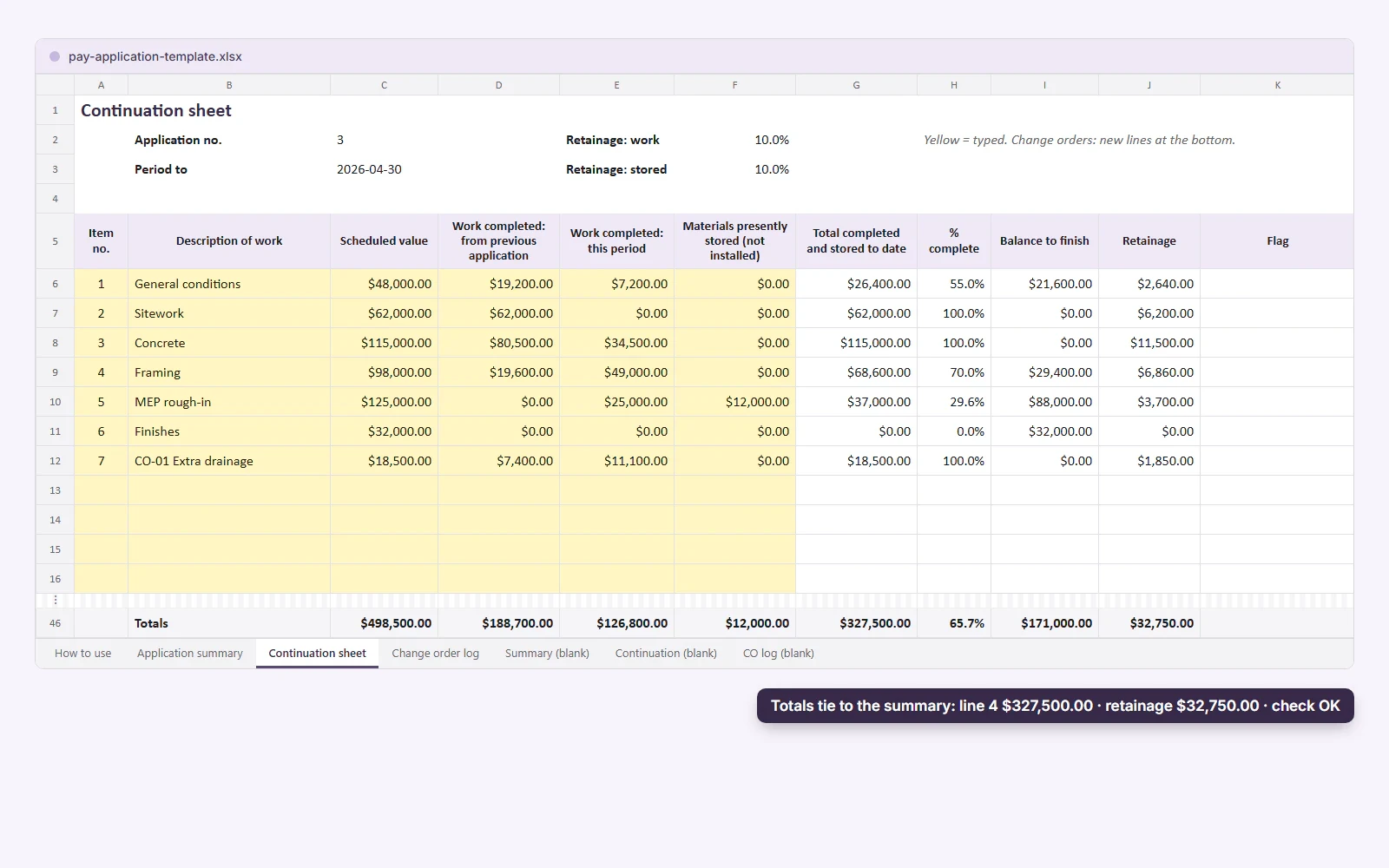
- Continuation sheet, your schedule of values with work to date, stored materials, percent complete, balance to finish and retainage per line (the G703-style part).
- Change order log, where only approved change orders count toward the contract sum.
- Blank copies of the summary and continuation sheet for your next job.
Input cells are yellow. Formula cells are protected without a password, so you can unprotect the sheet and change a formula if your contract words things differently. Retainage has two rates, one for completed work and one for stored materials, both set to 10% in the example.
Progress billing in 100 words
Progress billing pays a construction contract in stages, usually monthly, for the work actually done. The contract sum is split into a schedule of values. Each period you claim the work completed and materials stored on every line, hold back retainage, and subtract what earlier applications already certified. The rest is due now. The G702-style summary shows that arithmetic on one page; the G703-style continuation sheet shows it line by line. Our progress billing guide carries this same job through three pay periods, including a change order, overbilling and the WIP report.
How to fill in the application summary, line by line
The example is application 3 on a $480,000 office fit-out, for the period ending 30 April, with one approved change order for $18,500. Work through the lines in order. In the template, lines 2 to 9 calculate themselves once the continuation sheet and change order log are filled in.
- Header. Project name and address, who you're billing (owner or general contractor), your company, the contract date, the application number and the period it covers. Keep application numbers in sequence: a gap is the first thing a reviewer questions.
- Original contract sum. $480,000, as signed.
- Net change by approved change orders. $18,500, from the change order log. Pending changes don't belong here.
- Contract sum to date. Line 2 plus line 3: $498,500.
- Total completed and stored to date. The grand total of that column on the continuation sheet: $327,500.
- Retainage. Work completed of $315,500 at 10% gives $31,550; stored materials of $12,000 at 10% gives $1,200. Total held: $32,750.
- Total earned less retainage. Line 5 minus line 6: $294,750.
- Less previous certificates for payment. The "earned less retainage" figure from application 2 as certified: $182,430. Take it from the last certified application, not the last one you sent.
- Current payment due. Line 7 minus line 8: $112,320.
- Balance to finish, including retainage. Line 4 minus line 7: $203,750. It's what's left to bill, including the retainage you'll claim at the end.
- Change order summary. Additions and deductions approved in previous months and this month, netting to line 3. Here, $18,500 in additions approved in March and nothing this month.
- Sign and date. Add the certification, signatures and notarization your contract asks for. The architect or owner's certification follows yours, sometimes for a lower amount with a note explaining why.
How to fill in the continuation sheet
The continuation sheet is your schedule of values, extended every month. One row per line item, in the order agreed at the start, with change orders added as new lines at the bottom.
| Column | What to enter | How it's calculated |
|---|---|---|
| Item no. | The line number from the agreed schedule of values | Typed |
| Description of work | The scope for that line, in the contract's words | Typed |
| Scheduled value | The dollar value agreed for that line | Typed; change orders get their own lines |
| Work completed: from previous application | Work billed on this line before this period, excluding stored materials | Last month's "previous" plus "this period" |
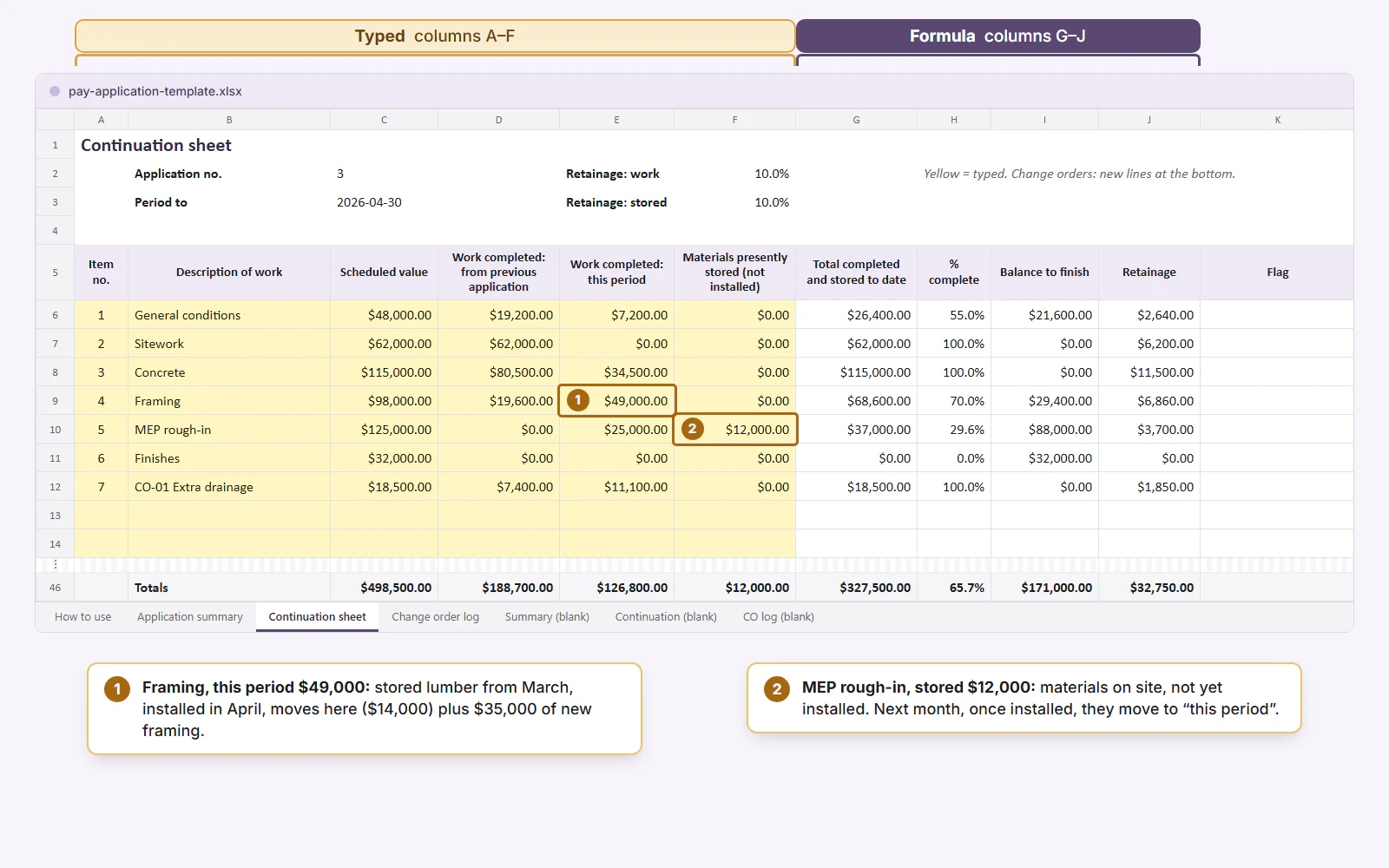
| Work completed: this period | Value of work put in place this period, including stored materials now installed | Typed |
| Materials presently stored | Materials on hand for this line, not yet installed | Typed |
| Total completed and stored to date | Previous + this period + stored | Formula |
| Percent complete | Total to date ÷ scheduled value | Formula |
| Balance to finish | Scheduled value − total to date | Formula |
| Retainage | Work × work rate + stored × stored rate | Formula |
Application 3, filled in:
| # | Description | Scheduled value | Previous | This period | Stored | Total to date | % | Balance to finish | Retainage (10%) |
|---|---|---|---|---|---|---|---|---|---|
| 1 | General conditions | 48,000 | 19,200 | 7,200 | 0 | 26,400 | 55% | 21,600 | 2,640 |
| 2 | Sitework | 62,000 | 62,000 | 0 | 0 | 62,000 | 100% | 0 | 6,200 |
| 3 | Concrete | 115,000 | 80,500 | 34,500 | 0 | 115,000 | 100% | 0 | 11,500 |
| 4 | Framing | 98,000 | 19,600 | 49,000 | 0 | 68,600 | 70% | 29,400 | 6,860 |
| 5 | MEP rough-in | 125,000 | 0 | 25,000 | 12,000 | 37,000 | 29.6% | 88,000 | 3,700 |
| 6 | Finishes | 32,000 | 0 | 0 | 0 | 0 | 0% | 32,000 | 0 |
| 7 | CO-01 Extra drainage | 18,500 | 7,400 | 11,100 | 0 | 18,500 | 100% | 0 | 1,850 |
| Totals | 498,500 | 188,700 | 126,800 | 12,000 | 327,500 | 65.7% | 171,000 | 32,750 |
Line 4 is the one people get wrong. In March, $14,000 of lumber sat on site as stored material. In April it went up, so it left the "stored" column and joined "this period": $49,000 is $14,000 of installed lumber plus $35,000 of new framing. The "previous" column stays at $19,600 because stored materials never enter it.
Change orders go at the bottom as new lines, numbered to match the change order log (CO-01, CO-02). A deduction gets its own line too, with a negative scheduled value, so the owner can see it rather than finding an original line quietly reduced. Don't edit the original scheduled values after the first application; the reviewer compares every month's sheet with the first one.
If you're a subcontractor billing a general contractor, the GC's subcontract often fixes the format, the cut-off date (usually before the GC's own billing date) and the retainage rate. The arithmetic is the same. Ask for their form in writing before your first application, and fill this template in alongside it so you keep your own running record.
Retention in 100 words
Retainage, called retention in the UK and the Gulf, is the share held back from each payment until the work is finished, commonly 5% or 10%. On a pay application it's worked out on the running total, so it grows each month. It sits inside the balance to finish: the $32,750 here isn't lost, it's billed at the end with its own application once the contract allows release. Rates, reductions at 50% complete and release dates come from your contract and local law. Our retainage guide has three worked calculations, the bookkeeping entries and the release steps, and the free progress billing and retainage calculator works out retainage and stored materials from your own schedule of values.
Common rejections and how to avoid them
Most pay apps that come back do so for small, fixable reasons. These eight cover nearly all of them.
- Sheets that don't tie. The summary's completed-and-stored line must equal the continuation sheet total to the cent, and our template's check cell turns red when they differ. Never overtype a formula to make a number match.
- Rounding drift. Percentages rounded on screen but not in the cell make a line show 70% while the dollars say 69.97%. Bill in dollars and let the percentage follow; round each dollar figure to the cent, not each percentage.
- Retainage on stored materials at the wrong rate, or not at all. Some contracts hold a different rate on stored materials, and some reviewers expect line 5 split into work and stored. Read the payment clause and set both rates.
- "Previous" doesn't match last month's certificate. If the owner cut application 2, application 3's previous column starts from the cut figures. Keep a copy of every certified application, not just the one you sent.
- The change order summary doesn't match the change order lines. The net of approved additions and deductions on the summary must equal the scheduled values of the CO lines on the continuation sheet. A change billed before it's signed gets struck.
- A line over 100%. You can't bill more than the scheduled value. Extra work belongs on a change order line.
- Stored materials without backup. Attach invoices, delivery tickets and proof of insurance or storage if the contract asks for them, and say where the materials are.
- Missing paperwork or a missed cut-off. Lien waivers, certified payroll, an updated schedule or a notarized signature travel with the application when the contract requires them. Miss the monthly cut-off date and you wait a full cycle.
Outside the US, the same sheet works as an interim payment application. Rename "retainage" to "retention" and "change order" to "variation", set the currency, and add a line for VAT after the amount due if your invoices carry it. Units on the continuation sheet don't matter; the template bills in money, so metric quantities stay in your measurement records.
Ways to produce a pay app
| Excel template (this page) | Nagi CM Suite | AIA Contract Documents | Knowify | Contractor Foreman | |
|---|---|---|---|---|---|
| Cost | Free | $99/month; $199.50/year or $349.50 once (discounted prices) | See aiacontracts.com | Core $99 or $149 a month, 1 user (page shows both on its yearly/monthly toggle) | From $49 a month, billed annually (1 user) |
| Retainage calculated | Yes, by formula | Yes, from the client contract, with a separate rate for stored materials | Not checked | Retainage tracking listed | Retainage tracking listed |
| Change orders roll in | Manually, via the log | Yes: an approved change order updates contract, budget and billing | Not checked | Change order reconciliation listed | Not listed on pricing page |
| Where it's stored | Your PC | Your PC, or Nagi Cloud if you add it | See aiacontracts.com | Vendor's servers | Vendor's servers |
Prices as listed on each vendor's pricing page on 13 November 2026, in US dollars, before tax. Prices change; check the vendor's page. Knowify and Contractor Foreman features from their own pricing pages.
Rival prices last checked on 15 November 2026 on each vendor's public pricing page.
Our view: the spreadsheet is the right tool for one or two jobs a month. Past that, the risk isn't the formulas. It's copying last month's certified figures, change orders and retainage by hand across several jobs, then keying them again into the accounts.
Doing it in software
In Nagi Construction Management Suite, the pay app is the end of a chain, not a document you rebuild each month.
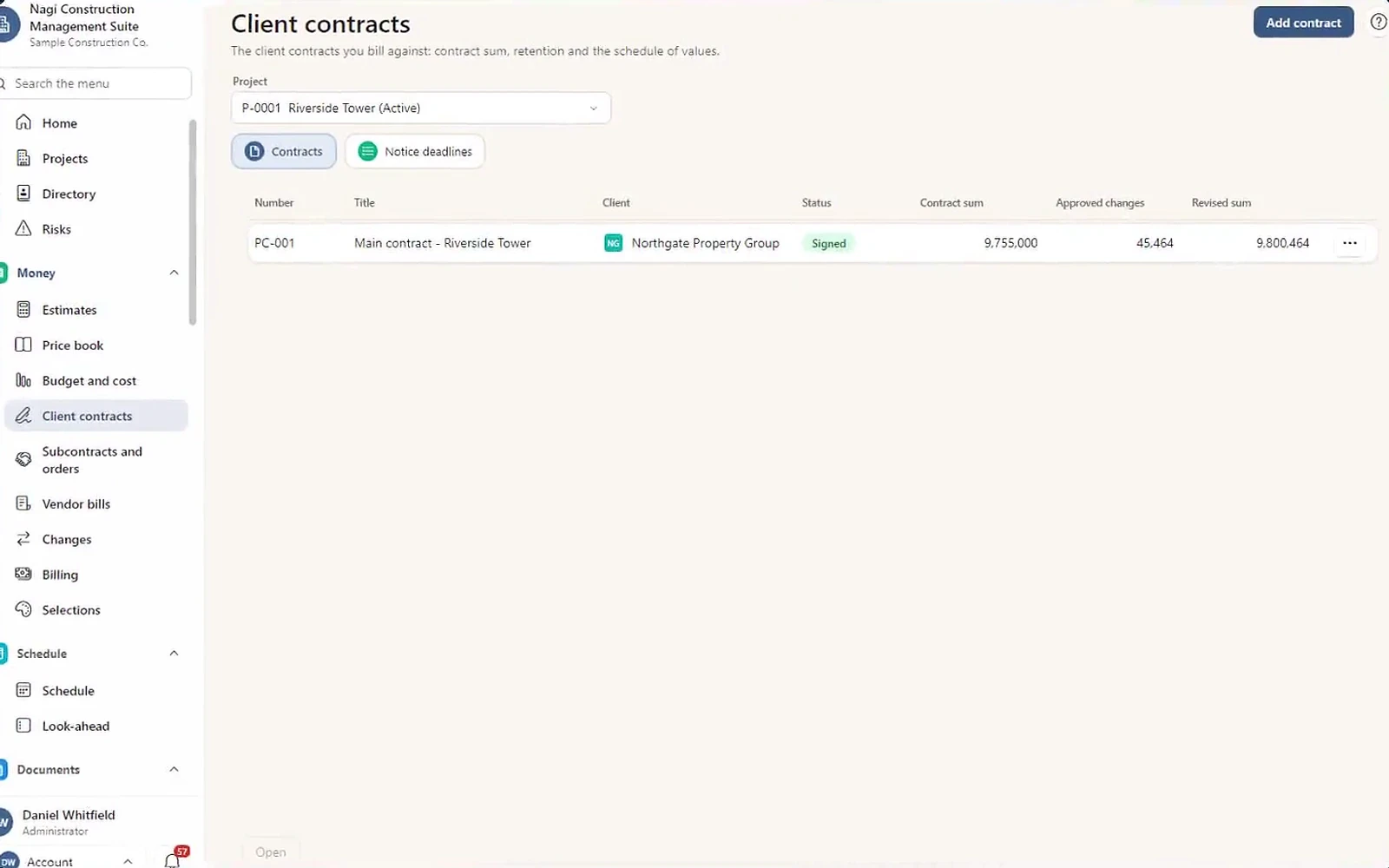
- The client contract holds the schedule of values and the retention rate. Type the lines once, or import a bill of quantities from Excel or CSV. Our schedule of values template explains how to split the lines.
- Potential changes become change orders, and each approved one updates the contract, the budget and the billing in one step.
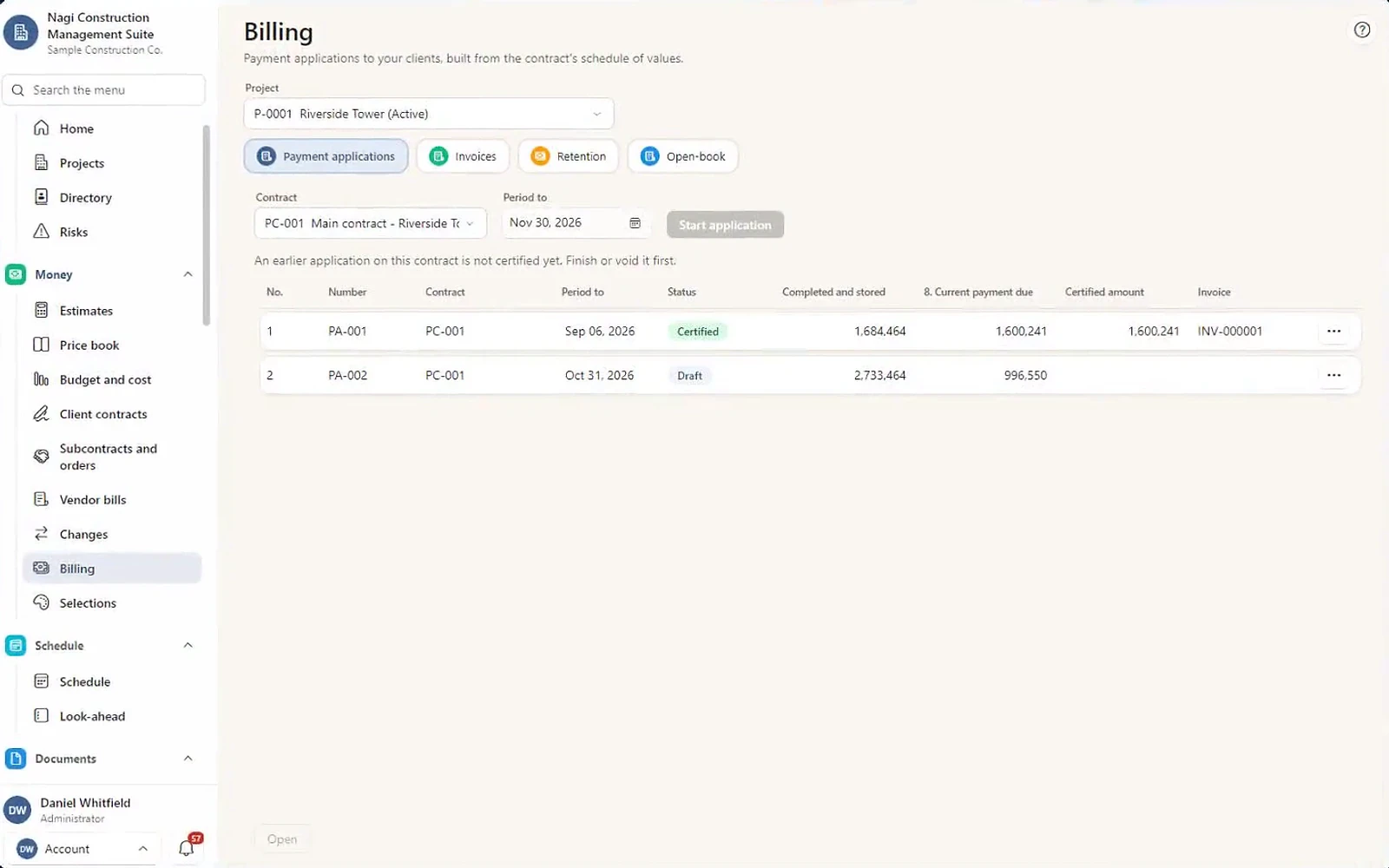
- Each application for payment is built from the contract and the work done, so previous figures, retention and the amount due come from numbers the office already keeps.
- Built-in bookkeeping (chart of accounts, journals, bank reconciliation, profit and loss) sits in the same program.
Applications print on your own letterhead, in English or Arabic (right to left), in the company's own currency, with tax codes at your own rate and your tax number on invoices where you need them. What it doesn't do: there's no owner portal, so you still send the PDF yourself, and it doesn't collect lien waivers from your subs.
The data stays in a company database on your own PC, and the program runs offline apart from a few seconds online at least once every 14 days. If you're weighing the cost against cloud tools, our construction software cost comparison runs the numbers over five years, and the pricing page shows what a company license costs.
AIA, G702 and G703 are trademarks of The American Institute of Architects. Knowify and Contractor Foreman are trademarks of their respective owners. Nagi Software is not affiliated with, endorsed by or sponsored by them. This template is an independent G702/G703-style document and does not reproduce AIA forms. Comparisons use information published by each vendor on the date shown. General information, not legal advice: check your contract and local law.
Frequently asked questions
- Is there a free G702/G703 template in Excel?
Yes. Ours is free and ungated: an Excel workbook with an application summary, a continuation sheet, a change order log and a how-to tab, with the formulas already in place. It follows the G702/G703 billing logic in its own layout and wording. It is not an AIA document; if your contract names the official AIA forms, buy them from AIA Contract Documents.
- What is the difference between G702 and G703?
The G702 is the one-page summary, the Application and Certificate for Payment: contract sum, change orders, work to date, retainage, previous certificates and the amount due. The G703 is the continuation sheet behind it: one row per schedule-of-values line, showing work completed previously and this period, stored materials, percent complete, balance to finish and retainage.
- Can I use my own pay application form instead of AIA?
Often, yes. Many owners and general contractors accept any clear form that shows the schedule of values, work and stored materials to date, retainage, previous certificates and the amount due. If the contract names AIA documents, use the official forms. When unsure, send your format to the person who certifies your applications before the first one is due.
- How is retainage shown on the G702?
On AIA's layout, retainage sits on line 5 of the summary, usually split into retainage on completed work and retainage on stored material, then totaled. It's taken off the total completed and stored to date to give the total earned less retainage. Our template does the same with two rates you can set separately, because some contracts hold a different rate on stored materials.
- Does the G702 need to be notarized?
Only if your contract, the owner or your state requires it. The AIA summary form has a notary block, and some owners and lenders insist on it, while many private jobs skip it. Check the contract's payment section; if it says the application must be sworn or notarized, budget the extra day each month.
Sources
- AIA Contract Documents (official G-series pay application forms), checked November 13, 2026
- Knowify pricing page (AIA pay applications G702 and G703), checked November 13, 2026
- Contractor Foreman pricing page (AIA-style G702/G703 invoicing, retainage), checked November 13, 2026
- Nagi Software pricing page, checked November 13, 2026
The product in this post
Nagi Construction Management Suite
Run a construction company from estimate to close-out in one program that keeps your data on your own PC.
- template
- g702
- g703
- pay-application
- progress-billing
- retainage