
Construction Management Software You Buy Once (and Run Offline): 2026 Costs
Which construction programs you can still pay for once, what six popular platforms cost a 10-person contractor over one, three and five years, and a five-minute test for offline claims. Every price dated and linked.
Nagi Software TeamUpdated 15 min read
Yes, you can still buy construction management software once, but only a handful of products sell it that way. Almost everything a small contractor shortlists in 2026 is rented: per user, in tiers with a user cap, or on a quote tied to how much you build. We make one of the exceptions, Nagi Construction Management Suite, so we're not neutral. Below are the pay-once options we could find, six platforms priced for a 10-person contractor over one, three and five years (every figure from the vendor's own page, dated), and a five-minute test for any vendor's "works offline" claim.
Short answer: is there construction software you buy once?
There is. Nagi Construction Management Suite sells a lifetime license at a price of $349.50 (50% off $699), as listed on nagisoftware.com/pricing on 13 November 2026. That's one payment with no expiration date, for one company on its own Administrator PC with 10 employee seats. Monthly ($99) and yearly ($199.50 discounted price, 50% off $399) plans exist too.
None of the other six products in our cost table lists a one-time price on a page we could read. Older Windows programs aimed at contractors still turn up with "one-time license" tags on directory sites; we cover what their own pages say further down. Cloud pricing isn't a trick, by the way. You get hosting, browser access from any site and portals for clients and subs. You just pay for them every year, for as long as you want to open your job history.
How construction software is priced in 2026
Five models cover nearly everything a small contractor will see.
- Per user. Fieldwire charges $39, $64 or $89 per user per month, billed annually. Its free Basic plan covers 5 users, 3 projects and 100 sheets.
- Base fee plus internal users. JobTread lists $199 a month including one internal user, then $20 a month for each internal user from 2 to 10 on the monthly plan ($16 on the annual plan, which saves 20%). Portal users for subs, vendors and customers are free.
- Flat tiers with a user cap. Contractor Foreman's annual plans run from $49 a month for 1 user to $332 a month for unlimited users. Projul's annual plans run from $199 a month (up to 3 users) to $1,199 a month (unlimited).
- Quote by construction volume. Procore doesn't publish prices. Its pricing page says it charges "an upfront annual fee by product" based on your Annual Construction Volume, and never charges for extra users.
- Perpetual license plus maintenance. The traditional desktop model: a large first payment, then a yearly support or maintenance plan for updates and help. It's now rare, and most products that used it sell through resellers on a quote.
And then there's per company with a pay-once option, which is how Nagi sells. One company license covers one Administrator PC and 10 employee PCs. The price doesn't move with the number of people in your directory or the size of your jobs.
A 10-person contractor: 1-, 3- and 5-year cost
The scenario: 10 office and field staff who each need full access. We took the cheapest annual plan that fits 10 users at its listed price and multiplied it out. Where a feature most contractors expect sits on a higher plan, we show that plan as well.
| Product and plan | How it's priced | Year 1 | 3 years | 5 years |
|---|---|---|---|---|
| Nagi CM Suite, lifetime | $349.50 once (50% off $699) | $349.50 | $349.50 | $349.50 |
| Nagi CM Suite, yearly | $199.50 first year (50% off $399) | $199.50 | Renewal: see pricing* | Renewal: see pricing* |
| Nagi CM Suite, monthly | $99 per month | $1,188 | $3,564 | $5,940 |
| Contractor Foreman Pro (up to 15 users) | $2,654 a year | $2,654 | $7,962 | $13,270 |
| JobTread annual (1 included + 9 internal users) | $199 base less 20%, plus 9 × $16 a month | $3,638.40 | $10,915.20 | $18,192 |
| Projul Core (up to 10 users) | $4,788 a year | $4,788 | $14,364 | $23,940 |
| Projul Core+ (adds job costing and progress billing) | $7,188 a year | $7,188 | $21,564 | $35,940 |
| Fieldwire Business Plus (10 users) | $89 per user per month, billed annually | $10,680 | $32,040 | $53,400 |
| Procore | Quote by Annual Construction Volume | Quote only | Quote only | Quote only |
| Sage 100 Contractor | No price listed on the page (read 15 Nov 2026) | See vendor | See vendor | See vendor |
Prices as listed on each vendor's pricing page on 13 November 2026, in US dollars, before tax. Prices change; check the vendor's page. *The yearly row shows year 1 only. $199.50 is a discounted price; check nagisoftware.com/pricing for what a renewal costs.
Rival prices last checked on 15 November 2026 on each vendor's public pricing page.
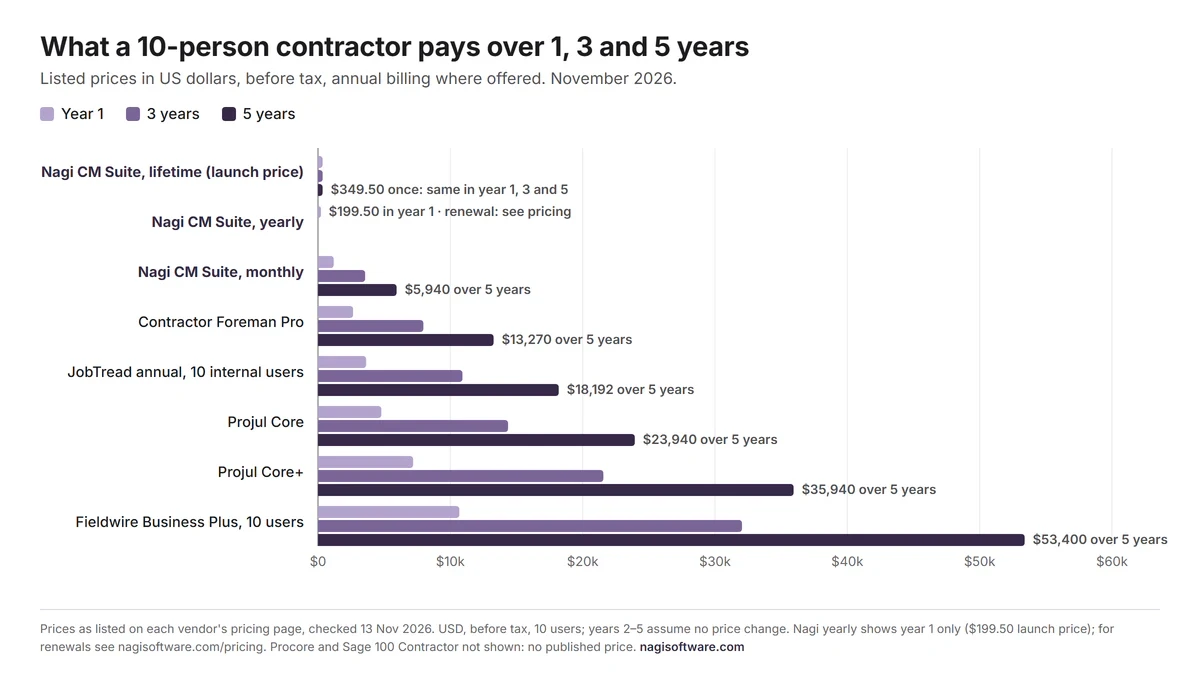
The table hides three things you should check before you sign.
- Tiers decide features, not just seats. On Projul, job costing, budgeting and progress billing start at Core+, and daily logs at Pro. On Fieldwire, RFIs, submittals, change orders and budget sit in Business Plus. The cheapest plan that "fits 10 users" may not fit your work.
- JobTread lets some field crew in free. Its pricing page says crew who only upload photos, log daily notes, view schedules and check off tasks can be added as free users. If only five of your ten need full access, that bill drops.
- Nagi's seats are PCs. "10 users" here means one Administrator PC plus 10 employee PCs, which one company license covers. Phones don't take employee seats: they use phone connections, one for the company seat and one for each employee seat, so 11 in all.
Our call for a 10-person outfit that bills on a schedule of values: compare Projul Core+ ($7,188 a year) or Fieldwire Business Plus ($10,680) against a program you pay for once, not their entry plans, because the entry plans leave out the billing you'll use every month. To run the same comparison on your own headcount and see when a subscription catches up, use the free subscription vs one-time license calculator; more tools like it are on our free tools page.
Features side by side
Cells come from each vendor's own pricing, feature or help pages. "Not listed" means we couldn't find it on the pages we checked, not that it doesn't exist.
| Nagi CM Suite | JobTread | Contractor Foreman | Projul | Fieldwire | Procore | |
|---|---|---|---|---|---|---|
| Free trial | 7 days in the browser, no card | None; 30-day money-back on monthly | 30 days | Not listed; demo | Free Basic plan | Not listed; quote |
| Runs offline | Desktop: yes, online a few seconds every 14 days. Android: site entries queue | Not listed | Not listed | Not listed | Mobile apps, with downloaded content | Mobile app, with cached items |
| Where data lives | Your PC; Nagi Cloud optional | Vendor's servers | Vendor's servers | Vendor's servers | Vendor's servers | Vendor's servers |
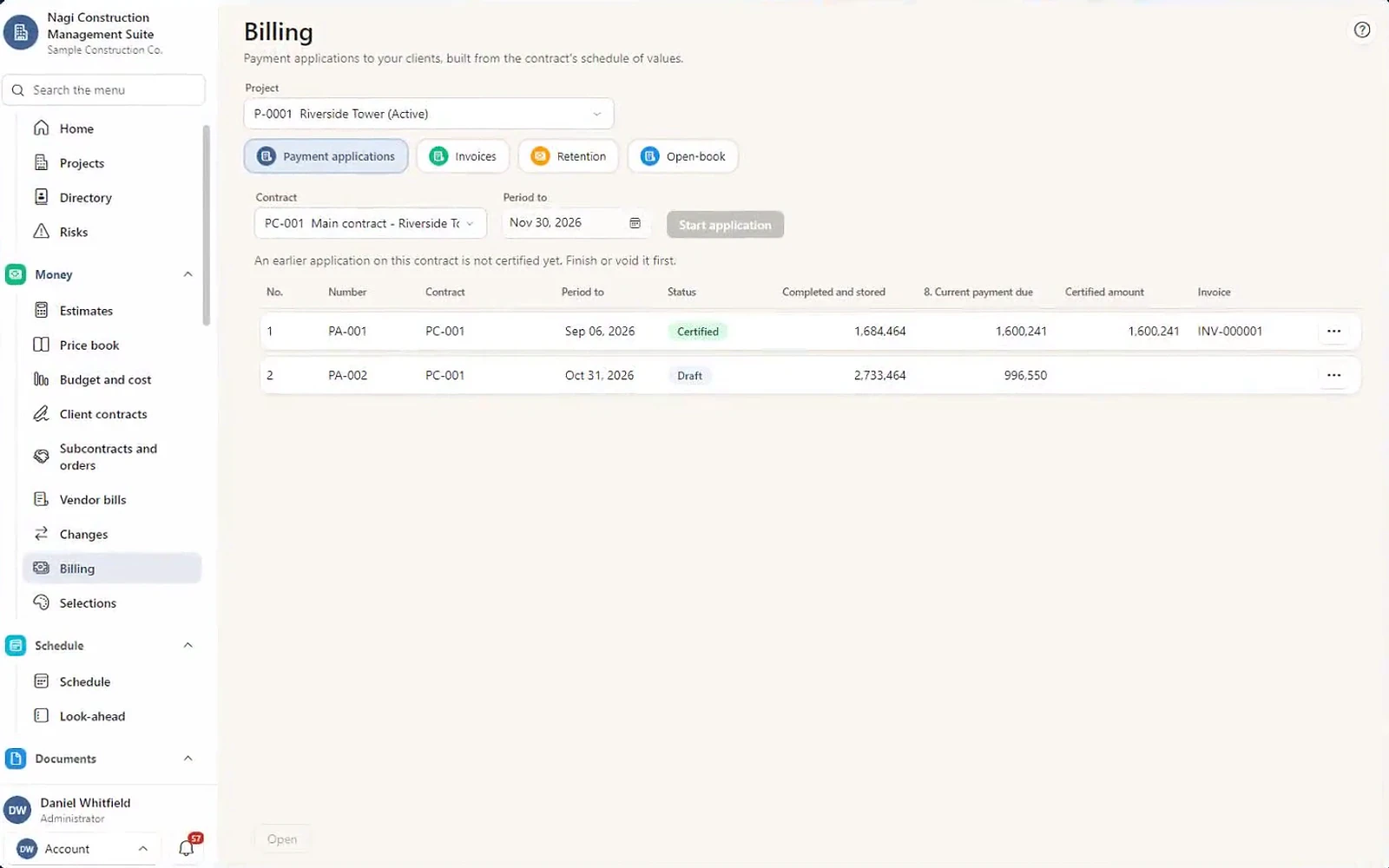
| Schedule of values with retention | Included | AIA payment applications listed | AIA-style G702/G703 invoicing, retainage listed | Progress billing, Core+ and up | Not listed | Not listed on pricing page |
| Built-in books | Chart of accounts, journals, bank reconciliation, P&L, balance sheet | QuickBooks Online integration | QuickBooks Online integration | QuickBooks Online (Core+), Desktop (Pro) | Not listed | Not listed on pricing page |
| Arabic interface | Included (right to left) | Not listed | Not listed | Not listed | Not listed | Not listed |
| Installed desktop app | Windows and Mac | Not listed | Not listed | Not listed | Not listed | Not listed |
Pay-once options that still exist (and their maintenance fees)
We searched for every construction program still sold with a one-time price, then went to each vendor's own site. What we could confirm is shorter than the directory lists suggest.
| Product | What the vendor's own page says (13 Nov 2026) | Our note |
|---|---|---|
| Nagi CM Suite | Lifetime license, $349.50 discounted price, "one payment, no expiration" | Same program as monthly. Updates included today; see the next sections for the fine print |
| Sage 100 Contractor | The product page lists no price (read 15 Nov 2026) | Listings disagree on whether it's sold perpetual or by subscription. Ask a Sage partner for a written quote that separates the license from the yearly support plan |
| Deltek ComputerEase | Describes cloud hosting and says you "only pay for the first month" when you start | Directories still tag it "one-time". The vendor page reads like monthly billing now; confirm before you budget |
| Contractor's Office | The vendor site didn't respond when we checked on 14 and 15 November 2026 | Directories list a "Pay Once" plan with a separate yearly support plan. We don't quote a figure we couldn't read on the vendor's page |
| Construction Partner | Its pricing page lists software and setup at $6,995 "one time", then maintenance and updates at $895 billed every six months ($1,790 a year) after a 90-day onboarding; no per-user fee (read 15 Nov 2026) | One-time for the software, but maintenance recurs. Ask what the maintenance covers if you stop paying it |
Two patterns stand out. Old perpetual products usually charge again every year for support and new versions, so "one-time" covers the license only. And several are drifting toward monthly billing. Ask any pay-once vendor these four questions in writing: what the yearly support plan costs, whether you can keep running the last version if you stop paying it, how many PCs one license covers, and how you get all your data out.
What a one-time license covers in Nagi CM Suite
The lifetime plan and the monthly plan run the same program. Everything below is in version 1.5.8, the current release on the product page.
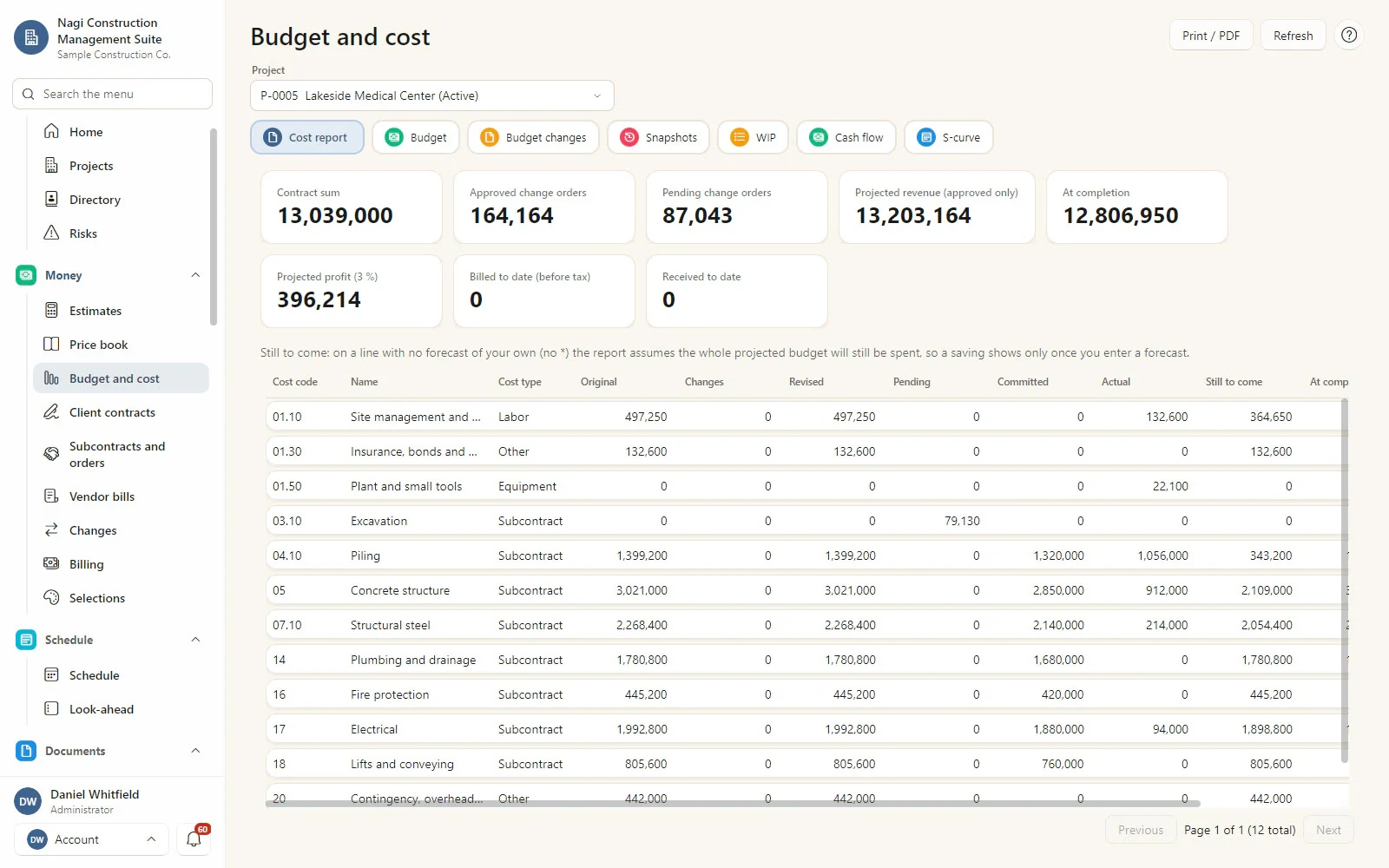
- Money: estimates from your own price book with reusable assemblies, budget and cost by cost code (committed, actual, forecast), client contracts with schedules of values and retention, subcontracts and purchase orders, vendor bills matched to commitments, potential changes and change orders, and progress billing with applications for payment built from the contract and the work done.
- Documents: drawings with revisions and sheet viewing, specifications, RFIs, submittals, transmittals, correspondence and meeting minutes, with print forms on your own letterhead.
- Field: daily logs, photos and time sheets, punch lists, quality and safety records (including permits and incidents), workforce, equipment and subcontractor compliance, close-out and warranty.
- Schedule: tasks with dependencies, look-ahead plans, and imports of Microsoft Project (.mpp, Project XML) and Primavera (.xer) files.
- Books: chart of accounts, journals, bank reconciliation, profit and loss, balance sheet and trial balance. Our guide to construction bookkeeping software covers when that's enough and when to keep an accountant's package.
Setup imports help on day one. Excel or CSV files load your directory, projects, cost codes, price book, chart of accounts and opening balances, and a bill of quantities can go straight into a client contract. Bank statements come in as CSV or BAI files.
It runs on Windows 10 and 11 (64-bit) and on Macs with Apple silicon (macOS 15 or later), with an Android app for the site team. The Mac version went on sale with version 1.5.8 on 11 November 2026, and one license covers both. Screens come in English, Arabic (right to left, printouts too), Spanish, French and German, and each company sets its own currency. For Gulf contractors there are tax codes with your own rate (mark VAT as recoverable and it stays out of job cost), and your company tax number prints on invoices; you choose which code applies to each line. It has no AI features.
Does it work offline? A 5-minute test you can run on any tool
Most vendors say "works offline". Few mean the same thing. Run this on every trial before you sign, on the phone and on the laptop your office uses:
- Sign in, open a job, then switch on airplane mode.
- Open a drawing you haven't viewed before.
- Add a daily log entry with a photo.
- Look up an RFI or a submittal.
- Open the job's budget or the latest pay application.
- Switch the connection back on and check that the step 3 entry arrived, once, with its photo.
A cloud app with an offline cache usually passes step 3 and fails steps 2, 4 and 5, because it can only show what it stored earlier. That isn't a defect; it's how a website with a buffer works. A desktop program with the database on your PC should pass everything on the laptop. Procore's support FAQ, for example, says its mobile app works offline with items you've "previously viewed", and new project data waits until you reconnect. Fieldwire's help center says its iOS and Android apps show downloaded content offline and sync new entries later. Buildertrend's blog describes offline daily logs and time clock in its mobile app. JobTread's mobile page describes a progressive web app and doesn't state offline use.
What runs offline in Nagi CM Suite
On Windows or Mac, everything in the module list above runs without a connection: estimates, contracts, change orders, billing, drawings, RFIs, schedules, field records and the books. The data is a database file in the company folder on your PC, with documents and photos beside it, and it doesn't leave that PC unless you move the company to Nagi Cloud or send a backup yourself.
Employee PCs and phones on the same office network reach the Administrator PC with no internet at all. The Administrator PC has to be switched on for them, unless the company is on Nagi Cloud.
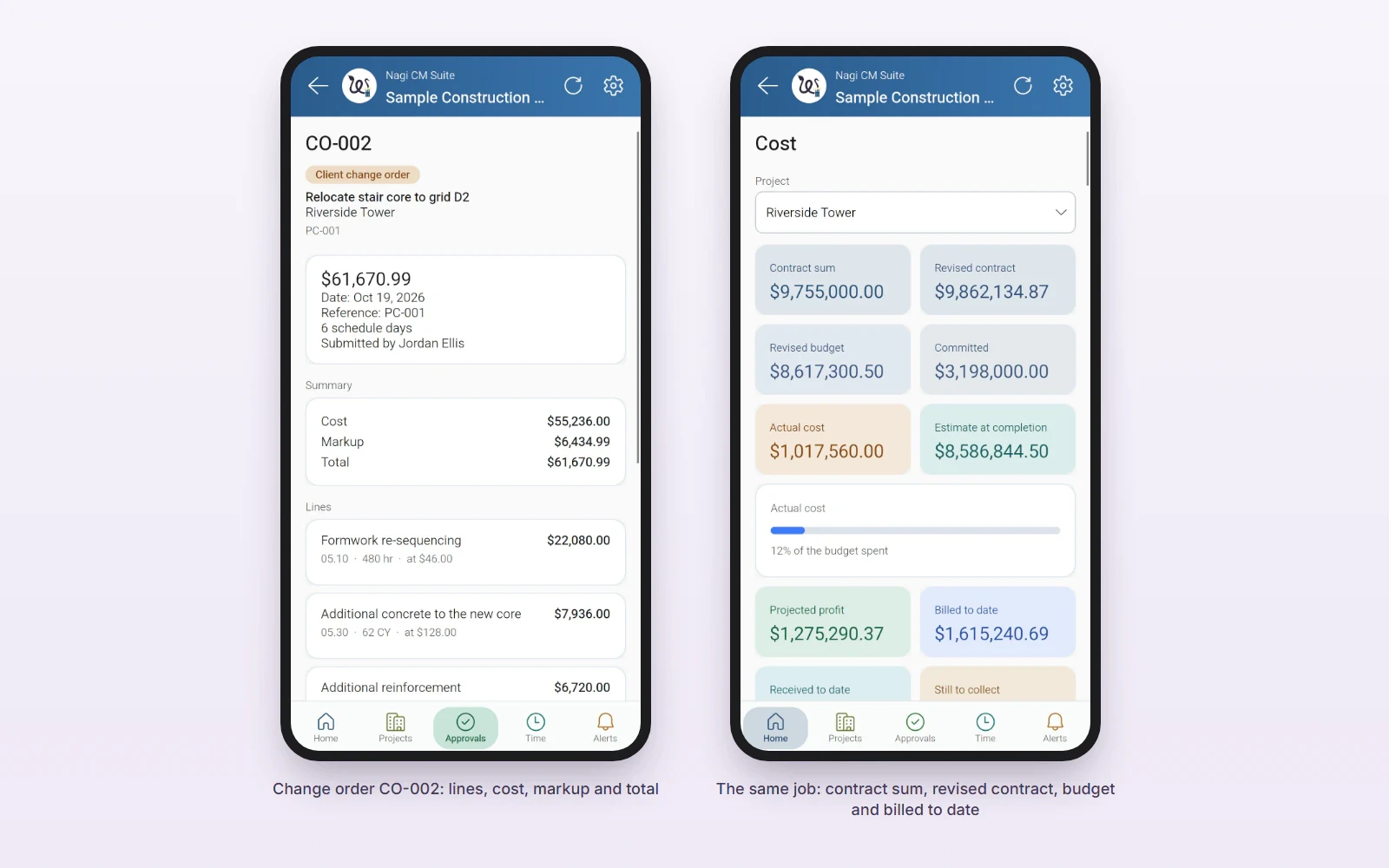
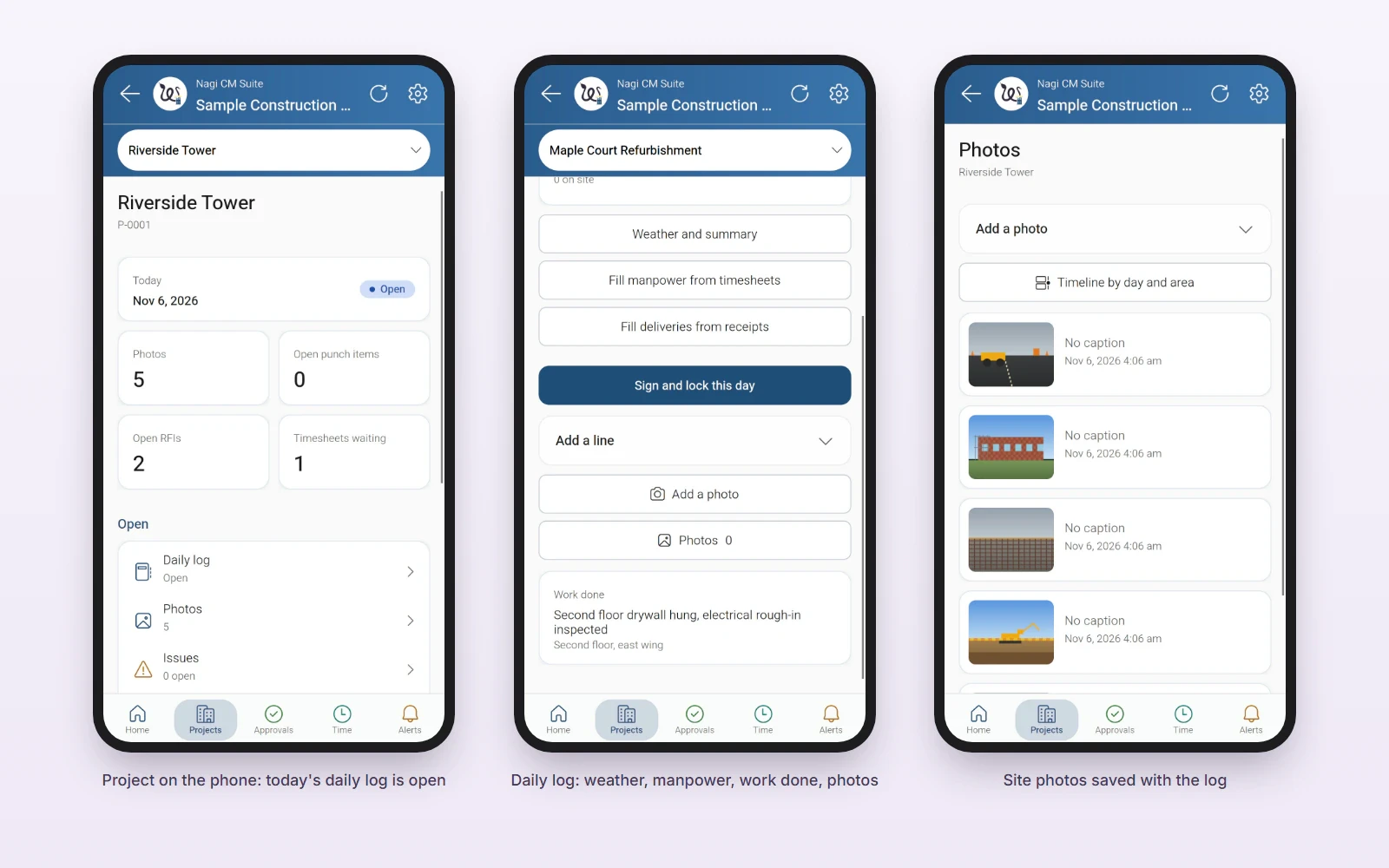
The phone needs plainer wording. On the Android app, new site entries work offline: hours, daily logs, photos, punch items, observations and incidents wait in the phone's outbox and are sent when it's back online. Looking things up (projects, RFIs, documents, approvals) needs a connection. So the site entries are offline; the whole phone app isn't. With a signal, a manager who has approval rights can approve or reject change orders and timesheets from the phone.
What needs internet
- Activation, and a check of a few seconds at least once every 14 days. Every plan does this, lifetime included; miss it and the program asks you to reconnect.
- Updates, which you download as signed installers.
- People away from the office. Reaching the Administrator PC from another site needs internet hosting through your router, which needs a dedicated public IP address from your provider, or Nagi Cloud.
- Nagi Cloud itself, and the phone's look-ups.
- The free trial, which runs in the browser at cms.nagisoftware.com and keeps its data in your browser.
The catch with "lifetime"
A one-time price is only good value if you know what it buys. This is what Nagi's own pages say, plainly.
"Lifetime" means the life of the product. The license agreement defines it as the life of the software product you bought it for, not your life or your company's. If the product is discontinued, you can keep using the last version you were licensed for, and Nagi says it will give reasonable notice before withdrawing activation.
Updates are included with every license today. The same agreement says no license, lifetime included, carries a contractual right to future updates. It's a policy, not a promise.
Monthly and yearly plans end on their date unless renewed, and automatic renewal is off by default. When one lapses, nothing is deleted: the company turns read-only, so you can still open, print and export every job. The yearly $199.50 is a discounted price, so check the pricing page for the renewal price before you plan years 2 to 5 on it.
Nagi Cloud is a separate monthly add-on per company, priced before you pay and not refundable. When a Nagi Cloud period ends, the hosted company keeps running for 24 hours and is then deleted with its backups, after warnings from seven days before. You can leave Nagi Cloud at any time and bring the company back to your own PC.
$349.50 is a discounted price, half of $699. Neither the pricing page nor this article gives it an end date. Refunds: 7 days on monthly, 14 days on yearly and lifetime; add-ons and renewals aren't refundable.
Vendor decisions you don't control
Renting software means the vendor sets the roadmap. CoConstruct is the clearest recent case. When Buildertrend acquired it on 24 February 2021, CoConstruct's announcement said there were no plans to shut down either product. CoConstruct's own migration page now asks customers to move to Buildertrend and says projects can still be added through 31 March 2027, with past projects kept viewable.
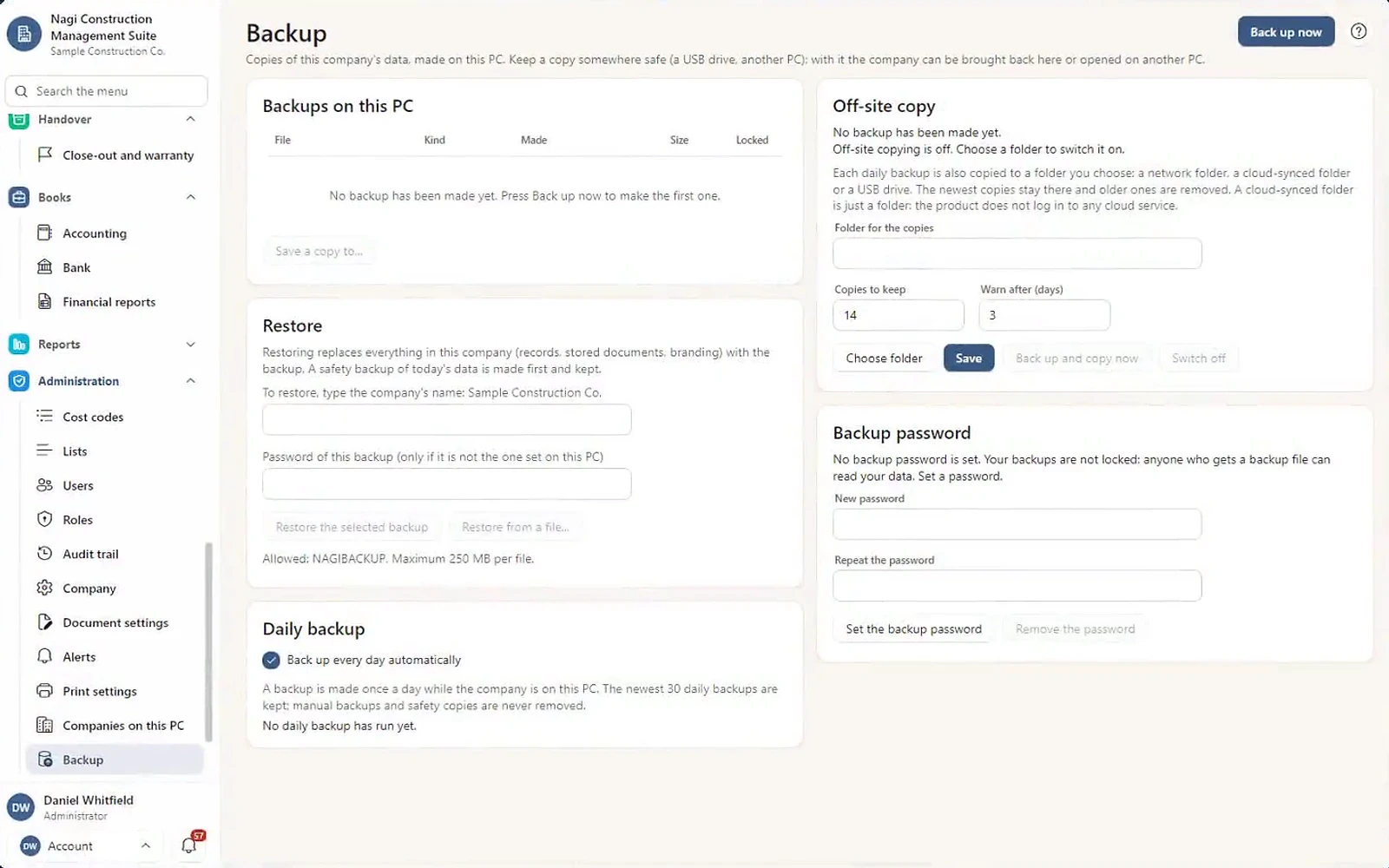
Installed software doesn't remove that risk. A vendor can stop updating a product, Nagi included. What changes is where the records sit. With a desktop program the database and documents are on your PC, a backup is one file you keep, and moving to a new computer is backup, install, restore.
When a subscription tool is the better fit
Pick the subscription if any of these describe you. We'd rather lose the sale than have you fight the wrong tool for five years.
- You're a large GC or owner-side team running BIM coordination, owner reporting and dozens of jobs at once. Procore's unlimited-user model and product range are built for that scale.
- Clients, subs and vendors need to log in. JobTread and Procore let them in through portals at no extra charge. Nagi CM Suite has no client or sub portal.
- QuickBooks or Xero sits at the center of your office. Several tools above sync with QuickBooks Online. Nagi has built-in books and no accounting integration.
- Your crew works from phones everywhere, all day, including iPhones. Cloud tools reach any browser by default. With Nagi, people away from the office need internet hosting or Nagi Cloud, and the phone app is Android only.
Who should not buy Nagi: a contractor whose people never sit at an office PC and who won't keep one switched on or pay for Nagi Cloud. You'd be paying for a desktop program you don't use as one.
If none of those fit, the per-company model is worth the five-minute test above. Our Procore alternatives for small contractors compare field features in more depth, and perpetual license vs subscription runs the same five-year math for software in general.
How we calculated
JobTread, Contractor Foreman, Projul, Fieldwire, Procore, Sage 100 Contractor, ComputerEase, Contractor's Office, Construction Partner, CoConstruct, Buildertrend, QuickBooks, Xero, Microsoft Project and Primavera are trademarks of their respective owners. Nagi Software is not affiliated with, endorsed by or sponsored by them. Comparisons use information published by each vendor on the date shown.
Frequently asked questions
- Is there construction management software without a monthly fee?
Yes, a few. Nagi Construction Management Suite sells a lifetime license at a price of $349.50 (50% off $699), as listed on nagisoftware.com/pricing on 13 November 2026, for one company with an Administrator PC and 10 employee PCs. Directory sites also list one-time plans for older Windows programs such as Contractor's Office and Construction Partner; confirm those with the vendor. Most cloud platforms are monthly, annual or quoted by construction volume.
- What does a lifetime license include?
For Nagi, the same program as the monthly plan, with no end date. Updates are included today, but the license agreement says no license, lifetime included, carries a contractual right to future updates, and lifetime means the life of the product. The program still goes online for a few seconds at least every 14 days. Nagi Cloud and extra employee seats are billed separately.
- What happens to my data if I stop paying?
With a Nagi monthly or yearly plan, nothing is deleted: the company becomes read-only, so you can open, print and export your jobs but not change them until you renew. The data stays in a database file on your own PC. Nagi Cloud is stricter: 24 hours after a Nagi Cloud period ends, the hosted company and its backups are deleted, so download a copy first.
- Does construction software work without internet on site?
It depends on what the vendor means by offline. Cloud apps usually cache what you opened and sync later. Nagi's desktop program runs with no connection apart from a few seconds every 14 days, and its Android app can record hours, daily logs, photos, punch items, observations and incidents offline and send them later; looking things up on the phone needs a connection.
- Is free construction management software good enough for a small contractor?
For drawings and tasks on a few jobs, sometimes. Fieldwire's free Basic plan covers 5 users, 3 projects and 100 sheets (pricing page, 13 November 2026). Free plans rarely include budgets, change orders or progress billing, so once you bill on a schedule of values you will need a paid plan or a program you buy.
Sources
- Nagi Software pricing page, checked November 13, 2026
- JobTread pricing page, checked November 13, 2026
- Contractor Foreman pricing page, checked November 13, 2026
- Projul pricing page, checked November 13, 2026
- Fieldwire pricing page, checked November 13, 2026
- Procore pricing page, checked November 13, 2026
- Sage 100 Contractor product page (no price listed), checked November 15, 2026
- Deltek ComputerEase product page, checked November 13, 2026
- Fieldwire help: Can I use Fieldwire while offline?, checked November 13, 2026
- Procore support: Can I use Procore's mobile application in offline mode?, checked November 13, 2026
- Buildertrend blog: offline Daily Logs and Time Clock, checked November 13, 2026
- JobTread mobile app page, checked November 13, 2026
- CoConstruct: CoConstruct has joined the Buildertrend family (24 February 2021), checked November 13, 2026
- CoConstruct migration page, checked November 13, 2026
- Nagi license agreement (clauses 3, 5 and 6), checked November 13, 2026
- Nagi Cloud page, checked November 13, 2026
The product in this post
Nagi Construction Management Suite
Run a construction company from estimate to close-out in one program that keeps your data on your own PC.
- construction-software
- pricing
- lifetime-license
- one-time-purchase
- offline
- comparison