
Buildertrend Alternatives: Prices and Features Compared
Buildertrend now quotes every customer. Five alternatives for builders and remodelers with their listed prices, a 5-year cost for a 10-person team, what you give up when you switch, and when Buildertrend is still the better buy.
Nagi Software TeamUpdated 16 min read
Nagi Software makes Nagi Construction Management Suite, which appears in this comparison.
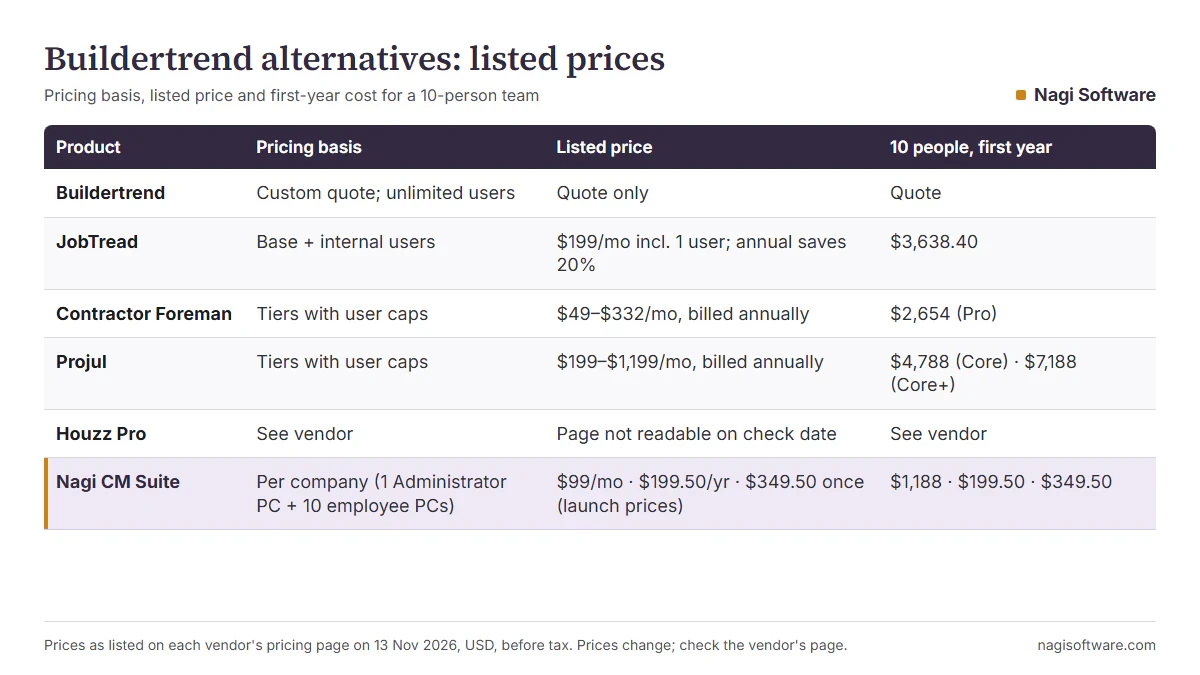
The main Buildertrend alternatives for builders and remodelers are JobTread, Contractor Foreman, Projul and Houzz Pro, plus Nagi Construction Management Suite if you'd rather pay once and keep the data on your own PC. Buildertrend no longer publishes prices, so the table below sets each alternative's listed price beside its quote-only model, then works out five years for a 10-person team. We make Nagi, and we say where Buildertrend is still the better buy.
Short answer
Prices as listed on each vendor's pricing page on 13 November 2026, in US dollars, before tax. Prices change; check the vendor's page.
| Product | Pricing basis | Listed price | 10 people, first year | Trial or guarantee | Where your data lives |
|---|---|---|---|---|---|
| Buildertrend | Custom quote; unlimited users | Quote only; 10% off when paid annually upfront | Quote | Demo; no trial listed | Vendor's cloud |
| JobTread | Base fee + internal users; portal users free | $199/month incl. 1 user + $20 per user (users 2–10) monthly; annual saves 20% | $3,638.40 (annual) | No free trial; 30-day money-back on monthly | Vendor's cloud |
| Contractor Foreman | Tiers with user caps | $49 to $332/month billed annually; monthly $139 to $399 | $2,654 (Pro, up to 15 users, annual) | 30 days free on annual plans | Vendor's cloud |
| Projul | Tiers with user caps | $199 to $1,199/month billed annually | $4,788 (Core, up to 10) or $7,188 (Core+, with job costing) | Demo; no trial listed | Vendor's cloud |
| Houzz Pro | Plan plus extra users | Pro $199/month (1 user); Teams from $399/month (5 users); +$50 per extra user (read 15 Nov 2026) | $7,788 (Teams: 5 users + 5 extra, monthly price × 12) | 30-day trial | Vendor's cloud |
| Nagi CM Suite | Per company: 1 Administrator PC + 10 employee PCs | $99/month; $199.50/year or $349.50 once (50% off $399 and $699) | $1,188 (monthly), $199.50 (yearly) or $349.50 once | 7 days in the browser, no card | Your PC; Nagi Cloud optional |
Rival prices last checked on 15 November 2026 on each vendor's public pricing page.
A few notes so the rows compare fairly. JobTread lets field crew who only upload photos, log notes or view schedules join free, so your paid count may be under 10. Contractor Foreman's 8-user Plus plan won't fit 10 people, so Pro is the plan shown. Projul puts job costing and progress billing on Core+. Nagi's "10 people" means a 10-person office where everyone has a PC: one company license covers 1 Administrator PC and 10 employee PCs, plus 11 phone connections.
What Buildertrend costs in 2026
Buildertrend doesn't list a price. Its pricing page asks whether you're a home builder, remodeler, specialty contractor or commercial general contractor, then your average annual construction volume (five brackets, from $0–499K to $31M+) and your revenue. You get a custom quote on a call. The FAQ on the same page says "pricing is tailored" and that each subscription includes unlimited users, the core set of tools, daily virtual trainings and the help center.
Two other facts from that page are worth knowing before the call. There's a 10% discount "when you pay annually upfront". And the page describes the ideal buyer as a builder who oversees five or more projects a year and wants to grow from six to eight figures of revenue. If you run two kitchens at a time, you're not who the page is written for, and the quote may reflect that.
Many comparison sites still print Buildertrend's tier prices from 2024. We haven't repeated them, because Buildertrend's own page no longer shows them and we can't check them. Treat any dollar figure you see elsewhere as a starting point for the call, not a price.
Questions to ask on that call:
- Is the price fixed for the term, and what was the average renewal increase last year?
- Is the contract annual? Can I pay monthly, and can I leave at the end of any month?
- Does the quote change if my construction volume grows?
- Which features are in my plan, and which cost extra (payments, takeoff, AI, onboarding)?
- How do I get all my data out if I leave?
Why contractors look for alternatives
Buildertrend is a capable product with a large user base; its pricing page says more than a million users in over 100 countries. People who leave mostly describe the commercial terms, not the features. Here is what public reviews report, with the caveat that unhappy customers write more reviews than happy ones.
On Trustpilot, Buildertrend scored 2.1 out of 5 from 11 reviews when we checked; Trustpilot notes the company hasn't recently invited customers to review, so the sample may not be representative. Most of the low ratings from 2026 describe annual terms: a yearly renewal the reviewer says was charged without notice, a request to return to month-to-month declined, and a contract that couldn't be suspended during a cash-flow problem. Rising prices and unclear pricing on sales calls come up in several more.
On its BBB profile, reviews averaged 1.1 out of 5 from 10. Buildertrend replies there, and the replies are useful facts: in March 2026 it processed a refund for a disputed renewal, and in December 2025 it wrote that it "does not currently offer a bulk or 'Export All' feature".
Outages are the other thing reviewers raise. Buildertrend publishes its incidents on a status page, which listed 25 when we read it, most of them short. Publishing them is to its credit.
Where Nagi carries the same risk, so you can weigh it fairly:
- Renewals. Monthly and yearly Nagi licenses have to be renewed, and $199.50 a year is a discounted price, so check the pricing page for what a renewal costs. Only the lifetime license avoids renewals.
- Support. We have no phone line and publish no guaranteed response time. A person reads every message, but we're a small team.
- Nagi Cloud. If you use it, your data is on our server, and we publish no uptime figure.
Auto-renew on Nagi is off by default, monthly licenses have no annual term, and an expired license leaves your company file on your PC in read-only mode. Those are structural differences we can show. We can't claim fewer bugs or faster support; we have no data for that.
The alternatives
Each profile uses the vendor's own pricing or feature page, checked on 13 November 2026.
JobTread
A cloud platform for home builders, remodelers and specialty contractors, sold as a base fee plus internal users. Its pricing page lists estimating, takeoff, cost catalog, budgeting, job costing, change orders, purchase orders, AIA payment applications, customer and vendor portals, selections and allowances, online payments, daily logs and a QuickBooks Online and Gusto link. Customer, sub and vendor portal users are free. There's no contract and no setup fee, no free trial, and a 30-day money-back guarantee on monthly plans. The mobile app is a progressive web app you save from the browser; "You won't find JobTread in your favorite app store," the page says. Offline use isn't mentioned.
Pick it if you want Buildertrend's client-facing features at a price you can see.
Contractor Foreman
Priced in tiers by user count, from one user ($49 a month, annual only) to unlimited ($332 a month billed annually). The pricing page lists a long feature set: daily logs, punch lists, RFIs, submittals, change orders, schedule of values, progress invoicing, AIA-style G702/G703 billing, retainage, bid management, time cards, client portal, and QuickBooks Online and Gusto links, with Xero listed as coming in Q4 2026. Annual plans start with 30 days free; Plus and up add a 100-day money-back guarantee. Its FAQ says the price doesn't increase as your company grows or adds projects. Selections aren't named on the pricing page.
Pick it if you want the most features per dollar for a team of 8 to 15, and you're comfortable in a browser and its iOS and Android apps.
Projul
Flat tiers with user caps: Starter (up to 3 users), Core (10), Core+ (20) and Pro (unlimited), from $199 to $1,199 a month billed annually. Change orders start on Core. Job costing, budgeting, progress billing, the client portal and QuickBooks Online start on Core+. Daily logs, purchase orders and selections need Pro. Annual plans other than Starter include a premium support package. The page offers a demo, not a trial.
Pick it if you're a residential contractor who wants a simple tool and phone-based onboarding, and check which tier carries the features you use.
Houzz Pro
Aimed at remodelers and design-build firms. Its pricing page lists Pro at $199 a month for 1 user and Teams from $399 a month for 5 users, with extra users at $50 a month each, and a 30-day trial. The page returned an error when we first checked on 13 November 2026; we read it on 15 November 2026. Ask about contract length and auto-renewal before you sign.
CoConstruct (now moving customers to Buildertrend)
If you're on CoConstruct, you're on the clock but not in a hurry. CoConstruct's migration page says projects can still be added through March 31, 2027, and that after that new projects go into Buildertrend. It also says you keep access to historical project information and that "no project data will be lost". There's no shutdown date on the page. Finish active jobs where they are, and decide where the next job starts before April 2027.
Nagi Construction Management Suite
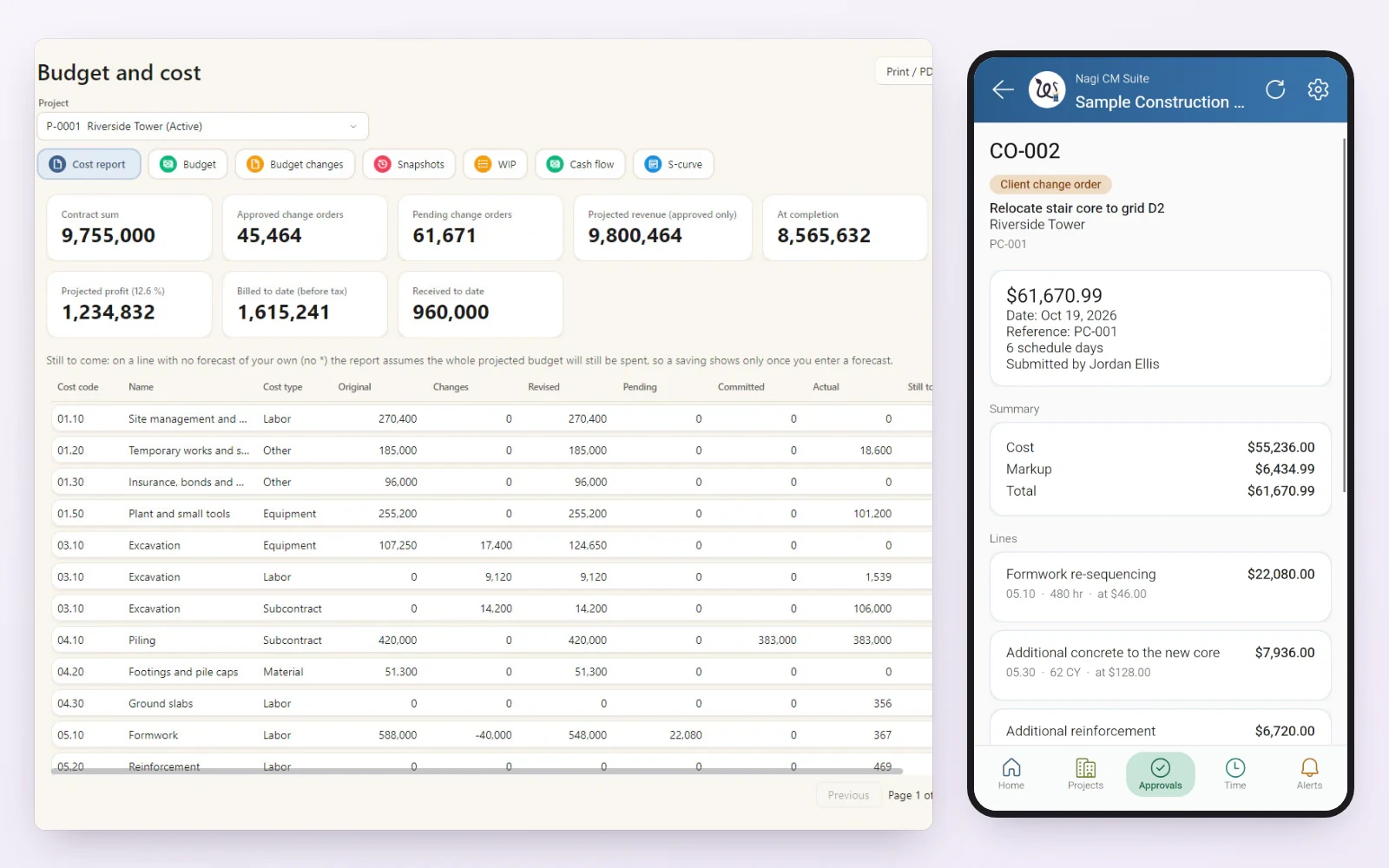
Our own program, so judge it on the facts. It's installed on Windows or Mac, with your data in a company database on your own PC. It covers estimates from your own price book with reusable assemblies, client contracts with schedules of values and retention, subcontracts and purchase orders, budgets with committed, actual and forecast cost by cost code, change orders, progress billing, vendor bills, daily logs, photos, time sheets, punch lists, selections, close-out and warranty, drawings, RFIs and submittals, a schedule that imports Microsoft Project and Primavera files, and built-in bookkeeping. The Android app records hours, daily logs, photos, punch items, observations and incidents offline and sends them when the phone is back online; look-ups need a connection, and with one a manager can approve or reject change orders from the phone. The interface runs in English, Arabic (right to left), Spanish, French and German. More detail is on the Nagi Construction Management Suite product page.
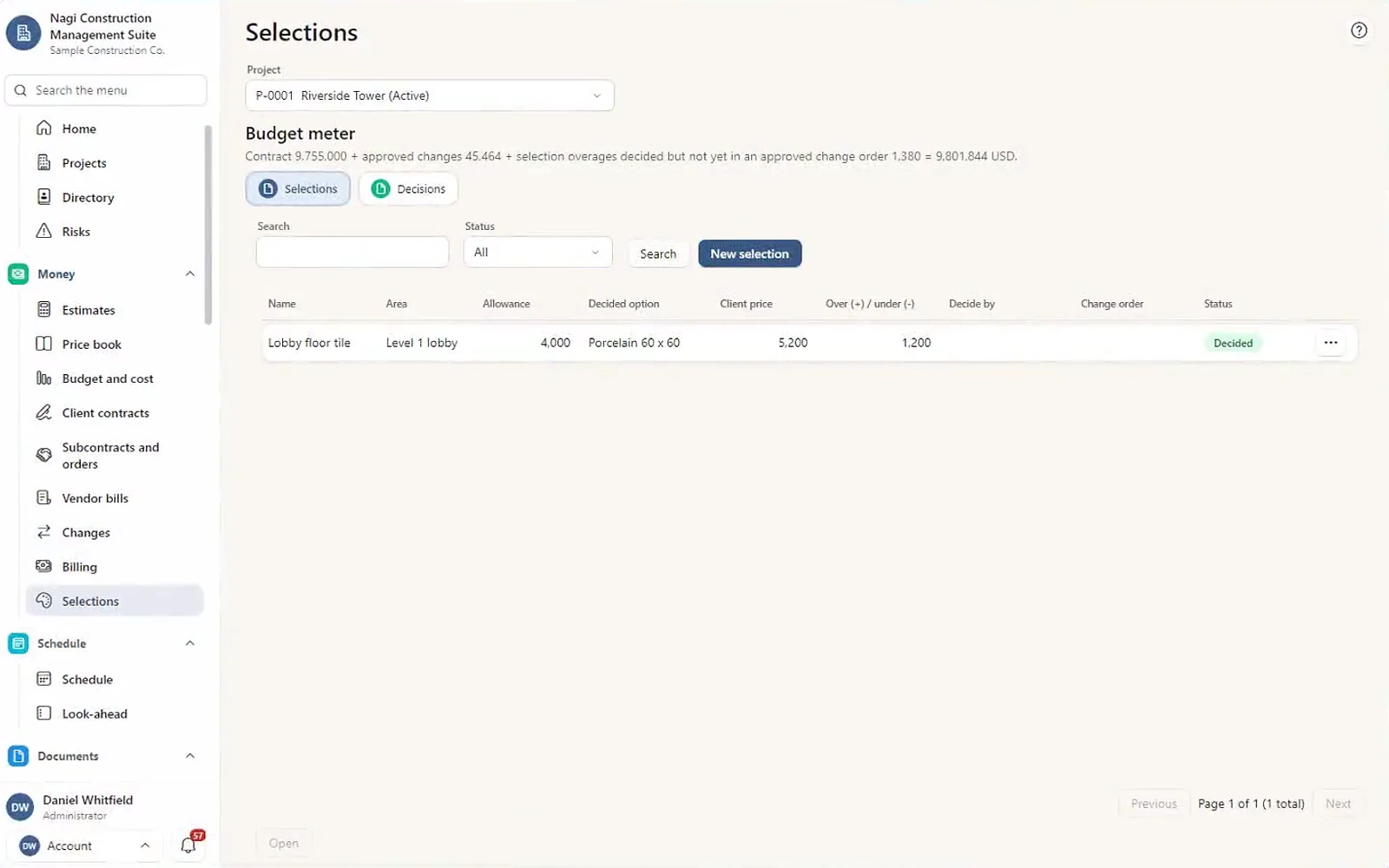
What it doesn't have: a client or sub portal, online payments, takeoff, accounting integrations, AI or an iPhone construction app. Selections are staff-only: clients don't log in to choose. Your office records each decision and how it was given (in person, email, phone or letter) against the allowance, and a choice over allowance drafts a change order for you.
JobTread vs Buildertrend
JobTread and Buildertrend chase the same buyer: the home builder or remodeler who wants estimates, selections, a client portal and job costing in one place. The real differences are commercial.
| Buildertrend | JobTread | |
|---|---|---|
| Price | Custom quote after a call | Published: $199/month incl. 1 user, then per internal user |
| Users | Unlimited | Internal users paid; portal users and some field crew free |
| Contract | Annual discount of 10% upfront; terms per quote | "No contract & no setup fees" |
| Trial | Demo | No trial; 30-day money-back on monthly |
| Client portal and selections | Listed | Listed |
| Accounting links | QuickBooks, Xero, Gusto listed | QuickBooks Online and Gusto listed |
| Mobile | App with offline daily logs and time clock (help article) | Progressive web app, not in app stores; offline not mentioned |
Rival prices last checked on 15 November 2026 on each vendor's public pricing page.
For a builder with five office staff, JobTread's annual cost is easy to work out: $199 base plus four users at $20, less 20% for annual billing, comes to $2,678.40 a year. Buildertrend's unlimited users could beat that for a 30-person firm, but you only learn that on the call.
Our call: if the site crew needs to file daily logs from places with no signal, Buildertrend's documented offline mode is the safer choice of the two. If you want a price before a sales conversation and no contract, JobTread is.
Procore vs Buildertrend in one paragraph
Both quote by the size of your business, and both include unlimited users. Procore's pricing page charges an annual fee per product based on annual construction volume, and its tools lean toward commercial general contractors: RFIs, submittals, drawings and financials across many outside parties. Buildertrend leans residential, with sales, selections and a client portal. A home builder rarely needs Procore; a commercial GC with owners and architects in the loop rarely picks Buildertrend.
5-year cost for a 10-person remodeler or builder
Here's what each published price adds up to for 10 people over one, three and five years, assuming today's list prices hold and annual billing where offered. Buildertrend doesn't publish a price, so it's left out of the math. Houzz Pro is included at its Teams monthly list price.
| Product (plan) | Year 1 | 3 years | 5 years |
|---|---|---|---|
| JobTread (10 internal users, annual) | $3,638.40 | $10,915.20 | $18,192 |
| Contractor Foreman (Pro, up to 15 users, annual) | $2,654 | $7,962 | $13,270 |
| Projul (Core, up to 10 users, annual) | $4,788 | $14,364 | $23,940 |
| Projul (Core+, adds job costing, annual) | $7,188 | $21,564 | $35,940 |
| Nagi CM Suite (monthly, $99) | $1,188 | $3,564 | $5,940 |
| Nagi CM Suite (yearly, $199.50 discounted price) | $199.50 | Renewal: see pricing | Renewal: see pricing |
| Nagi CM Suite (lifetime, discounted price) | $349.50 | $349.50 | $349.50 |
| Buildertrend | Quote | Quote | Quote |
| Houzz Pro (Teams, 5 users + 5 extra, monthly price) | $7,788 | $23,364 | $38,940 |
Rival prices last checked on 15 November 2026 on each vendor's public pricing page.
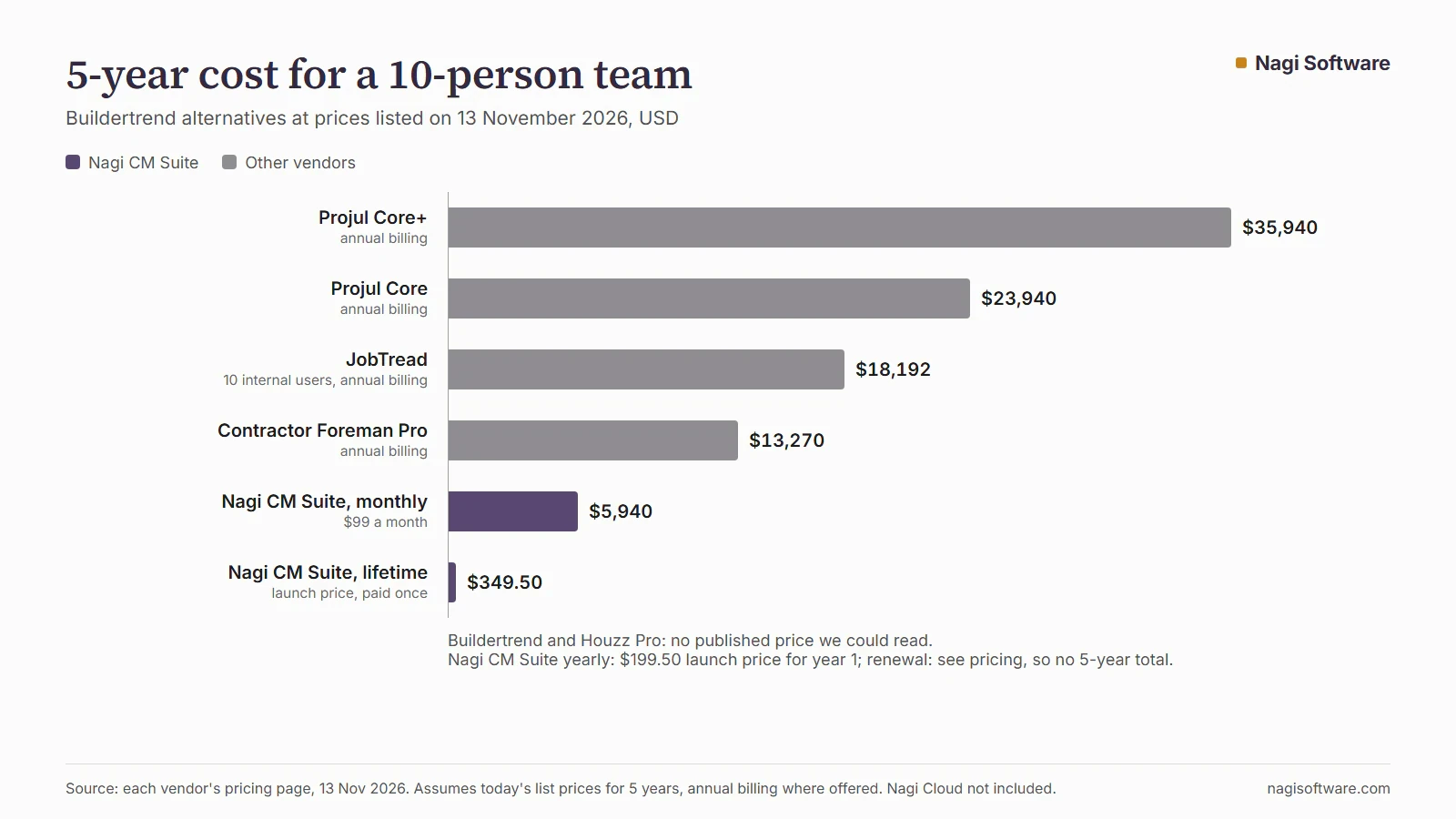
How to read it. The yearly Nagi row shows year 1 only: $199.50 is a discounted price, and the pricing page shows what a renewal costs. Nobody's price is guaranteed for five years, ours included. Nagi Cloud, if you add it, is billed per company per month on top, at a price shown before you pay. To run your own headcount through the same comparison, the subscription vs one-time license calculator works it out year by year; the rest of our calculators are on the free tools page. And the Nagi rows assume everyone works at a PC in the office or on the same network; if your crew needs to reach the office data from home or another site, you need Nagi Cloud or one of the cloud tools above.
Our call: for a 10-person remodeler whose office runs the jobs and whose crews log their day from Android phones, Nagi's lifetime license is the lowest five-year cost in this table by a wide margin. For a builder whose clients expect to log in, pick selections and pay online, it's the wrong tool, and JobTread or Contractor Foreman is the better spend.
Which alternative fits which builder
Match the tool to how your jobs run, not to the longest feature list.
A remodeler doing 15 to 30 kitchens and baths a year, with clients who want to see progress and pick finishes online: JobTread first, Contractor Foreman second. Both publish prices and list customer portals; JobTread names selections and allowances on its pricing page.
A small general contractor billing on pay applications with retainage: Contractor Foreman lists schedule of values, AIA-style G702/G703 billing and retainage across its plans. Nagi builds applications for payment from the client contract's schedule of values with retention, and keeps the books in the same program. You can see the layout first with the pay application generator, which makes a printable application for payment in your browser.
A builder with crews on Android phones and an office that does the money: Nagi, because the phone records hours, logs and photos with no signal and the office PC holds everything else at a one-time price.
A firm of 25 or more with a sales team and a client portal at the center of the business: get a Buildertrend quote and a JobTread estimate side by side. Unlimited users start to matter at that size.
A contractor who mainly needs plans, punch lists and field tasks: Fieldwire's free Basic plan (5 users, 3 projects) is worth a look before you buy anything bigger.
What you give up when you switch
Every switch costs something, even to a cheaper tool. Count these before you decide.
History in the client portal. Messages, approvals and selection choices that homeowners made in Buildertrend stay there. Export or print the ones you may need for a warranty claim or a dispute.
Sub and vendor logins. If your subs submit bids or bills through Buildertrend's sub portal, they'll need a new routine. With Nagi there's no sub portal; bills come in by email or paper and are entered against the subcontract.
Integrations. A QuickBooks, Xero or Gusto link has to be set up again in a tool that has one, or replaced. Nagi has its own books and no accounting link, so your accountant needs to agree before you move.
Habits. Your team knows where things are. Expect slower days while they learn a new layout, and plan the switch for a quiet month, not April.
Mid-job data. Moving a half-finished job means re-entering its budget, commitments and billing history. Finishing active jobs in Buildertrend and starting only new jobs elsewhere avoids most of that, at the cost of paying for both systems for a while.
Switching: canceling, renewal dates and exporting your data
Most switching pain is about dates and data, not software. Do these in order.
- Find your renewal date and notice period in your Buildertrend agreement. Several of the Trustpilot complaints above are about a renewal charged before the customer cancelled.
- Ask Buildertrend in writing how to cancel and confirm the date access ends. Send it from the account's administrator.
- Export what you need, list by list. Buildertrend says there's no bulk export, so plan for several exports: clients and contacts, subs and vendors, cost codes and items, estimates, budgets, change orders, invoices and bills, daily logs, photos and files.
- Save job photos and documents to your own drive by job. They're usually the largest and the hardest to replace.
- Finish active jobs in the old system where you can. Start new jobs in the new one.
Moving into Nagi Construction Management Suite is mostly importing spreadsheets. The import wizard reads Excel or CSV files for the directory (clients, subs, suppliers), projects, cost codes, the price book, the chart of accounts and opening balances, and reads bills of quantities. Schedules come in from Microsoft Project (.mpp or XML) or Primavera (.xer) files. Old photos and PDFs attach to the job as documents.
Try the import in the trial before you cancel anything. The 7-day trial runs in the browser at cms.nagisoftware.com with no card, and its data stays in your browser.
When Buildertrend is still the right choice
Stay on Buildertrend, or pick it, when:
- Your clients use the portal. If homeowners choose selections, approve changes and pay online through the portal, that's the heart of Buildertrend's product, and neither Nagi nor Projul's lower tiers replace it.
- Your team is large. Unlimited users can make a quote cheaper per head than any per-user tool once you pass 20 or 30 people.
- You depend on integrations. Buildertrend lists QuickBooks, Xero and Gusto links. Nagi has none.
- Your site crews need offline daily logs on iPhones. Buildertrend documents offline daily logs and time clock in its app; Nagi has no iPhone construction app.
Who should not buy Nagi: a builder whose sales process runs through a client portal, a firm that needs payroll or a QuickBooks link inside the same tool, or a team spread across sites with no office PC. For them, the cloud tools above are the better spend.
For everyone else, the next step is cheap: list the five features you used last month, check each against the table, and ask for every price in writing.
Related reading: what construction software you buy once costs over five years and construction bookkeeping software, with or without QuickBooks.
Buildertrend, CoConstruct, JobTread, Contractor Foreman, Projul, Houzz Pro, Fieldwire, Procore, QuickBooks, Xero, Gusto, Microsoft Project and Primavera are trademarks of their respective owners. Nagi Software is not affiliated with, endorsed by or sponsored by them. Comparisons use information published by each vendor on the date shown.
Frequently asked questions
- How much does Buildertrend cost per month?
Buildertrend doesn't publish a price. Its pricing page (checked 13 November 2026) asks for your contractor type, annual construction volume and revenue, then gives a custom quote after a call. It says every subscription includes unlimited users, and it offers 10% off when you pay for a year upfront.
- What is cheaper than Buildertrend?
We can't compare directly because Buildertrend quotes each customer. Among tools with published prices, Contractor Foreman's Pro plan lists $221 a month billed annually for up to 15 users, JobTread lists $199 a month including one user plus a fee per extra internal user, and Nagi Construction Management Suite lists $99 a month per company, or $349.50 once at its discounted price. Prices as listed on 13 November 2026.
- Is JobTread better than Buildertrend?
For a buyer who wants to see the price first, JobTread publishes its pricing and has no contract; Buildertrend quotes after a call. Both list estimates, budgets, change orders, selections, customer portals and a QuickBooks Online link. Buildertrend includes unlimited users and documents offline daily logs and time clock in its mobile app; JobTread charges per internal user and its mobile app is a web app that isn't in the app stores.
- Is there a free Buildertrend alternative?
Not one that covers the same ground. Fieldwire has a free Basic plan for up to 5 users and 3 projects, but it's a field and plans tool without budgets on that plan. Most alternatives offer a trial or a money-back period instead: Contractor Foreman 30 days on annual plans, Nagi Construction Management Suite 7 days in the browser with no card.
- Can I export my data from Buildertrend?
Partly. In a December 2025 reply on its BBB profile, Buildertrend said it does not currently offer a bulk or Export All feature, though specific types of information can be exported. Export each list and report you need before your renewal date, and check your agreement for how long you keep access after canceling.
- Is CoConstruct shutting down?
CoConstruct's own migration page doesn't give a shutdown date. It says projects can still be added through March 31, 2027, that new projects go into Buildertrend after that, and that you keep access to historical project information.
Sources
- Buildertrend pricing page, checked November 13, 2026
- Buildertrend Mobile App FAQs (offline daily logs and time clock), checked November 13, 2026
- Buildertrend BBB profile, customer reviews and business replies, checked November 13, 2026
- Buildertrend on Trustpilot, checked November 13, 2026
- Buildertrend status page history (RSS), checked November 13, 2026
- CoConstruct migration page, checked November 13, 2026
- JobTread pricing page, checked November 13, 2026
- JobTread mobile app page, checked November 13, 2026
- Contractor Foreman pricing page, checked November 13, 2026
- Projul pricing page, checked November 13, 2026
- Houzz Pro pricing page, checked November 15, 2026
- Fieldwire pricing page, checked November 13, 2026
- Procore pricing page, checked November 13, 2026
- Nagi Construction Management Suite product page, checked November 13, 2026
The product in this post
Nagi Construction Management Suite
Run a construction company from estimate to close-out in one program that keeps your data on your own PC.
- buildertrend-alternatives
- construction-software
- pricing
- comparison
- remodelers
- home-builders