
Free Schedule of Values Template (Excel) With Retainage
A free schedule of values template in Excel with retainage per line and a linked pay application sheet, plus a column-by-column guide, a 17-line example split by CSI division, front-loading, change orders and a subcontractor version.
Nagi Software Team9 min read
A schedule of values (SOV) splits a construction contract sum into line items, each with a dollar value, so every progress payment can be measured line by line. Below is a free Excel template with retainage per line and a linked pay application sheet, no email needed, and a guide to filling it in, column by column. We make Nagi Construction Management Suite, where the SOV sits inside the client contract, and the example here is the same $480,000 office fit-out we use across our progress billing and pay application guides.
What a schedule of values is
The schedule of values is the contract sum, taken apart. The contractor proposes it, the owner or architect approves it, and from then on it's the yardstick for every application for payment. Each month you claim how much of each line is done; the owner checks that against the site.
It does three jobs at once. The owner sees where the money goes. A reviewer can agree percent complete line by line instead of arguing about the whole job. And retainage, change orders and the final account all hang off it.
It isn't the same as your bid form or your estimate. A bid form is the price breakdown the owner asked for at tender, sometimes with alternates and unit prices. Your estimate is the internal cost build-up, with labor hours, crew rates and markups the owner never sees. The SOV sits between them: the contract sum, split into lines the owner can inspect, with overhead and profit spread across the lines rather than shown on their own.
Two rules never bend. The lines add up to the contract sum exactly, to the cent. And once the first application is certified, you don't change the original lines; changes arrive as new lines.
Download the template
Download the schedule of values template (.xlsx). No email, no sign-up. It opens in Excel, and in Google Sheets or LibreOffice if you upload it.
The workbook has five tabs:
- How to use.
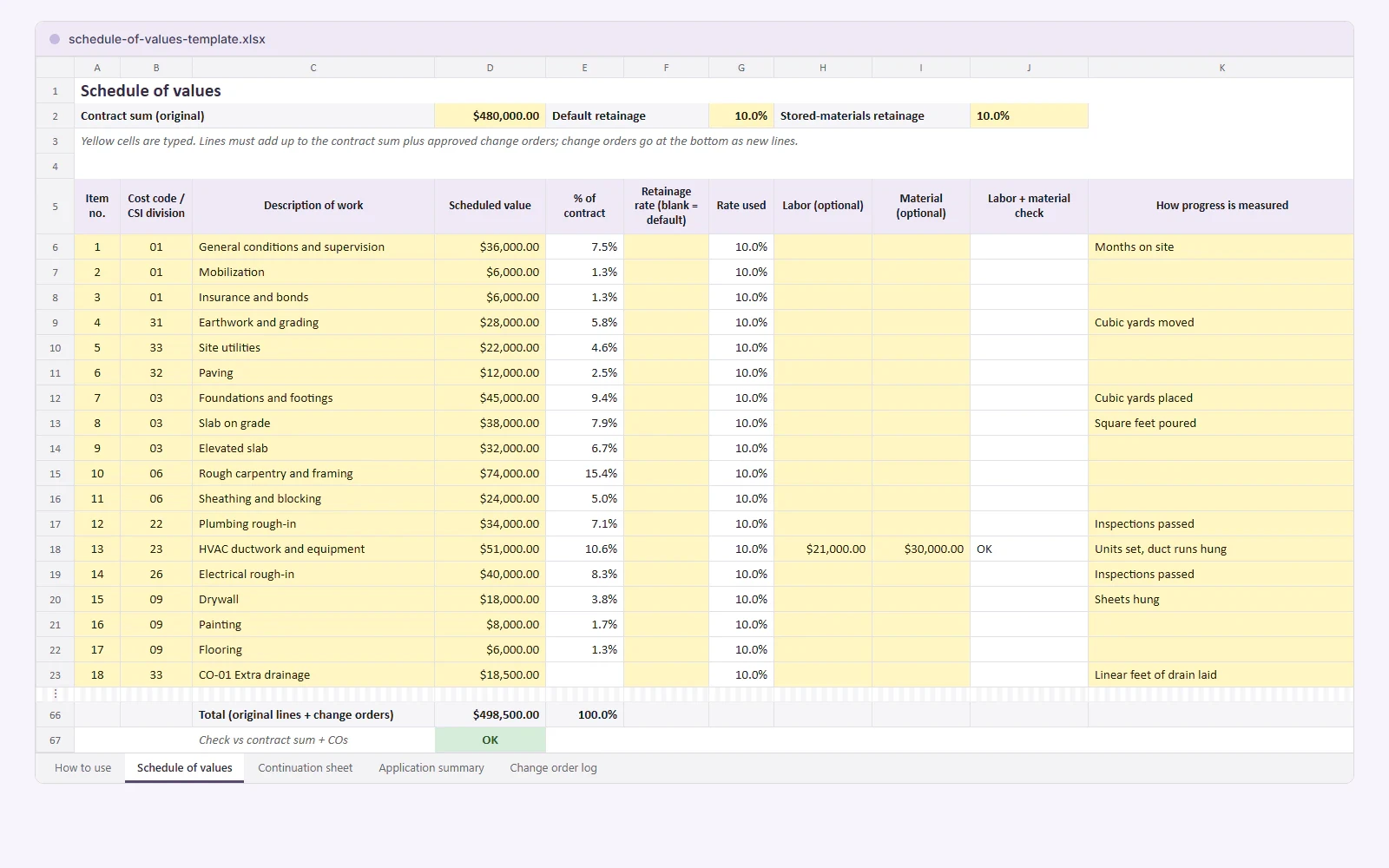
- Schedule of values: the setup sheet described below, with retainage per line and a check that the lines equal the contract sum.
- Continuation sheet: the monthly billing view, a G702/G703-style layout that reads its lines straight from the SOV tab.
- Application summary: the one-page cover with retainage, previous certificates and the amount due.
- Change order log: approved changes feed new SOV lines and the contract sum.
The SOV tab comes filled in with the 17-line example from this article. Overwrite it, or clear the yellow cells and start from your own estimate.
How to fill in a schedule of values, column by column
- Item no. Number the lines in the order the work happens. Keep the numbers stable; add new lines at the end.
- Cost code or CSI division. Use your own cost codes, or the CSI MasterFormat division (03 for concrete, 09 for finishes, 26 for electrical). Owners who see a familiar code check faster.
- Description of work. Use the contract's words, specific enough to inspect: "Slab on grade", not "Concrete work".
- Scheduled value. The dollar value of that line, taken from your estimate: labor, material, equipment, subcontract cost and your share of overhead and profit.
- Percent of contract. A formula: scheduled value ÷ contract sum. It's there so you can spot a line that looks too heavy.
- Retainage rate. Defaults to the contract rate on the settings row; override it on a single line if the contract holds a different rate there.
- Labor and material (optional). Split a line's value if your contract bills stored materials, so materials delivered early can be claimed against the material part.
- Notes. How you'll measure progress on the line: square feet of drywall hung, panels set, inspections passed.
- Check. The template totals column 4 and compares it with the contract sum. It shows "OK" only when they match.
The continuation sheet adds the monthly columns: work from previous applications, work this period, materials presently stored, total completed and stored to date, percent complete, balance to finish and retainage. You never retype the lines; they come from the SOV tab.
How to break down line items (CSI, trade, phase)
Split lines so each one can be inspected on its own and finishes within a few billing periods. Most jobs mix three ways of splitting:
- CSI division or trade, which suits commercial work and maps to your subcontracts;
- phase or area (building A and B, floors 1 to 3), for repeated work;
- labor and material on lines with big purchases, so stored materials are easy to bill.
Here's the $480,000 fit-out from our other guides, split into 17 lines by CSI division. The six-line version we used to teach the arithmetic is on the right; it's too coarse for a real owner review.
| # | CSI | Description | Scheduled value | % of contract | Six-line version |
|---|---|---|---|---|---|
| 1 | 01 | General conditions and supervision | $36,000 | 7.5% | General conditions $48,000 |
| 2 | 01 | Mobilization | $6,000 | 1.3% | |
| 3 | 01 | Insurance and bonds | $6,000 | 1.3% | |
| 4 | 31 | Earthwork and grading | $28,000 | 5.8% | Sitework $62,000 |
| 5 | 33 | Site utilities | $22,000 | 4.6% | |
| 6 | 32 | Paving | $12,000 | 2.5% | |
| 7 | 03 | Foundations and footings | $45,000 | 9.4% | Concrete $115,000 |
| 8 | 03 | Slab on grade | $38,000 | 7.9% | |
| 9 | 03 | Elevated slab | $32,000 | 6.7% | |
| 10 | 06 | Rough carpentry and framing | $74,000 | 15.4% | Framing $98,000 |
| 11 | 06 | Sheathing and blocking | $24,000 | 5.0% | |
| 12 | 22 | Plumbing rough-in | $34,000 | 7.1% | MEP rough-in $125,000 |
| 13 | 23 | HVAC ductwork and equipment | $51,000 | 10.6% | |
| 14 | 26 | Electrical rough-in | $40,000 | 8.3% | |
| 15 | 09 | Drywall | $18,000 | 3.8% | Finishes $32,000 |
| 16 | 09 | Painting | $8,000 | 1.7% | |
| 17 | 09 | Flooring | $6,000 | 1.3% | |
| Contract sum | $480,000 | 100% | $480,000 |
Why bother? Because "MEP rough-in 29.6% complete" on one $125,000 line is a negotiation, while "electrical rough-in 50%, plumbing 25%, HVAC 15%" is something a reviewer can check by walking the floor. The detailed version also tells you, line by line, where the job is running behind.
Don't go too far the other way. A 200-line SOV on a $480,000 job means 200 percentages to agree every month. Aim for lines that each take one to three billing periods to finish.
Front-loading: why owners reject it
Front-loading means loading early lines with more value than they're worth, so the first applications pay you ahead of the work. The usual targets are mobilization, general conditions, bonds and sitework.
Say the contractor on our job moved $24,000 of value out of drywall, painting and flooring into mobilization, making it $30,000 instead of $6,000. Application 1 would bill mobilization at 100% and collect $24,000 more in month one. Mobilization would also jump from 1.3% to 6.3% of the contract, which is exactly the kind of line a reviewer checks against the estimate. Finishes, now worth $8,000 instead of $32,000, would make the last applications too small to cover the painters and floor layers.
The likely outcome: the architect sends the SOV back, or certifies it and then looks hard at every percentage you claim for the rest of the job. A modest, honest weighting toward general conditions is normal and expected. Anything you'd struggle to explain from your estimate isn't.
Adding change orders
An approved change order becomes a new line at the bottom, never an edit to an old one. In March our owner approved CO-01, extra drainage, for $18,500:
| # | CSI | Description | Scheduled value |
|---|---|---|---|
| 18 | 33 | CO-01 Extra drainage | $18,500 |
| Revised contract sum | $498,500 |
A deduction gets its own line with a negative value, so the change order log, the SOV and the summary all show the same net change. In the template, a change order marked "Approved" in the log feeds the revised contract sum on the summary; you add its SOV line yourself so you can choose the description and cost code. Pending changes stay out until they're signed.
Subcontractor SOV
Subcontractors bill the general contractor the same way, on a smaller SOV. Here's the electrical subcontract from line 14, $40,000, split so stored material and close-out each get their own line:
| # | Description | Scheduled value |
|---|---|---|
| 1 | Temporary power | $2,500 |
| 2 | Underground and in-slab conduit | $6,500 |
| 3 | Branch rough-in | $15,000 |
| 4 | Switchgear and panels: material | $10,000 |
| 5 | Switchgear and panels: installation | $4,000 |
| 6 | Testing and close-out documents | $2,000 |
| Subcontract sum | $40,000 |
Line 4 lets the sub bill the switchgear as stored material the month it arrives. Line 6 is small on purpose: the GC holds it until the test reports and as-builts arrive, so nobody argues about retainage over paperwork. Check your subcontract for the GC's billing cut-off and retainage rate before the first application; our retainage guide covers what happens when the sub's rate and the owner's don't match. To write the scope behind a sub's SOV, the subcontractor scope of work generator starts a scope for eight trades with included and excluded work and prices the lines.
From SOV to pay application
Once the SOV is approved, every month's application is the same table with more columns. The continuation sheet carries each line with previous work, this period, stored materials, total to date, percent complete, balance to finish and retainage. The summary sheet adds it up, takes off retainage and previous certificates, and gives the amount due.
Our G702/G703-style pay application template explains both sheets line by line, and the progress billing guide runs this job through three months with the change order above. If your contract names AIA's official forms, buy them from AIA Contract Documents; our template is an independent G702/G703-style layout. If you would rather build the application in your browser, the free pay application generator makes a printable application for payment with nine summary lines and a continuation sheet; the other generators are on our free tools page.
Keeping the SOV in software
A spreadsheet SOV works well for a few jobs. It starts to slip when change orders arrive every month, when the estimate lives in another file, and when someone re-keys each application into the accounts.
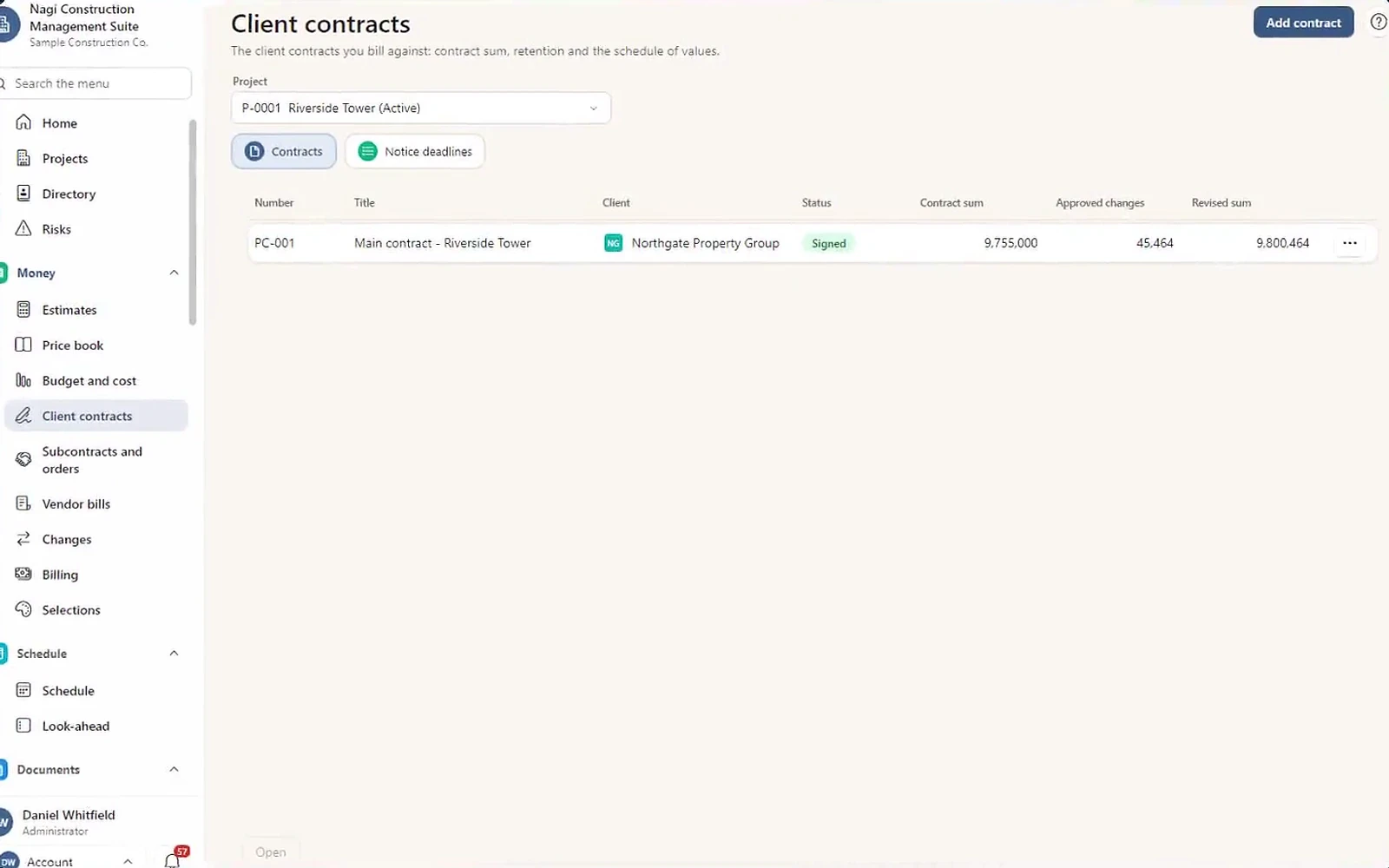
In Nagi Construction Management Suite the schedule of values belongs to the client contract, together with its retention rate (a separate rate for stored materials and a step-down point are optional). You can type the lines, or import a bill of quantities from Excel or CSV straight into the contract, and load your cost codes and price book from a spreadsheet when you set up. Estimates come from your own price book with reusable assemblies, so the SOV starts from numbers you already priced. Approved change orders update the contract, the budget and the billing together, and each application for payment is built from the contract and the work done.
Gulf contractors can keep the whole thing in Arabic, right to left on screen and in print, in their own currency and with tax codes at their own rate. There's no owner portal: you send the printed or PDF application yourself.
Start with the free template on your next job. If you find yourself copying the same SOV into a third file, try the program on that job instead. Plans and prices are on the pricing page.
AIA, G702 and G703 are trademarks of The American Institute of Architects. MasterFormat is a trademark of the Construction Specifications Institute. Nagi Software is not affiliated with, endorsed by or sponsored by them. This template is an independent document and does not reproduce AIA forms.
Frequently asked questions
- What is a schedule of values in construction?
A schedule of values (SOV) is the list of line items that splits a contract sum into parts, each with a dollar value, agreed between contractor and owner before the first payment. Every progress billing is measured against it: each month you claim the share of each line that's done. The lines must add up exactly to the contract sum.
- How detailed should a schedule of values be?
Detailed enough that anyone walking the site can agree each line's percent complete in a minute. In practice that means splitting by trade or CSI division, and further by building, floor or phase on bigger jobs. Separate lines for big material purchases help too. Our 17-line example for a $480,000 fit-out is a sensible minimum; six lines invites arguments.
- Is the schedule of values the same as the G703?
Not quite. The schedule of values is the agreed breakdown of the contract sum, set once. The G703, or a G703-style continuation sheet, is the monthly billing form built on it, adding columns for work completed previously and this period, stored materials, percent complete, balance to finish and retainage. Same lines, more columns.
- How do change orders affect the schedule of values?
Each approved change order becomes a new line at the bottom of the SOV with its own scheduled value, and the contract sum rises or falls by that amount. Don't edit the original lines: reviewers compare every application with the first one, and a quietly changed value looks like front-loading. Deductions get their own negative line.
- What is front-loading?
Front-loading means putting more value on early line items, such as mobilization, general conditions or sitework, than they're worth, so the contractor is paid ahead of the work. It helps cash flow briefly but owners and architects look for it, and a front-loaded SOV can be sent back, cut, or make the reviewer suspicious of every later percentage.
Sources
- Nagi Construction Management Suite product page, checked November 13, 2026
- CSI MasterFormat (Construction Specifications Institute), checked November 13, 2026
- AIA Contract Documents (official G-series forms), checked November 13, 2026
The product in this post
Nagi Construction Management Suite
Run a construction company from estimate to close-out in one program that keeps your data on your own PC.
- template
- schedule-of-values
- retainage
- progress-billing
- pay-application