
How to Choose Construction Management Software: A Checklist for Small Contractors
Twenty questions in five groups (money, field, documents, ownership and price, switching out), with the good answer and the red flag for each, and a free scorecard to run three vendors through during their trials.
Nagi Software TeamUpdated 13 min read
To choose construction management software, ask every vendor the same 20 questions in five groups (how money flows, the field, documents, ownership and price, and switching out), then run your top three through one real job during their trials and score them side by side. We make Nagi Construction Management Suite, so we're one of the vendors you'd be scoring; where our program falls short on a question, we say so below.
Start with your problem, not the feature list
The right tool is the one that fixes the problem costing you the most money today. Write that down before you look at a single demo.
The usual culprits are a handful: change work that never gets billed, overruns found at month end, retention nobody chases, a week lost reconciling before the bill goes out, or site records too thin to win a dispute. Our post on construction margin leaks lists eight of them, with a 0 to 8 score you can run on your own jobs.
Pick your top two. Every question below is worth asking, but those two decide the vote. A tool with 200 features that doesn't fix your top problem is the wrong tool at any price.
One more filter before the questions: who will use it every day? A program the project manager loves and the foremen refuse to open fails on site, and the site is where most of the cost is.
Group 1: how money flows
This group decides whether the software pays for itself. If the estimate, the budget, the change orders and the bill don't share one set of numbers, someone in your office retypes them, and retyping is where the errors come from.
| # | Question | Good answer | Red flag |
|---|---|---|---|
| 1 | Does the estimate become the budget and the contract without retyping? | The same lines carry through, by cost code | "You can export it and import it into the budget module" |
| 2 | Can I see committed cost next to budget and actual, per cost code? | Subcontracts and purchase orders count against the budget when issued | Budget vs actual only |
| 3 | When a change order is approved, what else updates? | Contract sum, budget and the next bill, together | Change orders stored as PDFs, billed by hand |
| 4 | Can it build a progress bill from the schedule of values, with retainage? | Previous billings, stored materials and retainage worked out for you | Plain invoices only, or retainage tracked "in notes" |
Ask them to show you question 3 live, on their demo company. Approve a change order, then open the budget and the next bill. If either needs a manual step, you've found your future month-end marathon.
Question 1 sounds minor until you count the hours. A $400,000 estimate with 60 lines, retyped into a budget spreadsheet and again into a schedule of values, is three chances to drop a line or swap two digits. Question 4 is the one that touches cash: if the tool can't hold retainage and stored materials on a schedule of values, you'll keep a pay application spreadsheet on the side, and the side spreadsheet becomes the real one.
Question 2 is the one most small-business tools skip. Actual cost tells you what you've spent. Committed cost tells you what you've agreed to spend, which is how you see an overrun while the job is still running instead of after.
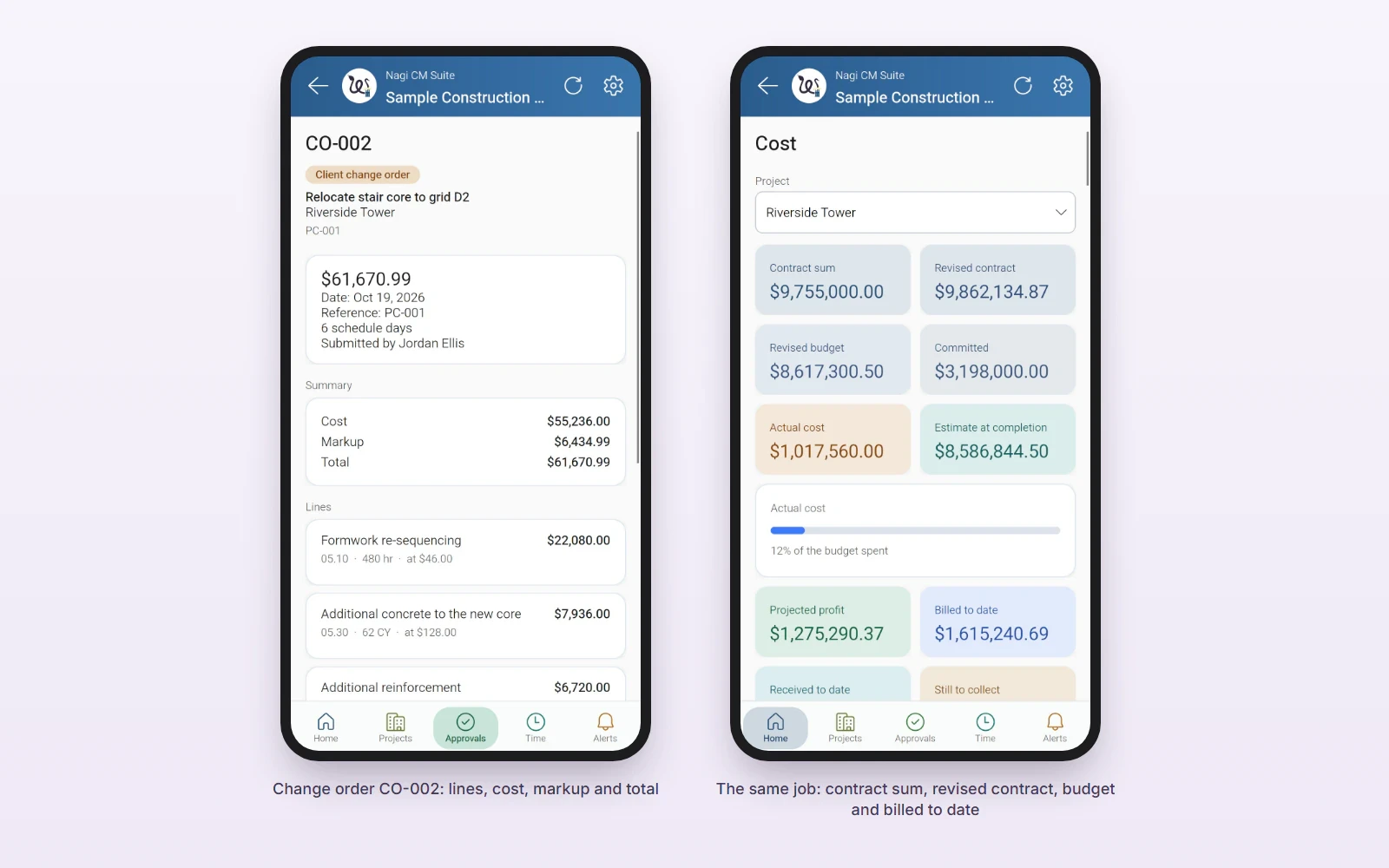
How Nagi answers: in Nagi Construction Management Suite, the estimate becomes the budget, the contract and the bill; the budget and cost screen shows budget, committed, actual and forecast for every cost code; an approved change order updates the contract, the budget and the billing together; and applications for payment are built from the contract's schedule of values with retention, stored materials and earlier applications. The job costing page shows each step. To see what a forecast looks like on your own numbers, the free job cost report calculator turns budget, committed and actual cost by cost code into a forecast, percent complete and projected margin.
Group 2: the field
The field group tells you whether your site team will actually use it. Office features are easy to demo. Site features have to work in a basement with gloves on.
| # | Question | Good answer | Red flag |
|---|---|---|---|
| 5 | What exactly works on the phone with no signal? | A named list: hours, logs, photos queue and send later; what needs a connection is stated | "It works offline" with no list |
| 6 | Which phones does it run on today? | The platforms your crews carry, available now, not "coming soon" | Your crew's phone type isn't listed |
| 7 | Are daily logs dated and locked, with photos attached? | Logs lock at day end; photos carry date and area | Logs editable forever, photos in a separate app |
| 8 | Can a manager approve things on site? | Change orders, timesheets and bills approved from the phone, with permissions | Approvals only at a desk |
For question 5, don't take anyone's word, including ours. During the trial, put a phone in airplane mode on site, enter a day's hours, a log and three photos, then turn the signal back on and check they arrived. Then try to open a drawing with no signal. That five-minute test answers more than any feature page.
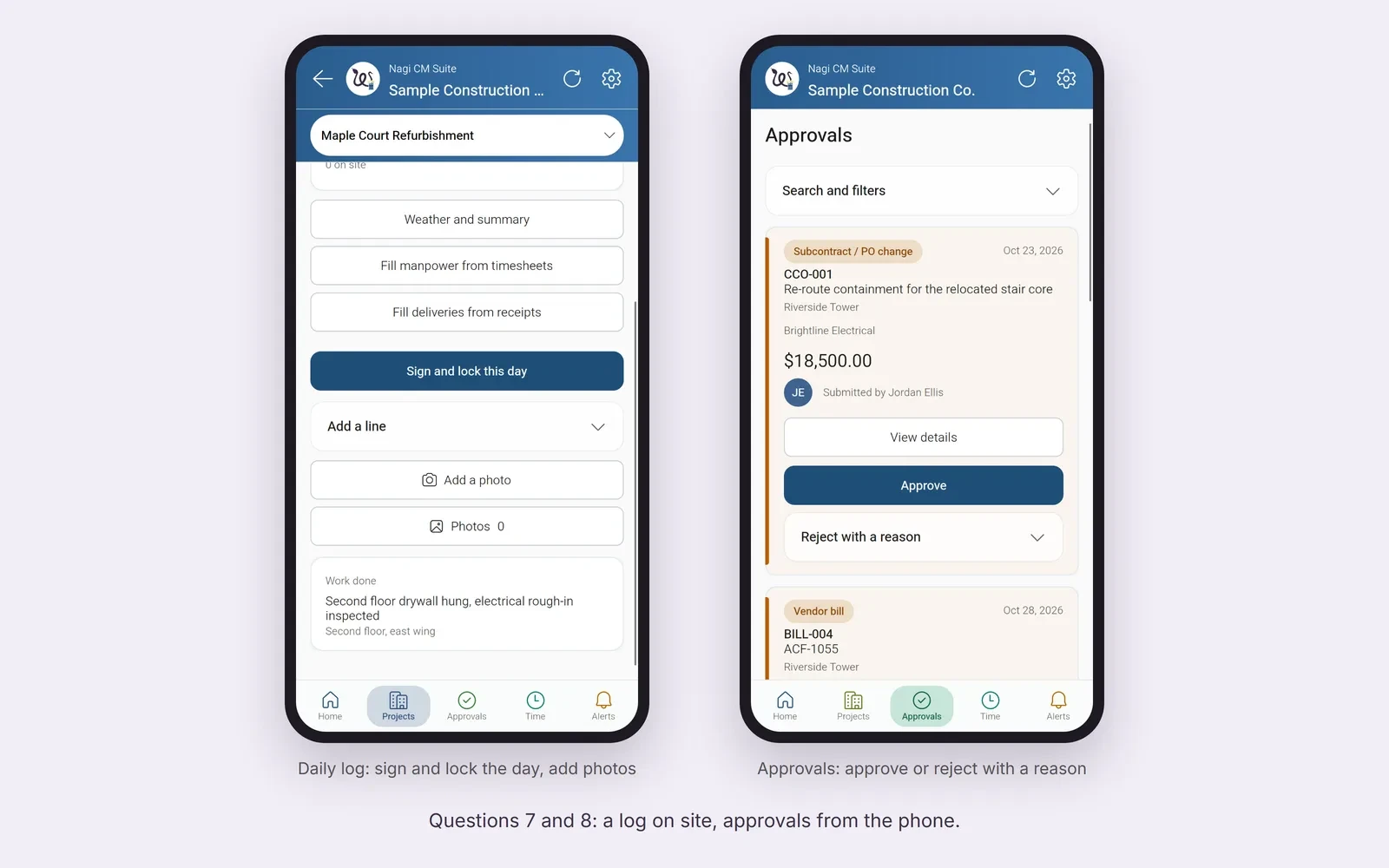
Questions 7 and 8 are about proof and speed. A log that can still be edited in March for a day in January carries less weight in a dispute than one locked at the end of that day. And a change order that waits for the project manager to get back to the office is a change order the crew may already be building without a price.
Question 6 can end a shortlist on its own. If half your foremen carry iPhones and a tool is Android-only, or the other way round, that's a hard no until the other app ships.
Nagi's answers, including the weak one: the Android app queues new hours, daily log entries, photos, punch items, observations and incidents with no signal and sends them when it's back online; looking things up (projects, RFIs, documents, approvals) needs a connection. Our Releases list on the product page shows Windows, Mac and Android as available on 14 November 2026, with no iPhone app yet. Daily logs lock each day, and photos are dated, tagged with the area and linked to the log. On Android, managers with the right permission can approve or reject client and subcontract change orders, and approve timesheets, commitments, vendor bills and pay applications.
Group 3: documents and records
Documents are where disputes are won or lost months later. You want every drawing, question and answer findable by number and date, by someone who wasn't on the job.
| # | Question | Good answer | Red flag |
|---|---|---|---|
| 9 | Are RFIs and submittals numbered and tracked to the answer? | Numbered, with an owner and a due date | A shared inbox folder |
| 10 | How are drawing revisions handled? | Revisions kept, the current sheet obvious | Old sheets overwritten or mixed with new |
| 11 | Can I import my existing schedule and lists? | Microsoft Project or Primavera files, cost codes and contacts from Excel | "Our team will re-enter it for you" (at a price) |
| 12 | Do my clients or subs need to log in? | A portal if they do, and an honest "no" if there isn't one | A portal that's on a higher plan than the one quoted |
Questions 9 and 10 protect you later. When an owner says the wall was built to the wrong detail, you want the RFI number, the date it was answered and the drawing revision that was current that day, in under a minute. Question 11 is about your first week: a tool that can't read your existing schedule or cost codes means days of typing before you've tested anything.
Question 12 is about how you work. If your clients expect to approve selections or pay applications online, you need a tool with a client portal. If they're happy with an emailed PDF, a portal is something you pay for and don't use.
Here's where Nagi loses points for some contractors: it has no client or subcontractor portal. Selections are recorded by your staff, and applications, approvals and lien waivers travel by email or on paper. JobTread, for one, lists free, unlimited portal users for vendors, subs and customers on its pricing page. If a portal is on your must-have list, score us low on question 12.
On the others: Nagi numbers RFIs and tracks them to the answer, keeps drawing revisions, and handles specifications, submittals, transmittals and meeting minutes. It imports Microsoft Project (.mpp and Project XML) and Primavera (.xer) schedules, and its import wizard reads Excel or CSV for the directory, projects, cost codes, the price book, the chart of accounts and opening balances.
Group 4: ownership and price
This group is about the next five years, not the first month. Two tools with the same demo can cost three times as much by year five, and only one of them may let you keep your data on your own computer.
| # | Question | Good answer | Red flag |
|---|---|---|---|
| 13 | What will it cost for our real headcount over five years? | One number in writing, including the plan with the features you need | Only the entry-plan price per month |
| 14 | What is the renewal price? | Stated in writing, or a cap on increases | "Pricing may change at renewal" |
| 15 | Where does my data live, and what happens if the internet is down? | You know the location; you can work through an outage | "In the cloud", with no answer on outages |
| 16 | Does it keep the books or sync with mine? | One clear answer that matches what your accountant uses | "We're working on a QuickBooks sync" |
Questions 14 and 15 are the ones buyers forget. A first-year discount that vanishes at renewal can cost more over five years than the whole software budget you planned. And "in the cloud" is a fine answer as long as you also know what your site team does on the day the office internet is down.
For question 13, count people properly. Per-user tools charge for every login, including the superintendent who opens it twice a week. Fieldwire, for example, lists $39 to $89 per user per month billed annually. Procore's pricing page says it charges by Annual Construction Volume with unlimited users. Our construction management software pricing post works out five-year costs for three company sizes, with every price dated. To test your own user count, the subscription vs one-time license calculator compares the two year by year and shows when the subscription catches up; the other calculators we offer are on our free tools page.
For Nagi, the price is per company, not per user. One company license covers one Administrator PC and 10 employee seats (a seat is a PC, not a person), with 11 phone connections. As listed on nagisoftware.com/pricing on 14 November 2026, it costs $99 a month, $199.50 a year or $349.50 for a lifetime license; the yearly and lifetime figures are discounted prices (50% off $399 and $699), and buyers on the yearly plan keep their price on renewal. The data sits in a database file on your own PC with your documents and photos, and the program works offline, needing the internet for a few seconds at least once every 14 days to check the license. Nagi Cloud is optional, for teams who need to sign in from anywhere without the office PC on.
On question 16, Nagi keeps its own books (chart of accounts, journals, bank reconciliation, P&L, balance sheet and trial balance) and has no QuickBooks link, so if your accountant needs QuickBooks as the system of record, keep it.
Group 5: switching out
Ask how you'd leave before you join. It's the question vendors least expect, and the answer tells you how they think about your data.
| # | Question | Good answer | Red flag |
|---|---|---|---|
| 17 | What happens to my data the day I stop paying? | Nothing deleted; read access or a full export window | Deleted after a short notice period |
| 18 | What can I export, and in what format? | Jobs, costs, documents and photos, in files you can open elsewhere | Reports only, or "contact support" |
| 19 | How long does it take to get one live job running? | Days, with your own cost codes and contacts imported | A paid onboarding project before you can test |
| 20 | Can I try it on my own job before I talk to sales? | A self-serve trial, no card | Demo only, booked through a salesperson |
Question 17 is the big one for anyone who keeps job records for warranty claims or audits. Three years after handover, you may need a daily log from a job you've long finished.
Question 18 is the test of question 17. "You can export" often means a report as a PDF, which is fine for reading and useless for loading into the next tool. Ask for a sample export of the demo company and open it on your own PC. Questions 19 and 20 are about speed: if you can't get one live job running inside a trial week without paying for onboarding, your team won't get the rest of the jobs in either.
If a Nagi license ends, nothing is deleted. The company becomes read-only, so you can open, print and export everything but not change it until you renew. A backup is one file that holds the whole company with its documents. The trial runs for 7 days in the web portal at cms.nagisoftware.com with no card. It starts with a sample company and 3 sample projects; you can add up to 3 projects of your own and 1 GB of documents, and if you buy, your paid key keeps the same company.
How to run the scorecard during three trials
Score three vendors on the same job within the same two weeks. Comparing one tool in March with another in June measures your memory, not the software.
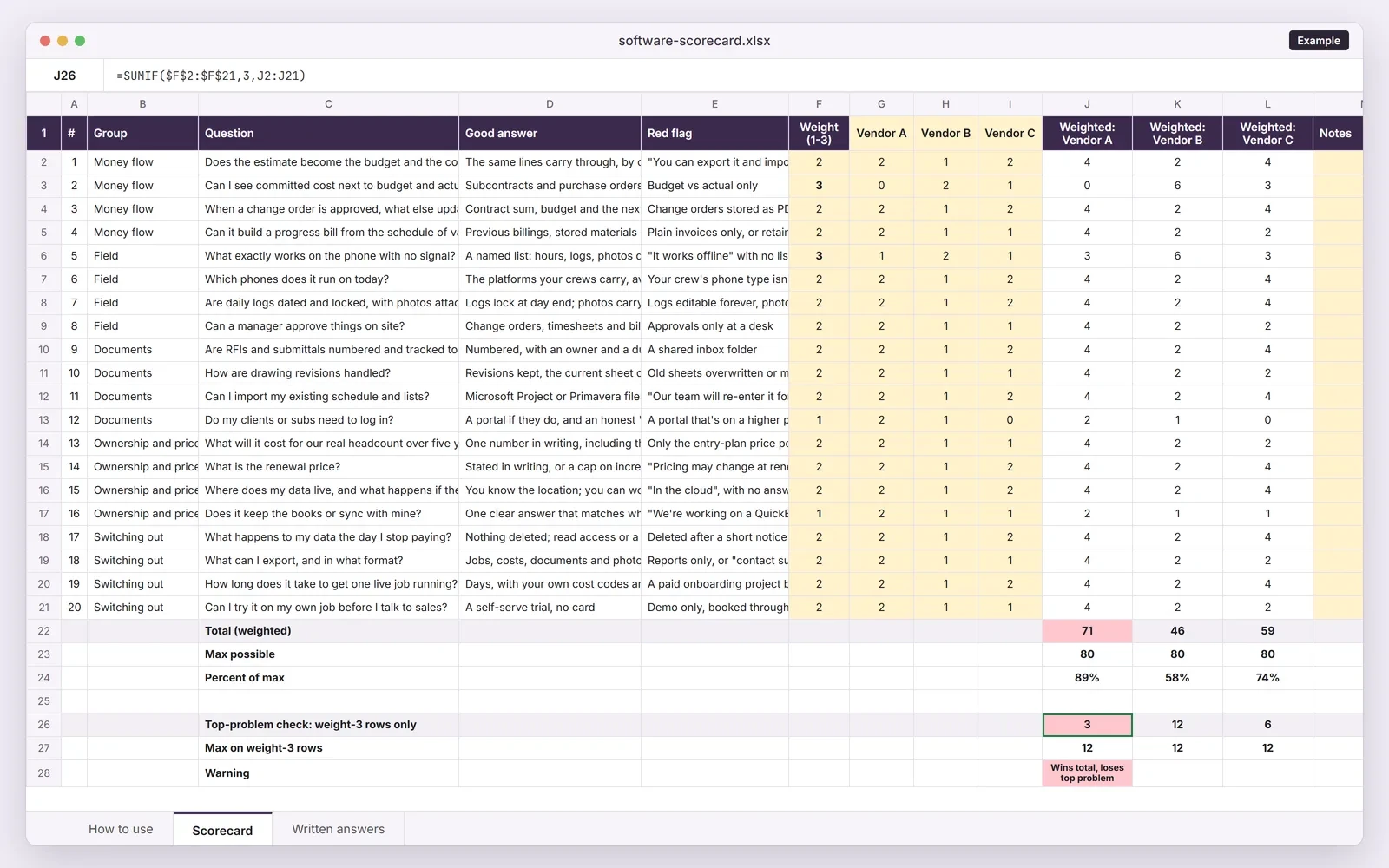
Download the software scorecard (.xlsx). It has the 20 questions, a weight column, three vendor columns and a weighted total. No email needed.
- Set the weights first. Give your top two problems a weight of 3, anything you could live without a 1, and the rest a 2. Do this before any demo, so a slick screen can't change your priorities.
- Pick one real job that's live now. Use its budget, its subcontracts and purchase orders, and last week's vendor bills.
- In each trial, enter that job, approve one change order and build one bill. Note how long each step takes.
- Give a foreman the phone app for two days on site, including the airplane-mode test from question 5.
- Ask each vendor questions 13, 14, 17 and 18 by email, so the answers are in writing.
- Score each question 0 (no), 1 (partly) or 2 (yes, shown to me). Score only what you saw working, not what a salesperson promised.
- Read the weighted totals, then read your two weight-3 rows on their own. If the winner on total loses on your top problem, the total is wrong.
Our call: a tool that scores 2 on your two weight-3 questions and 1 elsewhere beats one that scores 2 everywhere except your top problem. That's the whole point of the weights.
Who should not choose Nagi
Some contractors are better served elsewhere, and it's cheaper for both of us to say so now.
Choose another tool if your clients need a portal to approve selections or pay applications online, or if your crews carry iPhones and need the app on site today. Nagi has no payroll, so if you want payroll inside your construction software, look elsewhere. It doesn't include bid management. It has no AI features. And if your accountant runs everything through QuickBooks, a construction tool that syncs with it will fit your office better.
Nagi fits a small contractor who wants the estimate, the budget, the change orders, progress billing and the books in one program, priced per company, with the data on its own PC. If that's you, put us through the same 20 questions as everyone else. For more on the ownership side, read construction management software without a subscription; for site work with no signal, see construction apps that work offline; and if you're moving off CoConstruct, our CoConstruct alternatives post covers what to export first.
Procore, JobTread, Fieldwire, CoConstruct, Microsoft Project, Primavera and QuickBooks are trademarks of their respective owners. Nagi Software is not affiliated with, endorsed by or sponsored by them. Comparisons use information published by each vendor on the date shown.
Frequently asked questions
- What should a small contractor look for in construction management software?
Look at how money moves first: whether the estimate becomes the budget, whether committed cost shows next to actual, and whether an approved change order reaches the next bill without retyping. Then check what works on site with no signal, who owns the data, the five-year cost for your real headcount, and how you get your data out if you leave.
- Is Procore too much for a small company?
It depends on your volume and your field team. Procore prices by Annual Construction Volume with unlimited users, according to its pricing page, so a contractor with many occasional users can do well on it. A small office with a handful of jobs often pays for modules it never opens. Ask for a five-year quote and compare it with tools that publish prices.
- How important is offline access in construction software?
Very, if your sites have basements, steel buildings or rural locations. Ask exactly what works with no signal: entering hours, logs and photos, or also opening drawings and looking things up. Then test it yourself in airplane mode during the trial. A vague 'works offline' with no list of what works is a red flag.
- How long should a construction software trial take?
Long enough to run one real job through it: a week of focused use usually tells you more than a month of occasional clicking. Enter one live job's budget, its orders and last week's bills, have a foreman log two days on site, and build one bill. If the trial is too short for that, ask the vendor to extend it.
- What questions should I ask a construction software vendor?
Ask what the software costs for your real headcount over five years, what the renewal price is in writing, where your data is stored, what happens to it when you stop paying, which file formats you can export, what you can import on the way in, and which features sit on a higher plan than the one quoted.
Sources
- Nagi Construction Management Suite product page, checked November 14, 2026
- Nagi Construction Management Suite trial page, checked November 14, 2026
- Nagi Software pricing page, checked November 14, 2026
- Procore pricing page, checked November 14, 2026
- JobTread pricing page, checked November 14, 2026
- Fieldwire pricing page, checked November 14, 2026
The product in this post
Nagi Construction Management Suite
Run a construction company from estimate to close-out in one program that keeps your data on your own PC.
- construction-software
- buyers-guide
- checklist
- small-business
- general-contractor