
Perpetual License vs Subscription: The 5-Year Cost for a Small Business
Perpetual license or subscription? The 5-year math for a 10-person business, the break-even year, what each model includes, what happens to your data when you stop paying, and the lifetime-deal traps to check.
Nagi Software TeamUpdated 11 min read
A perpetual license costs more on day one and less every year after; a subscription costs less on day one and more every year after. In the three 10-person examples below, the one-time price paid for itself within four months to two years. So if you'll use the software for three years or more, buying outright is usually cheaper. It isn't when the subscription includes something you can't do without, such as hosting, or when you might drop the tool within a year.
We sell both kinds. Nagi HR Suite and Nagi Construction Management Suite each come as monthly, yearly or lifetime licenses, so we've run this math for our own customers. Below is the method, three worked examples and the traps.
Definitions: perpetual, lifetime, subscription and term
Four words get mixed up on pricing pages, and they mean different things in the license terms.
A perpetual license is a one-time payment for the right to use a specific version indefinitely. Microsoft Project Standard 2024 is a clear example: $679.99, "one-time purchase", licensed for one user on one PC, as listed on microsoft.com on 13 November 2026.
A lifetime license is a vendor's name for a one-time license, and its meaning sits in the fine print. Usually it's the lifetime of the product. Our own license agreement says a lifetime license "has no end date" and lasts as long as we offer and support that product; if we discontinue it, you keep the last version you were licensed for.
A subscription is a payment every month or year for access. Stop paying and access stops, or shrinks to read-only, depending on the vendor.
A term license sits between the two: an installed program you license for a fixed period (one to three years is common), then renew. You'll meet it mostly in larger business software.
The 5-year math
You can do this on the back of an envelope. Two formulas cover almost every case.
Subscription, 5 years = seats × price per seat per month × 12 × 5, plus any price rise.
One-time, 5 years = license price × number of licenses, plus any yearly maintenance × 5.
If you expect the subscription price to rise, multiply each later year by the increase. A 5% yearly rise turns 5 years of a $3,000-a-year plan into $16,577 instead of $15,000. Nobody knows future prices, so run it at 0% and at a rise you'd find plausible, and look at both.
Then add what neither formula shows:
- Migration and training, once, whichever you choose.
- Hosting and backups. A subscription usually includes them; with an installed program, you supply the PC and keep the backups.
- Upgrades. Some one-time licenses cover only the version you bought.
We'd like this to be an interactive calculator. Until then, the tables below do the same sums for three real cases.
Three worked examples for a 10-person business
Every price is as listed on the vendor's own page on 13 November 2026, in US dollars, before tax, with no price rise assumed unless shown.
Example 1: HR software for 10 employees
A 10-person office wants employee records, leave and payroll calculation.
| Option | Year 1 | 3 years | 5 years | 5 years with a 5% yearly price rise |
|---|---|---|---|---|
| BambooHR Core (flat $250 a month for 25 or fewer employees) | $3,000 | $9,000 | $15,000 | $16,577 |
| Nagi HR Suite, monthly ($19) | $228 | $684 | $1,140 | $1,260 |
| Nagi HR Suite, yearly ($190) | $190 | $570 | $950 | $1,050 |
| Nagi HR Suite, lifetime ($349 once) | $349 | $349 | $349 | $349 |
BambooHR price from bamboohr.com/pricing; Nagi prices from nagisoftware.com/pricing; both checked 13 November 2026.
Rival prices last checked on 15 November 2026 on each vendor's public pricing page.
The lifetime license overtakes the yearly plan during year 2 ($349 against $380 for two years). The two products aren't equal, though. BambooHR is a cloud system with US payroll, benefits and integrations available as add-ons; Nagi HR Suite calculates payroll but doesn't file taxes or pay anyone. Compare like with like before you compare prices. Our HR software pricing guide goes further.
One company license covers one Administrator PC and 10 employee PCs, with 11 phone connections and unlimited employee records. Pay monthly, yearly or once (lifetime). Prices as listed on nagisoftware.com/pricing on 13 November 2026.
Example 2: construction management software for a 10-person contractor
Here's the same choice inside one product, which shows the trade-off without any feature differences.
| Nagi Construction Management Suite | Year 1 | 3 years | 5 years |
|---|---|---|---|
| Monthly ($99) | $1,188 | $3,564 | $5,940 |
| Yearly ($199.50 discounted price, first year) | $199.50 | Renewal: see pricing | Renewal: see pricing |
| Lifetime ($349.50 discounted price, once) | $349.50 | $349.50 | $349.50 |
Prices as listed on nagisoftware.com/pricing on 13 November 2026 (50% off $399 yearly and $699 lifetime). The yearly row shows year 1 only: check the pricing page for what a renewal costs before you count on it.
Against the monthly plan, the lifetime license pays for itself in under four months. Against yearly, it depends on the renewal price, so look it up before you choose. We'd pick monthly only for a short job or a trial run on a live project.
Example 3: project scheduling for 10 people
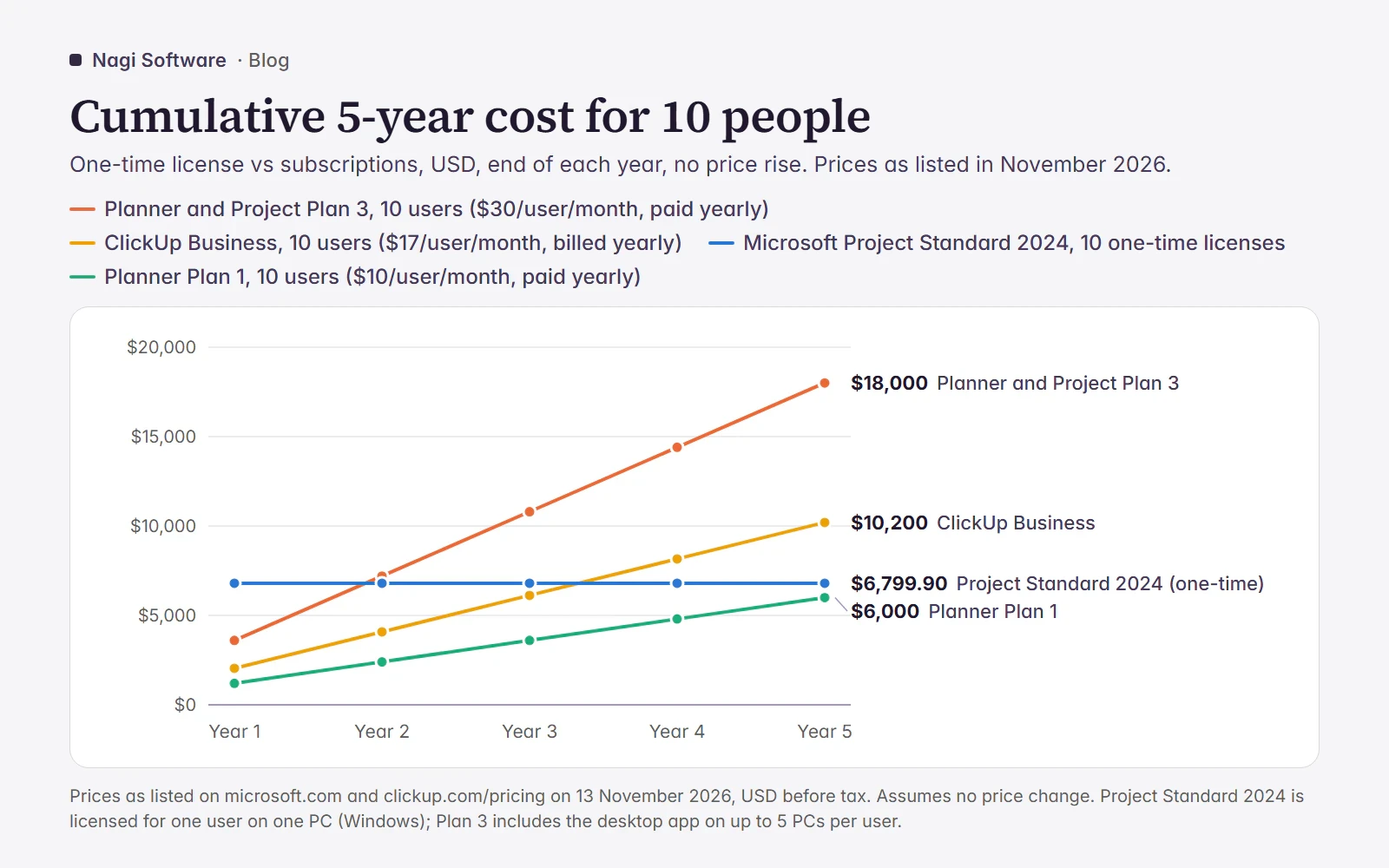
Microsoft sells the same kind of tool both ways, so it's a clean test.
| Option | Year 1 | 3 years | 5 years |
|---|---|---|---|
| Project Standard 2024, one-time, 10 licenses at $679.99 | $6,799.90 | $6,799.90 | $6,799.90 |
| Project Professional 2024, one-time, 10 licenses at $1,129.99 | $11,299.90 | $11,299.90 | $11,299.90 |
| Planner Plan 1, $10 per user a month, paid yearly | $1,200 | $3,600 | $6,000 |
| Planner and Project Plan 3, $30 per user a month, paid yearly | $3,600 | $10,800 | $18,000 |
| ClickUp Business, $17 per user a month, billed yearly (for scale) | $2,040 | $6,120 | $10,200 |
Microsoft prices from microsoft.com (Project plans and Planner plans pages), ClickUp from clickup.com/pricing, checked 13 November 2026.
The one-time Standard license beats Plan 3 before the end of year 2. It doesn't beat Planner Plan 1 within five years, because Plan 1 is a lighter, cheaper product. Note what you give up: Standard 2024 is Windows-only and licensed per PC, while Plan 3 includes the Project desktop app on up to 5 PCs per user plus the cloud service. More in our guide to Microsoft Project alternatives you pay for once.
Break-even: when pay-once wins and when it doesn't
Break-even year = one-time price ÷ yearly subscription cost. Below that point the subscription is cheaper; above it, the one-time license is. Our subscription vs one-time license calculator runs this sum year by year on your own prices.
| Comparison | One-time | Subscription per year | Break-even |
|---|---|---|---|
| Nagi HR Suite lifetime vs yearly | $349 | $190 | 1.8 years |
| Nagi HR Suite lifetime vs monthly | $349 | $228 | 1.5 years |
| Nagi CM Suite lifetime vs monthly | $349.50 | $1,188 | 3.5 months |
| Project Standard 2024 (10) vs Planner and Project Plan 3 (10) | $6,799.90 | $3,600 | 1.9 years |
Rival prices last checked on 15 November 2026 on each vendor's public pricing page.
Pay-once wins when all of these hold: you'll use the tool for longer than the break-even point, the version you buy does what you need without future features, and you can run it yourself (an office PC, backups). It loses when you might switch tools within a year, when you need cloud features that only the subscription has, or when the one-time price is more than three years of subscription. At that point, the vendor's roadmap will have moved on before you've broken even.
When a subscription is the better buy
Subscriptions aren't a trick. For plenty of small businesses they're the right call, and we'd tell a customer so.
Pick a subscription when your team has no office, or no PC anyone would leave switched on. A cloud service runs the server, the backups and the security updates for you. Pick one when the tool is new to you and you might drop it in six months; three months at $99 is cheaper than a lifetime license you stop using. Pick one when the software does something that changes every year, such as US payroll tax filing, where the vendor has to keep up with the rules.
And pick one when cash is tight this quarter. A one-time price is a bigger payment now, even when it's cheaper over five years. Spreading the cost can be worth a few hundred dollars.
The mistake isn't choosing a subscription. It's never re-checking it. Put the renewal date in your calendar and run the two formulas again each year with your real seat count.
Updates, support and upgrades: what each model includes
This is where the two models differ most in practice, and where pricing pages say least.
| Typical subscription | Typical perpetual license | Nagi lifetime license | |
|---|---|---|---|
| Updates | Included while you pay | Bug fixes for that version; new versions often a new purchase or a maintenance plan | Updates included with every license today; no contractual right to future updates |
| Support | Included while you pay | Sometimes included for a period, sometimes paid | Contact form, a person replies, no guaranteed response time |
| New major version | Included | Often paid | Not promised |
| If the product is discontinued | Access ends | You keep the version you have | You keep the last version you were licensed for; activation withdrawn only after reasonable notice |
OmniPlan for Mac is a good example of the classic perpetual model: its buy page lists "Purchase once to own this version forever. Includes all 4.x updates," at $199.99 (Standard) or $399.99 (Pro), next to a $199.99 yearly subscription. Version 5 would be a new decision.
Be wary of any vendor, us included, that promises updates forever. We don't. Our license agreement says plainly that no license "carries a contractual right to future updates". Today every license gets updates; that's a practice, not a promise, and you should price it that way.
What happens to your data when you stop paying
This is the question to ask before you sign anything, because the answers vary a lot.
- Microsoft Planner subscriptions: the pricing page footnote says that when a subscription is canceled, "all associated data will be deleted."
- Asana: its pricing FAQ says that when a paid plan ends you lose access to paid features "and all data associated with those features".
- BambooHR: its terms of service say data can be downloaded for 30 days after termination and is then deleted.
- Nagi monthly and yearly licenses: the software becomes read-only. Your data stays on your own PC, untouched, and you can still open, print and export it. Nothing is deleted.
- Nagi lifetime: nothing ends, because there's no end date.
- Any installed one-time program: the data is a file on your computer. You own the backups, which also means you lose it if you don't make any.
A perpetual license doesn't guarantee your data is safe; it means the data is your responsibility. A subscription doesn't mean your data is at risk; it means you need an exit plan and a calendar reminder. Either way, export once a quarter.
Lifetime-deal traps: a checklist
"Lifetime" deals (pay once, use forever) are sold by large vendors, small vendors and deal sites. The good ones are good value. Check these before you pay.
- Whose lifetime? Find the sentence that defines it. "For the life of the product" is normal; make sure you know what happens if the product is discontinued.
- Does it need to phone home? Many one-time programs check their license online. Ours needs internet for a few seconds at least every 14 days. Ask what happens if the vendor's activation server goes away.
- Are updates included, and for how long? A version, a year, "the life of the product"?
- Is there a maintenance fee after year 1? Some "one-time" prices add a yearly fee for updates or support.
- How many people, PCs or companies does it cover? Microsoft Project 2024 is one user on one PC. Ours is one company with one Administrator PC and 10 employee PCs.
- Can you move it to a new PC? Ours frees the old PC from Account → Licenses.
- Is there a refund window? Ours is 14 days for lifetime licenses, counted from payment.
- Is the price a discounted price? Ours on the construction suite is. That's fine for a lifetime license you buy now; for a yearly plan, check what the renewal costs before you do the math.
- Where's the data, and can you get it out in a format another program reads?
- Is it a real license from the vendor? Very cheap "lifetime" keys for well-known software sold by third parties deserve a close look at who is selling them and on what terms.
How to decide
Run the two formulas with your own seat count, then answer four questions:
- Will we use this for longer than the break-even point? If yes, lean one-time.
- Do we need something only the subscription includes (hosting, access from anywhere without our own setup, a mobile app that works away from the office)? If yes, lean subscription, or a one-time license plus a hosted add-on.
- Can we keep a PC on and take backups? If not, a subscription is the safer choice.
- What happens to our data on the day we stop paying? If the answer is "deleted", diary an export now.
If you land on one-time for HR or construction software, our pricing page lists monthly, yearly and lifetime prices side by side, and both products (Nagi HR Suite and Nagi Construction Management Suite) have a 7-day trial with no card. More calculators like the one above are on our free tools page. For project tools, see what ClickUp, monday.com and Asana cost a 10-person team, and for construction, software you buy once.
Microsoft, Microsoft Project, Microsoft Planner, BambooHR, ClickUp, Asana and OmniPlan are trademarks of their respective owners. Nagi Software is not affiliated with, endorsed by or sponsored by them. Comparisons use information published by each vendor on the date shown.
Frequently asked questions
- What is the difference between a perpetual license and a subscription?
A perpetual license is paid once and lets you keep using the version you bought with no end date. A subscription is paid every month or year, and access stops or becomes limited when you stop paying. Updates and support are usually included in a subscription and may cost extra with a perpetual license.
- Is a lifetime license the same as perpetual?
Not always. Perpetual usually means you can use the version you bought forever. Lifetime is a marketing word whose meaning sits in the license terms: often the lifetime of the product, not your lifetime. Read what happens if the product is discontinued, whether activation can be withdrawn, and whether updates are promised.
- Is buying software outright cheaper?
Over three to five years it usually is, if you'd keep paying the subscription that long and the one-time price isn't more than about two years of subscription. In our examples, break-even came between 4 months and 2 years. It isn't cheaper if you'd cancel within a year or need the cloud features only a subscription includes.
- Do perpetual licenses get updates?
It depends on the vendor. Some include updates for the version you bought, some sell a yearly maintenance plan for updates and support, and some make each new major version a new purchase. Check the terms for the words 'updates', 'upgrades' and 'maintenance' before you buy.
- What happens when a subscription ends?
Each vendor decides. Some delete your data after a period, some lock you out, and some leave the data readable but not editable. Microsoft's Planner pricing page, for example, says that when a subscription is canceled, all associated data will be deleted. Export your data before the end date.
Sources
- Microsoft Project plans and pricing (Project Standard 2024, Project Professional 2024), checked November 13, 2026
- Microsoft Planner business plans and pricing (Planner Plan 1, Planner and Project Plan 3), checked November 13, 2026
- BambooHR pricing page, checked November 13, 2026
- ClickUp pricing page, checked November 13, 2026
- Asana pricing page (refunds and cancellation FAQ), checked November 13, 2026
- OmniPlan buy page (perpetual license and subscription), checked November 13, 2026
- Nagi Software pricing page, checked November 13, 2026
- Nagi Software license agreement (lifetime terms, read-only on expiry), checked November 13, 2026
- Nagi Software FAQ (auto-renew, renewals, updates), checked November 13, 2026
Products in this post
Nagi HR Suite
HR, attendance, leave and payroll in one desktop application.
Nagi Construction Management Suite
Run a construction company from estimate to close-out in one program that keeps your data on your own PC.
- perpetual-license
- subscription
- lifetime-license
- software-cost
- small-business
- pricing