
ClickUp vs monday vs Asana: What a 10-Person Team Pays Over 3 Years
The listed prices of ClickUp, monday.com and Asana for a 10-person team, added up over 1, 3 and 5 years, with seat buckets, free-plan caps, the cost of hire number 11, and how per-company pricing compares.
Nagi Software TeamUpdated 13 min read
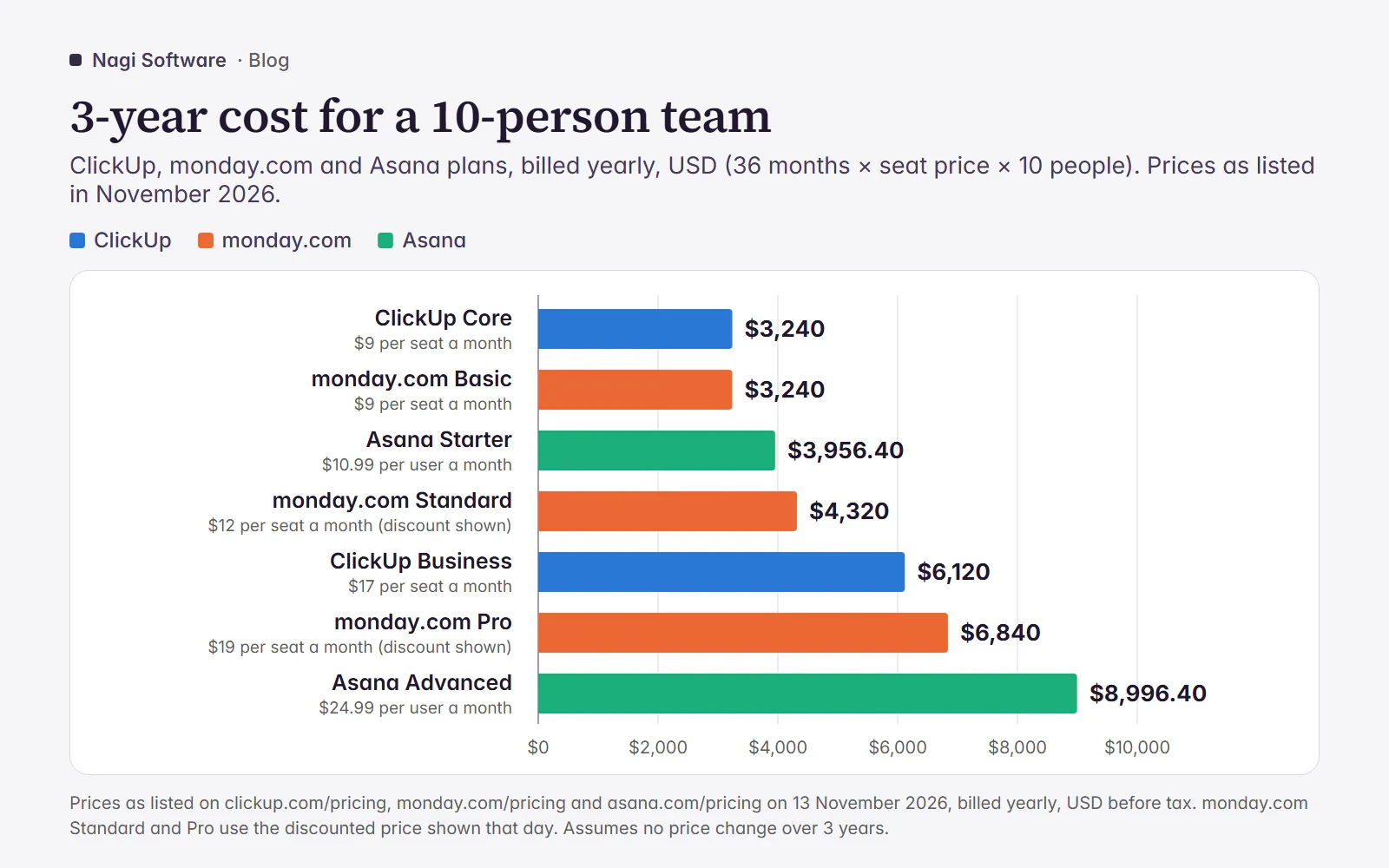
A 10-person team on the cheapest paid plans pays about the same for all three: ClickUp Core and monday Basic come to $1,080 a year billed yearly, and Asana Starter to $1,318.80. Over three years that is $3,240 against $3,956.40. On the middle plans most teams end up on, the gap opens: $4,320 for monday Standard, $6,120 for ClickUp Business and $8,996.40 for Asana Advanced over three years.
Nagi Software makes Nagi Project Management Suite, Nagi HR Suite and Nagi Construction Management Suite, which appear in the per-company section of this comparison. They are not in the per-user tables above it.
Short answer: the 3-year cost for 10 people
Every figure below comes from the vendor's own pricing page on 13 November 2026, in US dollars, before tax. "Yearly" means billed annually, which all three discount.
| Plan | Per seat, billed yearly | Per seat, billed monthly | 10 people, 1 year (yearly billing) | 3 years | 5 years |
|---|---|---|---|---|---|
| ClickUp Core | $9 | $12 | $1,080 | $3,240 | $5,400 |
| ClickUp Business | $17 | $25 | $2,040 | $6,120 | $10,200 |
| monday.com Basic | $9 | $12 | $1,080 | $3,240 | $5,400 |
| monday.com Standard | $12 (discount shown; $14 crossed out) | $14 | $1,440 | $4,320 | $7,200 |
| monday.com Pro | $19 (discount shown; $22 crossed out) | $24 | $2,280 | $6,840 | $11,400 |
| Asana Starter | $10.99 | $13.49 | $1,318.80 | $3,956.40 | $6,594 |
| Asana Advanced | $24.99 | $30.49 | $2,998.80 | $8,996.40 | $14,994 |
Prices as listed on each vendor's pricing page on 13 November 2026, in the vendor's currency, before tax. Prices change; check the vendor's page: ClickUp, monday.com, Asana. Multi-year totals assume today's price holds, which none of the three promises.
Rival prices last checked on 15 November 2026 on each vendor's public pricing page.
Two of those numbers need a warning. monday.com showed Standard and Pro with a discount against a crossed-out higher total ("$20 off / month" on 10 Standard seats). If that offer has ended when you read this, 10 Standard seats cost $1,680 a year, not $1,440.
How each one charges
All three charge per seat, per month. What differs is how seats are counted and sold, and that decides what your bill does when the team changes.
ClickUp
ClickUp bills every member of the Workspace on a paid plan. Its pricing FAQ says people added mid-cycle are billed prorated, and that people inside your organization count as paid users, not guests. There's no seat minimum and no seat bundle. You pay for 10 people, or 11.
Guests are partly free. Core includes 5 guest seats plus 2 for each extra paid user; Business includes 10 plus 5 per extra paid user. Read-only guests are unlimited on every paid plan.
monday.com
monday.com sells seats in fixed sizes. The team-size menu on its pricing page offered 3, 5, 10, 15, 20, 25, 30, 40, 50, 100 and 200+ seats when we checked. The FAQ says plans start from 3 users. A team of 11 can't buy 11 seats: the next size up is 15.
Viewers are free and unlimited from Basic upward. Guest access (people outside your company who can edit) starts on Standard.
Asana
Asana also sells seats in steps, but smaller ones at first. Its FAQ: between 2 and 5 users you add seats one at a time; up to 30 users, in increments of 5; up to 100, in increments of 10. So 10 people buy 10 seats and 11 people buy 15. Starter includes unlimited free guests, per the pricing page.
10 people over 1, 3 and 5 years
Yearly billing saves real money on all three, but you commit for a year. Here is the same team paying month by month, which is how many small teams start because they aren't sure the tool will stick.
| Plan | Per seat, monthly | 10 people, 1 year | 3 years | Extra over 3 years vs yearly billing |
|---|---|---|---|---|
| ClickUp Core | $12 | $1,440 | $4,320 | $1,080 |
| ClickUp Business | $25 | $3,000 | $9,000 | $2,880 |
| monday.com Basic | $12 | $1,440 | $4,320 | $1,080 |
| monday.com Standard | $14 | $1,680 | $5,040 | $720 |
| monday.com Pro | $24 | $2,880 | $8,640 | $1,800 |
| Asana Starter | $13.49 | $1,618.80 | $4,856.40 | $900 |
| Asana Advanced | $30.49 | $3,658.80 | $10,976.40 | $1,980 |
Monthly prices as shown on each vendor's pricing page with the monthly toggle on 13 November 2026.
Rival prices last checked on 15 November 2026 on each vendor's public pricing page.
Our view: once a team has used a tool for two or three months and isn't going to leave, switch to yearly billing. On ClickUp Business the difference is $960 a year for 10 people. Stay monthly only while you're still testing, or if headcount swings a lot.
The 5-year column in the first table is arithmetic, not a forecast. None of the three pages promises a fixed price. ClickUp's pricing page says that if AI providers raise rates, it will "adjust pricing gradually and transparently".
What changes at 11, 15 and 25 people
This is where the three stop looking alike. ClickUp charges per person; monday.com and Asana sell seat blocks, so one hire can buy you four or five empty seats.
| Team size (yearly billing) | ClickUp Core | ClickUp Business | monday Basic | monday Standard | monday Pro | Asana Starter | Asana Advanced |
|---|---|---|---|---|---|---|---|
| 10 people | $1,080 | $2,040 | $1,080 (10 seats) | $1,440 | $2,280 | $1,318.80 (10 seats) | $2,998.80 |
| 11 people | $1,188 | $2,244 | $1,620 (15 seats) | $2,160 | $3,420 | $1,978.20 (15 seats) | $4,498.20 |
| 15 people | $1,620 | $3,060 | $1,620 (15 seats) | $2,160 | $3,420 | $1,978.20 (15 seats) | $4,498.20 |
| 25 people | $2,700 | $5,100 | $2,700 (25 seats) | $3,600 | $5,700 | $3,297 (25 seats) | $7,497 |
Seat sizes from monday.com's team-size menu and Asana's seat-increment FAQ, 13 November 2026. monday Standard and Pro use the discounted price shown that day (15 Standard seats: $180 a month against a crossed-out $200).
Rival prices last checked on 15 November 2026 on each vendor's public pricing page.
So the 11th hire costs:
- $108 a year more on ClickUp Core.
- $540 to $1,140 a year more on monday.com, depending on the plan, because you jump from 10 to 15 seats.
- $659.40 a year more on Asana Starter, for the same reason.
If you're at 10 and hiring, that difference is worth more than any feature comparison. A team that will sit between 11 and 14 people for a year pays for empty seats on monday.com and Asana. ClickUp's per-person billing is the better deal for a team in that range.
Free plans: what they cap
Each free plan suits a different team, and only one of them works for 10 people.
| ClickUp Free Forever | monday.com Free | Asana Personal | |
|---|---|---|---|
| People | Unlimited free members | Up to 2 seats | 2 users |
| Main limits on the pricing page | 60 MB storage; 100 automation actions a month; 1 Form | Up to 3 boards and 3 Docs | Up to 2 seats per project and team |
| Fits a 10-person team? | Yes, until storage or automations run out | No | No |
As listed on each vendor's pricing page on 13 November 2026.
Rival prices last checked on 15 November 2026 on each vendor's public pricing page.
ClickUp's free plan is the only one a team of 10 can live on. The catch is the 60 MB storage cap, which a few attached PDFs and photos use up fast. Asana's free plan used to cover more people; its pricing page now says 2 users.
Add-ons that change the bill
The per-seat price is the floor. Three things push it up.
AI credits. All three now meter AI use. ClickUp's pricing page lists extra credits at $10 per 10,000, shared across the Workspace, with auto top-up shown as on. monday.com includes 1,000 to 3,000 AI credits a month depending on the plan, and its examples price 1,000 extra credits at $10. Asana Starter and Advanced include 5 AI requests per user a month (up to 50 per account), with extra requests at $0.50 each prepaid. If nobody on your team uses the AI features, turn off any automatic top-up on day one.
Plan features you can't get on the cheap tier. Timeline and Gantt views start on monday Standard, not Basic. ClickUp lists unlimited Gantt charts on Core. Check the one feature your team can't work without, then price the plan that has it, not the plan you'd like to pay for.
Outside people. If clients or subcontractors need to edit, check guest rules before you buy. monday.com gives edit-guests only from Standard; ClickUp gives a few guest seats per plan; Asana Starter lists unlimited free guests.
Canceling: refunds and your data
Read this before you pay for a year, because the three treat leaving differently.
- ClickUp's pricing FAQ offers a full refund if you ask within 30 days, and says hitting a limit doesn't delete data.
- monday.com's FAQ gives a partial refund of the unused balance on a yearly plan paid within the last 30 days, and no refunds after that. An admin can export the whole account to a zip file; the help page says archived boards and workdocs aren't included, the export can take up to 24 hours, and the download link lasts 24 hours.
- Asana's FAQ says plainly: "We do not offer refunds." When a paid plan ends, you "lose access to paid features and all data associated with those features."
Whichever you pick, export everything once a quarter and keep the file somewhere you control. It costs ten minutes and saves a bad week.
Per user vs per company pricing: the break-even
Per-user pricing charges for every person with a login. Per-company pricing charges one fee for the organization, usually with a cap on devices or seats. The break-even point is simple: divide the company price by the per-user price. Above that number of people, the flat fee is cheaper. Our subscription vs one-time license calculator does the same sum year by year.
We price our three products per company, so we'll use them to show how the model behaves. Nagi Project Management Suite is the one that does project work; the other two are an HR program and a construction program. All three are installed Windows software with data on your own PC, while ClickUp, monday.com and Asana are cloud tools, so treat this as a price comparison only. Check features, guests and phone use against what your team needs; the Project Management Suite's phone apps are still to come.
| Per-company price | Compared with | Break-even | What 10 people pay per year |
|---|---|---|---|
| Nagi HR Suite, $19 a month | $9 per user (ClickUp Core, monday Basic) | 2.1 people | $228 vs $1,080 |
| Nagi Construction Management Suite, $99 a month | $12 per user (monday Standard) | 8.25 people | $1,188 vs $1,440 |
| Nagi HR Suite, $349 once (lifetime) | $9 per user | Paid back in under 4 months at 10 people | $349 once vs $1,080 every year |
| Nagi Project Management Suite, $99 a month | $12 per user (monday Standard) | 8.25 people | $1,188 vs $1,440 |
| Nagi Project Management Suite, $199.50 a year (50% off $399) | $9 per user (ClickUp Core, monday Basic) | 1.8 people | $199.50 vs $1,080 |
| Nagi Project Management Suite, $349.50 once (lifetime, 50% off $699) | $9 per user | Paid back in under 4 months at 10 people | $349.50 once vs $1,080 every year |
Nagi prices as listed on nagisoftware.com/pricing on 15 November 2026. The prices shown are 50% off, and a yearly license bought at a discounted price keeps it on renewal.
Rival prices last checked on 15 November 2026 on each vendor's public pricing page.
One company license covers one Administrator PC and 10 employee PCs, with 11 phone connections, and Nagi HR Suite includes unlimited employee records. Pay monthly, yearly or once (lifetime). Prices as listed on nagisoftware.com/pricing on 15 November 2026.
Per-company pricing has its own traps, and you should know them:
- It's capped by something. Ours counts PCs, not people: a seat is a computer. Ten people sharing six PCs use six seats; one person on two PCs uses two. Extra employee seats beyond 10 are priced per seat, shown before you pay.
- Small teams can overpay. A three-person team on a $99 flat fee pays more than three seats at $12.
- The flat price can still rise at renewal. On our monthly plans, a renewal is charged at the current price, and a regular-price yearly license renews at the current price too. A yearly license bought at a discounted price keeps that price on renewal, and a lifetime license has no renewal.
Which to pick by team type
These calls come from the pricing tables above, not from feature testing.
- Exactly 10 people, no hiring planned this year: monday Basic or ClickUp Core, both $1,080 a year. Pick by which interface your team prefers after the free trial.
- At 10 and hiring: ClickUp. Per-person billing means hire number 11 adds $108 a year on Core, not a 5-seat block.
- Many clients who only need to look: monday.com, because viewers are free and unlimited from Basic.
- Already on Asana with 5 people or fewer: stay. Seats go one at a time up to 5, and Starter's free guests are generous.
- Lowest bill, no card on file: ClickUp Free Forever, if 60 MB of storage is enough.
Six ways to cut the bill
Most teams overpay by a few seats and one plan level. These checks take an afternoon.
- Count the people who opened the tool in the last 30 days. Anyone who only reads updates can be a viewer (monday.com) or a read-only guest (ClickUp) at no cost.
- Price the size you'll be in six months, not today. On monday.com and Asana, 11 and 15 people cost the same.
- Run the trial on the plan you'll actually buy. Teams that trial the top plan get used to features they then have to pay for.
- Move to yearly billing only after the trial month, when you know the tool will stay.
- Put the renewal date in your calendar 45 days early. monday.com's partial refund only applies to a yearly plan paid within the last 30 days, and Asana gives none, so the time to change plan is before the renewal, not after.
- Switch off automatic AI credit top-ups unless someone owns that budget.
None of this is clever. It's the same discipline you'd apply to a phone contract. On monday.com, getting a team back from 15 seats to 10 saves $540 to $1,140 a year at the prices above.
Asana is the most expensive of the three at every size we priced. That doesn't make it the wrong choice. If your team already runs on it, migration time costs more than the difference for a year or two.
Where Nagi fits today
Nagi Project Management Suite is on sale. Its product page, read on 15 November 2026, describes a Windows app for project managers, PMOs and owners of small and mid-size firms. It lists a work breakdown structure, all four link types with lag and lead, baselines and the critical path, Gantt, Kanban, calendar and timeline views, a shared resource pool with leveling, timesheets and expenses, budgets with earned value, a register for risks, issues and decisions, and the 14 DCMA schedule checks. It reads and writes Microsoft Project XML and Primavera XER files. Its page says the data stays on your Administrator PC and the app keeps working without an internet connection. Phone apps are still to come, and the page lists no Mac version. There's a 7-day free trial in a web portal with no card. We built it, so we are not neutral; check the product page before you decide. Current prices are on the pricing page. To test a project's business case before you buy any tool, the free project cost-benefit analysis calculator works out NPV, payback and more from your own numbers, and the rest are on our free tools page.
If what you really need is construction scheduling, Nagi Construction Management Suite already has a schedule with dependencies, critical path, baseline and look-ahead plans, and it imports Microsoft Project and Primavera files. If your project work is mostly people (leave, attendance, timesheets), Nagi HR Suite covers that. Both run on Windows and Mac with data on your own PC, and both have a 7-day trial with no card. For the long view on paying once versus renting, see perpetual license vs subscription and our breakdown of HR software pricing.
ClickUp, monday.com and Asana are trademarks of their respective owners. Nagi Software is not affiliated with, endorsed by or sponsored by them. Comparisons use information published by each vendor on the date shown.
Frequently asked questions
- Is ClickUp cheaper than monday.com for 10 users?
On the entry plans they cost the same: ClickUp Core and monday Basic were both $9 per seat per month billed yearly on 13 November 2026, so $1,080 a year for 10 people. On the plans most teams pick, monday Standard ($12 a seat at the discount shown that day) came to $1,440 a year and ClickUp Business ($17) to $2,040.
- Does monday.com have a minimum number of seats?
Yes. monday.com's pricing page says plans start from 3 users, and paid plans are sold in seat sizes of 3, 5, 10, 15, 20, 25, 30, 40, 50, 100 and 200+. A team of 11 buys the 15-seat size. The free plan covers up to 2 seats.
- How much does Asana cost for a small team?
Asana Starter was listed at $10.99 per user per month billed yearly ($13.49 monthly), and Advanced at $24.99 ($30.49 monthly). For 10 people on Starter that is $1,318.80 a year. Above 5 users, Asana adds seats in steps of 5 up to 30 users, so 11 people pay for 15.
- What happens to my data if I cancel Asana or monday.com?
Asana's pricing FAQ says that when a paid plan ends you lose access to paid features and all data associated with those features, and that it doesn't offer refunds. monday.com lets an admin export the whole account to a zip file; its help page says archived boards and workdocs aren't included. Export before you cancel.
- What is per-user pricing?
Per-user (or per-seat) pricing charges a fixed amount for every person with a login, every month. The bill grows with headcount, and some vendors sell seats only in groups, so adding one person can mean paying for several.
- Is there project management software priced per company?
Some tools charge a flat fee per company or per account instead of per person. Nagi Software prices all its products per company license, including Nagi Project Management Suite: $99 a month, $199.50 a year or $349.50 once at the prices shown on its pricing page on 15 November 2026 (50% off $399 a year and $699 lifetime). Each license includes 10 employee seats, and a seat is a PC, not a person.
Sources
- ClickUp pricing page (yearly and monthly views), checked November 13, 2026
- ClickUp Help: Offline Mode, checked November 13, 2026
- monday.com pricing page (yearly and monthly views, seat sizes, FAQ), checked November 13, 2026
- monday.com Support: How to export your entire account's data, checked November 13, 2026
- Asana pricing page (plans, seat increments, refund and cancellation FAQ), checked November 13, 2026
- Nagi Software pricing page, checked November 15, 2026
- Nagi Project Management Suite product page, checked November 15, 2026
Products in this post
Nagi Project Management Suite
Professional project control that runs on your own PCs.
Nagi HR Suite
HR, attendance, leave and payroll in one desktop application.
Nagi Construction Management Suite
Run a construction company from estimate to close-out in one program that keeps your data on your own PC.
- project-management
- pricing
- clickup
- monday
- asana
- per-user-pricing
- comparison