
What to Keep in an Employee Personnel File (Checklist + Digital Setup)
A country-neutral checklist of what goes in an employee personnel file, what to keep out of it, who can see it and how long to keep it, plus three ways to keep the files digital and private.
Nagi Software Team10 min read
An employee personnel file holds the documents that record one person's employment, from the job application to the exit letter: contract, job description, pay changes, leave, reviews, training and discipline. Medical records, immigration forms and investigation notes go in separate restricted files. Keep each record for as long as the longest rule that applies to it.
We make Nagi HR Suite, HR software that stores employee files on your own PC, so the second half of this guide shows how those files look when they're digital.
What a personnel file is (and the separate files you also need)
A personnel file is the official record of one employee's job: how they were hired, what they were offered, how their role and pay changed, how they performed and how they left. It's the file you open when there's a dispute, an audit or a reference request. Most employers keep three or four files per person, not one.
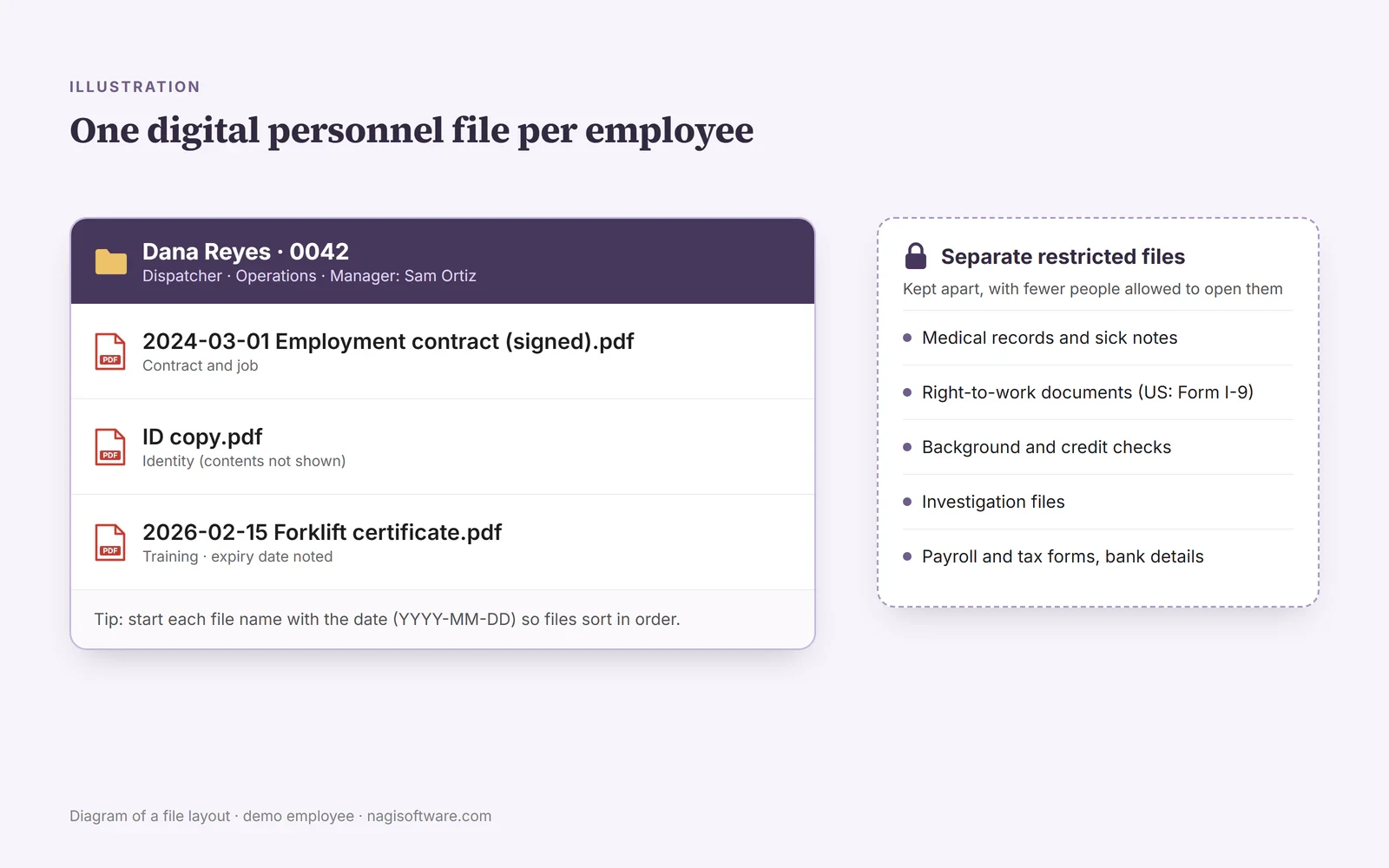
Some records have stricter access rules, which is why the files are split. A supervisor who reads a performance review shouldn't see a doctor's note. The US ADA regulations say medical information must be "collected and maintained on separate forms and in separate medical files" (29 CFR 1630.14).
A workable set for a small business:
- The personnel file: everything in the checklist below.
- A confidential medical file: sick notes, medical leave paperwork, accommodation requests, health insurance enrollment.
- A payroll and tax file: tax forms, bank details for salary, time records, payroll calculations. Fewer people need it, so it gets its own access.
- For US employers, an I-9 file for employment eligibility forms, kept together so you can hand them over in an inspection without opening anyone's personnel file.
Outside the US the fourth file becomes "right-to-work documents" or "visa and permit copies". Same reason, different form.
The checklist: what to keep
The personnel file covers eight stages of employment. For each one, keep the signed or final version of the document, dated. If something only exists as an email, save a PDF of it into the file. A copy you can't find on the day a claim arrives is worth nothing.
| Stage | Keep in the personnel file | Tip |
|---|---|---|
| Hiring | Job application or resume, interview notes that justify the decision, reference checks, offer letter | Keep notes factual; they may be read by a tribunal |
| Contract and job | Signed employment contract, job description, signed handbook and policy acknowledgments, confidentiality or non-compete agreements | File every new version of the job description, not just the latest |
| Pay history | Starting salary, each raise or bonus with its date and the approval | Effective dates settle disputes about back pay |
| Leave | Leave requests and approvals, yearly balances, unpaid leave records | Medical certificates go in the medical file, not here |
| Performance | Reviews signed by the employee, goals, recognition | An unsigned review is easy to dispute |
| Training | Course records, certificates and their expiry dates | Expired certificates can stop someone working on site |
| Discipline | Written warnings, the employee's response, improvement plans | Record the facts and the policy breached, nothing more |
| Separation | Resignation or termination letter, final pay calculation, exit checklist, experience or reference letter issued | Note the date access to systems ended |
Add emergency contact details and a current address. They change, so date each update. For a new hire, the free new hire onboarding checklist builder gives each task an owner and a due date counted from the start date, and our other HR builders are on the free tools page.
Download the one-page version to print or keep beside your records: Personnel file checklist (PDF).
What to keep out of the personnel file
Leave out anything that has its own access rules or that you wouldn't want the employee, a court or an inspector to read cold. That means medical records, US Form I-9, background and credit checks, equal-opportunity self-identification forms, workplace investigation files, and personal opinions.
Each has a reason:
- Medical records. Separate and confidential under the ADA in the US; health data has extra protection under data-protection laws in the UK and EU.
- Form I-9 (US). Inspectors may ask for all of them at once.
- Background and credit reports. US employers handle them under the Fair Credit Reporting Act; limit who sees them.
- Self-identification forms (race, sex, veteran or disability status). Keeping them apart means hiring managers never see them.
- Investigation files. Witness statements name other employees. Put only the outcome, such as a written warning, in the personnel file.
- Opinions. "Seems unhappy lately" has no place in an official record. Write what happened and when.
Who can see a personnel file
Access should be on a need-to-know basis: HR, the person's own manager for the parts they manage, and the employee where the law gives them a right to see it. Write the list down. Then make your paper cabinet or your software enforce it.
Employee access rights differ a lot. In the UK anyone can make a subject access request for their personal data, and organizations "usually have one month to respond" (ICO). In the US there's no federal right to see your personnel file, but several states grant one with their own deadlines. Check your state labor department before replying to a request.
Two practical rules hold everywhere:
- A manager sees their own team's files, not their peers' files and not their own.
- Log who opened or copied a file and when. When someone asks "who saw my warning letter?", you can answer.
How long to keep employee records
Keep each type of record for the longest period any rule in your country or state sets for it, and longer while a claim or audit is open. US federal minimums range from one year for general personnel records to three years for payroll. The table lists the rules we checked on the official sites.
| Record | Minimum we found | Source |
|---|---|---|
| Personnel and employment records (US) | 1 year; for an involuntary termination, 1 year from the termination date | EEOC |
| Payroll records (US) | 3 years | EEOC, DOL Fact Sheet #21 |
| Time cards, wage rate tables (US) | 2 years | DOL Fact Sheet #21 |
| Form I-9 (US) | 3 years after hire or 1 year after employment ends, whichever is later | USCIS M-274 |
| Records relevant to a discrimination charge (US) | Until the charge and any lawsuit are finished | EEOC |
| Payroll, PAYE, leave and sickness records (UK) | 3 years from the end of the tax year they relate to | GOV.UK |
Federal and national minimums only, checked on each official page on 13 November 2026. States, collective agreements and other countries can set longer periods.
The I-9 rule trips people up, so here's a worked example. Someone hired on 1 March 2024 who leaves on 31 May 2025: three years after hire is 1 March 2027, one year after leaving is 31 May 2026. The later date wins, so keep the form until 1 March 2027.
Data-protection law pulls the other way. UK and EU rules say you shouldn't keep personal data longer than you need it. So write a retention schedule, apply it once a year, and shred or delete what has expired.
Paper, spreadsheet or HR software: three ways to keep records
Paper folders suit a handful of staff. A spreadsheet with linked folders works up to roughly a dozen people with one person maintaining it. Beyond that, or once two people edit records, an HR program pays for itself in time saved and access you can control.
A folder structure that works
Whether the folders are cardboard or on a shared drive, use one folder per employee, named so it sorts: Reyes, Dana - 0042. Inside, mirror the checklist: 01 Hiring, 02 Contract, 03 Pay, 04 Leave, 05 Performance, 06 Training, 07 Discipline, 08 Separation. Medical and I-9 files live in a second top-level folder with tighter permissions.
Name files with the date first (2026-03-01 Offer letter.pdf) so the history reads in order.
An employee database in Excel
A spreadsheet works as an index to those folders. One row per employee, with these columns:
| Column | Example |
|---|---|
| Employee ID | 0042 |
| Full name | Dana Reyes |
| Job title / department | Dispatcher / Operations |
| Manager | Sam Ortiz |
| Start date | 2024-03-01 |
| Employment type | Full-time |
| Current salary and effective date | 52,000 from 2026-01-01 |
| Contract end or probation end | 2024-06-01 |
| Emergency contact | Lee Reyes, +1 555 0100 |
| Training expiry (earliest) | 2027-02-15 |
| Folder link | HR/Personnel/Reyes, Dana - 0042 |
| Leaving date | (blank while employed) |
Use a filter on "Training expiry" and "Contract end" to see what's due this month.
Where it breaks: a spreadsheet has no per-row permissions, so anyone who can open it sees every salary. It keeps one current value per cell, so last year's salary disappears when you type this year's. And two people editing a copied file produce two versions of the truth. When any of those bites, move on.
In an HR program
HR software keeps the file as part of the employee record: documents attached to the person, a timeline of changes, letters generated from templates, and access set by role. Here's how that looks in Nagi HR Suite, which we know first-hand.
The employee record holds personal, contact, job and pay details plus a profile photo and document attachments. Upload the signed contract or a training certificate to the person, and it stays with them. Once an item such as an expense claim is approved, its attached documents can't be removed.
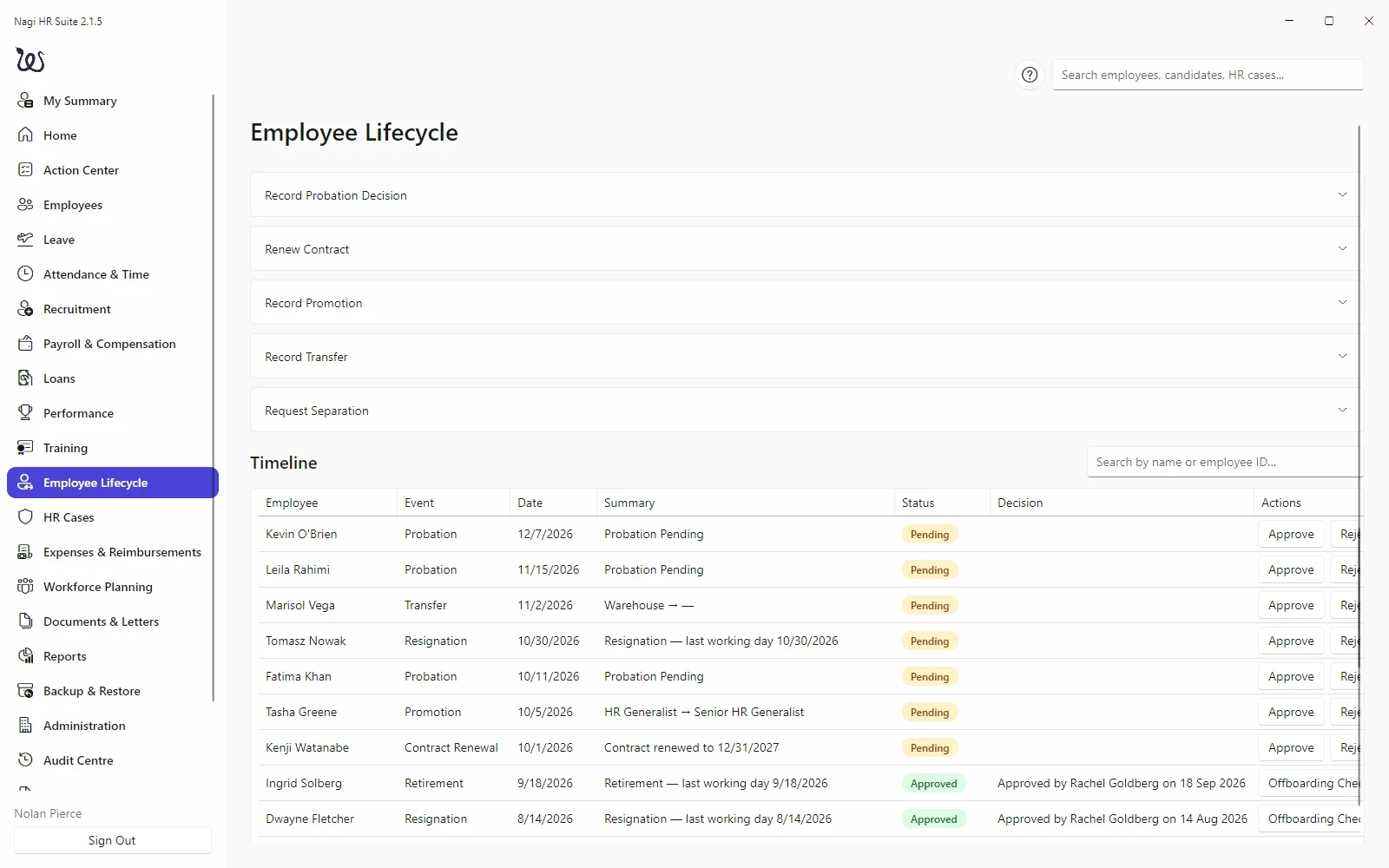
Pay changes are effective-dated. A raise creates a new dated revision and keeps the old figure, so the pay history the checklist asks for builds itself. Probation, confirmation, promotion, transfer and separation are lifecycle events, and each one appears on a single timeline per employee.
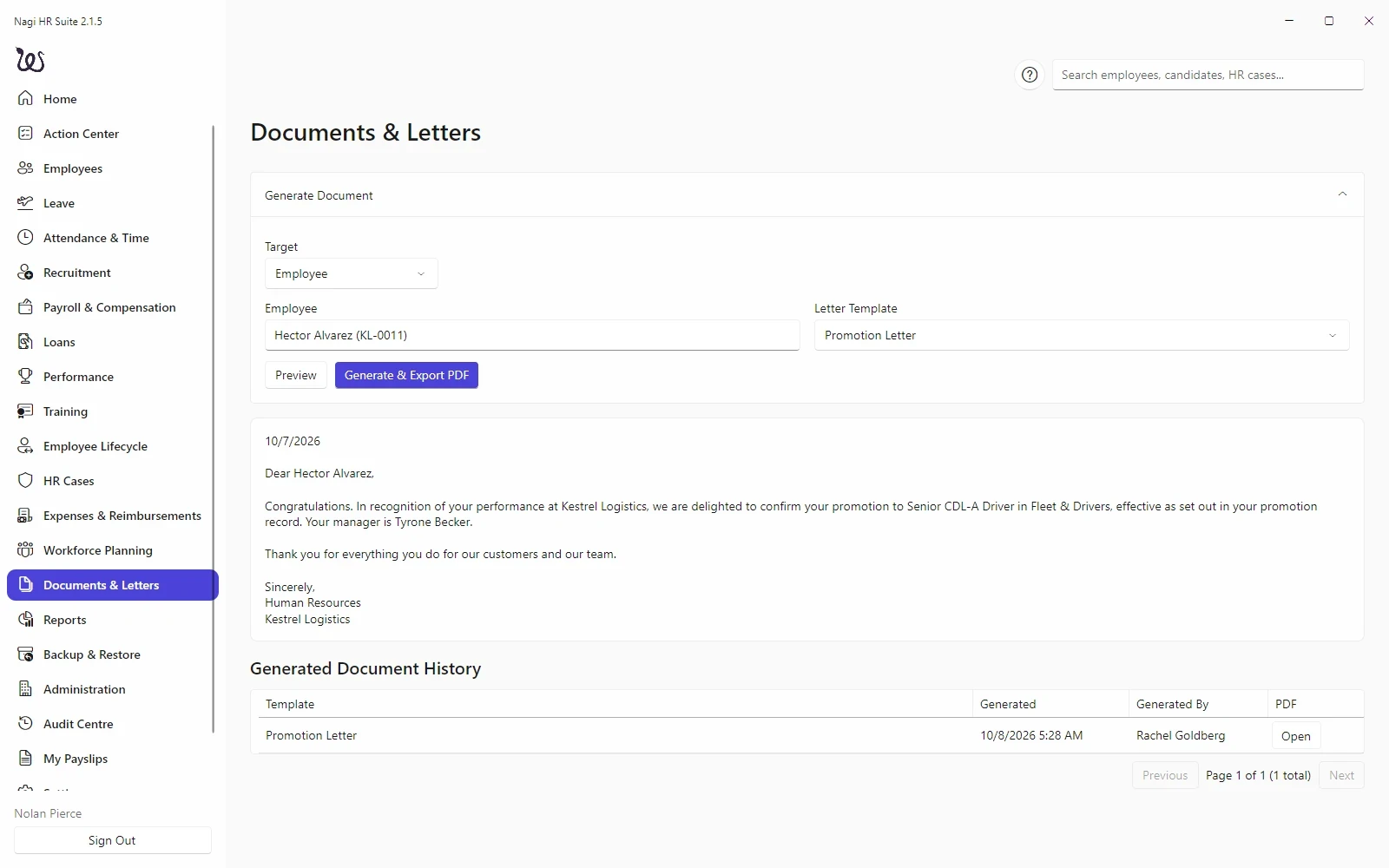
Letters come from templates: offer, appointment, confirmation, salary certificate, experience, warning, promotion, transfer and termination, with merge fields filled from the record. A promotion letter comes out with the name, new job title and date already filled in, ready to sign and file. If you only need two of those letters, the free offer letter generator and experience letter generator write them from a few fields.
One honest limit: Nagi HR Suite doesn't have a separate, restricted "medical file" area. Keep medical certificates and US I-9 forms in a separate locked folder or system, as you would with paper.
Keeping files private: access, encryption, backups and where the data lives
Privacy comes down to four questions. Who can open each file? Is it encrypted at rest and in backups? Is there a tested backup somewhere else? Whose computer is it on? A vendor's cloud, a shared drive and a program on your own PC give four different answers.
In a cloud HR tool the data sits on the vendor's servers under their contract and privacy policy. On a shared drive it sits wherever the drive does, protected only by folder permissions.
In Nagi HR Suite the data sits on your Administrator PC, in a workspace folder, and is uploaded nowhere unless you choose Google Drive or OneDrive backup or move the company to Nagi Cloud. Inside the app:
- Roles decide what each person sees, and the rule is enforced in the program's service layer, not only by hiding menu items. Employees sign in and see their own record, leave and finalized payslips.
- Managers act only on their own reporting line and can't approve their own requests. A manager's letters don't show a report's salary.
- Admins can export an audit log.
- The screen locks after a set idle time, and passwords are stored hashed (PBKDF2-HMAC-SHA256).
- Backups are one-click packages with optional AES-256-GCM encryption. Automatic daily backups keep the newest 30, and encrypted copies can go to your own Google Drive or OneDrive.
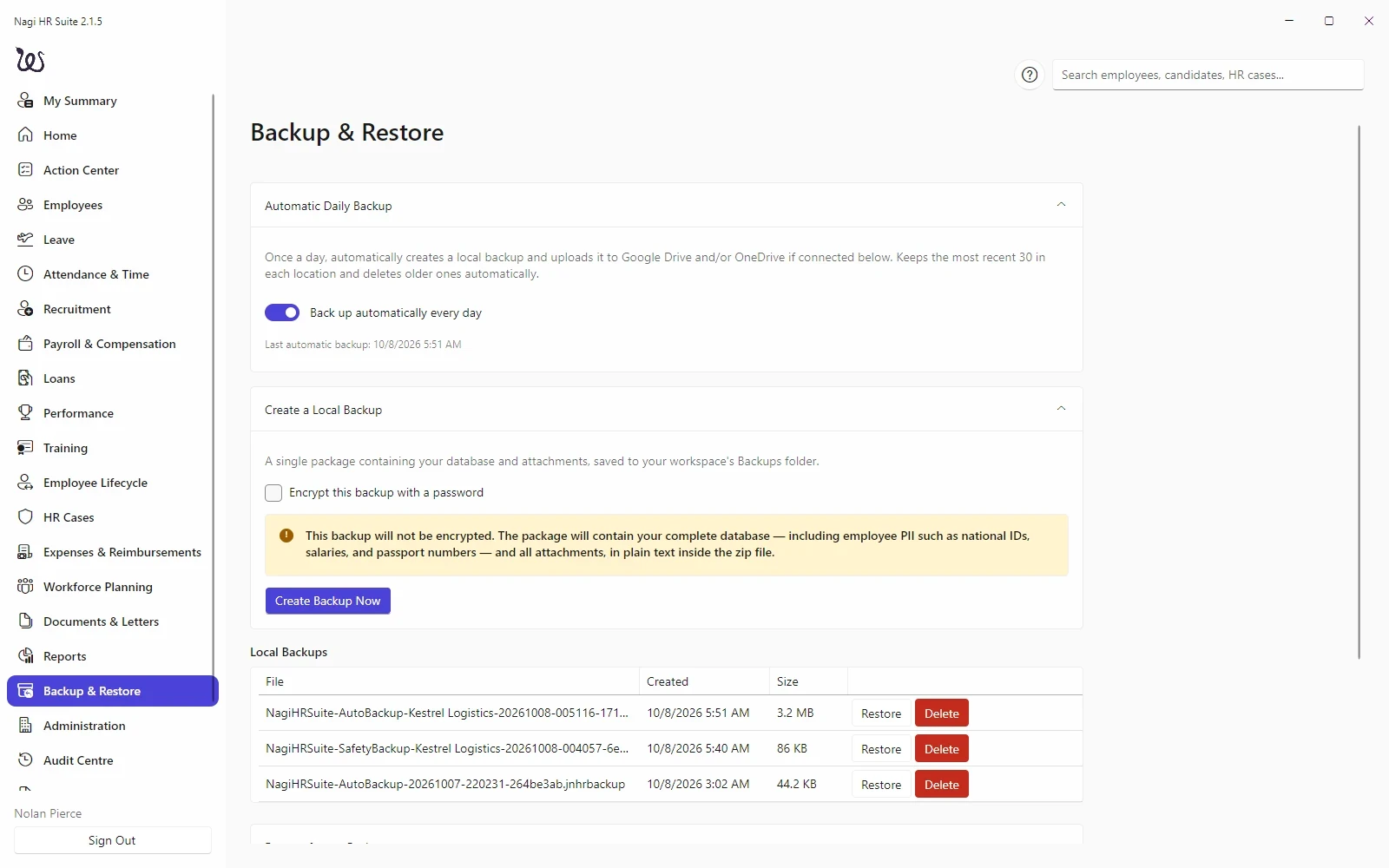
The flip side of data on your own PC: if that PC dies with no backup, nobody can recover the files, including us. Keep one encrypted copy off the machine and try a restore once a quarter.
Free checklist download (PDF)
The checklist is one printable page: the eight stages with a tick box per document, the "keep out" list, and a blank retention schedule to fill in for your own country or state. It's free and there's no email form in front of it.
Download the personnel file checklist (PDF)
How to use it this week: print one per employee, tick what's already in the file, and list the gaps. Most offices find the same three missing: signed policy acknowledgments, the old job descriptions, and the date each raise took effect. Collect those first.
If you'd rather keep the files digital from day one, the Nagi HR Suite page lists every module, and the offline HR software guide explains where the data lives and what works without internet. Paying staff from those records next? Our payslip template for any country is the next step, and HR software pricing at 10, 25 and 50 employees shows what the software options cost. The Nagi HR Suite prices are listed on one page.
Frequently asked questions
- What should be in an employee personnel file?
The documents that show the employment relationship from hiring to exit: the application or resume, offer letter and contract, job description, signed policy acknowledgments, pay and job changes, leave records, performance reviews, training certificates, disciplinary records, and the resignation or termination letter with exit paperwork.
- What should not be kept in a personnel file?
Medical information, which US disability rules require in a separate confidential medical file; Form I-9 in the US; background check reports; equal-opportunity self-identification forms; workplace investigation notes; and personal opinions about the employee that aren't part of a formal review.
- Can employees see their personnel file?
It depends on where they work. Some US states give employees a legal right to inspect or copy their file within a set number of days, and others don't. In the UK, employees can make a subject access request, and organizations usually have one month to respond. Check your own state or country rules before you answer a request.
- How long should you keep employee files after they leave?
At least as long as the longest rule that applies to each record. In the US, EEOC rules require personnel records for one year, FLSA payroll records for three years, and Form I-9 for three years after hire or one year after employment ends, whichever is later. UK payroll records must be kept three years from the end of the tax year. Many employers keep the whole file longer; ask a local employment lawyer.
- Can personnel files be kept digitally?
Yes, in most places, as long as you can control who sees each file, keep it intact and produce it when asked. USCIS, for example, accepts Form I-9 on paper or electronically. Use per-person access, encryption and backups you have tested, and keep the medical and I-9 files separate in the digital system too.
Sources
- EEOC: Recordkeeping requirements, checked November 13, 2026
- USCIS Handbook for Employers M-274, 10.0 Retaining Form I-9, checked November 13, 2026
- US Department of Labor, Fact Sheet #21: Recordkeeping requirements under the FLSA, checked November 13, 2026
- 29 CFR 1630.14 (ADA): medical information kept in separate medical files, checked November 13, 2026
- GOV.UK: PAYE for employers, keeping records, checked November 13, 2026
- ICO: Getting copies of your information (subject access request), checked November 13, 2026
- Nagi HR Suite product page (records, letters, security, backups), checked November 13, 2026
The product in this post
Nagi HR Suite
HR, attendance, leave and payroll in one desktop application.
- personnel-files
- employee-records
- hr-compliance
- checklist
- small-business