
Free Payslip Template for Any Country (Excel + PDF), With Your Own Pay Items
A free payslip template in Excel where you define your own earnings and deductions, with a gross-to-net walkthrough, a filled PDF example and country notes for the US, UK, Australia, the UAE, India and Pakistan.
Nagi Software Team9 min read
A payslip shows one employee's pay for one period: what they earned, what was deducted and what they actually received. Our free Excel template lets you define your own earnings and deductions, so it works in any country, and it does the gross-to-net arithmetic for you. It does not calculate tax. You enter that.
We make Nagi HR Suite, which prints PDF payslips from a payroll run, and we built this template to work the same way on a smaller scale.
What a payslip must show (core fields)
A payslip needs the employer's and employee's names, the pay period and pay date, each earning, gross pay, each deduction, total deductions and net pay. Most countries add something: hours for hourly staff, tax and pension details, or year-to-date totals. Start with the core and add your country's fields.
| Field | Why it's there | Required where (examples) |
|---|---|---|
| Employer name (and tax or business number) | Proves who paid | Most countries; Australia asks for the ABN |
| Employee name and ID | Matches the slip to a record | Everywhere |
| Pay period and pay date | Ties the amounts to dates | Everywhere |
| Earnings, line by line | Shows how gross pay was built | UK, Australia and most others |
| Hours and rate | Lets hourly staff check the math | UK when pay varies with hours; Australia for hourly staff |
| Gross pay | Pay before deductions | Everywhere |
| Deductions, line by line | Tax, pension, loans, unpaid leave | UK, Australia and most others |
| Net pay | What was paid into the account | Everywhere |
| Employer contributions | Pension, superannuation or provident fund paid by the employer | Australia (super); good practice elsewhere |
| Year-to-date totals | Running totals for the tax year | Common practice; check locally |
The UK rule is short enough to quote in part: a payslip must show "your earnings before and after any deductions" and the deductions that can change each payday, such as tax and National Insurance (GOV.UK).
Download the template (Excel + PDF example)
The template is a free Excel workbook with no sign-up. It has a settings sheet, a list of pay items you define, an employee list, a pay-run sheet for each period's numbers, and a printable payslip that fills itself from those sheets. The PDF shows a finished example.
What's inside, sheet by sheet:
| Sheet | What you do there |
|---|---|
| How to use | Read the five steps once |
| Settings | Company name and address, currency, pay frequency, standard hours and working days per period, overtime multiplier, the month your tax year starts |
| Pay items | Name each earning and deduction, pick how it's calculated (fixed amount, % of basic, hours × rate) and whether it's an employer contribution |
| Employees | ID, name, position, department, basic pay per period |
| Pay run | One row per employee per period: overtime hours, unpaid days, loan repayment, the tax amount you enter |
| Payslip | Pick an employee and a pay date; the slip fills in, ready to print or save as PDF |
Input cells are white and unlocked. Formula cells are shaded and locked, so a stray keystroke can't break the math. It works in Excel and opens in Google Sheets.
How to fill in a payslip: gross to net, step by step
Gross to net means starting from everything the employee earned and subtracting everything withheld. Five steps cover any country: add the earnings, check overtime and unpaid days, subtract deductions, note employer contributions, and update the year-to-date totals. Here's one month for one person, with round numbers.
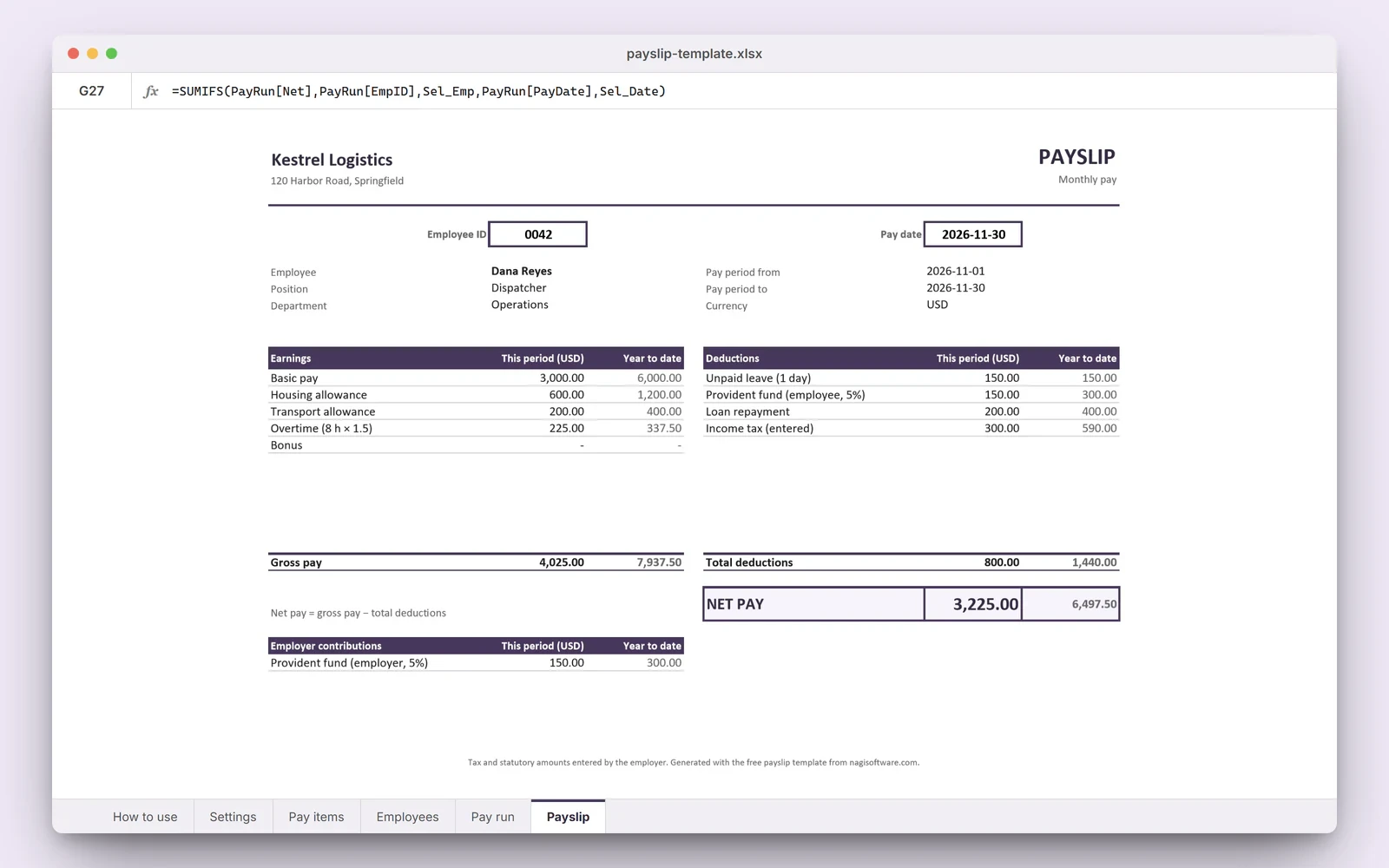
The example: Dana Reyes, dispatcher, paid monthly. Basic pay 3,000. Contracted hours 160 a month, 20 working days. Amounts are in whatever currency you set.
Step 1: list the fixed earnings
Enter basic pay and each fixed allowance. Dana gets basic pay of 3,000, a housing allowance of 600 and a transport allowance of 200. Fixed earnings so far: 3,800.
Step 2: add overtime and other variable pay
The template works out the hourly rate as basic ÷ contracted hours: 3,000 ÷ 160 = 18.75. Dana worked 8 overtime hours at 1.5 times the rate: 8 × 18.75 × 1.5 = 225. Gross pay is 3,800 + 225 = 4,025. If part of the pay is commission instead of overtime, the free sales commission calculator works out tiered commission two ways, and more HR calculators are on the free tools page.
In Excel: =OT_Hours * (Basic / Std_Hours) * OT_Multiplier.
Step 3: subtract deductions
Dana took one unpaid day. Daily rate = basic ÷ working days = 3,000 ÷ 20 = 150, so 150 comes off. Her provident fund share is 5% of basic, which is 150. She repays 200 a month on a staff loan. Income tax for the month is 300: that number comes from your tax tables or your accountant, and you type it in.
Total deductions: 150 + 150 + 200 + 300 = 800. Net pay is 4,025 − 800 = 3,225.
Step 4: show employer contributions
The employer also pays 5% of basic (150) into Dana's provident fund. It isn't deducted from her pay, so it sits in its own box below net pay. In Australia, this is where superannuation goes.
Step 5: update year-to-date totals and send it
The payslip adds up every pay-run row for that employee since the start of your tax year: =SUMIFS(PayRun[Net], PayRun[EmpID], EmpID, PayRun[PayDate], ">="&YearStart, PayRun[PayDate], "<="&PayDate). Then print it or save it as PDF and send it on or before payday.
The finished slip:
| Earnings | Amount | Deductions | Amount |
|---|---|---|---|
| Basic pay | 3,000.00 | Unpaid leave (1 day) | 150.00 |
| Housing allowance | 600.00 | Provident fund (5%) | 150.00 |
| Transport allowance | 200.00 | Loan repayment | 200.00 |
| Overtime (8 h × 1.5) | 225.00 | Income tax (entered) | 300.00 |
| Gross pay | 4,025.00 | Total deductions | 800.00 |
| Net pay | 3,225.00 | ||
| Employer provident fund (5%) | 150.00 |
Adding your own earnings and deductions
Every country and company names its pay items differently, so the template doesn't fix them. On the Pay items sheet you add a row, give it a name, mark it as an earning, a deduction or an employer contribution, and choose how it's calculated. The payslip picks up the new line automatically.
Common items and how to set them up:
| Pay item | Type | Calculation in the template |
|---|---|---|
| Housing, transport, meal allowance | Earning | Fixed amount |
| Overtime | Earning | Hours × hourly rate × multiplier |
| Bonus or commission | Earning | Fixed amount per pay run |
| Arrears (back pay after a late raise) | Earning | Fixed amount per pay run |
| Income tax / PAYE / withholding | Deduction | Amount you enter (no rate tables built in) |
| Social security, National Insurance | Deduction | % of a base you choose, or amount you enter |
| Provident fund or pension, employee share | Deduction | % of basic |
| Provident fund or pension, employer share | Employer contribution | % of basic |
| Loan or advance repayment | Deduction | Fixed amount until repaid |
| Unpaid leave | Deduction | Basic ÷ working days × unpaid days |
Gratuity, the end-of-service payment common in the Gulf and South Asia, usually appears once, on the final payslip. Add it as an earning in the last pay run. How it's calculated is set by your country's law and the employee's contract, so check both.
Country notes: what to check
Payslip rules come from national law and, in the US, from state law. The UK and Australia set out required content clearly; the US has no federal pay stub requirement; the UAE runs salaries through its Wages Protection System; India's Code on Wages requires wage slips. Check the official source for your country before your first run.
| Country | What the official source says | Where to check |
|---|---|---|
| United States | The FLSA requires accurate records of hours and wages but "does not require an employer to provide employees pay stubs." Many states do require a wage statement. | DOL FLSA FAQ, then your state labor department |
| United Kingdom | Employers must give a payslip on or before payday, printed or electronic, showing pay before and after deductions, variable deductions such as tax and National Insurance, and hours when pay depends on time worked. | GOV.UK: Payslips |
| Australia | Pay slips must be issued within one working day of payday, on paper or electronically, and show payments, deductions and superannuation contributions. | Fair Work Ombudsman |
| UAE | Private-sector wages are paid through the Wages Protection System (WPS), and the rules set when salaries are due. | u.ae: Payment of wages, MOHRE: WPS |
| India | The Code on Wages, 2019 requires employers to issue wage slips in the form and manner the rules prescribe. Central and state rules set the format. | Code on Wages, 2019 |
| Pakistan | Labor law is largely provincial. We didn't find one national official page on payslip content, so check with your provincial labor department or your accountant. | Your provincial labor department |
Checked on each official site on 13 November 2026.
The US row surprises people. No federal pay stub rule doesn't mean no rule: several states set their own wage statement content and penalties, so look up yours.
Payslip vs pay stub vs salary slip
They're the same document under different names. "Payslip" is standard in the UK, Australia, Ireland and much of Asia. "Pay stub" is American, from the stub that came attached to a paper paycheck. "Salary slip" is the usual term in India, Pakistan and the Gulf, sometimes "wage slip" in law.
A payroll register is different: it lists every employee in one pay run on one sheet, for the employer's records. The payslip is the one-person extract you hand over.
From one payslip to the whole team: when to use payroll software
A spreadsheet payslip works for a few people paid the same way. Move to payroll software when you run more than about ten payslips a month, when pay depends on attendance and overtime you're copying from elsewhere, or when two people need to check a run before it's paid. The free pay period calendar lists every payday in the year, including the years with an extra one.
Here's what that looks like in Nagi HR Suite. You set up salary components, allowances and deductions once, including a provident-fund share. Pay is effective-dated, so a raise from 1 March doesn't rewrite February. Each payroll run pulls in attendance and leave: unpaid absences come off at the daily rate, and overtime is split into weekend, holiday and other with the multipliers from your policy. Loan repayments and a single-rate gratuity by years of service are built in.
The run moves from draft to finalized to paid. Once it's finalized, the payslip figures can't change, even if someone edits the salary later. Then you print branded PDF payslips for one person, the whole run, or a reprint. Employees see their own payslips on their PC or phone, but only from finalized or paid runs; drafts stay hidden.
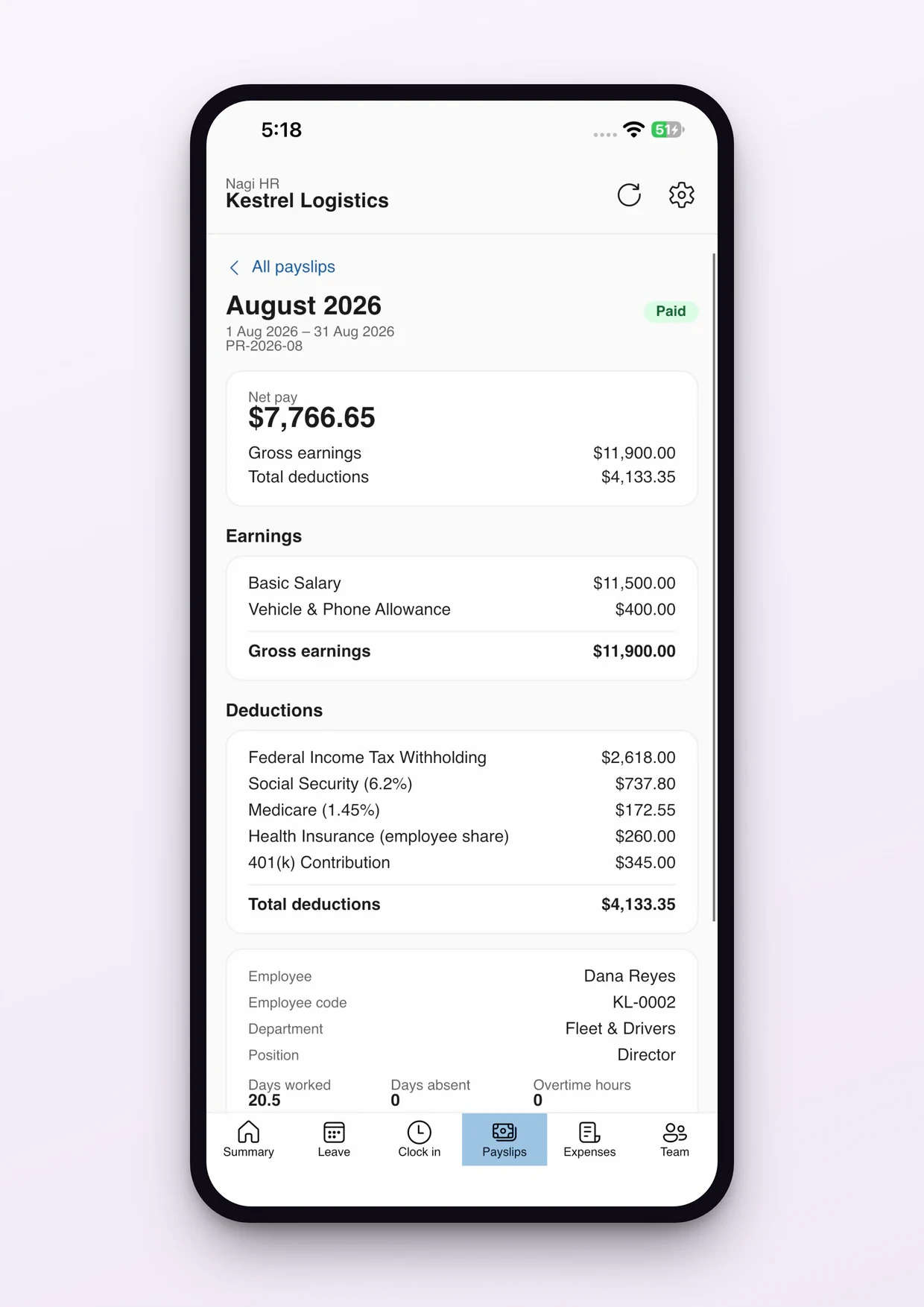
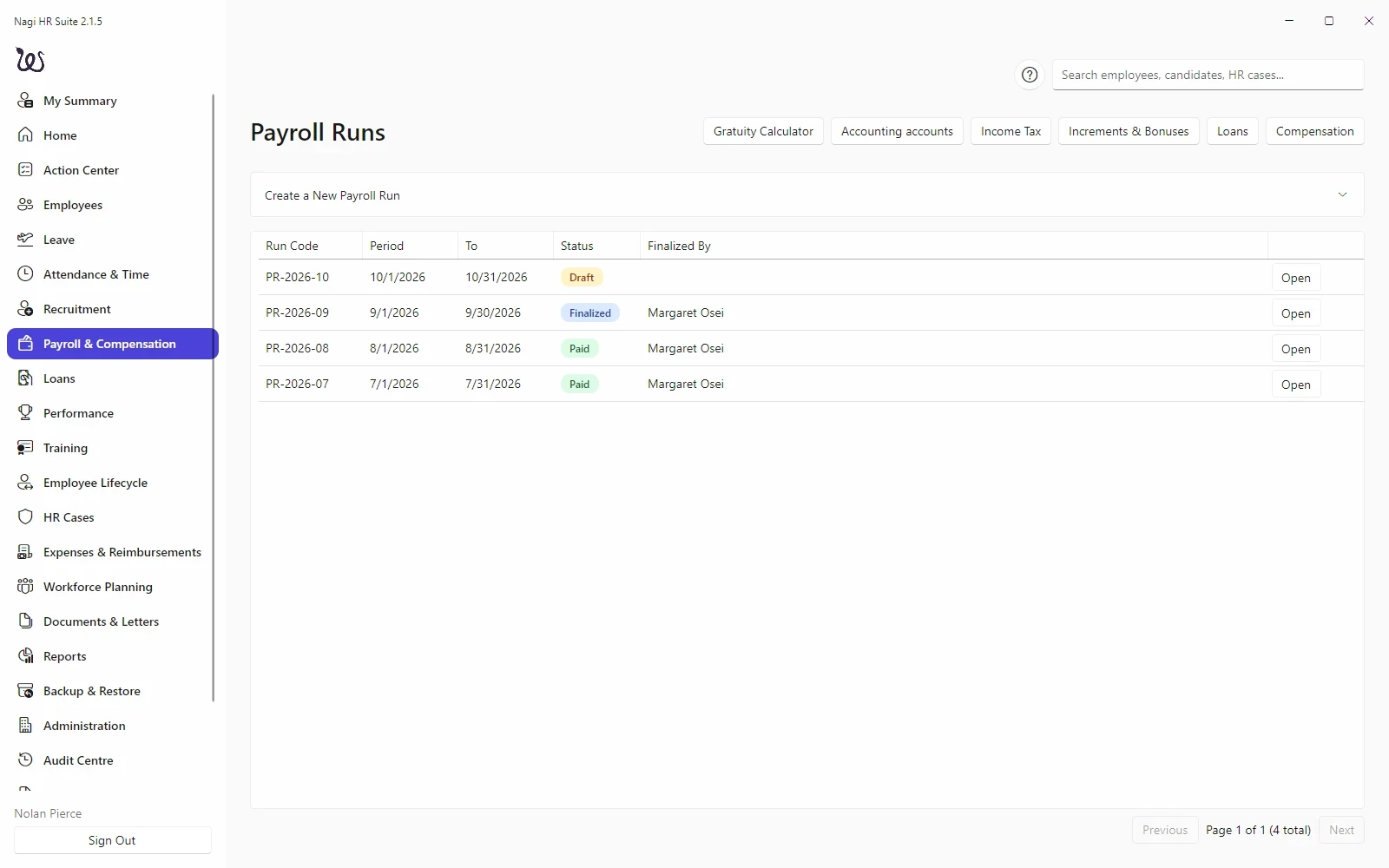
The limit is the same as the template's. Nagi HR Suite doesn't apply any country's tax or statutory rules, doesn't file taxes and has no direct deposit. You or your accountant enter the tax side and handle filings. If you're a US employer who wants payroll taxes filed for you, a payroll service is the better buy. Our HR software pricing guide compares both kinds.
Keeping salary data private
A payslip holds a person's pay, often a tax number and sometimes bank details. Before you type that into a free website that "generates" payslips, check who runs it, where the data goes and whether it's kept. A spreadsheet on your own PC, or software that stores data on your own PC, keeps it in the office.
Three habits that cost nothing:
- Send each payslip only to the employee, as a PDF. Put a password on the PDF if it goes by email.
- Keep the workbook in a folder only payroll staff can open, and back it up.
- Never keep a copy of everyone's slips in a shared inbox.
In Nagi HR Suite the payroll data stays on your Administrator PC unless you choose Nagi Cloud, and backups can be encrypted with a password. Employees see only their own payslips. Managers' letters don't show a report's salary.
Start with the template this pay period. When the spreadsheet starts taking an afternoon, look at the Nagi HR Suite page or start a trial; the pricing page lists what it costs. Our personnel file checklist covers which pay records to keep and for how long.
Frequently asked questions
- What should a payslip include?
At minimum: employer and employee names, the pay period and pay date, each earning and its amount, gross pay, each deduction and its amount, total deductions and net pay. Many countries also require hours worked for hourly staff, employer pension or superannuation contributions, and year-to-date totals. Check your country's official list.
- How do I make a payslip for an employee?
List the earnings for the pay period (basic pay, allowances, overtime), add them up to get gross pay, list the deductions (tax, pension or provident fund, loan repayments, unpaid leave), subtract them to get net pay, then add the period, pay date and year-to-date totals. Our free Excel template does the arithmetic once you enter the amounts and rates.
- Is a payslip the same as a pay stub?
Yes, mostly. Payslip is the usual word in the UK, Australia and much of Asia; pay stub is the US word, from the stub attached to a paper paycheck; salary slip is common in India, Pakistan and the Gulf. All three show gross pay, deductions and net pay for one pay period.
- Can I make payslips in Excel?
Yes. A spreadsheet works well for a handful of employees: set up your pay items once, enter each period's hours and amounts, and print or save each payslip as a PDF. It gets slow and error-prone once you run payroll for more than about ten people every month.
- Do payslip generators calculate tax?
Some do, but each is built for one country's tax rules, so it's only right if you're in that country. Our template does not calculate tax: you enter the tax amount or rate yourself, from your tax authority's tables or your accountant. Nagi HR Suite's payroll doesn't apply tax rules either.
Sources
- GOV.UK: Payslips, checked November 13, 2026
- Fair Work Ombudsman: Record-keeping and pay slips fact sheet, checked November 13, 2026
- US Department of Labor: FLSA FAQ (pay stubs not required federally), checked November 13, 2026
- u.ae: Payment of wages (Wages Protection System), checked November 13, 2026
- MOHRE: Wages Protection System, checked November 13, 2026
- The Code on Wages, 2019 (India), text hosted by V.V. Giri National Labour Institute, checked November 13, 2026
- Nagi HR Suite product page (payroll and payslips), checked November 13, 2026
The product in this post
Nagi HR Suite
HR, attendance, leave and payroll in one desktop application.
- payslip-template
- salary-slip
- pay-stub
- payroll
- excel-template
- small-business