
Free Employee Attendance Tracker (Excel): Monthly Sheet With Late and Absent Totals
A free Excel attendance tracker with a monthly grid for every month of the year, codes for present, late, absent and leave, late minutes, attendance percentage, a payroll summary and a Bradford factor sheet, plus how to keep it honest.
Nagi Software Team8 min read
An employee attendance tracker is a monthly grid with one row per employee and one column per day, where you mark each working day present, late, absent or on leave. Ours does that for all twelve months, adds up late minutes and absences per person, works out attendance percentage, and gives payroll the unpaid days.
We make Nagi HR Suite, which works out attendance status from clock-in data automatically, so we built the template on the same codes and rules.
Download the attendance tracker (Excel)
The tracker is a free Excel workbook, no email form, and it opens in Google Sheets. There's a sheet for each month of the year, a year summary, a payroll summary and an optional Bradford factor sheet. Weekends and your holidays shade themselves; you only type codes.
Download the employee attendance tracker (.xlsx)
| Sheet | What it holds |
|---|---|
| How to use | Setup in five steps and the code list |
| Settings | Year, weekend days, start time, grace minutes, whether absences are unpaid |
| Employees | ID, name, department, manager |
| Holidays | Date and name of each holiday |
| Jan to Dec | Monthly grid: codes per day, totals per employee |
| Year summary | Every month's totals side by side |
| Payroll summary | Unpaid days and late minutes for the chosen month |
| Bradford factor | Absence spells over the last 52 weeks and each person's score |
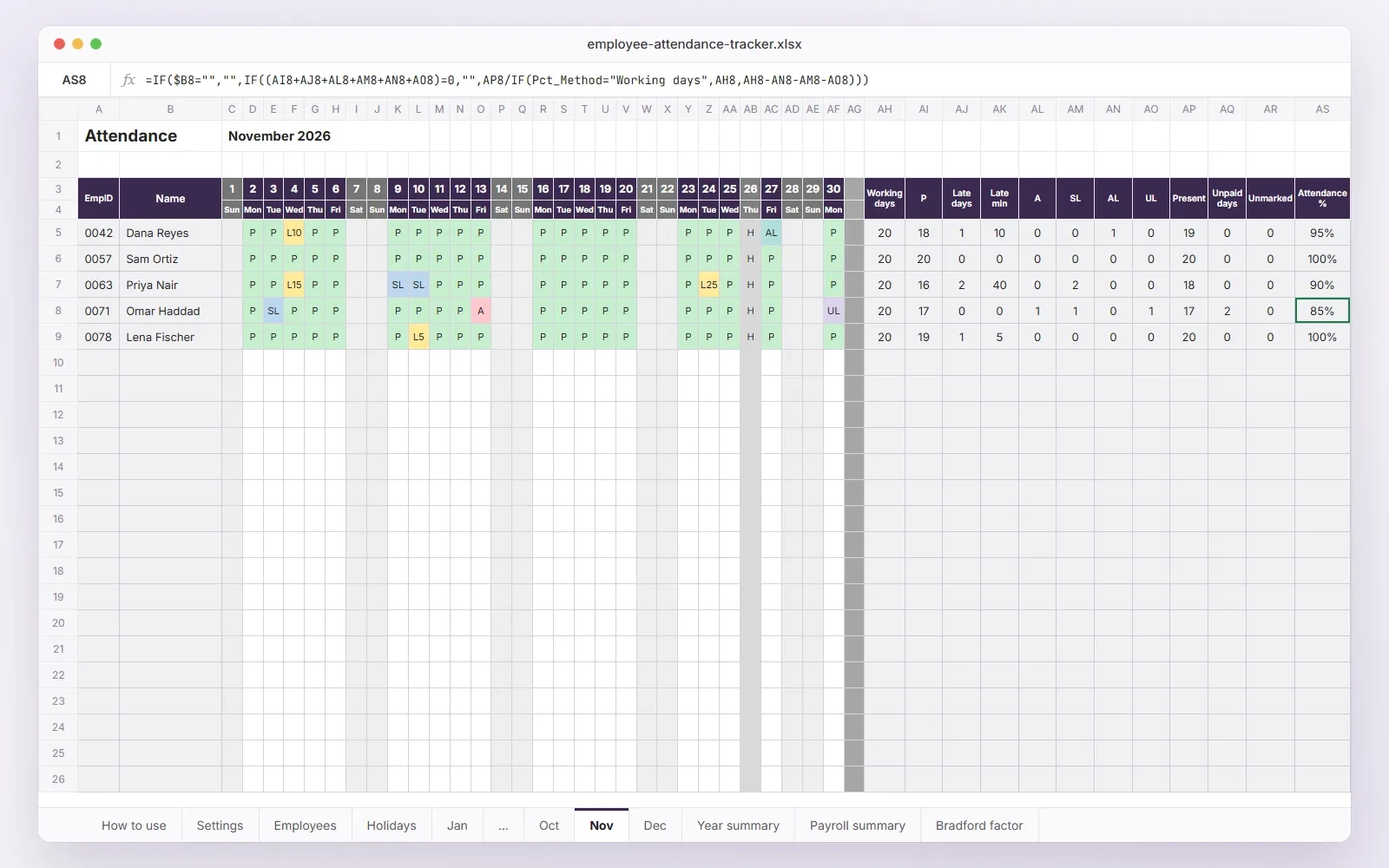
The attendance codes
Use one code per working day. A short fixed list keeps the sheet readable and the formulas reliable, and the cells only accept codes from the list.
| Code | Means | Counts as present |
|---|---|---|
| P | Present, on time | Yes |
| L or L15 | Late; the number is minutes late | Yes |
| A | Absent without approval | No |
| SL | Sick leave | No |
| AL | Annual leave (approved) | No |
| UL | Unpaid leave (approved) | No |
| H | Public holiday (filled in for you) | Not a working day |
Writing the minutes after the L is the trick most free trackers miss. "L15" still counts as a late day, and the row adds up 15 minutes toward the month's late total. Half days and leave balances belong in a leave tracker; our PTO tracker template handles those.
How to set up the tracker
Setup takes five steps: fill in Settings, list holidays, add employees, mark each day, and read the totals at month end. After that, marking attendance is one code per person per day, which takes a minute for a team of ten.
Step 1: fill in Settings
Enter the year, your weekend days as a seven-digit code starting Monday (0000011 means Saturday and Sunday off; a Friday and Saturday weekend is 0000110), your start time and any grace minutes before someone counts as late. Choose whether an A day is unpaid in your company.
Step 2: list your holidays
Type each paid holiday with its date. The monthly sheets mark those days H and take them out of the working-day count.
Step 3: add employees
One row per person on the Employees sheet: ID, name, department and manager. Every month sheet picks up the list, so you add a new hire once.
Step 4: mark each day
Pick a time, say 10 a.m. Enter a code for everyone. Late arrivals get L plus the minutes. Approved leave gets its code when it's approved, so the grid already shows who'll be out.
Step 5: read the totals at month end
Each row ends with present days, late days, late minutes, absences, each leave type, unpaid days and attendance percentage. The Payroll summary copies the unpaid days and late minutes for the month you choose.
Worked example: November 2026
Example: five people at Kestrel Logistics, our demo company, for November 2026. November has 21 weekdays; Thanksgiving on 26 November is on the holiday list, which leaves 20 working days. To count the days for your own weekend and holidays, the free working days calculator does it for any year, and our other HR calculators sit on the free tools page.
| Employee | P | Late days | Late min | A | SL | AL | UL | Present | Attendance |
|---|---|---|---|---|---|---|---|---|---|
| Dana Reyes | 18 | 1 | 10 | 0 | 0 | 1 | 0 | 19 | 95% |
| Sam Ortiz | 20 | 0 | 0 | 0 | 0 | 0 | 0 | 20 | 100% |
| Priya Nair | 16 | 2 | 40 | 0 | 2 | 0 | 0 | 18 | 90% |
| Omar Haddad | 17 | 0 | 0 | 1 | 1 | 0 | 1 | 17 | 85% |
| Lena Fischer | 19 | 1 | 5 | 0 | 0 | 0 | 0 | 20 | 100% |
The formulas at the end of each row:
Working days   =NETWORKDAYS.INTL(MonthStart, MonthEnd, Weekend_Code, Holidays[Date])
Present        =COUNTIF(Days, "P") + COUNTIF(Days, "L*")
Late minutes   =SUMPRODUCT((LEFT(Days,1)="L") * IFERROR(--MID(Days,2,4), 0))
Attendance %   =Present / Working days
Omar's 85% is 17 present days out of 20. For payroll, his A day and his UL day make 2 unpaid days, if your Settings say an unauthorized absence is unpaid. Priya's two late arrivals, L15 and L25, add up to 40 minutes.
Some companies take approved leave out of the working days before dividing. With that method, Dana's figure is 19 out of 19, so 100%. Neither is wrong. Pick one, write it in your policy, and don't switch mid-year.
The Bradford factor (optional)
The Bradford factor scores absence as spells squared times total days, usually over the last 52 weeks (the free Bradford Factor calculator scores absences from real dates). It's common in the UK and rare in US templates. Frequent short absences score far higher than one long one, which is the point: they disrupt rotas more.
| Pattern | Spells | Days | Score |
|---|---|---|---|
| Four separate one-day absences | 4 | 4 | 4 × 4 × 4 = 64 |
| One four-day absence | 1 | 4 | 1 × 1 × 4 = 4 |
Same four days. Sixteen times the score.
The template's Bradford sheet has a short log: one row per absence spell, with first and last day. It counts spells and days in the 52 weeks before the date you choose. In the example file, Omar has three spells (two days of sick leave in May, one sick day on 3 November, one absence on 13 November), four days in all: 3 × 3 × 4 = 36. Priya has one spell of two days: 2.
Use the score to start a conversation, never as an automatic trigger. Leave protected absences out. In the US, counting FMLA leave under a "no fault" attendance policy is listed by the Department of Labor as prohibited (DOL Fact Sheet #77B), and state sick-leave laws add their own protections. Outside the US, check local rules on disability- and pregnancy-related absence before acting on any score.
How to keep the tracker honest
An attendance sheet is only as good as the habit behind it. One person marks it at the same time each day, codes come from the list only, nothing gets overwritten without a note, and each employee sees their own row at month end.
That last habit settles most disputes before payroll. Print each person's row, or send it, on the last working day, and ask them to flag anything wrong within two days. A late mark someone saw and didn't query is much harder to argue about after their pay has been cut for it.
Corrections go in the Note column with a date: "13 Nov changed A to SL, doctor's note received 16 Nov". Keep last month's file as it was at payroll. Start the next month on its own sheet.
When a spreadsheet tracker stops working
A spreadsheet works while one person can see everyone arrive. It stops working when staff start at different sites, when the person marking the sheet is off, or when late minutes depend on someone's memory of when a person walked in.
Signs you've reached that point:
- Staff work at more than one site, or start at different times
- Late minutes are guessed, not recorded
- Managers keep their own copies and payroll gets three versions
- Absences reach payroll as a phone call or a chat message
- You need hours and overtime as well as days, which is a timesheet job
If several of those apply, the fix is a clock-in that records the time for you.
Attendance in Nagi HR Suite
Nagi HR Suite marks attendance status automatically. From clock-in data and your attendance policy, each day becomes present, late, absent, on leave, holiday or weekend, and unpaid absences deduct in payroll at the daily rate.
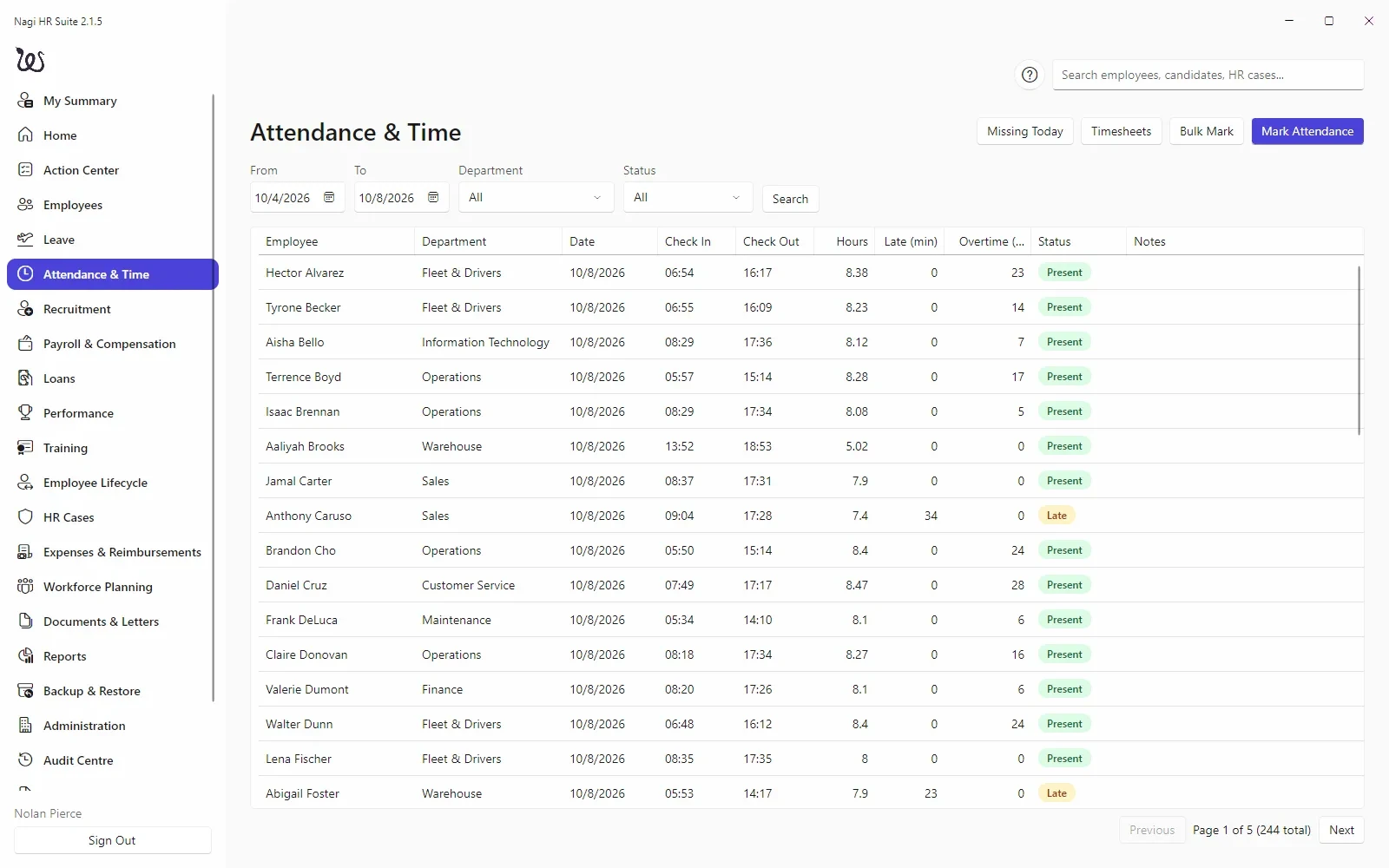
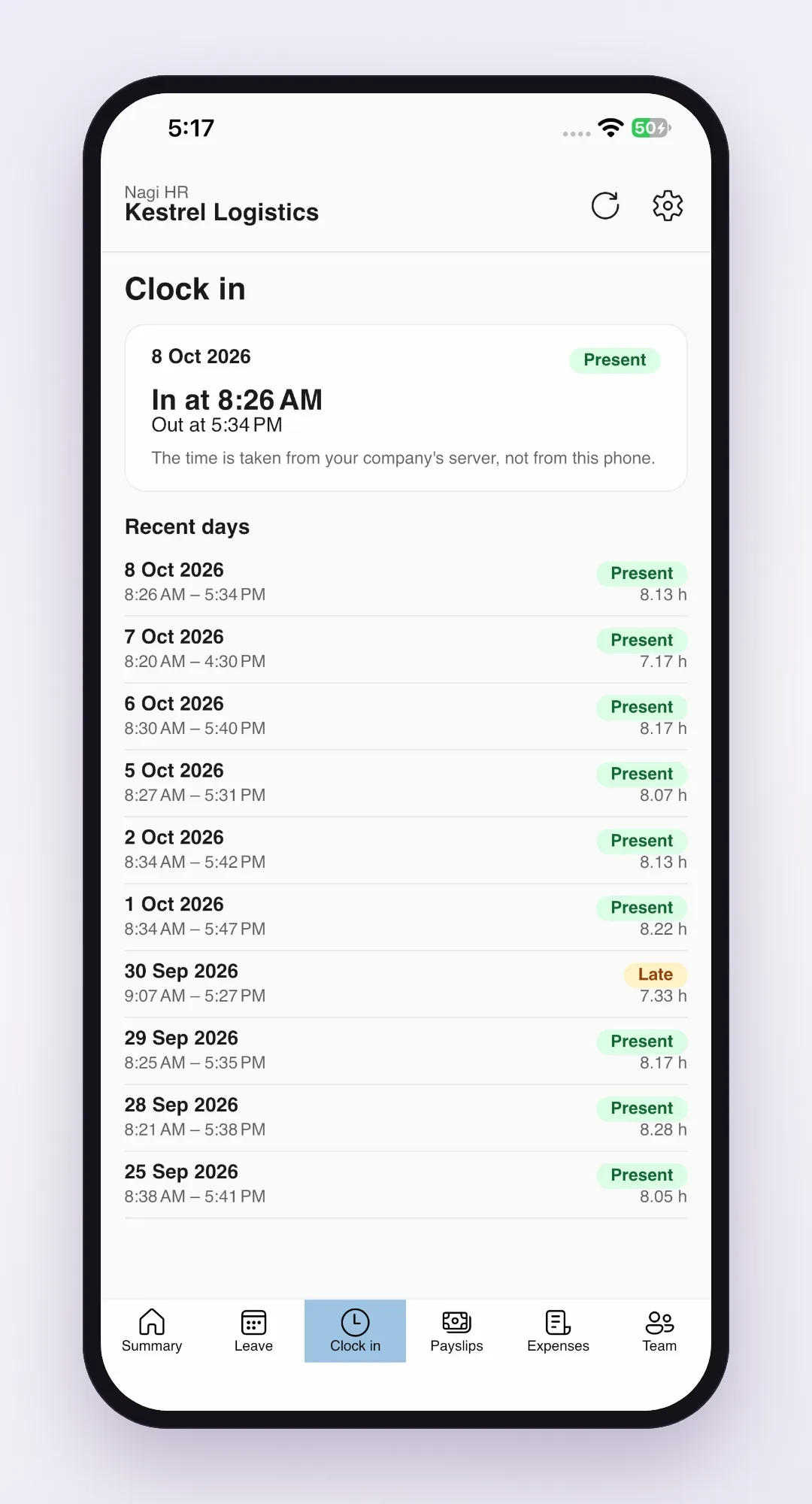
Staff clock in and out on the Android or iPhone app, or mark today's attendance on their own PC. The time comes from your company's server, not the phone. Employees see their own hours worked, late minutes and overtime. Managers see who on their team is in today, and they can correct their team's attendance, though nobody can back-date their own.
It also passes the router test. The program runs on your office network, so when the internet drops, phones and PCs on the office Wi-Fi still reach the Administrator PC and clock-ins keep coming in. The Administrator PC needs the internet for a few seconds at least once every 14 days to check its license; read more in our post on offline HR software.
If you already have a fingerprint or card clock, the product page doesn't list a direct connection to those machines. What it has is CSV and XLSX import for attendance, with columns matched for you, a preview and a dry run before anything is saved. So a clock that exports a file can feed it.
A clock that doesn't, can't.
Reports for attendance export to PDF or Excel. Payroll uses your own rules and applies no tax rules, files no taxes and has no direct deposit, so keep your accountant or payroll provider for those.
One company license covers the Administrator PC, 10 employee PCs and 11 phone connections, with unlimited employee records: $19 a month, $190 a year or $349 once, as listed on our pricing page on 14 November 2026.
Keep the spreadsheet if everyone works in one room and one person marks the grid every morning. Switch when people clock in at different places or times, or when payroll keeps getting attendance by phone call. You can see how it works on the Nagi HR Suite page, or try it with your own team for a week.
Frequently asked questions
- How do you calculate attendance percentage?
Divide the days the employee was at work, on time or late, by the working days in the period, then multiply by 100. November 2026 has 20 working days in our example once weekends and Thanksgiving are removed. An employee present on 17 of them has 17 ÷ 20 = 85% attendance. Decide once whether approved leave counts against it.
- What is the Bradford factor?
A score that weighs frequent short absences more heavily than one long one: spells squared times total days, usually over the last 52 weeks. Four one-day absences score 4 × 4 × 4 = 64; one four-day absence scores 1 × 1 × 4 = 4. It's a prompt for a conversation, not a verdict, and protected leave shouldn't be counted.
- How do I track employee attendance in Excel?
Make one row per employee and one column per day of the month. Shade weekends and holidays automatically, then enter a code each working day: P for present, L for late, A for absent, plus codes for each type of leave. COUNTIF formulas at the end of each row give the totals. Our free template has all twelve months set up.
- What codes are used in an attendance sheet?
Common codes are P for present, L for late, A for unauthorized absence, SL for sick leave, AL for annual leave, UL for unpaid leave and H for a public holiday. Our template also lets you write the minutes late after the L, such as L15, so the sheet can add up late minutes for the month.
- Can I use an attendance tracker with a fingerprint machine?
A spreadsheet can't read the machine directly, but most clocks export a file of punches. You can paste the export into a sheet and turn it into codes, or bring it into HR software that imports attendance. Check what format your machine exports before you choose either.
Sources
- US DOL Fact Sheet #77B: Protection for employees under the FMLA, checked November 14, 2026
- Nagi HR Suite product page (attendance, clock in, offline use), checked November 14, 2026
The product in this post
Nagi HR Suite
HR, attendance, leave and payroll in one desktop application.
- attendance-tracker
- attendance-sheet-template
- excel-template
- bradford-factor
- small-business