
Free PTO Tracker Template (Excel): Accruals, Carry-Over and When to Switch
A free PTO tracker in Excel that handles monthly or per-pay-period accrual, carry-over caps, half days, public holidays and business-day counting, with every formula explained, a short PTO policy and the signs you've outgrown a spreadsheet.
Nagi Software Team10 min read
A PTO tracker is a sheet that records each employee's paid time off: how much they've earned, carried over, taken and have left. Our free Excel template does the parts most free trackers skip: monthly or per-pay-period accrual, carry-over caps, half days, and business-day counting that leaves out weekends and your public holidays.
We make Nagi HR Suite, whose leave module does this automatically, so we know where a spreadsheet holds up and where it doesn't. Both answers are below.
Download the PTO tracker (Excel)
The PTO tracker is a free Excel workbook with no email form. It has a settings sheet, a holiday list, an employee list, a request log, a balances sheet that does the math, and a monthly calendar. It opens in Google Sheets too. Formula cells are locked; input cells are white.
Download the PTO tracker template (.xlsx)
| Sheet | What it holds |
|---|---|
| How to use | The five setup steps |
| Settings | Leave year start, accrual method (upfront, monthly or per pay period), pay periods per year, your weekend days, carry-over cap, optional balance cap, days or hours |
| Holidays | Date and name of each public holiday you give |
| Employees | ID, name, start date, yearly entitlement, last year's unused days, approver |
| Requests | One row per request: employee, type (PTO, sick, unpaid), start, end, half day, status |
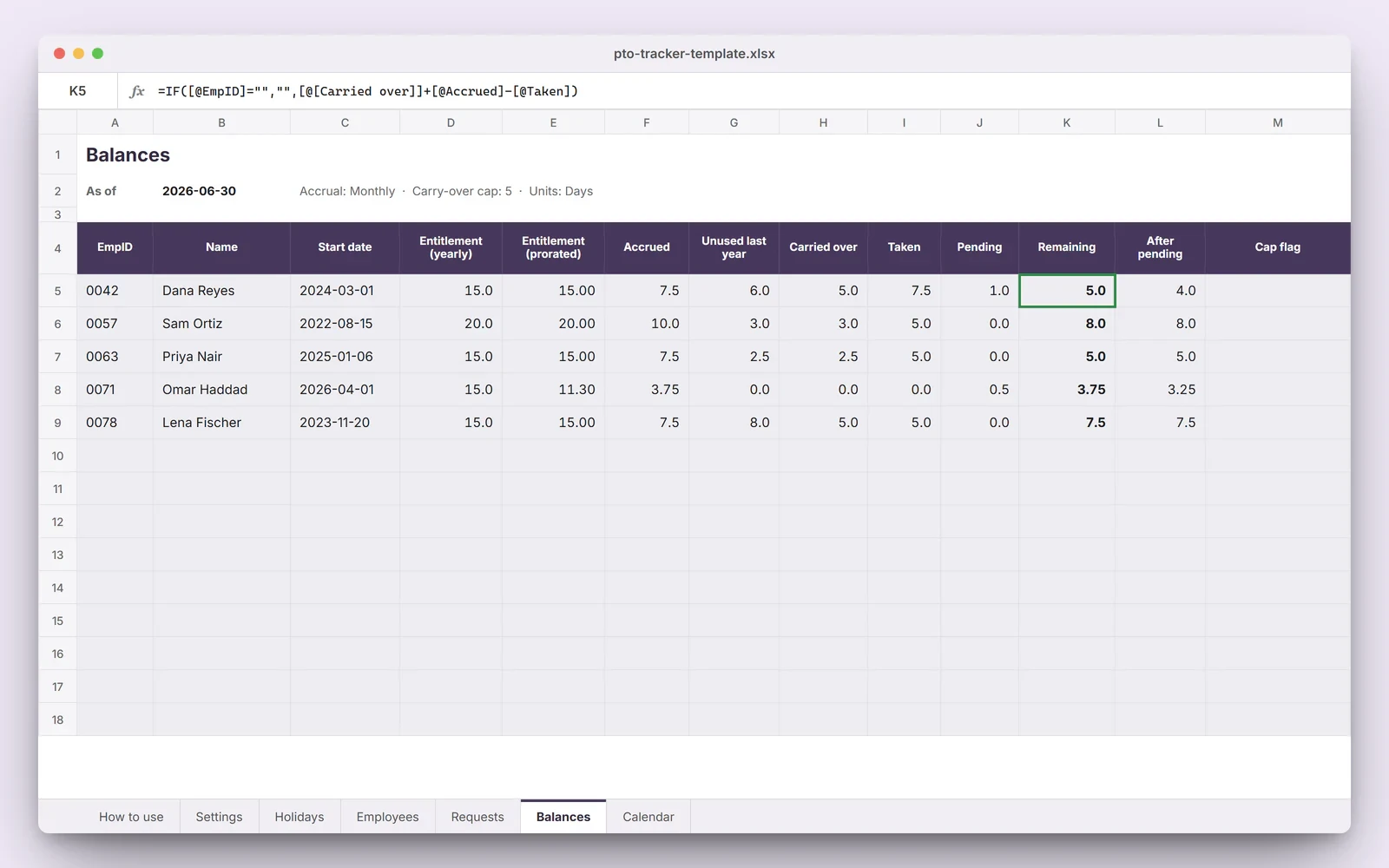
| Balances | Per employee: entitlement, accrued to date, carried over, taken, pending, remaining |
| Calendar | A month grid of employees by day, shaded for approved and pending leave |
How to set up the PTO tracker in 10 minutes
Setup is five steps: set the leave year and accrual method, list your holidays, add employees with their entitlement, enter last year's unused days, and start logging requests. After that, the only daily task is adding a row when someone asks for time off and changing its status when it's approved.
Step 1: fill in Settings
Pick the date your leave year starts (1 January for most US companies; many UK employers use their own leave year). Choose the accrual method. Monthly suits salaried staff; per pay period suits hourly staff paid weekly or bi-weekly; "upfront" gives the whole year's leave on day one. Enter your weekend days and the carry-over cap.
Step 2: list your public holidays
Type each holiday you give as paid time off, with its date. If a holiday falls on a weekend and you give the Friday or Monday instead, list the day you actually close. In 2026, US Independence Day is a Saturday, so most offices list Friday 3 July.
Step 3: add employees and entitlements
One row each: ID, name, start date and yearly PTO in days (or hours, if you set hours). Someone hired mid-year gets a prorated amount automatically from their start date.
Step 4: enter last year's unused days
Type each person's unused balance from last year. Your cap is applied, and the sheet shows what actually carries over.
Step 5: log requests as they come in
Add a row per request, with the status set to Pending. When the manager approves, change it to Approved. The Balances and Calendar sheets update by themselves. If staff still ask on paper, the free time off request form generator makes a form with approval lines you can print.
The formulas: accrual, carry-over, half days, holidays
Four formulas do the work: NETWORKDAYS.INTL counts working days in a request, a half-day flag turns a one-day request into 0.5, accrual multiplies the yearly entitlement by the share of the year completed, and carry-over takes the smaller of last year's balance and your cap. Here they are with one employee's numbers.
The example: Dana Reyes, 15 PTO days a year, monthly accrual, leave year from 1 January 2026, carry-over cap of 5 days. She had 6 days left from 2025. We check her balance on 30 June 2026.
Business days and public holidays
=IF([@[Half day]]="Yes", 0.5, NETWORKDAYS.INTL([@Start], [@End], Weekend_Code, Holidays[Date]))
Weekend_Code is a seven-character pattern starting Monday, where 1 means a day off. "0000011" is Saturday and Sunday off. Gulf companies with a Saturday–Sunday weekend use the same code; a Friday–Saturday weekend is "0000110".
Dana's requests:
| Request | Dates | Calendar days | Counted |
|---|---|---|---|
| Trip | Wed 11 – Fri 13 March | 3 | 3 |
| Appointment | Fri 17 April, half day | 1 | 0.5 |
| Vacation | Mon 25 – Fri 29 May | 5 | 4 (Memorial Day, 25 May, is on the holiday list) |
| Long weekend | Mon 31 August | 1 | 1 (Pending) |
Without the holiday list, the May week would cost Dana 5 days instead of 4. That one mistake is the most common reason people dispute a spreadsheet balance.
Accrual: monthly or per pay period
Monthly accrual gives 1/12 of the entitlement for each completed month:
=MIN(Entitlement, Entitlement / 12 * DATEDIF(MAX(Year_Start, [@[Start date]]), As_Of_Date + 1, "m"))
By 30 June, Dana has completed 6 months: 15 ÷ 12 × 6 = 7.5 days accrued. To try your own figures without the workbook, the free PTO accrual calculator shows what someone has earned by any date, and the other HR calculators are on the free tools page.
Per pay period works the same way with periods instead of months. For bi-weekly pay (26 periods), each payday adds 15 ÷ 26 = 0.577 days. The template counts completed periods from the leave year start or the hire date, whichever is later.
If you give leave upfront, the accrued figure is simply the full entitlement from day one (prorated for new hires).
Carry-over and caps
=MIN([@[Unused last year]], Carry_Cap)
Dana had 6 days left over; the cap is 5, so 5 days carry over and 1 is lost.
That last part isn't legal everywhere. California's Labor Commissioner says a use-it-or-lose-it vacation policy is illegal there, because earned vacation vests as it's earned. A cap on how much an employee can accrue in the first place is allowed (California DLSE). If you employ people in California or anywhere with similar rules, leave the carry-over cap blank and set the balance cap instead. The template then flags anyone at the cap so you can pause their accrual.
The balance
Taken     =SUMIFS(Requests[Days], Requests[EmpID], [@EmpID], Requests[Type], "PTO", Requests[Status], "Approved", Requests[Start], ">="&Year_Start)
Pending   =SUMIFS(Requests[Days], Requests[EmpID], [@EmpID], Requests[Type], "PTO", Requests[Status], "Pending", Requests[Start], ">="&Year_Start)
Remaining =[@[Carried over]] + [@Accrued] - [@Taken]
Dana on 30 June: 5 carried over + 7.5 accrued − 7.5 taken = 5 days remaining, with 1 day pending. If the August day is approved, she'll have 4 left on top of what she earns from July onward.
A simple PTO policy to go with it
A tracker only works if everyone agrees on the rules it applies. Write a one-page policy covering eligibility, entitlement, accrual, carry-over, how to request, notice, approval, holidays, sick days, and payout when someone leaves. Then set the template to match it, line for line.
The legal floor differs a lot by country. In the US, the FLSA "does not require payment for time not worked, such as vacations" (DOL); paid time off is set by your policy, plus any state or city rules on sick leave. In the UK, almost all workers are entitled to 5.6 weeks of paid holiday a year, which is 28 days for a 5-day week, and the employer can choose to count bank holidays within it (GOV.UK). UK teams call it "annual leave", and the tracker works the same way: set the entitlement to 28 days, put bank holidays in the entitlement or on the holiday list (not both), and choose upfront or monthly accrual.
A starter policy you can adapt:
- Eligibility: All employees from their first day; part-time staff pro rata.
- Entitlement: 15 days of PTO per leave year (1 January to 31 December), plus the public holidays on the company list.
- Accrual: 1.25 days for each completed month of service.
- Carry-over: Up to 5 unused days carry into the next year (or, where the law requires, no forfeiture and a balance cap of 20 days).
- Requests: At least two weeks' notice for two days or more; one day's notice for a single day where possible.
- Approval: Your manager approves. Managers' own requests go to their manager.
- Half days: Allowed; they count as 0.5 days.
- Sick leave: Tracked separately from PTO.
- Leaving: Accrued, unused PTO is paid out or handled as local law requires.
Where spreadsheets break (checklist)
A PTO spreadsheet works well for a small team with one person keeping it. It breaks when the second approver arrives, when the team passes about ten people, when carry-over is disputed, or when employees want to see their own balance without asking. Tick the ones that already apply to you.
- More than about 10 employees, or more than one location with different holidays
- Two or more people approve leave, each keeping their own copy
- Employees ask HR for their balance every week because they can't see it
- Someone disputed a carry-over or a half day, and you couldn't show the history
- Part-timers or hourly staff accrue in hours while others accrue in days
- You need different leave types with different rules (sick, parental, unpaid, compassionate)
- A manager approved their own request because nothing stopped them
- The file lives in a shared folder anyone can edit, with salaries or sick notes nearby
- You can't tell who changed a cell, or when
Two ticks: plan the move. Four or more: the spreadsheet is costing you more time than software would.
The accrual cap is a good example. A spreadsheet can flag that someone reached it, but it can't pause their accrual month by month and restart it after they take leave. You end up doing that by hand.
Free PTO apps: what the free tiers limit
Free PTO apps exist, but the free tiers are small and the leave data lives on the vendor's servers. Homebase's free plan covers one location and up to 10 employees; Connecteam's is free for up to 10 users. Accrual policies and larger teams sit on paid tiers. Here's what each pricing page showed on 13 November 2026.
| Free tier limit | Time off on the free tier | Next step up | |
|---|---|---|---|
| Homebase Basic | 1 location, up to 10 employees | Employees can request unpaid time off; PTO policies with accruals and balances are listed on paid tiers | Essentials, $30 per location per month |
| Connecteam Small Business | Up to 10 users, "all hubs and all features" (with an asterisk on the page) | Not confirmed from the pricing table | HR & Skills hub Basic, $29/month billed annually for the first 30 users |
| This Excel template | No limit | Accrual, carry-over, half days, holidays | Your own time |
As listed on each vendor's pricing page on 13 November 2026, before tax. Prices change; check the vendor's page.
Both apps are cloud services, so names, leave dates and sick days are stored with the vendor under its terms. That's normal for cloud software, and fine for many teams. It's worth knowing before you put sick-leave reasons into any app.
Moving to leave software
Switch when the checklist above has two or more ticks. Leave software keeps the same rules as your spreadsheet (accrual, carry-over, half days, holidays) but enforces them, keeps a history, and lets employees see their own balance and request from their phone. Your spreadsheet's Employees and Requests sheets become the import.
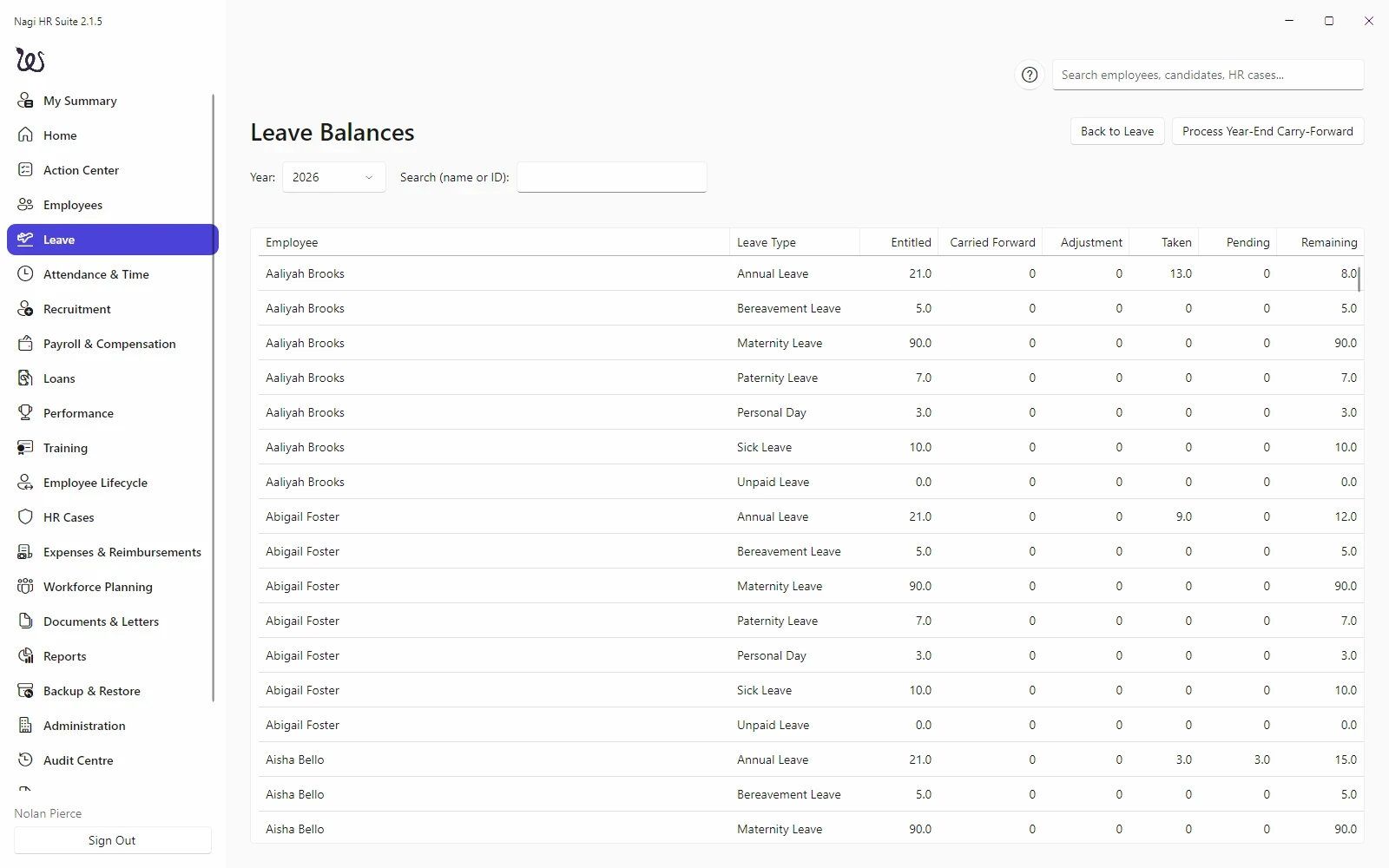
Here's how the same setup looks in Nagi HR Suite, where we can be specific. Each leave type is paid or unpaid with its own accrual method, carry-forward settings, half-day support and, where needed, gender eligibility. Requests go through submit, approve, reject or cancel, and the day count follows your weekends and holiday calendar. Balances are calculated when you open them, not stored, so they can't drift. Each employee sees entitlement, carried forward, adjustments, taken, pending and remaining, per leave type and year.
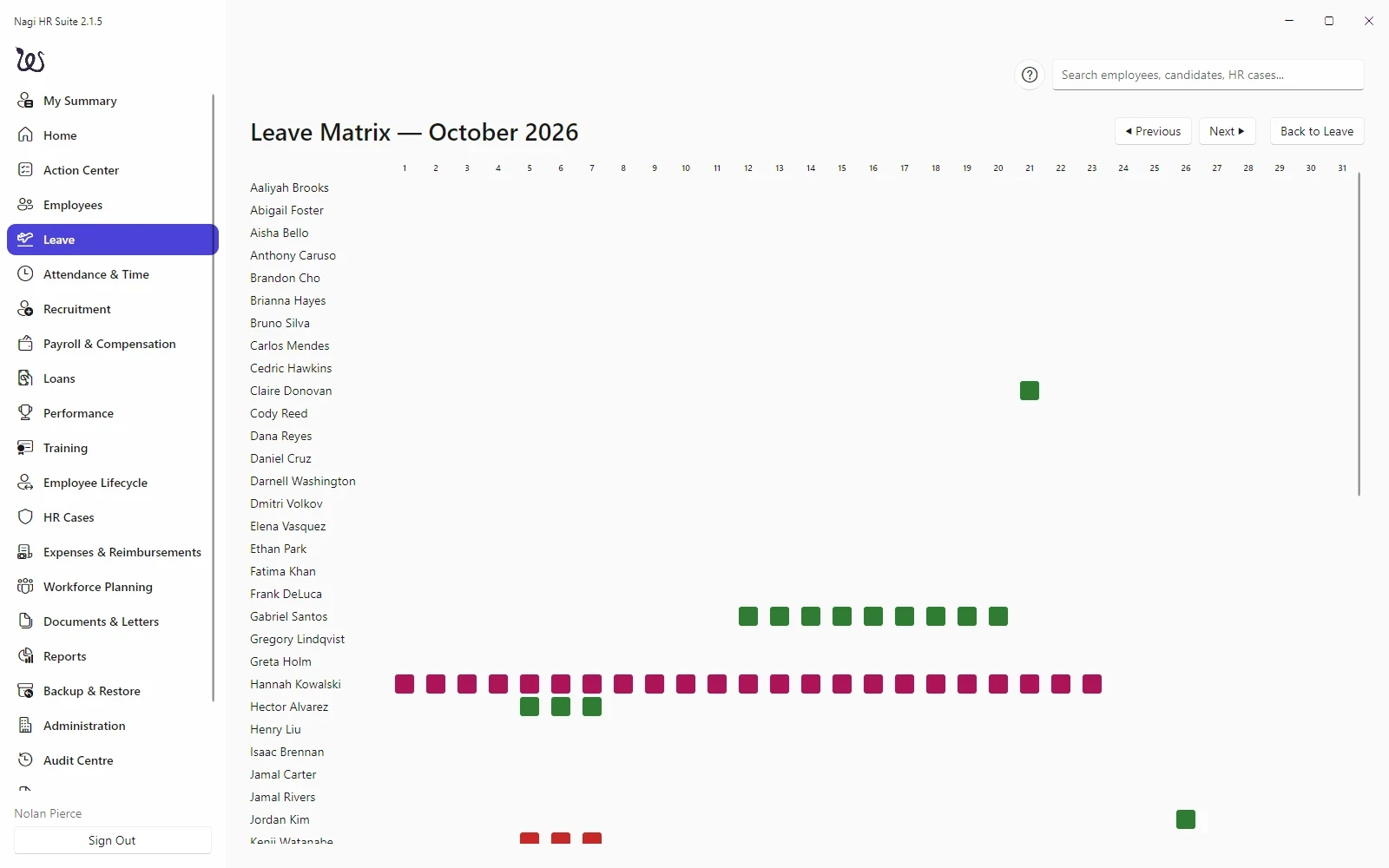
Managers approve for their own team only and can't approve their own requests; those go to their manager. Employees can withdraw a pending request, and it's recorded as withdrawn, not refused. On the Android or iPhone app, staff check balances and request leave from the office Wi-Fi. The calendar view and a monthly employee-by-day matrix replace the spreadsheet's Calendar sheet.
The data stays on your own Administrator PC, not on our servers, unless you choose Nagi Cloud. One company license covers an Administrator PC, 10 employee PCs and 11 phone connections, with unlimited employee records: $19 a month, $190 a year or $349 once, as listed on our pricing page on 13 November 2026. It's not free, and for a team of five that's happy with the template, the template is the better choice.
For a fuller buyer's checklist, read our guide to leave management software for small businesses. Keeping leave records with the rest of each employee's file? The personnel file checklist covers that. Or see every leave feature on the Nagi HR Suite page.
Frequently asked questions
- How do I track PTO in Excel?
Keep three things: a list of employees with their yearly entitlement, a log of every request (start date, end date, half day or not, approved or pending), and a holiday list. Count each request's working days with NETWORKDAYS.INTL so weekends and holidays don't count, then add up approved days per person with SUMIFS. Our free template has all of it set up.
- How is PTO accrual calculated?
Divide the yearly entitlement by the number of accrual periods and multiply by the periods completed. Monthly: 15 days a year ÷ 12 = 1.25 days a month, so 7.5 days by the end of June. Per pay period: 15 ÷ 26 bi-weekly periods = about 0.58 days each period. Prorate from the start date for new hires.
- What is a typical carry-over limit?
There's no single standard. Common policies cap carry-over at a number of days, such as five, or let none carry over. Check local law first: California, for example, treats use-it-or-lose-it vacation as illegal but allows a cap on how much an employee can accrue.
- Is there a free PTO tracker for small business?
Yes. Our Excel template is free with no sign-up. Free app tiers also exist: Homebase's Basic plan is free for one location and up to 10 employees, and Connecteam's Small Business plan is free for up to 10 users. Check what each free tier includes for accruals before you rely on it.
- What should a PTO policy include?
Who is eligible, how much leave per year, how it accrues, whether unused days carry over and the cap, how to request and how much notice, who approves, how public holidays and sick days are handled, and what happens to unused leave when someone leaves. Keep it to one page and have each employee sign it.
Sources
- US Department of Labor: Vacation leave (FLSA does not require paid vacation), checked November 13, 2026
- California DLSE: Vacation FAQ (use-it-or-lose-it, accrual caps), checked November 13, 2026
- GOV.UK: Holiday entitlement, checked November 13, 2026
- Homebase pricing page, checked November 13, 2026
- Connecteam pricing page, checked November 13, 2026
- Nagi HR Suite product page (leave module), checked November 13, 2026
The product in this post
Nagi HR Suite
HR, attendance, leave and payroll in one desktop application.
- pto-tracker
- annual-leave-tracker
- leave-tracker
- excel-template
- small-business