
Leave Management Software for Small Businesses: What to Look For
What a small business should check before buying leave management software: accrual and carry-over rules, half days, approvals, phone requests, where the data lives, and what 10 and 25 people pay on seven tools.
Nagi Software Team14 min read
Good leave management software for a small business does five things well: it applies your own accrual and carry-over rules, handles half days and public holidays, sends each request to the right manager, shows people their balance on their phone, and costs a predictable amount as you hire. Everything else is extra. Prices range from free (for 5 to 10 people) to about $3,000 a year.
Nagi Software makes Nagi HR Suite, which appears in this comparison. We built its leave module, so we know where the hard parts are, and we'll say where another tool fits you better.
Leave law differs by country and US state. This is general information about software, not legal advice; check the rules that apply to you.
What leave management software does
Leave management software holds your leave policies, takes requests from employees, routes them for approval and keeps a running balance for each person. It replaces the spreadsheet, the email thread and the paper form with one record that payroll can trust. Most tools add a team calendar and reports.
Under that one sentence sits a lot of rule-keeping. It's fiddly work. A leave policy says who gets which kind of leave, how fast it builds up, how much can roll into next year, whether half days count, and which days don't count at all (weekends, public holidays). The software's job is to apply those rules the same way every time, so nobody has to argue about a balance in December.
Spreadsheet vs software: the tipping point
A spreadsheet works for a small team with one simple rule, such as "everyone gets 20 days on 1 January". Then the rules start to vary. That's when it breaks. We've written a free PTO tracker template for teams that aren't there yet.
You've probably outgrown the spreadsheet when two or more of these are true:
- More than about 10 people take leave from the same sheet.
- Leave builds up monthly instead of arriving on one date, and people join mid-year.
- There's a carry-over cap, and someone has to work out each January who loses what.
- Two or more managers approve leave, and requests arrive by chat, email and in person.
- People ask HR "how many days do I have left?" more than once a week.
- Payroll needs unpaid leave days for the month, and someone retypes them.
Here's why accrual is where sheets usually go wrong. Say your policy gives 15 days a year, accrued monthly, with up to 5 days carried into the next year. Someone who joins on 1 April has earned 1.25 days a month, so 11.25 days by 31 December. If they took 4, they have 7.25 left, but only 5 roll over; 2.25 lapse. Now do that for 20 people with different start dates and two half days each. A formula can do it, but someone has to maintain the formula, and one bad paste breaks it for everyone. To check a single person's number, the free PTO accrual calculator shows what they have earned by any date, with carry-over and leave taken, and our other HR calculators are on the free tools page.
The features that matter
This is the checklist we'd use to judge any leave tool, ours included. The order follows how often each item causes trouble in a small office.
Your own leave types and who they apply to
You should be able to create leave types yourself: annual, sick, unpaid, parental, compassionate, time off in lieu, whatever your policy has. Each type needs a paid or unpaid flag, because unpaid days must reach payroll. Some types only apply to some people (maternity leave, for example), so look for eligibility rules by gender, contract type or length of service.
Accrual and carry-over rules
Ask which accrual methods the tool supports: all at the start of the year, monthly, per pay period, or by hours worked. Then ask how carry-over works: a cap in days, an expiry date for carried days, and whether the tool applies it on its own or someone does it by hand. If the demo can't show a mid-year joiner's balance with your real rule, assume you'll be fixing it in a spreadsheet anyway.
Half days and business-day counting
A request for Thursday to Tuesday should count 4 working days, not 6, and fewer still if Monday is a public holiday. The tool needs a holiday calendar you can edit for your country or region, and it should count only business days. Half days should be a normal option, not a workaround with "0.5 day" typed into a note.
Approvals that follow your org chart
Requests should go to the person's own manager automatically. Two details catch small businesses out. First, a manager shouldn't be able to approve their own leave; it should go up a level. Second, someone (HR, an owner) needs to act on everyone's requests when a manager is away. Check both. Most demos skip them. Even a paper process needs a form with approval lines, and the free time off request form generator makes one you can print.
Balances people can trust
The balance an employee sees should show where it comes from: entitlement, carried forward, taken, pending, remaining. When a balance is just one number, people don't believe it, and you're back to answering emails.
A calendar of who's off
A team calendar and a month view (people down the side, days across the top) let a manager spot clashes before approving. Managers open it daily.
Phone requests
Most employees will request leave from a phone. Ask how the phone app connects, whether it works outside the office, and what each phone costs. Seat counts and phone limits are where "cheap per user" tools and "flat price" tools differ most.
Reports and the link to payroll
At month end, someone needs unpaid leave days per person, and at year end, balances for carry-over. Check the reports export to Excel or PDF, and whether leave flows into payroll in the same program or has to be copied across.
Pricing models and what 10 and 25 people pay
Leave tools are priced in five different ways. The model decides your bill more than the headline price does.
| Tool | Price basis | Price as listed | 10 people, per year | 25 people, per year |
|---|---|---|---|---|
| Timetastic | Per user per month, billed monthly | Business $1.50, Pro $2.50 (accruals on Pro) | $180 (Business) / $300 (Pro) | $450 / $750 |
| WhosOff | Per user per month, rolling monthly | From £0.95 (plus VAT) | From £114 | From £285 |
| Homebase | Per location per month | Plus $70 (first plan with PTO and time-off controls); Basic free for 1 location, up to 10 employees | $840 (1 location, Plus) | $840 (1 location, Plus) |
| Connecteam | Small Business Plan free up to 10 users; HR & Skills hub priced for the first 30 users | $0 up to 10 users; Advanced $49 a month billed yearly (time-off policies with balances and carry-over limits) | $0 | $588 (Advanced) |
| Zoho People | Per user per month; free edition | Free for up to 5 users (global page; the US page showed 3); Essential HR $1.25 billed yearly (global page, 5-user minimum) | $150 | $375 |
| BambooHR | Flat monthly up to 25 employees, then per employee | Core $250 a month (25 or fewer employees); time off included in Core | $3,000 | $3,000 |
| Nagi HR Suite | Per company license | $19 a month, $190 a year or $349 once | $190 (yearly) | $190, if the people who use the app fit in 1 Administrator PC + 10 employee PCs and 11 phones (see below) |
Prices as listed on each vendor's pricing page on 13 November 2026, in the vendor's currency, before tax. Prices change; check the vendor's page. Timetastic showed US dollars to us; UK visitors see pounds (£1.20 and £2.00 in the page data). Zoho People's US view lists different plans; we used the global page.
Rival prices last checked on 15 November 2026 on each vendor's public pricing page.
The Nagi row needs a plain explanation, because our seats are PCs, not people. One company license covers one Administrator PC and 10 employee PCs, with 11 phone connections and unlimited employee records. Pay monthly, yearly or once (lifetime). Prices as listed on nagisoftware.com/pricing on 13 November 2026.
In a 25-person company, all 25 can have a full record, leave balances and payslips. What's limited is how many devices connect: 11 PCs and 11 phones. If 20 people each want to request leave from their own phone, you'll need extra employee seats (each adds a PC seat and one more phone connection), priced per seat and shown before you pay. If most of your staff ask a supervisor, who enters the request, one license is enough.
Two calls from this table:
- For a 10-person team that only needs leave tracking, Connecteam's free plan or Timetastic Business is the cheapest route. Paying for a full HR suite to track leave alone doesn't make sense below about 10 people.
- For a 25-person office that also wants records, payroll calculation and payslips in one place, BambooHR Core costs about 16 times Nagi HR Suite's yearly price. BambooHR includes things we don't (US payroll and benefits add-ons, 150+ integrations listed on its pricing page), so the gap only counts if you don't need those.
Where your leave data lives
Leave records include sick leave, and sick leave often comes with a reason or a doctor's note. In most countries that's sensitive data, and you're responsible for where it's stored.
Every cloud tool in the table keeps your leave data on the vendor's servers. So do most HR systems. That's normal and usually well protected, but you should know two things before you sign. First, how you get the data out: BambooHR's terms of service, for example, say data can be downloaded for 30 days after termination and is then deleted. Second, where else it travels: if leave requests flow into Slack or Microsoft Teams, they also sit in those systems.
Ours is different. The data is a database on your Administrator PC, and nothing is uploaded unless you turn on Google Drive or OneDrive backup (encrypted copies, backup only, not sync) or move the company to Nagi Cloud. When a monthly or yearly license ends, the company becomes read-only and nothing is deleted. The trade-off is that backups are your job. If the Administrator PC fails and you have no copy, nobody can recover the data, including us.
Seven tools compared
| Nagi HR Suite | Timetastic | WhosOff | Homebase | Connecteam | Zoho People | BambooHR | |
|---|---|---|---|---|---|---|---|
| Price basis | Per company license | Per user | Per user | Per location | Free to 10 users, then per hub | Per user | Flat to 25 employees, then per employee |
| Accrual | Included (method per leave type) | Pro plan and above | Not listed on pricing page | Plus plan and above | Advanced plan and above (balances) | Included | Included |
| Carry-over | Included (carry-forward per leave type) | Not listed on pricing page | Not listed on pricing page | Not listed on pricing page | Carry-over limits on Advanced | Not listed on pricing page | Not listed on time-off page |
| Half days | Included | Not listed on pricing page | Not listed on pricing page | Not listed on pricing page | Not listed on pricing page | Not listed on pricing page | Not listed on time-off page |
| Approvals | By reporting line; managers can't approve their own leave | Included | Included | Included with PTO controls | Approval required on time-off requests | Not listed on pricing page | Included |
| Phone app | Android and iPhone | iOS and Android | iOS and Android, free | Not listed on pricing page | Yes (one app for all hubs) | Not checked | Yes |
| Works offline | Yes, after activation; phones on the office network | Not listed (cloud) | Not listed (cloud) | Not listed (cloud) | Not listed (cloud) | Not listed (cloud) | Not listed (cloud) |
| Data stored on | Your Administrator PC (Nagi Cloud optional) | Vendor's cloud | Vendor's cloud | Vendor's cloud | Vendor's cloud | Vendor's cloud | Vendor's cloud |
From each vendor's pricing or feature page on 13 November 2026. "Not listed" means we couldn't find it on that page, not that the tool lacks it. Ask in the demo.
Rival prices last checked on 15 November 2026 on each vendor's public pricing page.
Timetastic
A leave-only tool that's easy to price: per user, monthly, no minimum term, with a 30-day trial and no card. Accruals need the Pro plan. Pick it if all you want is leave and you'd rather not run an HR system.
WhosOff
Also leave-only, from £0.95 per user a month, rolling monthly, with a free trial of up to 8 weeks that doesn't turn into a charge on its own. Its pricing page lists leave policies, time off in lieu and free phone apps. A good fit for UK teams that want the lowest per-user price.
Homebase
Built for hourly, shift-based teams. Basic is free for one location and up to 10 employees; PTO and time-off controls start on Plus at $70 per location a month, with unlimited employees. If your people already clock in and swap shifts in one phone app, adding leave there beats a separate tool.
Connecteam
Its Small Business Plan is free for up to 10 users across all hubs. Above that, the HR & Skills hub's Advanced plan adds time-off policies with balances and carry-over limits at $49 a month billed yearly for the first 30 users. Strong for field teams who live on their phones.
Zoho People
A full HR suite with a free edition for a handful of users and paid plans from $1.25 per user a month on the global page. Its pricing page lists custom leave types, accrual (including by days or hours worked) and compensatory off. A sensible choice if you already use other Zoho apps.
BambooHR
A full cloud HR system. Time off, the time-off calendar and unlimited custom policies are in Core, which is $250 a month for 25 or fewer employees. You're paying for much more than leave. It's the right buy for a US company that wants payroll, benefits and integrations in one cloud system.
Nagi HR Suite
An installed HR program for Windows and Mac with Android and iPhone apps, priced per company. Leave sits next to records, attendance, timesheets and payroll calculation. The next section shows how it handles leave.
How Nagi HR Suite handles leave
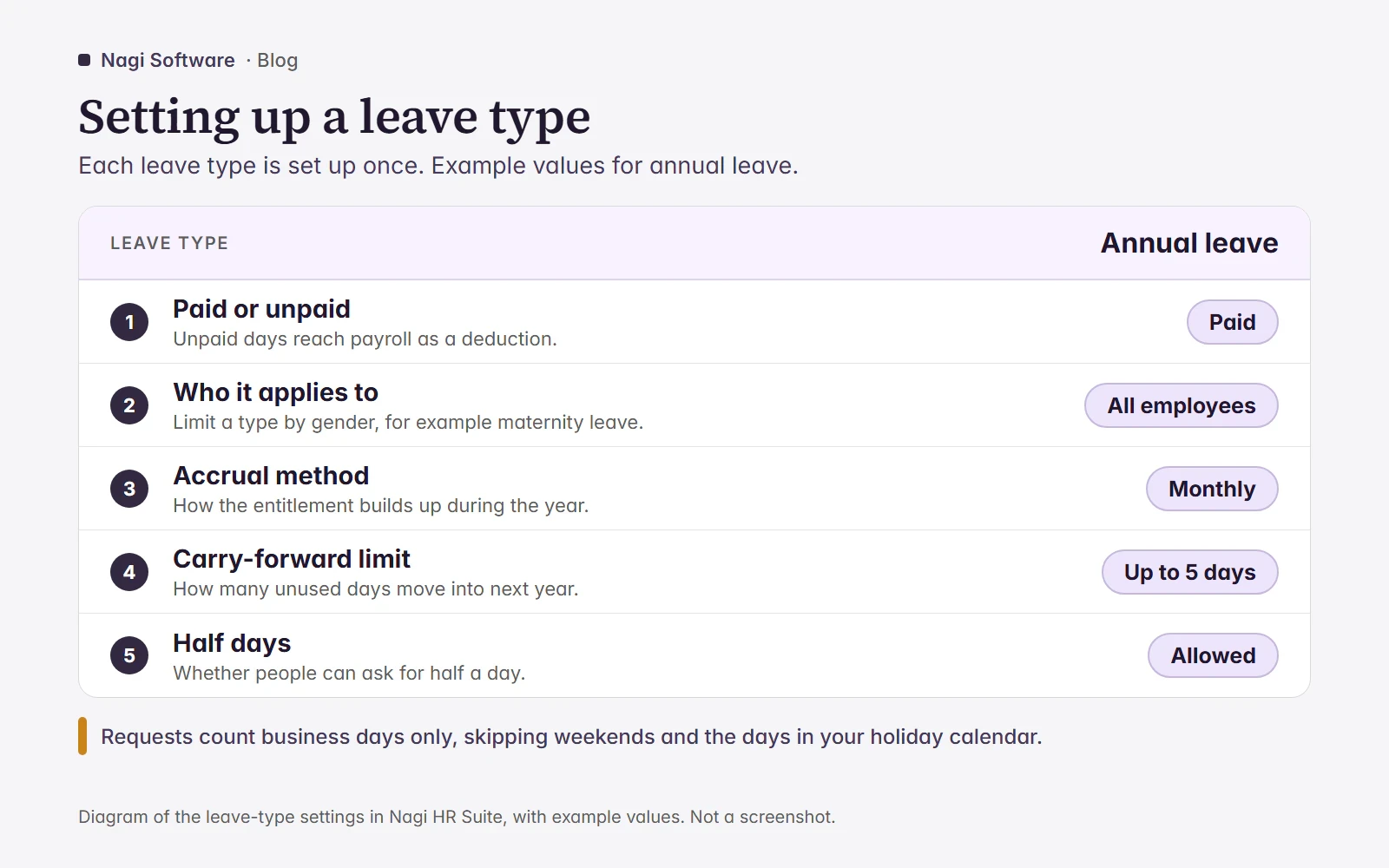
Each leave type is set up once: paid or unpaid, which genders it applies to, how it accrues, how much carries forward, and whether half days are allowed. Requests count business days only, skipping weekends and the days in your holiday calendar.
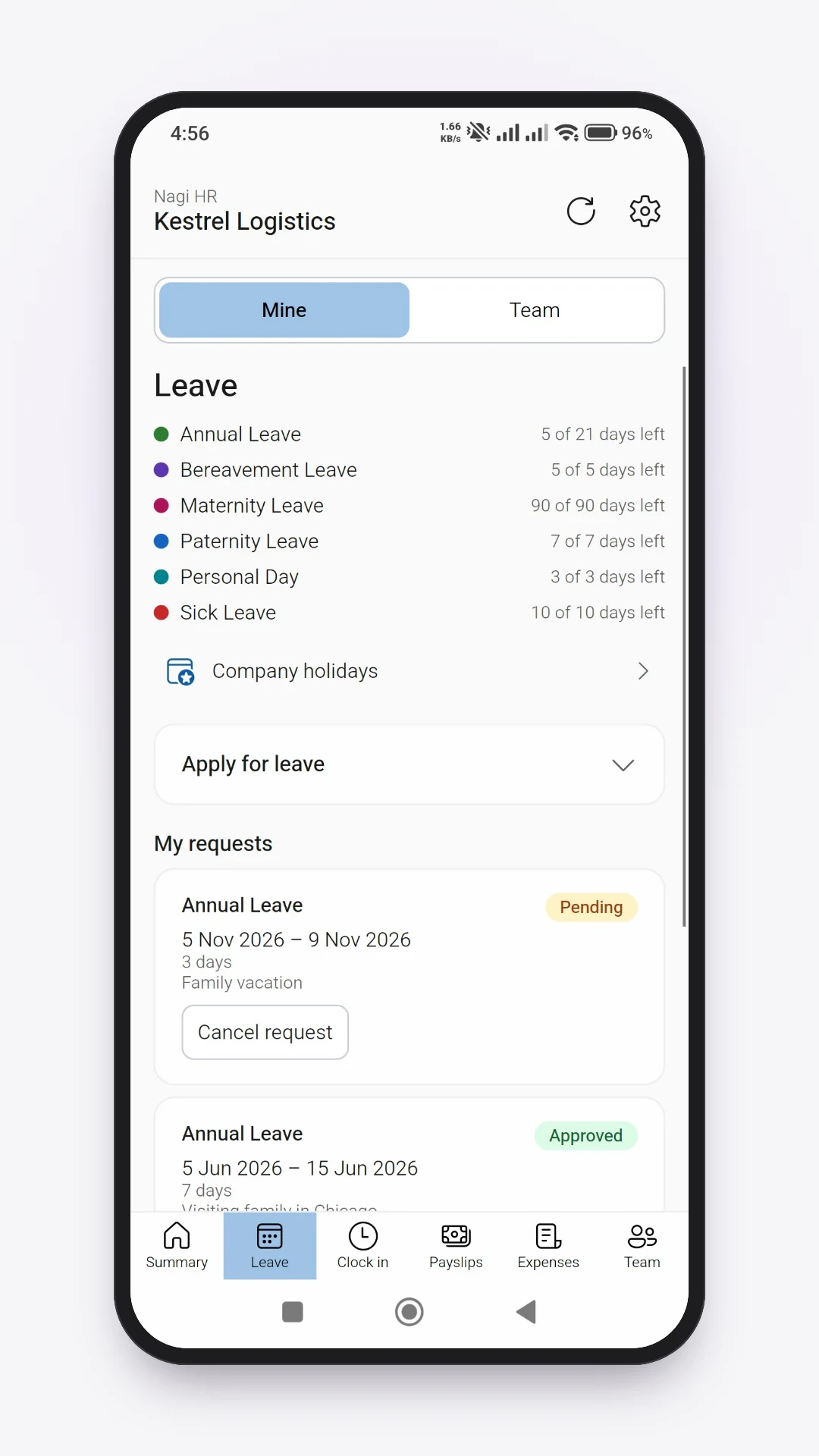
An employee requests leave from an employee PC or the phone app and sees their balance broken down as entitlement, carried forward, taken, pending and remaining. Balances are worked out from the records each time you open them, so they're never a stale figure someone forgot to update.
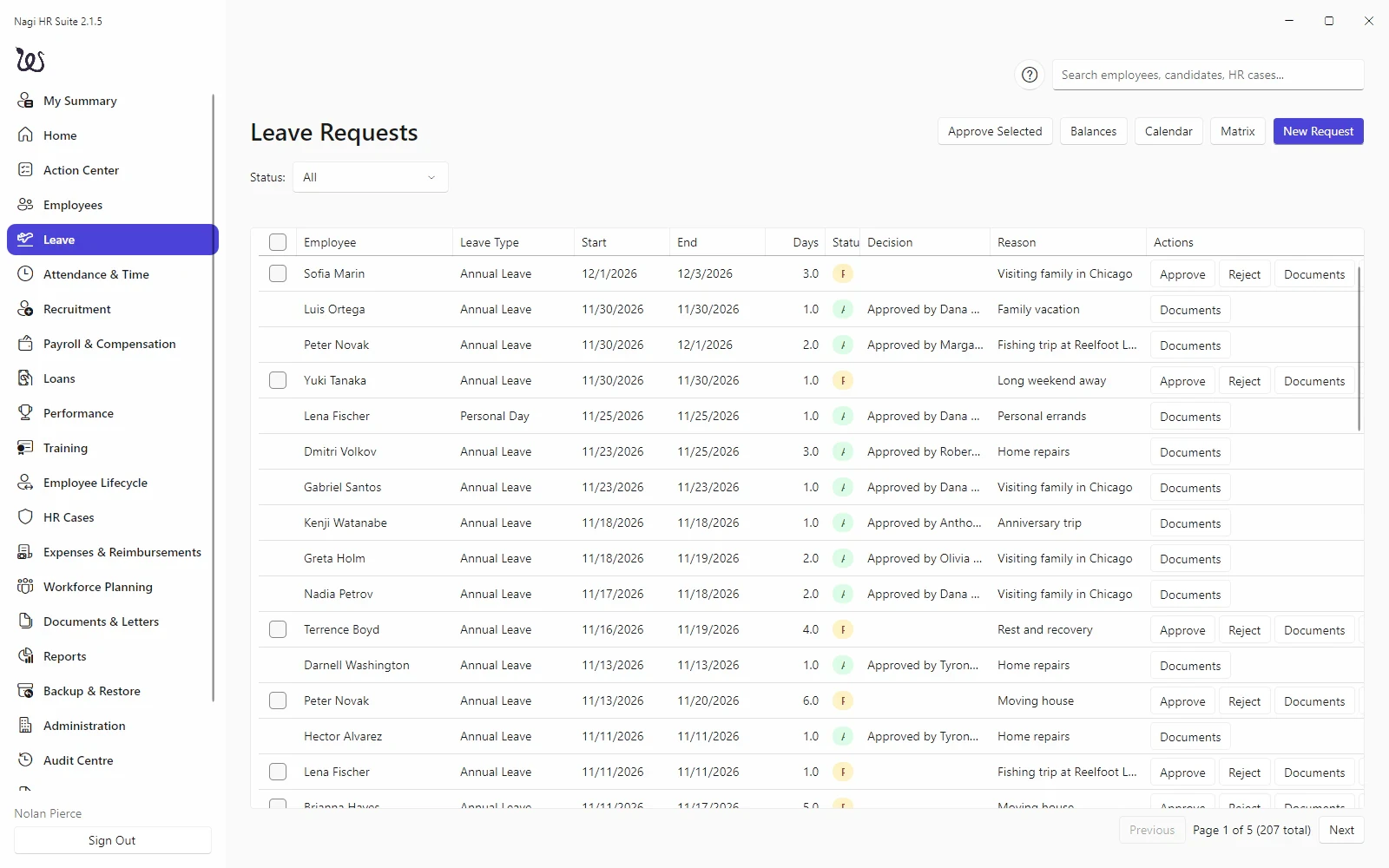
Approval follows the reporting line. Anyone with direct reports is a manager and approves only their own team. A manager's own request goes to their manager. Roles that can act on all employees (HR, Finance and Administrator by default) can approve anyone's leave, including their own, so give those roles carefully. An employee can withdraw a pending request; it's stored as canceled, not rejected, so your reports don't show refusals that never happened.
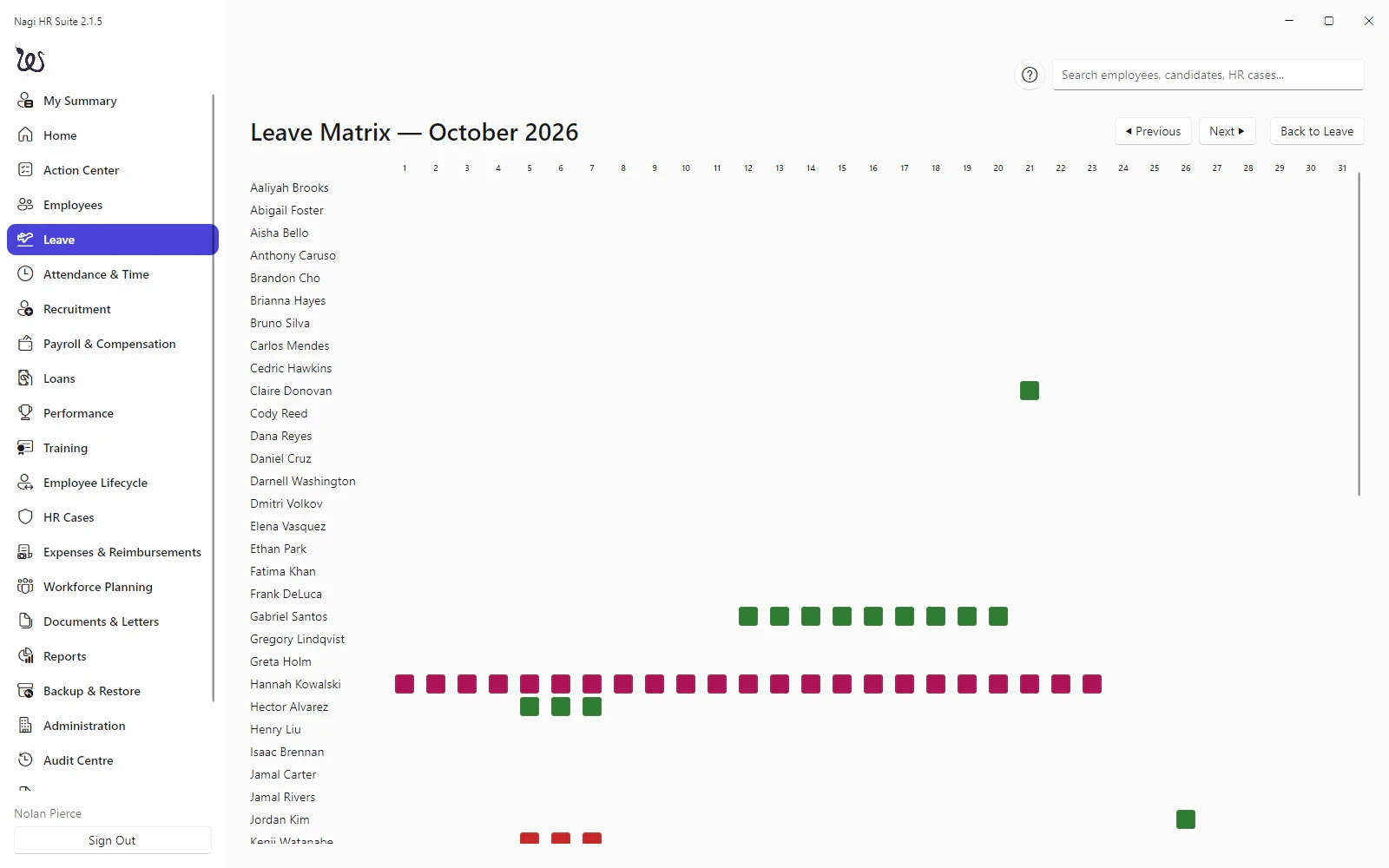
Managers see clashes on the leave calendar and on the monthly matrix, which shows every employee down the side and every day of the month across the top. Attendance picks up leave automatically: a day on approved leave shows as on-leave, not absent.
What it doesn't do: there's no Slack or Microsoft Teams integration, the app isn't in Arabic (English, Spanish, French and German only), and phones away from the office network need internet hosting or Nagi Cloud. The 7-day trial runs in the browser with up to 10 employee records and no phone connections, so you can test leave rules but not the phone app during the trial.
Who should not buy Nagi HR Suite for leave: a business with several shift-based locations whose staff are rarely near an office network. Homebase or Connecteam fit that team better, because their phone apps were built for people who are never at a desk. The same goes for anyone who wants leave requests inside Slack or Teams.
Questions to ask in any demo
Take your own policy to the demo and make the salesperson, or the trial, prove each point. If you're comparing on price as well, our HR software pricing guide runs the numbers at 10, 25 and 50 employees, and our offline HR software guide covers the installed option in depth.
- Set up our annual leave rule with monthly accrual and a 5-day carry-over cap. What does a person who joined on 1 April have on 31 December?
- Book Thursday to Tuesday with Monday as a public holiday. How many days does it deduct?
- Book a half day. Does it count as 0.5 against the balance?
- A manager requests leave. Who gets the approval?
- Show me the balance an employee sees on their phone. Does it show carried forward and pending separately?
- Give me unpaid leave days per person for last month in Excel.
- What does the bill look like if we grow from 10 to 25 people, and from 1 location to 2?
- If we cancel, how do we get our leave history out, and when is it deleted?
A tool that answers all eight with your real rules is worth the money. One that needs a workaround for questions 1 to 3 will send you back to a spreadsheet within a year.
Timetastic, WhosOff, Homebase, Connecteam, Zoho People, BambooHR, Slack and Microsoft Teams are trademarks of their respective owners. Nagi Software is not affiliated with, endorsed by or sponsored by them. Comparisons use information published by each vendor on the date shown.
Frequently asked questions
- What is a leave management system?
A leave management system is software that records leave policies, takes leave requests, routes them to the right approver and keeps each employee's balance up to date. Most also show a team calendar of who is off and produce leave reports for payroll.
- How much does leave management software cost?
On the vendors' own pages in November 2026, dedicated leave tools started around $1 to $3 per user per month (Timetastic, WhosOff), shift-work apps charged per location or per block of users, BambooHR's Core plan was $250 a month for 25 or fewer employees, and Nagi HR Suite was $19 a month per company license. Several tools have free plans for up to 5 or 10 people.
- Can small businesses track leave for free?
Yes, within limits. Connecteam's Small Business Plan was free for up to 10 users and Zoho People's free edition covered a few users when we checked. A spreadsheet also works for a handful of people with simple rules. Free options usually stop at a headcount or leave out accruals and carry-over.
- What features should leave software have?
At minimum: your own leave types (paid and unpaid), accrual rules, carry-over limits, half days, business-day counting that skips weekends and public holidays, an approval chain where managers can't approve their own leave, a team calendar, and balances employees can see from a phone.
- Can employees request leave from their phones?
In most leave tools, yes. Cloud tools work from anywhere with mobile data. In Nagi HR Suite, the Android and iPhone apps work on the office network without internet; away from the office they need internet hosting or Nagi Cloud. Each company license includes 11 phone connections, one per PC seat.
Sources
- Timetastic pricing page, checked November 13, 2026
- WhosOff pricing page, checked November 13, 2026
- Homebase pricing page, checked November 13, 2026
- Connecteam pricing page (Small Business Plan, HR & Skills hub), checked November 13, 2026
- Zoho People pricing page, checked November 13, 2026
- BambooHR pricing page, checked November 13, 2026
- BambooHR time-off feature page, checked November 13, 2026
- BambooHR terms of service (data after termination), checked November 13, 2026
- Nagi HR Suite product page, checked November 13, 2026
- Nagi Software pricing page, checked November 13, 2026
The product in this post
Nagi HR Suite
HR, attendance, leave and payroll in one desktop application.
- leave-management
- pto
- time-off
- hr-software
- small-business
- comparison